 |
 |
 |
 |
 |
 |
 |
 |
 |
 |
 |
 |
 |
|


|

| |
CIVILIZATION:CTP PREVIEW
PART 2: PAGE 3
IV) FIRST CHANGES YOU NOTICE FROM CIV1/2, INTERFACE
What you see is the usual black undiscovered space and your settler in the middle. You will notice that around
the settler, the space that city will cover if built is marked. This help a lot in finding a good place to build
your cities. Another change you'll discover soon is that settlers are now used only to build cities, as land
improvement is done with a new system.
In the top part of the screen, you will see nothing. No menu ala civ2. Everything is at the bottom.
The bottom part of the screen, like in AOE and SMAC, is the interface of the game. The map thumbnail on the left
side works as you can imagine. Next to it, you can see your population, the year, how many public works(PW)
credits and gold you have, and the zoom buttons. Zoom buttons are useful but it seems that graphics are a bit
distorted when you use them.
Next to all these, are the tabs. In the tabs you will find almost everything you will need in the game. From the
image we have on this page you can take an idea of how many things you can do from the tabs.
What is not done from the tabs, can be done from the various screens. Clicking on the "screens" button on the right,
shows a menu with the various screens: Civ(same settings you can do with the Civ tab, but with more information
plus the screen where you can change you government), City(a list of your cities with details on gold, science
output, etc), Unit(listing of your units and the choice on the level of alert your units are at),
Science(change what you research, see which advances you have and other civs don't, and the opposite),
Diplomacy(communication with other civs, information on what treaties you have signed and when they expire,
their attitude to you and others, which cities have the most pollution, and more), trade(thank God(or Activision),
there is an "advisor" which suggests exactly what you should do, what kind of routes you should create, etc),
Library(civilopedia renamed), Ranking(powergraph, best cities, etc) and finally Options(load/save, graphics, sound
options, etc).
On the left side of the screen, you will be seeing small boxes with icons appearing on the beginning of each turn.
These are game messages: new units, cities without build orders, cities rioting, messages from other civs, etc.
This is a big improvement since messages don't pop up on you, and can just be ignored.
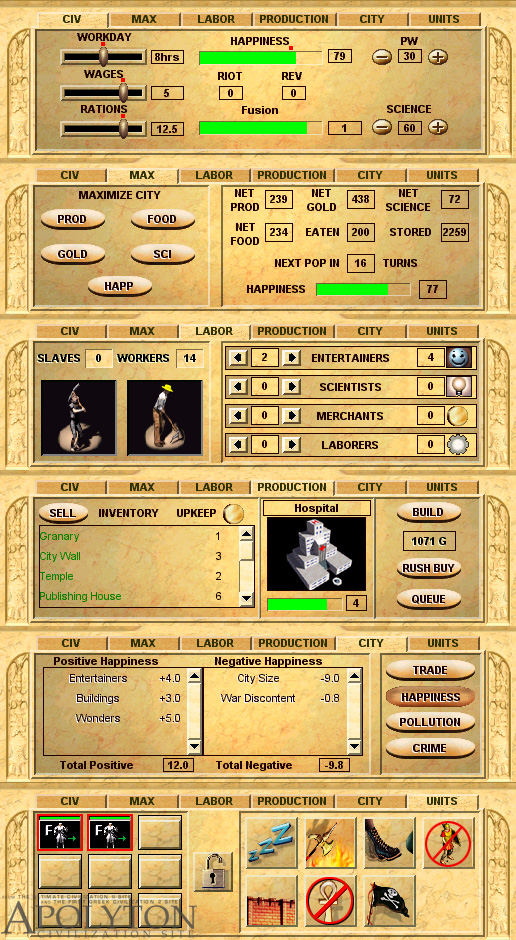
All the tabs presented in one image
Back to Preview index page
PAGE 2
II) OPENING THE BOX, INSTALLATION
III) STARTING, SETING UP A GAME
PAGE 4
IV) FIRST CHANGES YOU NOTICE FROM CIV1/2, INTERFACE
V) MICROMANAGMENT, LAND IMPROVEMENT

Apolyton Civilization Site Copyright © 1998-9 Daniel C. J. Quick and Markos Giannopoulos
CTP Section maintained by Markos Giannopoulos and Dan Quick; Graphics created by Markos
Giannopoulos
Page Last Updated Thursday, 01-Apr-1999 19:49:26 UTC
Civilization: Call to Power © 1998-9 Activision; CIVILIZATION computer games 1991-1999 MicroProse
Software.
All other trademarks and trade names are the properties of their respective owners.