Apolyton Archive  |  Preserved copy of the Apolyton Civilization Site and its forums as they stood in September 2005. Read-only; nothing here can be posted to or replied to.  |  Forum index |  About this archive |  The 1998–2001 UBB forums
Today on Apolyton WARDELL INTERVIEW PROMO A.C.S. HISTORY CHAPTER 4 GET CIV4 /w FREE PLUS! A.C.S. PHOTO GALLERY GET A.O.M. V1.1
Apolyton Civilization Forums
main| civ2| civ3| civ4| smac| ctp2| ron| moo3| galciv| galciv2| alt| about|
ApolytonPLUS | register | search | faq | new posts | pm (-/-) | upload | members
hall of fame new! | civgroups | civgroups news | interviews | the column | radio | chat | directory | news | store | PLUS
Apolyton Civilization Forums : Powered by vBulletin version 2.0.3 Apolyton Civilization Forums > Miscellaneous > Off-Topic > Mac OS X GUI versus Windows XP GUI
Show a Printable Version | Email This Page to Someone! | Receive updates to this thread | Report this to Apolyton news!
20.Sep: FOURTH CHAPTER IN `HISTORY OF...` PUBLISHED
13.Sep: NEWS ON THE FLY
06.Sep: APOLYTON DONATES TO HURRICANE RELIEF

bottom of page
   - CIVILIZATION 3 $9.99 - CIVILIZATION 2 from $6.95 - CIVILIZATION 2 from $4.25 - ALPHA CENTAURI + ALIEN CROSSFIRE (laptop collection) from $19.99 - ALPHA CENTAURI PC $9.99 -->
Author
Thread   
Pages (2): [ 1   2   ]
< Last Thread     Next Thread > Post New Thread     Post A Reply
nostromo is offline nostromo
Prince
Montréal, Québec
Mar 2002
time: 00:37
  Old Post 18-08-2005 23:53
Edit/Delete Message Reply w/Quote
#31 Report this post to a moderator
Full PM-box? Change here!

Since there's more action going on upstairs than downstairs, the risk of triggering it by mistake is greater. Anyway, that's my first reaction. I'll try it.

Q Cubed is offline Q Cubed
Prince
t3h y3ll0w p3ril
Apr 1999
time: 23:37
  Old Post 18-08-2005 23:57 Visit Q Cubed's homepage!
Edit/Delete Message Reply w/Quote
#32 Report this post to a moderator
Support Apolyton

quote:
Originally posted by nostromo
A personal gripe. Why can't we reorganize the Start menu in Windows XP? For example, I'd like to put all my games in a folder called "games". But AFAIK, its impossible.


...?

You can edit the Start Menu to your desiring, and you can also install the games to a Game folder.

Basic... Windows... usage.

Kuciwalker is offline Kuciwalker
Emperor
of Schmooism
Feb 2001
time: 00:37
  Old Post 19-08-2005 00:01
Edit/Delete Message Reply w/Quote
#33 Report this post to a moderator
Increase the size of your Attachments

quote:
Originally posted by nostromo
Since there's more action going on upstairs than downstairs, the risk of triggering it by mistake is greater. Anyway, that's my first reaction. I'll try it.


Oh, no, I meant leave the taskbar on top of everything else, not at the top of the screen. I was talking about not enabling auto-hide.

Asher is offline Asher
King
Calgary, Alberta
Nov 1999
time: 22:37
  Old Post 19-08-2005 00:11 Visit Asher's homepage!
Edit/Delete Message Reply w/Quote
#34 Report this post to a moderator
Support Apolyton, buy Civilization: The Boardgame

quote:
Originally posted by nostromo
I'm sure the people who study GUIs measure these kinds of things.

Not like he did.

I've taken several human-computer interaction courses as part of my degree, including usability studies of programs and websites. The first thing is there's no scenario or usecase described, he just throws the number out there -- that smacks of bullshit.

nostromo is offline nostromo
Prince
Montréal, Québec
Mar 2002
time: 00:37
  Old Post 19-08-2005 00:16
Edit/Delete Message Reply w/Quote
#35 Report this post to a moderator
Lose 30 kilos (of popups)

quote:
Originally posted by Q Cubed


...?

You can edit the Start Menu to your desiring, and you can also install the games to a Game folder.

Basic... Windows... usage.


I used to do it in Windows 98. But now that I have Windows XP, I'm not sure how to do it. I came to the conclusion that you can only do it with the Windows classic theme. There's no way in hell I'm returning to that... But if it can be done, I'll find out about it.

Asher is offline Asher
King
Calgary, Alberta
Nov 1999
time: 22:37
  Old Post 19-08-2005 00:16 Visit Asher's homepage!
Edit/Delete Message Reply w/Quote
#36 Report this post to a moderator
Browse Apolyton AD-FREE

quote:
Originally posted by nostromo
A personal gripe. Why can't we reorganize the Start menu in Windows XP? For example, I'd like to put all my games in a folder called "games". But AFAIK, its impossible.


Say what?

I must be doing something wrong then, because I've been able to reorganize the start menu since Windows 95...

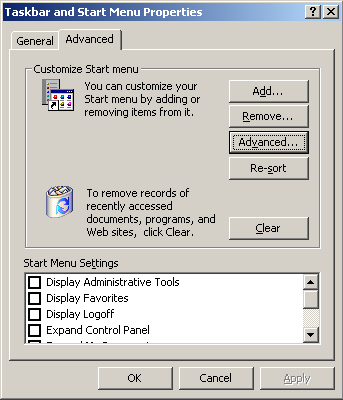
Here's a screenshot of how to do it in Windows 2000:

Start -> Settings -> Taskbar and Start Menu
click the Advanced tab, you see the attached screen.
Click the Advanced button...it opens an Explorer menu right to the Start Menu folder hierarchy. Delete/add/move all you wish.

You can also click Start, right click on Programs, then choose "explore" to do the same thing.

Attachment: sm.png
This has been downloaded 27 time(s).

Kuciwalker is offline Kuciwalker
Emperor
of Schmooism
Feb 2001
time: 00:37
  Old Post 19-08-2005 00:18
Edit/Delete Message Reply w/Quote
#37 Report this post to a moderator
Avatar Enlargement: We've got the solution

Or you can do what I said, and just click and drag the items around in the start menu.

Kuciwalker is offline Kuciwalker
Emperor
of Schmooism
Feb 2001
time: 00:37
  Old Post 19-08-2005 00:19
Edit/Delete Message Reply w/Quote
#38 Report this post to a moderator
Tired of ads?

quote:
Originally posted by nostromo
I used to do it in Windows 98. But now that I have Windows XP, I'm not sure how to do it. I came to the conclusion that you can only do it with the Windows classic theme. There's no way in hell I'm returning to that... But if it can be done, I'll find out about it.


Oh, you're talking about with the XP theme.

Anyone who uses something that fugly deserves what they get.

Asher is offline Asher
King
Calgary, Alberta
Nov 1999
time: 22:37
  Old Post 19-08-2005 00:20 Visit Asher's homepage!
Edit/Delete Message Reply w/Quote
#39 Report this post to a moderator
Remove this text

quote:
Originally posted by Kuciwalker
Oh, you're talking about with the XP theme.

Anyone who uses something that fugly deserves what they get.

The Window Theme has absolutely nothing to do with organizing start menu items.

The problem here is user error.

nostromo is offline nostromo
Prince
Montréal, Québec
Mar 2002
time: 00:37
  Old Post 19-08-2005 00:20
Edit/Delete Message Reply w/Quote
#40 Report this post to a moderator
Support Apolyton, buy Civilization: The Boardgame

quote:
Originally posted by Kuciwalker


Oh, no, I meant leave the taskbar on top of everything else, not at the top of the screen. I was talking about not enabling auto-hide.


I guess I could do that.

Imran Siddiqui is offline Imran Siddiqui

Deity
The Potterverse
Jan 1970
time: 00:37
  Old Post 19-08-2005 00:21
Edit/Delete Message Reply w/Quote
#41 Report this post to a moderator
Support Apolyton, buy Call to Power 2

quote:
Originally posted by Kuciwalker
Oh, you're talking about with the XP theme.

Anyone who uses something that fugly deserves what they get.


XP Silver

nostromo is offline nostromo
Prince
Montréal, Québec
Mar 2002
time: 00:37
  Old Post 19-08-2005 00:28
Edit/Delete Message Reply w/Quote
#42 Report this post to a moderator
Avatar Enlargement: We've got the solution

quote:
XP Silver

Kuciwalker is offline Kuciwalker
Emperor
of Schmooism
Feb 2001
time: 00:37
  Old Post 19-08-2005 00:36
Edit/Delete Message Reply w/Quote
#43 Report this post to a moderator
Support Apolyton, buy Civilization 2

quote:
Originally posted by Asher
The Window Theme has absolutely nothing to do with organizing start menu items.

The problem here is user error.


No, he's right, I tested it. When using the XP start menu you can't click and drag menu items like in the Classic start menu.

nostromo is offline nostromo
Prince
Montréal, Québec
Mar 2002
time: 00:37
  Old Post 19-08-2005 00:46
Edit/Delete Message Reply w/Quote
#44 Report this post to a moderator
Got spare money?

quote:
No, he's right, I tested it. When using the XP start menu you can't click and drag menu items like in the Classic start menu.


I just tried. In the "all programs" menu you can, but you have to click on the program or folder icon, not the label next to the icon.

Kuciwalker is offline Kuciwalker
Emperor
of Schmooism
Feb 2001
time: 00:37
  Old Post 19-08-2005 01:06
Edit/Delete Message Reply w/Quote
#45 Report this post to a moderator
Support Apolyton buy from Amazon

Ah. In Classic you can click either.

Imran Siddiqui is offline Imran Siddiqui

Deity
The Potterverse
Jan 1970
time: 00:37
  Old Post 19-08-2005 01:10
Edit/Delete Message Reply w/Quote
#46 Report this post to a moderator
Support Apolyton, buy GURPS/ Alpha Centauri

I just tried... I clicked on the name of the icon and dragged it... and it worked.

Asher is offline Asher
King
Calgary, Alberta
Nov 1999
time: 22:37
  Old Post 19-08-2005 01:12 Visit Asher's homepage!
Edit/Delete Message Reply w/Quote
#47 Report this post to a moderator
Remove this text

quote:
Originally posted by Kuciwalker
No, he's right, I tested it. When using the XP start menu you can't click and drag menu items like in the Classic start menu.


There is a delay, you need to hold it down for a bit before you can move it.

nostromo is offline nostromo
Prince
Montréal, Québec
Mar 2002
time: 00:37
  Old Post 19-08-2005 01:18
Edit/Delete Message Reply w/Quote
#48 Report this post to a moderator
Get a bigger avatar today!

You're right, Imran.

Kuciwalker is offline Kuciwalker
Emperor
of Schmooism
Feb 2001
time: 00:37
  Old Post 19-08-2005 01:20
Edit/Delete Message Reply w/Quote
#49 Report this post to a moderator
Support Apolyton, buy Civilization: The Boardgame

Huh. So it does.

Asher is offline Asher
King
Calgary, Alberta
Nov 1999
time: 22:37
  Old Post 19-08-2005 01:25 Visit Asher's homepage!
Edit/Delete Message Reply w/Quote
#50 Report this post to a moderator
Support Apolyton

We need a clapping icon.

nostromo is offline nostromo
Prince
Montréal, Québec
Mar 2002
time: 00:37
  Old Post 19-08-2005 01:38
Edit/Delete Message Reply w/Quote
#51 Report this post to a moderator
Full PM-box? Change here!

Asher, the Windows 2000 method you talked about is only available in the classic Start menu, not in the Standard XP Start menu. It was also the method I used in Windows 98. No wonder I was confused. I wonder why its not available in the Standard XP Start menu? Is there an easier way to do it in XP?

An example. I installed a game called Hoplites. It doesn't put an Hoplites folder in the Start menu, not even an icon. You have to do it yourself.

When I had Windows 98, I could easily create an Hoplites folder with in it a shortcut for the game and the manual. I simply used the method you described.

But now I don't know how to proceed. I opened the Hoplites folder in "My programs", right clicked on the Hoplites icon and Windows gave me the option to pin it on the Start menu. It doesn't give you the option to put it on the Start menu, without pining it.

I'll google it, maybe I'll find an answer

Last edited by nostromo on 19-08-2005 at 07:54

Imran Siddiqui is offline Imran Siddiqui

Deity
The Potterverse
Jan 1970
time: 00:37
  Old Post 19-08-2005 01:39
Edit/Delete Message Reply w/Quote
#52 Report this post to a moderator
Got spare money?

Asher is offline Asher
King
Calgary, Alberta
Nov 1999
time: 22:37
  Old Post 19-08-2005 01:47 Visit Asher's homepage!
Edit/Delete Message Reply w/Quote
#53 Report this post to a moderator
Support Apolyton buy from Amazon

quote:
Originally posted by nostromo
Asher, the Windows 2000 method you talked about is only available in the classic Start menu, not in the Standard XP Start menu. It was also the method I used in Windows 98. No wonder I was confused. I wonder why its not available in the Standard XP Start menu? I there an easier way to do it in XP?

An example. I installed a game called Hoplites. It doesn't put an Hoplites folder in the Start menu, not even an icon. You have to do it yourself.

When I had Windows 98, I could easily create an Hoplites folder with in it a shortcut for the game and the manual. I simply used the method you described.

But now I don't know how to proceed. I opened the Hoplites folder in "My programs", right clicked on the Hoplites icon and Windows gave me the option to pin it on the Start menu. It doesn't give you the option to put it on the Start menu, without pining it.

I'll google it, maybe I'll find an answer

I can help later tonight when I'm using Windows XP.

You can just edit the menu yourself if you'd like using Explorer.

Your personal (user-specific) start menu items are at:
C:\Documents and Settings\username\Start Menu

The global (all-users) start menu items are at:
C:\Documents and Settings\All Users\Start Menu

nostromo is offline nostromo
Prince
Montréal, Québec
Mar 2002
time: 00:37
  Old Post 19-08-2005 01:58
Edit/Delete Message Reply w/Quote
#54 Report this post to a moderator
Support Apolyton buy from Amazon

I'll experiment with Explorer I think it'll do the trick.

nostromo is offline nostromo
Prince
Montréal, Québec
Mar 2002
time: 00:37
  Old Post 19-08-2005 02:13
Edit/Delete Message Reply w/Quote
#55 Report this post to a moderator
Support Apolyton

Problem solved. Its actually faster with Explorer. But there should be a "create new folder" option when you right-click on an empty part of the Start Menu.

nostromo is offline nostromo
Prince
Montréal, Québec
Mar 2002
time: 00:37
  Old Post 19-08-2005 04:03
Edit/Delete Message Reply w/Quote
#56 Report this post to a moderator
Full PM-box? Change here!

Verto, you should maybe check out the last link I gave. It seems these add-ons really improve your Mac experience. I know Agathon was raving about Launchbar a while back.

http://www.asktog.com/columns/060MonsterMac.html

 
Pages (2): [ 1   2   ]
< Last Thread     Next Thread > Post New Thread     Post A Reply
All times are GMT. The time now is 05:37.
Apolyton Time is 00:37.
    top of page
Rate This Thread:
Forum Jump:
Forum Rules:
You may not post new threads
You may not post replies
You may not post attachments
You may not edit your posts
HTML code is ON
vB code is ON
Smilies are ON
[IMG] code is ON


Contact Us - Apolyton Civilization Site - Support Us!

Building a better Apolyton through better information. Click here and take our poll!
Non-US visitors, click here!

Powered by: vBulletin Version 2.0.3
Copyright ©2000, 2001, Jelsoft Enterprises Limited.

Page generated in 0.0563 seconds (90.89% PHP - 9.11% MySQL) with 30 queries
Page Loading Time:

Support Apolyton: Amazon USA | Amazon UK | Amazon DE | Amazon FR |
Support Apolyton and get FREE PLUS, Buy from Chips&Bits: Galactic Civilizations | Galactic Civilizations: Deluxe Edition | Call to Power 2 | Civilization: The Boardgame | GURPS/ Alpha Centauri | Alpha Centauri | Civilization IV | Civilization III: Complete |


Front Page | Civilization IV | Civilization III | Civilization II | Call to Power II | Alpha Centauri | Master of Orion III
Rise of Nations | Galactic Civilizations | Galactic Civilizations II | Misc
Alt.Civs | Civ I | C:CtP I | About | News | Directory | Apolyton Store | Forums | Chat | Columns | Interviews | Newsletter
Scenario League | CSC | Clash of Civs | Spanish Site | CtP Maps | Cradle of Civ | WesW's Ctp1/2 Site | Civ3 Haven

apolyton.net | apolyton.com | civilization2.net | civilization3.net | civilization4.net | civilizationiv.info | calltopower.net | galciv.net | galciv2.net | moo3.net