|
| |
|
| |
|

|
Spanky
|
|
Basel, Switzerland
Jun 2000
time: 06:14
|
|
Once again, thanks for the interest, guys. It helps motivate me through what at times can be a gruelling process!
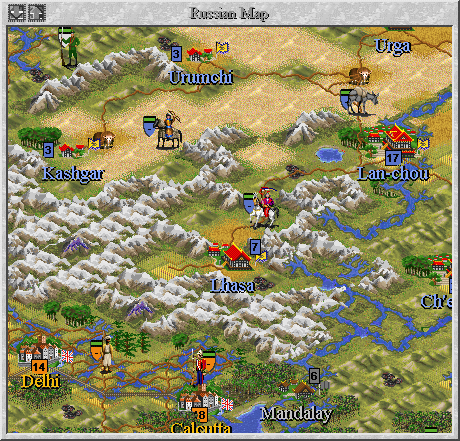
I am still working on agriculture and traffic routes, and I'm now finished with South America and the Chinese Empire. Along the way, I keep discovering how inaccurate the map is that I started off with - I certainly agree with Magyar Crusader on that. So, I'm further adjusting it on the fly. This meant some extensive remodelling in North Korea, the Russian Far East, the Gobi Desert and, not least, the Himalayas. Lhasa is now easily accessable only from a winding road through mountain passes extending from the city of Lan-chow. I also blocked easy access between China and Burma by inserting a graphically discrete Deep Water (formerly "Ocean") square into the rivers that connect the two, hoping to simulate the foreboding terrain in that area (think 'waterfalls').
Sometimes I wish I had discovered Andrew Livings' superb earth map before I had started, but actually, I dare say mine is now more accurate in many areas - including the above. 
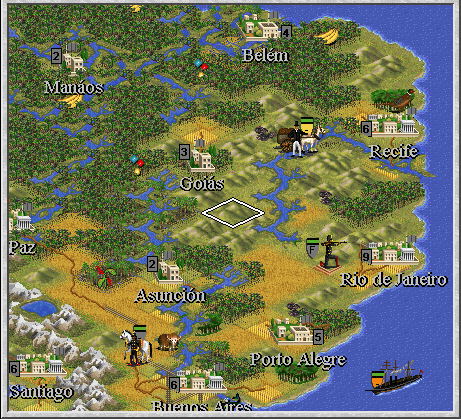
Latin America was a bit of a drag to do, especially because I still haven't found a good source for the extent of railroads outside Europe and the United States around 1875. The map now has two token railroad squares near Lima and Rio de Janeiro, and a small network radiating from Buenos Aires. Of course, none of these cities will be player-controlled, but will be available for trading and general atmosphere.
Oops, gotta go - Exile, I'll get back to you with some advice on the portraits.
Last edited by Spanky on 28-06-2001 at 16:20
|
|
| |
|
| |
|
|
|
Spanky
|
|
Basel, Switzerland
Jun 2000
time: 06:14
|
|
Thanks, Case!
I had actually finished Australia already, but I wasn't aware of the line from Sydney to Brisbane. Your help is much appreciated. 
P.S.:
Roads present as much of a problem to do accurately as railroads, so I sometimes resort to guesswork. I'm putting roads along some of the routes for major railroads that haven't been built yet by 1875. For example, I guess there must have been some kind of road predating the Transsiberian and the Canadian Grand Trunk Railway, since there are already cities and settlements along those routes. As long as they don't contradict history, I am hoping that the roads will also help lead the AI's Engineer units to build the respective railways on their own at some point (can't fault me for lack of faith...  ). ).
Where the Perth to Sydney line is concerned, I assume this wouldn't make any sense, though, since according to my information, nobody really bothered to traverse that wasteland until they decided to conquer it by rail. Would you agree with that assessment?
Last edited by Spanky on 28-06-2001 at 23:42
|
|
| |
|
|
|
Spanky
|
|
Basel, Switzerland
Jun 2000
time: 06:14
|
|
- WARNING: EXCESSIVE LENGTH -
Well Exile,
Basically what you would need is Paint Shop Pro or something similar and, of course, GIF Extractor.
Since Extractor limits the file size for the portraits, and also since it sort of fits into the 'feel' of the time period, the first thing I did was to convert my pictures to grey scale.
Next, I copied the frames out of two of the preexisting Civ2 images. For most portraits, requiring a western-style frame, I used the one that comes with Catherine the Great (the Russian female leader).
To get this frame, you basically need to load mk.dll in Extractor, go to the required picture, save it into a directory, and then work from there using Paint Shop. Here, you would mark the inside area of the frame and delete the picture that you don't need.
Next, you would have to see whether your leader portrait fits into the frame. If it is too large, you need to try cropping some of the edges, or alternatively shrink the image. If it's too small, you can reduce the size of the frame. I'll explain how in a moment.
To get an accurate measure, make sure you have the status bar visible in Paint Shop, then click on the icon that lets you mark out a square area (the one used for cutting and pasting). Mark the area inside the frame, and make a note of the horizontal and vertical lengths indicated in the status bar.
Using these numbers, you can now begin adjusting sizes.
To shrink the portrait, you first need to make sure it has 16 million colors. If not, go to the 'Colors' menu in Paint Shop, then to 'Increase color depth'. Use the 'Resample' option (under 'Image' in the menu), and make sure 'Maintain aspect ratio' is checked. Then, adjust the numbers in the 'Custom size' window to make sure at least one or both of the sides don't exceed the length allowed by the picture frame. (When you're finished, you need to decrease the colors back to 256.)
Since it is improbable that your picture will have the same ratio as the frame, you will need to resort to some cropping. To do this, mark out the area you want to keep, while making sure it fits the numbers for the frame you wrote down earlier. Then select 'Crop' from the 'Image' menu.
To make the frame smaller without sacrificing detail, take a look at its pattern. You will notice that certain elements keep repeating themselves - in the case of the 'Catherine' frame, they have the shape of little knobs. Mark the entire half of the frame right up to the edge and including one of these knobs on each side. Then, drag the marked half slowly over the unmarked one, stopping as soon as you've covered one pair of knobs entirely with the other. The sides of the frame can thus be reduced by one or more of such 'increments'.
One last thing: before replacing an old portrait with a new one, make sure the latter has the same palette. You can do this by first saving the palette used by one of the original portraits, using said option in the 'Colors' menu. Then, before saving the new portrait, choose 'Load palette' and use the same file you just saved to.
Well, this turned out to be quite a lengthy explanation after all...
Hope that answers your question. If not, feel free to ask me some more.
Last edited by Spanky on 29-06-2001 at 01:15
|
|
| |
|
| |
|
|
|
Spanky
|
|
Basel, Switzerland
Jun 2000
time: 06:14
|
|
Sorry for the delay, guys - I've been very busy lately, so I haven't been able to devote much time to the project.
Mapwise, I still have the Australian outback to touch up, and then there's the African continent to revise (the sub-saharan parts).
I've spent some time researching wonders, and have included background text to the pedia entries for a handful of them now. These include the Ruhr region (formerly King Richard's Crusade) and the Victory Column in Berlin (formerly Women's Suffrage) for Germany, and three wonders for China, representing the three main religions/philosophies: Confucianism, Taoism and Buddhism. These are necessary due to the fact that the temple and cathedral improvements have been replaced with "churches" and "mosques", which wouldn't make much sense in China (especially the former). The two German wonders are there to make the empire more powerful and warlike, to compensate for its small initial size on the one hand, and to counteract the pacifist effects of Constitutional Monarchy (formerly Republic) on the other.
Note, though, that these are subject to later change, if playbalancing should require it.
Finally, here's another preview shot, showing the Himalayas under Chinese control, parts of India and Burma, plus the Gobi desert and Tarim basin (where the Silk Road runs through). The Slavic looking fellow in the upper left, of course, indicates the border to the newly acquired Russian territories. The turbaned British soldiers are Sepoys, which are available to the Player only if in control of a city on the subcontinent (the exact mechanism still needs to be finalized).
 Attachment: rehimalayas.gif Attachment: rehimalayas.gif
This has been downloaded 330 time(s).
Last edited by Spanky on 24-08-2001 at 19:42
|
|
| |
|
| |
|
|
|
Spanky
|
|
Basel, Switzerland
Jun 2000
time: 06:14
|
|
Note the kneeling unit, which is the generic graphic used for all Riflemen that aren't controlled by European great powers. To make things simpler, the Japanese use this same graphic, as well as the Chinese once they acquire the technology. Although the two are intended to be playable by humans, I needed to save space. There is a logic to it, though, in that the Asian powers mixed and matched their uniforms from different Western sources anyway, coming up with a kind of 'generic' look that was actually quite similar to the guy pictured here. He and the Light Cavalry soldier both wear black, which I think is the most neutral looking colour. Cavalry looks the same for all powers, again due to the limitations of FW. It's a small sacrifice, though, since Cavalry uniforms generally adhered less strictly to national colours.
Latin America is almost entirely 'Barbarian'-controlled, but should prove interesting for trade.
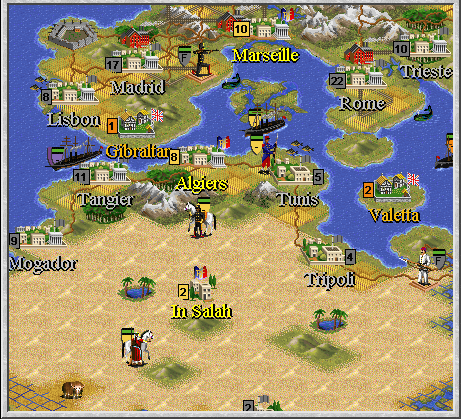
Note also the newly revamped generic architecture, which is also used in the region featured in the next shot, encompassing most of North Africa and Southern Europe:
Attachment: renorthafrica.gif
This has been downloaded 275 time(s).
Last edited by Spanky on 26-08-2001 at 10:38
|
|
| |
|
|
|
Spanky
|
|
Basel, Switzerland
Jun 2000
time: 06:14
|
|
You may wonder why Italy seems so small. This is due mainly to the fact that I've had to exagerate the size of the player-controlled countries like France, Germany and Great Britain. Keeping with the original size, there would have hardly been enough space for the most important cities in the respective "motherland", where most of the products, capital and manpower are supposed to come from. Italy, being none-player controlled, has been kept as small as possible (as has e.g. Austria-Hungary), but still retains its historical population size, albeit concentrated in Rome.
Concerning island colonies, I chose to use the name of the capital city (e.g. Valetta, Victoria) instead of the colony's (e.g. Malta, Hong Kong) wherever possible.
The Bedouin-looking unit is a Spahi in French service. The player acquires them in similar fashion to Sepoys in India (see above). They also appear as non-player units throughout the Middle East.
The white-uniformed soldier is Muslim Infantry, used mostly by the Ottoman Empire, but generally by any Middle Eastern power which has imported modern weapons and training.
|
|
| |
|
|
|
Spanky
|
|
Basel, Switzerland
Jun 2000
time: 06:14
|
|
Finally finished revamping the world map. Australia and Africa needed more work than I had expected, especially in terms of hills and mountain ranges. I also removed most of the grassland on both continents, replacing it with plains (the original is way too generous in that respect). The added hills more than compensate for the subsequent loss in variety, though (IMHO).
Windhoek (capital of modern-day Namibia) was a hard nut to crack in terms of research, by the way. Turns out it wasn't founded by the Germans when they set up a colony there, as earlier historians insist, but by a native Dutch-speaking African whose name I've sadly forgotten, who had already erected several stone buildings and a church there before the Germans came along...
A point that may arouse controversy is that Ethiopia won't be represented by a city - I simply ran out...  That said, though, the player will find himself thwarted by a heavily defended fortress if trying to invade the area. Including a secret weapon. That said, though, the player will find himself thwarted by a heavily defended fortress if trying to invade the area. Including a secret weapon.
Next, I will have to devote some time to sorting out a mess I have long seen coming... namely, reorganizing my units to cater for CivII's ideosyncrasies in the 'Sound' and 'Obsoletion' departments.  Thank god for Design Tips! Thank god for Design Tips!
Last edited by Spanky on 31-08-2001 at 16:52
|
|
| |
|
|
|
JPetroski
|
|
Was wondering how this scenario is coming along... I'm very interested in it.
|
|
| |
|
| |
|
|
|
Spanky
|
|
Basel, Switzerland
Jun 2000
time: 06:14
|
|
My apologies to everyone anxious to get their hands on this scenario. Without getting into details, I had to shelve it for a while, mainly due to my studies... but now I'm willing to give it another shot! 
Anyway, here's how it's going:
The units.gif has been rearranged to my satisfaction, although the AI's building behavior still seems to be flawed. Might have something to do with the fact that the "Knight" space is still occupied, but I'll look into that. Also, of course, the units and build orders on the map have been adjusted accordingly.
Aaargh! One of the central innovations I had in mind, namely revolutionary discoveries like combustion being introduced historically through events (see early post), turns out to be impossible!!! At least that's what it looks like:
The idea was based on having a tech with both prereqs set to 'no' as a prerequisite for military applications, which in turn would be researchable by the player. The thing is, if such a tech is set as a prerequisite in the in-game events editor, this editor replaces it with "no" once the file is saved(!).
Unless anybody knows of a way to get around this (text-editing?), here's my backup plan:
Since I probably would have had to split up the events file anyway, the game will prompt the player to run a batch file to replace, say, rules.txt and events.txt approximately twice during the scenario. 1875-1920 being the time period covered, it seems like the ideal times would be around 1890 and 1905. Firstly, this would split up the game nicely into 15-year intervals.
Second, and most importantly, the 1890s were an innovative period, seeing the appearance of combustion, the rigid airship and khaki uniforms. Also, the steam turbine will be introduced, marking larger and more powerful ships, including the Dreadnought class. 1905 was when the Wright Brothers perfected the first aeroplane, and motorized vehicles will have matured enough by then to make research into tanks look feasible.
So much for now. As always, I'll be happy to hear any feedback!
|
|
| |
|
|
|
Henrik
|
 |
The European Union, Sweden, Lund
Dec 2000
time: 06:14
|
|
quote:
Originally posted by Spanky
Aaargh! One of the central innovations I had in mind, namely revolutionary discoveries like combustion being introduced historically through events (see early post), turns out to be impossible!!! At least that's what it looks like:
The idea was based on having a tech with both prereqs set to 'no' as a prerequisite for military applications, which in turn would be researchable by the player. The thing is, if such a tech is set as a prerequisite in the in-game events editor, this editor replaces it with "no" once the file is saved(!).
Unless anybody knows of a way to get around this (text-editing?), here's my backup plan:
|
As you say yourself, just do it in the txt file manualy, many people do their entire tech threes that way.
If you are going to make future tech available from techs only aquirable via events the game will crash though, make sure that all the players allways have a path to Future tech that's not relying on events (this put some obstacles in the way of the scenario I'm working on myself)
Great to have this project back
|
|
| |
|
|
|
Spanky
|
|
Basel, Switzerland
Jun 2000
time: 06:14
|
|
Pleased to hear that, Henrik!
Alas, I tried text editing, but it still doesn't work. 
Let me quote an example:
"Air Combat" (formerly Advanced Flight, AFl in the Rules.txt), is supposed to have "Winged Flight" (CoL) as a prereq, which in turn has "no" as a prereq twice, since it is supposed to be distributed to all players through the Events file at the appropriate time in the game.
When specifying these prereqs through the in-game Advances Editor, the Rules.txt row for Air Combat contains "no" twice instead of "CoL" and "nil", when looked at through Notepad. It is possible to type these in manually and save, and the Rules.txt then remains unchanged when running the game (without saving in the Advances Editor). But:
In a test run, Air Combat does not become available for research, even when an appropriate event takes place, after which the player has received Winged Flight. The Civilopedia still states "no" under "Prerequisite", and in the Advances Editor, even though this time, "nil" is still stated in one slot, the slot that should contain "Winged Flight" now once again says "no"! All this, even though the "CoL" entry in Rules.txt hasn't been touched, as I made sure by looking at it once again through Notepad.
Which leads me to conclude that the program won't accept a tech tree branch that it perceives as coming out of nowhere, regardless of what Rules.txt says.
If anybody out there knows better, be sure to let me know!
|
|
| |
|
|
|
Spanky
|
|
Basel, Switzerland
Jun 2000
time: 06:14
|
|
Actually, yes!
Firstly, the program CivCity, available at Carl's Scenarios for Civilization II (http://users.stargate.net/~harden/) lets you specify any unit to be in the build slot of individual cities. Where British Sepoys in India are concerned, though, this isn't entirely satisfactory, since you would have to leave that build order untouched throughout the game, since you can't go back to that order if your Civ doesn't have the appropriate tech.
Actually, "Colonials" are a better example for the main method I will be using. As a counterpart to the Sepoys of the Indian subcontinent, these will be auxiliary troops raised mainly in Africa, to be made available after certain cities are conquered. I am hoping to provide a specific event for the conquest of each of the Cities in question, i.e., "If Douala conquered by Anybody, then create Colonials of the attacker's nationality at Douala's coordinates. (Just once)" This will take up a lot of space, but I hope I'll manage by splitting up the events file (see above).
In order to simulate a relatively steady flow of troops, I will probably add a simpler events routine for Africa and India respectively, to the effect of: "If a Sepoys unit is killed, then create a Sepoys unit of the same nationality in either the coordinates of Calcutta, Bombay or Delhi." The reasoning being that recruitment for a lost regiment would take place in either of the most important cities, which you would have to be in control of (the program won't create a unit in a city of differing nationality). In Africa especially, this might mean having to ship a unit from Cape Town way up to Accra at times, but I think that would still be reasonably believable.
|
|
| |
|
| |
|
|
|
Spanky
|
|
Basel, Switzerland
Jun 2000
time: 06:14
|
|
Winterfritz, you've read this before. Just thought I'd put it up, since this thread has been taking on the role of a designer's diary, anyway.
So, here's some notes on my world map and terrain:
The arctic regions are now only represented by one terrain type, "Frost", using the tundra graphic. The former glacier terrain slot has been used for a second grassland-type terrain I call "Rich Soil". This was necessary because I found that real population sizes vary so greatly that the larger cities can't be supported without terrain that generates extra-large amounts of food (this, even though I'm representing the world's population in 1875 on a reduced scale, 1:10). The loss in arctic variety isn't a big problem, though, since the game doesn't concentrate on that region. I also found that I could eliminate the terrain tiles in the extreme North and South representing the two poles, which was mainly glacier terrain. Effectively, all this does is move the polar borders further up and down, which is actually more accurate, while suspending potential disbelief caused by the tundra graphics.
I chose to eliminate the arctic ressources as well, since I was e.g. getting polar bears in the south. The description I use in my rules.txt is 'Barren'. (Though I'm not the first to get that idea, I think). Similarly, I removed the Oil ressource and replaced it with 'Arid' and no graphic, since I'm hoping to simulate oil wealth with trade items. Lastly, I found that I wasn't getting Gold where I wanted it anyway, so that both that and Iron are now called 'Ore'. Also, 'Silk' is now 'Timber'.
The map, by the way, still needs a few final touches, mainly in the Afghanistan area (that is actually a coincidence!). But I'm thinking of maybe putting it up for public use. Any suggestions which sites I should mail it to? Definitely Mercator's, I think, if it's still running.
|
|
| |
|
| |
All times are GMT. The time now is 05:14.
Apolyton Time is 00:14. |
top of page
|
| archivepost |
|
Forum Rules:
You may not post new threads
You may not post replies
You may not post attachments
You may not edit your posts
|
HTML code is ON
vB code is ON
Smilies are ON
[IMG] code is ON
|
|
|
|
|
|






 21-06-2001 15:49








 |
|