Apolyton Archive  |  Preserved copy of the Apolyton Civilization Site and its forums as they stood in September 2005. Read-only; nothing here can be posted to or replied to.  |  Forum index |  About this archive |  The 1998–2001 UBB forums
Today on Apolyton WARDELL INTERVIEW PROMO A.C.S. HISTORY CHAPTER 4 GET CIV4 /w FREE PLUS! A.C.S. PHOTO GALLERY GET A.O.M. V1.1
Apolyton Civilization Forums
main| civ2| civ3| civ4| smac| ctp2| ron| moo3| galciv| galciv2| alt| about|
ApolytonPLUS | register | search | faq | new posts | pm (-/-) | upload | members
hall of fame new! | civgroups | civgroups news | interviews | the column | radio | chat | directory | news | store | PLUS
Apolyton Civilization Forums : Powered by vBulletin version 2.0.3 Apolyton Civilization Forums > Other Games > Master of Orion I/II > MoO for WinXP
Show a Printable Version | Email This Page to Someone! | Receive updates to this thread | Report this to Apolyton news!

bottom of page
  
Author
Thread   
Pages (2): [ 1   2   ]
< Last Thread     Next Thread > Post New Thread     Post A Reply
patrickjb53 is offline patrickjb53
Chieftain
California
Jan 2003
time: 21:22
  Old Post 21-01-2003 06:16
Edit/Delete Message Reply w/Quote
#31 Report this post to a moderator
Re: MoO for WinXP Support Apolyton or Terrorists Win

quote:
Originally posted by jaaland
Howdy folks,

Just found you guys....I'm trying to play MoO on my WinXP box and not having much luck....I have it on my Mac and LOVE the game but since I don't have that machine up right now, I've been seriously jonseing....Help! I downloaded the game but when I try to install it I get the message that it wants me to install it from a disk (?)...Any suggestions would be much appreciated...

Jon


Here's want I did to get Moo1 to play on XP Pro.

1. Install the game (obviously)
2. Right Click on "Orion.exe" "Properties"
3. Click on "Memory" tab.
4. On the "Expanded (ems) memory" set to 4096 (this may be higher than needed, but it worked. You can play with this if you want)
5. Apply settings (click on 'Apply' on the bottom of properties screen)

That should be it, start the game by double clicking "Orion.exe"

This may work on Windows 2000 Pro as well, but I have not tested as of yet.

One problem I forgot about, for copy protection, you are asked a question from the manual. It shows you a picture of a ship, and you must tell which one it is from a selection. It tells you what page to go to, but if you don't have your manual and answer the question wrong, you game end!

You may also have a problem with your sound.
If so, I downloaded a dos emulator from:

VDMSound
http://ntvdm.cjb.net/

VDMSound is a program that overcomes what has probably been the most exasperating limitation of DOS boxes since Windows NT -- sound support. VDMSound is an open, plug-in oriented platform that emulates an MPU-401 interface (for outputting high-quality MIDI music), a SoundBlaster compatible (SB16, SBPro 2, SB2, SBPro, etc.) implementation (for digital sound effects and FM/AdLib music), as well as a standard game-port interface (for playing games with joystick support). In development are improvements to the existing joystick emulation, and possibly VESA support.

VDMSound works on Windows NT 4.0, Windows 2000 and Windows XP. It does not work on Windows 95, 98 or Me.

vmxa1 is offline vmxa1
Deity
Oviedo, Fl
Nov 2001
time: 21:22
  Old Post 21-01-2003 11:32
Edit/Delete Message Reply w/Quote
#32 Report this post to a moderator
Lose 30 kilos (of popups)

Sound works for me on XP PRO, but it is really a function of the sound card emulation for SB.
BTW you get three chances to guess the ship. If you are on the the last one and are unsure, look it up.I posted the list here a few times and so have others. It can be found on Jonsullivans page as well.

Whoster is offline Whoster
Settler

Dec 2002
time: 05:22
  Old Post 22-01-2003 04:33 Visit Whoster's homepage!
Edit/Delete Message Reply w/Quote
#33 Report this post to a moderator
Re: Re: MoO for WinXP Browse Apolyton AD-FREE

quote:
Originally posted by patrickjb53


Here's want I did to get Moo1 to play on XP Pro.

1. Install the game (obviously)
2. Right Click on "Orion.exe" "Properties"
3. Click on "Memory" tab.
4. On the "Expanded (ems) memory" set to 4096 (this may be higher than needed, but it worked. You can play with this if you want)
5. Apply settings (click on 'Apply' on the bottom of properties screen)

That should be it, start the game by double clicking "Orion.exe"

This may work on Windows 2000 Pro as well, but I have not tested as of yet.

One problem I forgot about, for copy protection, you are asked a question from the manual. It shows you a picture of a ship, and you must tell which one it is from a selection. It tells you what page to go to, but if you don't have your manual and answer the question wrong, you game end!

You may also have a problem with your sound.
If so, I downloaded a dos emulator from:

VDMSound
http://ntvdm.cjb.net/

VDMSound is a program that overcomes what has probably been the most exasperating limitation of DOS boxes since Windows NT -- sound support. VDMSound is an open, plug-in oriented platform that emulates an MPU-401 interface (for outputting high-quality MIDI music), a SoundBlaster compatible (SB16, SBPro 2, SB2, SBPro, etc.) implementation (for digital sound effects and FM/AdLib music), as well as a standard game-port interface (for playing games with joystick support). In development are improvements to the existing joystick emulation, and possibly VESA support.

VDMSound works on Windows NT 4.0, Windows 2000 and Windows XP. It does not work on Windows 95, 98 or Me.


That works for some people, but there are some systems [and we aren't sure if it's video, soundcard (I think it could be this) memory or motherboard] that's causing it to not work at all on some systems....

Last edited by Whoster on 22-01-2003 at 05:02

watorrey is offline watorrey
Warlord
Rochester, NY, USA
Oct 2001
time: 00:22
  Old Post 23-01-2003 05:12 Visit watorrey's homepage!
Edit/Delete Message Reply w/Quote
#34 Report this post to a moderator
Browse Apolyton AD-FREE

I just got moo1 to work on xp. After filling in the working directory and adding the ems memory, i was getting file not found errors. So i just copied the contents of the game directory on the cd to the orion directory on the hd. It seems it wasn't copying all the files to the hard drive.

For the sound setup, i just went w/ what it came up with for defaults.

Not sure i will actually play it much, but it is good to know i could get it to work.

vmxa1 is offline vmxa1
Deity
Oviedo, Fl
Nov 2001
time: 21:22
  Old Post 23-01-2003 05:53
Edit/Delete Message Reply w/Quote
#35 Report this post to a moderator
Support Apolyton, buy Galactic Civilizations: Deluxe Edition

Great.

patrickjb53 is offline patrickjb53
Chieftain
California
Jan 2003
time: 21:22
  Old Post 04-02-2003 12:46
Edit/Delete Message Reply w/Quote
#36 Report this post to a moderator
Increase Your PM Length

quote:
Originally posted by Whoster


I'd be curious as to why. For example, if the pro versions don't have an EMS manager, then why do we have that option? You could be right. It wouldn't be the first time Micosoft has done something stupid like this.


MOO1 will work on XP Pro. I have been playing MOO1 for about a month while waiting for MOO3 release.

You must RIGHT click on the "ORION.EXE" file. On the "PROPERTIES", you will see a "MEMORY" tab, enter a value for "EMS"(Expanded Memory System). I would suggest at least 4096 for ems.

You will only see the memory tab when you right click on 16-bit applications, such as "ORION.EXE". 16-bit program are your old dos programs. If you right click on a 32-bit application there will not be a memory tab.

You probably will not have sound when playing MOO1. If you get MOO1 to work, I can give you some ideas on getting your sound to work. I used a dos sound emulator and sound works fine when I play MOO1.

Whoster is offline Whoster
Settler

Dec 2002
time: 05:22
  Old Post 04-02-2003 20:39 Visit Whoster's homepage!
Edit/Delete Message Reply w/Quote
#37 Report this post to a moderator
Support Apolyton, buy GURPS/ Alpha Centauri

quote:
Originally posted by patrickjb53


MOO1 will work on XP Pro. I have been playing MOO1 for about a month while waiting for MOO3 release.

You must RIGHT click on the "ORION.EXE" file. On the "PROPERTIES", you will see a "MEMORY" tab, enter a value for "EMS"(Expanded Memory System). I would suggest at least 4096 for ems.

You will only see the memory tab when you right click on 16-bit applications, such as "ORION.EXE". 16-bit program are your old dos programs. If you right click on a 32-bit application there will not be a memory tab.

You probably will not have sound when playing MOO1. If you get MOO1 to work, I can give you some ideas on getting your sound to work. I used a dos sound emulator and sound works fine when I play MOO1.


I tried the options that you mentioned over a month ago and they didn't work on my system running XP Pro.

Harry Seldon is offline Harry Seldon
King
Birmingham, AL
Oct 2002
time: 05:22
  Old Post 04-02-2003 20:49
Edit/Delete Message Reply w/Quote
#38 Report this post to a moderator
Support Apolyton, buy Call to Power 2

Try creating a shortcut to orion.exe and making the changes to ems by right-clicking the shortcut. That's how it works on 2000 and it may work on XP. Also, be sure to check the full screen option.

vmxa1 is offline vmxa1
Deity
Oviedo, Fl
Nov 2001
time: 21:22
  Old Post 04-02-2003 22:25
Edit/Delete Message Reply w/Quote
#39 Report this post to a moderator
Help yourself to an AD-FREE life

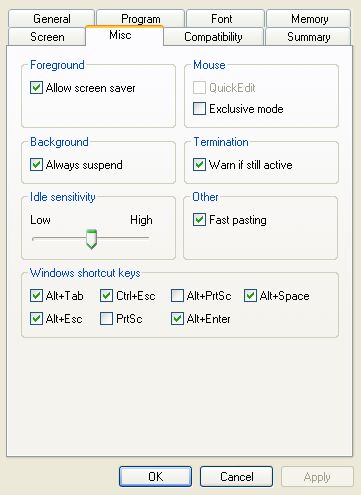
I used 2048 for EMS in Mem tab. Here is the Misc tab:

Attachment: moo1misc.jpg
This has been downloaded 194 time(s).

patrickjb53 is offline patrickjb53
Chieftain
California
Jan 2003
time: 21:22
  Old Post 05-02-2003 15:09
Edit/Delete Message Reply w/Quote
#40 Report this post to a moderator
Support Apolyton, buy Civilization: The Boardgame

quote:
Originally posted by Whoster


I tried the options that you mentioned over a month ago and they didn't work on my system running XP Pro.


What kind of errors are you getting?
Where you ever able to find the "Memory" tab?
What's not working MOO or/and the sound?

MatthewOutland is offline MatthewOutland
Settler

Feb 2003
time: 05:22
  Old Post 17-02-2003 06:44
Edit/Delete Message Reply w/Quote
#41 Report this post to a moderator
Support Apolyton, buy Galactic Civilizations

Hi I now know how to downlaod MOO in win XP (just put in in C drive and also get DOSbox) but I cannot figure out how to patch version 1.3 to it!


I am sorry to bother but I would really appreciate this....the original moo is so bug-ridden and filled with so many minor flaws it's unbelievable....

Bobbiac is offline Bobbiac
Settler

Feb 2003
time: 00:22
  Old Post 26-02-2003 02:39
Edit/Delete Message Reply w/Quote
#42 Report this post to a moderator
Support Apolyton, buy Galactic Civilizations: Deluxe Edition

download patch and replace old files

patrickjb53 is offline patrickjb53
Chieftain
California
Jan 2003
time: 21:22
  Old Post 26-02-2003 12:47
Edit/Delete Message Reply w/Quote
#43 Report this post to a moderator
Enter the AD-FREE zone

quote:
Originally posted by MatthewOutland
Hi I now know how to downlaod MOO in win XP (just put in in C drive and also get DOSbox) but I cannot figure out how to patch version 1.3 to it!


I am sorry to bother but I would really appreciate this....the original moo is so bug-ridden and filled with so many minor flaws it's unbelievable....


I believe you copy the moo patch file into you moo directory. When you run the patch the new files or overwrite the old files.

 
Pages (2): [ 1   2   ]
< Last Thread     Next Thread > Post New Thread     Post A Reply
All times are GMT. The time now is 05:22.
Apolyton Time is 00:22.
    top of page
Rate This Thread:
Forum Jump:
Forum Rules:
You may not post new threads
You may not post replies
You may not post attachments
You may not edit your posts
HTML code is ON
vB code is ON
Smilies are ON
[IMG] code is ON


Contact Us - Apolyton Civilization Site - Support Us!

Building a better Apolyton through better information. Click here and take our poll!
Non-US visitors, click here!

Powered by: vBulletin Version 2.0.3
Copyright ©2000, 2001, Jelsoft Enterprises Limited.

Page generated in 0.0359 seconds (88.92% PHP - 11.08% MySQL) with 30 queries
Page Loading Time:

Support Apolyton: Amazon USA | Amazon UK | Amazon DE | Amazon FR |
Support Apolyton and get FREE PLUS, Buy from Chips&Bits: Galactic Civilizations | Galactic Civilizations: Deluxe Edition | Call to Power 2 | Civilization: The Boardgame | GURPS/ Alpha Centauri | Alpha Centauri | Civilization IV | Civilization III: Complete |


Front Page | Civilization IV | Civilization III | Civilization II | Call to Power II | Alpha Centauri | Master of Orion III
Rise of Nations | Galactic Civilizations | Galactic Civilizations II | Misc
Alt.Civs | Civ I | C:CtP I | About | News | Directory | Apolyton Store | Forums | Chat | Columns | Interviews | Newsletter
Scenario League | CSC | Clash of Civs | Spanish Site | CtP Maps | Cradle of Civ | WesW's Ctp1/2 Site | Civ3 Haven

apolyton.net | apolyton.com | civilization2.net | civilization3.net | civilization4.net | civilizationiv.info | calltopower.net | galciv.net | galciv2.net | moo3.net