|
| |
|

|
E
|
 |
July 24,2005 Ctp2 Tiles in sig!
May 1999
time: 21:31
|
|
Okay I think I need some help. I read through many of the posts hear but cant really see a recent step by step compile with Microsoft Visual C++
I did these steps:
1) Updated the SVN trunk
2) Downloaded the minimal version of 400kb
3) Set up the environment variable (CDKDIR). See readme (Control Panel->System->Environment Variables). (I did reboot)
4) Opened the project file of the source code(ctp2_code\ctp\civctp.dsw) in Microsoft Visual Studio 6.
5) added the Include and Lib and classes/base directories from the DirectX SDKs to Tools->Options->Directories from Visual Studio, as described in the readme.
How do I do this?
6) Build the flex and byacc files manually, as described by John.
7) I still onlyget a build and compile is desensitized. Do I need anything else?
Last edited by E on 21-06-2005 at 09:10
|
|
| |
|
|
|
Fromafar
|
|
quote:
Originally posted by E
7) I still onlyget a build and compile is desensitized. Do I need anything else? |
Compile is used for individual files, and will only be active when you have selected a .cpp or other compilable file.
Build is used to make the whole project - it will automatically detect which files have been changed and need to be compiled. Just try it.
|
|
| |
|
|
|
Fromafar
|
|
5 errors is not bad, considering you are trying to build the wrong version. If you want the build a DirectX version, go to menu Build | Set Active Configuration, and select ctp2 - Win32 Debug (if you want a debug version) or ctp2 - Win32 Final (if you want to make the real thing). Then try to build again.
|
|
| |
|
|
|
Fromafar
|
|
reftime.h is in [...]dxmedia\classes\base, so you may have to check step 5). It should be the first directory in the list when you select Include Files list at the Tools|Options Directories tab.
The error in ctp2_enums.h may be repaired by just removing the #include line. Actually, the whole file should be removed, and its contents redistributed, as the comment at the top indicates. I think the file has been introduced for a quick-and-dirty early linux compilation attempt, and was forgotten after splitting off the linux branch.
|
|
| |
|
|
|
E
|
|
July 24,2005 Ctp2 Tiles in sig!
May 1999
time: 21:31
|
|
Ok, I downloaded the 186mb SDK and the dmweb thing in locutus's post on page 1. I then set the directories for the include and the library.
I'm using MS Visual C++ 6.0 and I now ihave the latest directX stuff from Locutus's post on the first page of this thread.
Martin, I found my matching directories that you had except:
C:\Activision\CTP2\ctp2_code\compiler\msvc6\stlfix
es
I don't see a compiler folder in svn-code...
code:
--------------------Configuration: Crater - Win32 Final--------------------
Compiling...
Command line warning D4002 : ignoring unknown option '/Ot'
Command line warning D4002 : ignoring unknown option '/Og'
Command line warning D4002 : ignoring unknown option '/Oi'
Command line warning D4002 : ignoring unknown option '/Op'
Command line warning D4002 : ignoring unknown option '/Oy-'
Command line warning D4002 : ignoring unknown option '/i'
Command line warning D4002 : ignoring unknown option '/i'
Command line warning D4024 : unrecognized source file type '..\gs\gameobj', object file assumed
Command line warning D4027 : source file '..\gs\gameobj' ignored
Command line warning D4024 : unrecognized source file type '..\os\include', object file assumed
Command line warning D4027 : source file '..\os\include' ignored
Crater.cpp
Linking...
   Creating library final/Crater.lib and object final/Crater.exp
--------------------Configuration: fault - Win32 Final--------------------
Compiling...
Command line warning D4002 : ignoring unknown option '/Ot'
Command line warning D4002 : ignoring unknown option '/Og'
Command line warning D4002 : ignoring unknown option '/Oi'
Command line warning D4002 : ignoring unknown option '/Op'
Command line warning D4002 : ignoring unknown option '/Oy-'
Command line warning D4002 : ignoring unknown option '/i'
Command line warning D4002 : ignoring unknown option '/i'
Command line warning D4024 : unrecognized source file type '..\gs\gameobj', object file assumed
Command line warning D4027 : source file '..\gs\gameobj' ignored
Command line warning D4024 : unrecognized source file type '..\os\include', object file assumed
Command line warning D4027 : source file '..\os\include' ignored
FaultGen.cpp
Linking...
   Creating library fault__3/fault.lib and object fault__3/fault.exp
--------------------Configuration: geometric - Win32 Final--------------------
Compiling...
Command line warning D4002 : ignoring unknown option '/Ot'
Command line warning D4002 : ignoring unknown option '/Og'
Command line warning D4002 : ignoring unknown option '/Oi'
Command line warning D4002 : ignoring unknown option '/Op'
Command line warning D4002 : ignoring unknown option '/Oy-'
Command line warning D4002 : ignoring unknown option '/i'
Command line warning D4002 : ignoring unknown option '/i'
Command line warning D4024 : unrecognized source file type '..\gs\gameobj', object file assumed
Command line warning D4027 : source file '..\gs\gameobj' ignored
Command line warning D4024 : unrecognized source file type '..\os\include', object file assumed
Command line warning D4027 : source file '..\os\include' ignored
FaultGen.cpp
Geometric.cpp
Linking...
   Creating library final/geometric.lib and object final/geometric.exp
--------------------Configuration: Plasma2 - Win32 Final--------------------
Compiling...
Command line warning D4002 : ignoring unknown option '/Ot'
Command line warning D4002 : ignoring unknown option '/Og'
Command line warning D4002 : ignoring unknown option '/Oi'
Command line warning D4002 : ignoring unknown option '/Op'
Command line warning D4002 : ignoring unknown option '/Oy-'
Command line warning D4002 : ignoring unknown option '/Ob2'
Command line warning D4002 : ignoring unknown option '/i'
Command line warning D4002 : ignoring unknown option '/i'
Command line warning D4024 : unrecognized source file type '..\gs\gameobj', object file assumed
Command line warning D4027 : source file '..\gs\gameobj' ignored
Command line warning D4024 : unrecognized source file type '..\os\include', object file assumed
Command line warning D4027 : source file '..\os\include' ignored
PlasmaGen2.cpp
Linking...
   Creating library final/plasma2.lib and object final/plasma2.exp
--------------------Configuration: dbgen - Win32 Final--------------------
Performing Custom Build Step on .\ctpdb.y
'F:\My' is not recognized as an internal or external command,
operable program or batch file.
Error executing c:\windows\system32\cmd.exe.

ctp2.exe - 1 error(s), 45 warning(s)
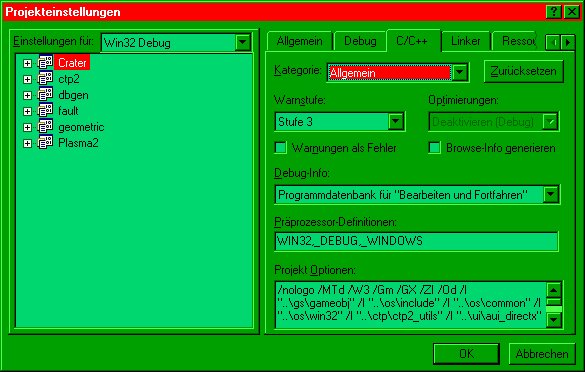
I think the warnings are from the
quote:
/I "..\gs\gameobj"
right before
/I "..\os\include"
|
I added I may have put them in the wrong place. you siad project options, but project options is available under many tabs like C/C++ and Resources, MDL, and so on. THere are many tabs there ad Iadded them to all asuming thats what you meant by addingto other map plug-ins.
But the final error my come from the folder name I use F:\My Games\ and i think the space may have stopped it, is that right? how do I get around this (without renaming if I can?)
|
|
| |
|
|
|
tombom
|
|
Pining for the fjords
Oct 2004
time: 05:31
|
|
You must not put the source in a folder path which contains spaces.
|
|
| |
|
|
|
J Bytheway
|
 |
England
Jul 2001
time: 05:31
|
|
quote:
Originally posted by tombom
You must not put the source in a folder path which contains spaces. |
You can, but you have to use the 8.3 versions of the names in the CDKDIR environment variable.
Last edited by J Bytheway on 28-06-2005 at 21:23
|
|
| |
|
|
|
E
|
|
July 24,2005 Ctp2 Tiles in sig!
May 1999
time: 21:31
|
|
thanks Martin, I found the folder I was looking in the old working copy.
I renamed 'my games' to 'mygames' and I still get:
code:
--------------------Configuration: dbgen - Win32 Final--------------------
Performing Custom Build Step on .\ctpdb.y
'F:\My' is not recognized as an internal or external command,
operable program or batch file.
Error executing c:\windows\system32\cmd.exe.

ctp2.exe - 1 error(s), 0 warning(s)
I fixed the directories for include and lib as well is there somewhere else to check. Or should I just move the code completely out of that directory?
--------------------------
Edit: Ok I've gone back and move SVN-Code to its own directory, there are now NO 'my' folders and I checked tools option and removed any references in the include and lib directories. I have the right directories for directX.
BUT I still get the F:\my error...is there somewhere else I should check? Why is it still looking there? How can I get around this?
Last edited by E on 27-06-2005 at 05:32
|
|
| |
|
|
|
devoblue
|
|
quote:
Linking...
amstrmid.lib(strmiids.obj) : error LNK2005: _IID_IDvdGraphBuilder already defined in strmbasd.lib(strmiids_guid352.obj)
amstrmid.lib(strmiids.obj) : error LNK2005: _IID_IDvdInfo already defined in strmbasd.lib(strmiids_guid351.obj)
amstrmid.lib(strmiids.obj) : error LNK2005: _IID_IDvdControl already defined in strmbasd.lib(strmiids_guid350.obj)
amstrmid.lib(strmiids.obj) : error LNK2005: _IID_IGraphBuilder already defined in strmbasd.lib(strmiids_guid309.obj)
amstrmid.lib(strmiids.obj) : error LNK2005: _IID_IBaseFilter already defined in strmbasd.lib(strmiids_guid289.obj)
amstrmid.lib(strmiids.obj) : error LNK2005: _IID_IMediaEventEx already defined in strmbasd.lib(strmiids_guid271.obj)
amstrmid.lib(strmiids.obj) : error LNK2005: _IID_IMediaControl already defined in strmbasd.lib(strmiids_guid269.obj)
amstrmid.lib(strmiids.obj) : error LNK2005: _IID_IMixerPinConfig already defined in strmbasd.lib(strmiids_guid180.obj)
amstrmid.lib(strmiids.obj) : error LNK2005: _CLSID_DvdGraphBuilder already defined in strmbasd.lib(strmiids_guid157.obj)
amstrmid.lib(strmiids.obj) : error LNK2005: _CLSID_OverlayMixer already defined in strmbasd.lib(strmiids_guid134.obj)
amstrmid.lib(strmiids.obj) : error LNK2005: _CLSID_FilterGraph already defined in strmbasd.lib(strmiids_guid90.obj)
ctp2.exe : fatal error LNK1169: one or more multiply defined symbols found
Error executing link.exe. |
Whoa!, the error is in the linker, so just post the linker part of the message.
Change the order of your library path under tools -> options -> directories and move the dxmedia directory above the dx90sdk directory
|
|
| |
|
| |
All times are GMT. The time now is 05:31.
Apolyton Time is 00:31. |
top of page
|
|
|
Forum Rules:
You may not post new threads
You may not post replies
You may not post attachments
You may not edit your posts
|
HTML code is ON
vB code is ON
Smilies are ON
[IMG] code is ON
|
|
|
|
|
|





 16-06-2005 20:53


 There these warnings are normal. MS stripped all these cool optimize features from the compiler.
 The game has not even started yet!
 By the way a good idea anyway before doing any code changes at all.
 Attachment:
  |
|