|
| |
|

|
dreyk
|
|
Dear friends!
I have several questions about file structure of the Pediaicons.txt and Script.txt.
Please respond, who know answer the questions:
1. In the Conquests the '#ICON_BLDG_NAME' sections have a new string - the number after imp./wond. type, like you can see below:
#ICON_BLDG_Pyramids
SINGLE
30
art\civilopedia\icons\buildings\pyramidlarge.pcx
art\civilopedia\icons\buildings\pyramidsmall.pcx
The Question is: what means this number and how we can get to know, which number should be set, when adding an new building etc.?
2. In case Vanilla Civilization III wonder splashes have numbers:
#WON_SPLASH_30
art\wonder splash\pyramid.pcx
Q: How we can get to know, which number should be added (#WON_SPLASH_?), when adding a new wonder splash?
3. Why in case Conquests Pediaicons.txt has not the "#End Units" mark?
4. Script.txt has lines, looks like that:
#SCIENCEADVICETECH0
Ah yes, {Bronze Working.} We could make bronze-tipped spears and build gigantic bronze statues.
Q: How we can get to know, which number should be added (#SCIENCEADVICETECH?), when adding a new tech?
____________________________________
Big thanks to all guys whom take part in the discussion.
Now answers to the questions much more clearly for me (I think that it’s useful information for many other guys too).
Lets resume results of our discussion. 
1.
Q: What means this number and how we can get to know, which number should be set, when adding a new building etc.?
A: The new number is the index in buildings_large/small.pcx, so in fact you no longer have to have the same order in the editor and that files. It is *not* the order in which they appear in the editor. Just type 1 there instead of 30, and pyramids will have barracks icon. It is quite an improvement, really speeds up things when you're adding 50 buildings to your mod... and you can re-order them any way you want without worrying about icons.
2.
Q: How we can get to know, which number should be added (#WON_SPLASH_?), when adding a new wonder splash?
A: In case Vanilla Civilization, this number means position in the Imp./Wond. list of the Scenario file.
Those numbers correspond the order that they appear in the improvement list in the editor. If you want to know what number you have to add, you have to count down, starting from 0.
For example: The first Imp. (Palace) number is 0, so pyramids has number 30 and it position in the list = 31 (30+1).
3.
Q: Why in case Conquests Pediaicons.txt has not the "#End Units" mark?
A: Maybe by design?! 
4.
Q: How we can get to know, which number should be added (#SCIENCEADVICETECH?), when adding a new tech?
A: This number means position in the Civilization Advances list of the Scenario file.
For example: Bronze Working is the first tech in the editor. It has been assigned number "0". The next tech in the editor would be tech number "1", etc.
Merry Xmas, Happy New Year... and happy Civilizing!
____________________________________
I think that now this thread can be closed.
Last edited by dreyk on 24-12-2003 at 11:54
|
|
| |
|
|
|
Supa
|
|
>> The Question is: what means this number and how we can get to know, which number should be set, when adding an new building etc.?
It's the place of the building in buildinglarge and small.pcx
When you add a new building below them, the # must be the last in pediaicons + 1.
>> How we can get to know, which number should be added (#WON_SPLASH_?), when adding a new wonder splash?
I think in Conquest, the #WON string is now #WON_SPLASH_NAMEOFTHEBUILDING. Ex: For The Pyramids : #WON_SPLASH_Pyramids.
|
|
| |
|
| |
|
|
|
dreyk
|
|
Hi!
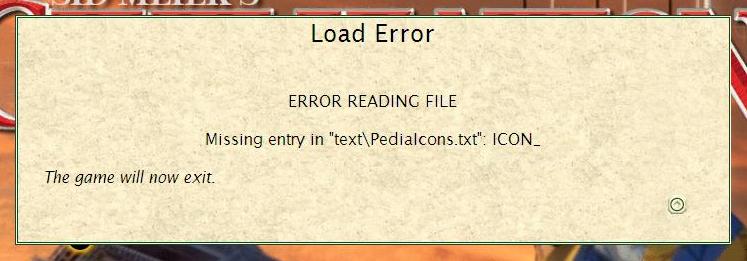
As you know, pediaicons.txt has a many entries, starts with 'ICON_' (for ex. #ICON_RACE_ROMANS, #ICON_TFRM_Mine, #ICON_TERR_Coast, #ICON_GOOD_Aluminum etc.).
Most likely you have added some wrong data to one of such entry, either 'ICON_' without first '#' or missed string like 'art\civilopedia\icons\resources\aluminumlarge.pcx' under the key or something else the same kind.
|
|
| |
All times are GMT. The time now is 05:32.
Apolyton Time is 00:32. |
top of page
|
|
|
Forum Rules:
You may not post new threads
You may not post replies
You may not post attachments
You may not edit your posts
|
HTML code is ON
vB code is ON
Smilies are ON
[IMG] code is ON
|
|
|
|
|
|





 22-12-2003 15:27




 Attachment:
  |
|
 |
|