|

|
Caligastia
|
|
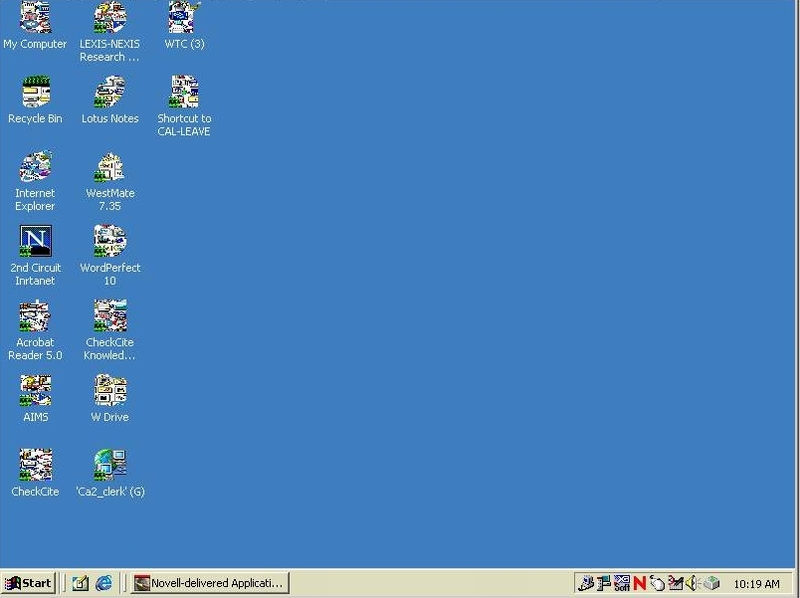
Does anyone here have any suggestions on why these desktop icons are all screwed up?
 Attachment: new bitmap image.jpg Attachment: new bitmap image.jpg
This has been downloaded 84 time(s).
|
|
| |
|
|
|
Zopperoni
|
|
1) Reboot
2) Scan for viruses
|
|
| |
|
|
|
Caligastia
|
|
Already done that, and installed all critical updates for windows.
|
|
| |
|
|
|
centrifuge
|
|
Give some history,
when did it first occur? Did you install any new software hardware etc.?
|
|
| |
|
|
|
Caligastia
|
|
Just happened today. No new installs. It's one of my user's computers. I can't find anything in Microsoft's knowledge base that is any help, so I thought I'd try here...
|
|
| |
|
|
|
Mercator
|
 |
Sorekara no Nanimo
Jan 1970
time: 06:33
|
|
Try this:
Go to your desktop properties (right-click) and change the desktop icon size to something other than it is now (in the Appearance tab). Apply the changes and change it back again right after.
That should refresh your icons, and may fix the problem. I've never seen my icons quite as ****ed up as that though.
Edit: This is exactly what TweakUI does for its icon refresh function (in Win98 anyway) so you could use that too.
Last edited by Mercator on 31-12-2003 at 21:57
|
|
| |
|
|
|
Caligastia
|
|
Tried all that guys, but still no joy.
|
|
| |
|
|
|
Caligastia
|
|
That looks promising. I'll try re-installing all the drivers and I'll let you know if it works.
|
|
| |
|
|
|
Caligastia
|
|
quote:
Originally posted by Mercator
Have you tried deleting the hidden ShellIconCache file (possibly in safe mode)? Or changing your monitor resolution back and forth? |
I've tried changing the monitor resolution, but that didn't help. I might try your other suggestion if reloading the drivers doesn't help.
|
|
| |
|
|
|
Caligastia
|
|
Well, I finally figured it out...yaaay!
I reinstalled the display drivers and the chipset drivers, but that didn't help so I decided to do some more messing around with the settings. On the effects tab in the display properties dialog box there is an option "Show icons using all possible colors". I unchecked it and the icons went back to normal (with less colors of course), so I checked it again and the colors came back and the icons stayed normal.
|
|
| |
All times are GMT. The time now is 05:33.
Apolyton Time is 00:33. |
top of page
|
| archivepost |
|
Forum Rules:
You may not post new threads
You may not post replies
You may not post attachments
You may not edit your posts
|
HTML code is ON
vB code is ON
Smilies are ON
[IMG] code is ON
|
|
|
|
|
|






 31-12-2003 20:51





 |
|