|
| |
|

|
Mercator
|
 |
Sorekara no Nanimo
Jan 1970
time: 06:33
|
|
quote:
Originally posted by Boco
Scrolling through the list might become tedious. |
That's what I feared...
quote:
I'd be more than willing to do it to get the sprites, but why not use your very intuitive SpriteGen 1 interface? |
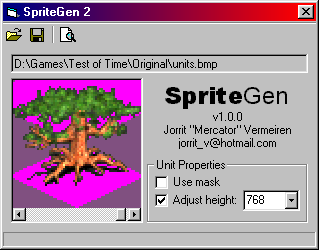
Being able to set height and use mask for each unit individually makes it rather difficult to maintain that interface. Unless you don't mind 81 checkboxes and drop-down lists. But that wouldn't look very appealing, and I want my utilities to look good too!
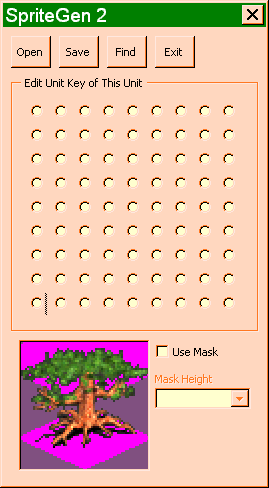
Oh wait... you're using radio buttons in your mockup... 
quote:
The option button determines the icon. |
If I maintain the original interface, the icon woldn't really be necessary. I'm only using the icon here, because that's the easiest way to identify the units with the interface I'm now using.
quote:
If you eager to use the scroll bar, perhaps make it bigger and set LargeChange to 9. |
That's already the case, the LargeChange, that is. 
quote:
The mask checkbox toggles the enabled or visible state of the dropdown. The initial value for the dropdown is the ToT default. |
Judging from your mockup, you misunderstand what the mask is. The mask is what can let you add civilization colours to a unit, using a separate mask unit bitmap like what CivSprite does... What Catfish did here: http://users.tpg.com.au/jpwbeest/ (second image)
The height checkbox toggles the enabled state of the dropdown.
quote:
Is the magnifying glass to find a file or an icon from the @Units listing? The latter is nice, but unless you already have the code, its IMHO not worth the effort. |
No, it's the standard "Preview" icon... You can preview the mask with it. Not quite like what you would see in ToT, but it'll overlay the civ colour mask over the unit image... In case you want to make sure the mask matches the unit.
About the mask, what I'm thinking of now is that you have to create a separate mask bitmap. That one should look just like the ToT units bitmap, except the spaces for the unit icons would be black and white masks, like what you get with CivSprite.
I think it's easiest if the mask is simply a variation on the units bitmap filename (e.g. Units.bmp vs. Units-mask.bmp), so SpriteGen can automatically locate the separate mask bitmap.
quote:
Hope this doesn't stir it up too much.   |
That depends, are my arguments convincing enough? 
|
|
| |
|
|
|
Boco
|
 |
who was once King for a week.
Jan 2001
time: 00:33
|
|
quote:
Judging from your mockup, you misunderstand what the mask is. |
Must never post before morning coffee again! Yes, I was reading mask but thinking sprite.  That's also why I didn't catch on to the preview icon. That's also why I didn't catch on to the preview icon.
quote:
Oh wait... you're using radio buttons in your mockup... |
Yeah I was thinking, select the icon with the radio buttons, then update the single dropdown with the appropriate selected value. One dropdown, one icon (not really necessary, as you point out), but many radio buttons. Although it reduces the icon selection process to a single click as opposed to many scrollings, it still doesn't provide an instant icon height summary for all units. Maybe, on the option buttons' captions.... Nope, that doesn't help to summarize the mask settings.
Time to shut up. Truth is, I'd be very grateful to use just about any interface to manufacture sprites. 
|
|
| |
|
| |
|
|
|
Catfish
|
|
Wollongong, Australia
Aug 2000
time: 14:33
|
|
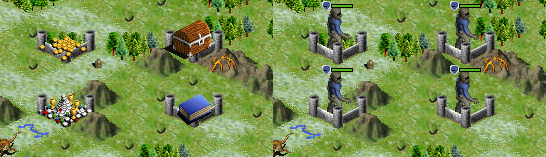
Mercator, one thing I noticed about sprites generated using the current version of SpriteGen, is that they appear superimposed on fortresses.
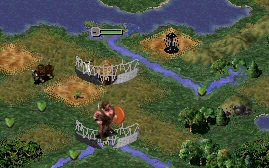
The screenshot on the left shows four sprites generated using SpriteGen for Curt's Bitterfrost scenario. The one on the right (and you might want to fetch yourself a bucket before viewing this) shows sprites from the Sci-Fi (I think - I've got 'em all jumbled up) game.
quote:
Originally posted by Boco
Yeah, I think we may start seeing AFV's from all angles soon. |
Five orientations. *cough* 3-D models. *choke*
 Attachment: bitter_sprites.png Attachment: bitter_sprites.png
This has been downloaded 66 time(s).
Last edited by Catfish on 09-02-2004 at 05:53
|
|
| |
|
|
|
Catfish
|
|
Wollongong, Australia
Aug 2000
time: 14:33
|
|
Sorry, I should've looked into it further. No, it appears to be just the ones with the hidden health bars. The others (for both SpriteGen and CivSprite) appear fine.
|
|
| |
|
|
|
Mercator
|
|
Sorekara no Nanimo
Jan 1970
time: 06:33
|
|
You're both definitely talking about the same thing, though different aspects of it. I'm afraid I can't fix it.
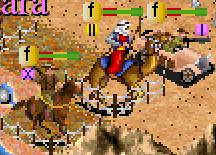
The screenshot below should say a lot. I adjusted the unit height to 128. I, ahem, improvised the fortress graphic a bit so I could see whether it overlapped the unit or not.
It seems the fortress is drawn twice. Once when the terrain is painted (the one that is actually on the right square), then a second time along with the unit (64 down from the top of the shield). That second one overlaps the unit, and that's also how it shows up on the status window.
The difference with the fortify graphic, is that fortifying is only a unit property, while the fortress is really a terrain property. That means the fortify graphic is only painted once, along with the unit, as per the second time for the fortress.
So it isn't really that the sprite is suddenly on top of the fortress, but rather that the top fortress has disappeared, revealing the bottom fortress which you normally wouldn't see (except on squares with no units on it, but in that case you won't know it's actually a different one).
I tried to see if I could use a different approach for hiding the shields by increasing the unit width rather than height. If the shield were centered at the top that should also make it disappear. But unfortunately the shield doesn't move.
So, bad luck! Unless one day someone hacks the executable and changes the fixed fortress/shield dependence to a variable one, based on the unit height. I guess they weren't expecting anyone would crack the sprite format. 
Bad Microprose, Bad!
*smacks Mick Uhl and John Possidente on the head repeatedly with a sprite*
 Attachment: image2.jpg Attachment: image2.jpg
This has been downloaded 53 time(s).
|
|
| |
|
| |
All times are GMT. The time now is 05:33.
Apolyton Time is 00:33. |
top of page
|
|
|
Forum Rules:
You may not post new threads
You may not post replies
You may not post attachments
You may not edit your posts
|
HTML code is ON
vB code is ON
Smilies are ON
[IMG] code is ON
|
|
|
|
|
|





 03-02-2004 02:07


 Attachment:


 Yikes! That won't do (not unless I can turn that into an option anyway).


 |
|