Apolyton Archive  |  Preserved copy of the Apolyton Civilization Site and its forums as they stood in September 2005. Read-only; nothing here can be posted to or replied to.  |  Forum index |  About this archive |  The 1998–2001 UBB forums
Today on Apolyton WARDELL INTERVIEW PROMO A.C.S. HISTORY CHAPTER 4 GET CIV4 /w FREE PLUS! A.C.S. PHOTO GALLERY GET A.O.M. V1.1
Apolyton Civilization Forums
main| civ2| civ3| civ4| smac| ctp2| ron| moo3| galciv| galciv2| alt| about|
ApolytonPLUS | register | search | faq | new posts | pm (-/-) | upload | members
hall of fame new! | civgroups | civgroups news | interviews | the column | radio | chat | directory | news | store | PLUS
Apolyton Civilization Forums : Powered by vBulletin version 2.0.3 Apolyton Civilization Forums > Call To Power II > CtP2-Creation/AI/Mods/Scenarios > Modmanager Problems
Show a Printable Version | Email This Page to Someone! | Receive updates to this thread | Report this to Apolyton news!

bottom of page
  
Author
Thread    < Last Thread     Next Thread > Post New Thread     Post A Reply
djpsychonaut is offline djpsychonaut
Settler
Boston, MA
Oct 2003
time: 00:36
  Old Post 15-05-2004 21:18
Edit/Delete Message Reply w/Quote
#1 Report this post to a moderator
Modmanager Problems Support Apolyton, buy Civilization III: Complete

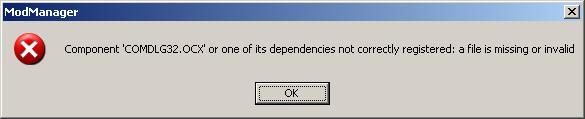
I keep getting an error when I try to run Modmanager...

How can I make it go?

Attachment: error.jpg
This has been downloaded 137 time(s).

djpsychonaut is offline djpsychonaut
Settler
Boston, MA
Oct 2003
time: 00:36
  Old Post 15-05-2004 21:25
Edit/Delete Message Reply w/Quote
#2 Report this post to a moderator
Support Apolyton, buy Civilization: The Boardgame

Answered my own question...

quote:
This is just the executable, and that should be OK for most people since I used only standard Windows Common Controls, but if you're missing .ocx (likely with Windows 95 or 98) files you can get the relevant ones here

HuangShang is offline HuangShang
King
USA, SoCal, L.A.
Jul 2002
time: 21:36
  Old Post 16-05-2004 00:17
Edit/Delete Message Reply w/Quote
#3 Report this post to a moderator
Support Apolyton buy from Amazon

wow thank you...
i was having this problem but i was scared to say it cus everybody new what to do

The Big Mc is offline The Big Mc
King
Of the universe / England
Oct 2001
time: 05:36
  Old Post 16-05-2004 04:41 Visit The Big Mc's homepage!
Edit/Delete Message Reply w/Quote
#4 Report this post to a moderator
Support Apolyton buy from Amazon

Huangshang never be scared to ask for help. We all help each other here if we can and we all need time to get up to speed. When I first came here I got accused of reinventing things with my suggestions.

J Bytheway is offline J Bytheway
Emperor
England
Jul 2001
time: 05:36
  Old Post 17-05-2004 04:41 Visit J Bytheway's homepage!
Edit/Delete Message Reply w/Quote
#5 Report this post to a moderator
Support Apolyton buy from Amazon

Yes, I should probably alter the directory entry to contain that info...

EPW is offline EPW
King
California, USA
Jan 2004
time: 21:36
  Old Post 22-05-2004 04:47 Visit EPW's homepage!
Edit/Delete Message Reply w/Quote
#6 Report this post to a moderator
Support Apolyton buy from Amazon

I was having the same problem. I downloaded the file but where do I put it?

J Bytheway is offline J Bytheway
Emperor
England
Jul 2001
time: 05:36
  Old Post 22-05-2004 15:07 Visit J Bytheway's homepage!
Edit/Delete Message Reply w/Quote
#7 Report this post to a moderator
Enter the AD-FREE zone

It's easiest if you unzip it in the main CTP2 directory. You can put it anywhere, but if you put it elsewhere you'll have to tell it where CTP2 is with a command line argument.

HuangShang is offline HuangShang
King
USA, SoCal, L.A.
Jul 2002
time: 21:36
  Old Post 23-05-2004 01:54
Edit/Delete Message Reply w/Quote
#8 Report this post to a moderator
Got spare money?

i was looking at the readme and it said something about requiring a modman entry for all mods... so does that mean that i have to right one of those?

J Bytheway is offline J Bytheway
Emperor
England
Jul 2001
time: 05:36
  Old Post 23-05-2004 02:44 Visit J Bytheway's homepage!
Edit/Delete Message Reply w/Quote
#9 Report this post to a moderator
Tired of ads?

quote:
Originally posted by HuangShang
i was looking at the readme and it said something about requiring a modman entry for all mods... so does that mean that i have to right one of those?


In most cases, no. If you read the next sentence in the readme:

quote:
ModManager can create these files automatically for ModSwapper class mods based on their *_Gamefile.txt if you click the 'Seek ModSwapper mods' button in the 'Manage Setups' dialog.


All existing mods (AFAIK) are ModSwapper mods, and you can do this for them.

Larry_Knerr is offline Larry_Knerr
Settler

Mar 2004
time: 05:36
  Old Post 03-07-2004 12:49
Edit/Delete Message Reply w/Quote
#10 Report this post to a moderator
Get a bigger avatar today!

I'm trying to run MedMod2 for CTP2 from ModManager. I think I've downloaded everything I need. The patch is installed. The missing OCXs are downloaded and registered. (Why don't they don't have links for those on the download page for ModManager??) DebugSlic=No. Followed the installation directions (except for trying to use ModManager instead of ModSwapper).


MedMod2 says "To install the modpack, simply unzip the portions into the "Call to Power 2" folder."

ModManager says "If you've installed a mod, but it doesn't show up in ModManager, then it might be a ModSwapper mod, in which case you must tell ModManager to look for it. To do this press 'Manage' and then 'Seek ModSwapper Mods'."


It's not finding it.
If this was supposed to simplify things, it's not working for me. What am I doing wrong?


ModMan is at D:\Program Files\Activision\Call To Power 2\ModMan.exe.

What I presume is the definition file (one of two there) is at D:\Program Files\Activision\Call To Power 2\medmod_texts_pics_and_videos\ctp2_data\ctp2_data
\default\gamedata\MM2_gamefile.txt.

BureauBert is offline BureauBert
Chieftain
Vienna, Europe
Apr 2003
time: 06:36
  Old Post 03-07-2004 17:10 Visit BureauBert's homepage!
Edit/Delete Message Reply w/Quote
#11 Report this post to a moderator
Inflate your Upload Space

quote:
D:\Program Files\Activision\Call To Power 2\medmod_texts_pics_and_videos\ctp2_data\ctp2_data
\default\gamedata\MM2_gamefile.txt

Something must have gone wrong while unzipping the Modfiles (I suppose the path defined in the zip-file is a bit too long). However - the above path should read as follows:
quote:
D:\Program Files\Activision\Call To Power 2\ctp2_data\default\gamedata\MM2_gamefile.txt

Moving all MM2_*.*-files out of any "medmod_texts_pics_and_videos"-like folder into the "regular" D:\...\Call To Power 2\ctp2_data\..." structure should solve the problem.

J Bytheway is offline J Bytheway
Emperor
England
Jul 2001
time: 05:36
  Old Post 03-07-2004 19:53 Visit J Bytheway's homepage!
Edit/Delete Message Reply w/Quote
#12 Report this post to a moderator
Support Apolyton, buy Alpha Centauri

quote:
Originally posted by Larry_Knerr
The missing OCXs are downloaded and registered. (Why don't they don't have links for those on the download page for ModManager??)


Well, there are links on the thread, and I can't really put links on the page in the directory because of the constraints on the format.

As regards your other problem, what BureauBert says is right.

Larry_Knerr is offline Larry_Knerr
Settler

Mar 2004
time: 05:36
  Old Post 03-07-2004 22:31
Edit/Delete Message Reply w/Quote
#13 Report this post to a moderator
Support Apolyton, buy Civilization III: Complete

Thanks.

To follow up, after posting the previous I did try copying all the MedMod2 files into the matching CTP2 directories but couldn't get that to work either. (I uninstalled and reinstalled and repatched after each of these, so there shouldn't have been leftovers screwing things up.)

Running CTP2 by itself afterwards gives error messages.

Following MedMod2's Win2K instructions (except for "change MM2_Wondermovie.txt to Wondermovie.txt"; the (new) gamefile.txt doesn't have a MM2_Wondermovie.txt entry) gives error messages.

Running ModSwapper (it finds it!) gives what seems like a couple of hundred error messages. I held the Enter key down for quite a while.


I'd suppose there's some newbie thing I'm doing or not doing, except if the process were inobvious you'd think ModManager and ModSwapper and MedMod2 between them would have at least one set of instructions for people who are doing this for the first time. Maybe I'm just dumb this week.
Or maybe I'm supposed to ignore the odd error messages with MedMod2?

J Bytheway is offline J Bytheway
Emperor
England
Jul 2001
time: 05:36
  Old Post 04-07-2004 00:10 Visit J Bytheway's homepage!
Edit/Delete Message Reply w/Quote
#14 Report this post to a moderator
Support Apolyton, buy Civilization: The Boardgame

If you're getting lots of error messages that suggests that you have DebugSlic on. If you're using ModManager you should be able to check that easily when you run it...

Larry_Knerr is offline Larry_Knerr
Settler

Mar 2004
time: 05:36
  Old Post 04-07-2004 12:25
Edit/Delete Message Reply w/Quote
#15 Report this post to a moderator
Support Apolyton, pre-order Civilization IV

Oops. Forgot that, last time. OK, one last try.

I note in passing that one MedMod2 folder contains a ctp2_data folder inside another ctp2_data folder and CTP2 doesn't. Maybe MedMod2 expects that?

Reinstalling, recopying...
Now I'm only getting 6 SLIC Errors with DebugSlic=No, all of the form
"D:\Program Files\Activision\Call To Power 2\ctp2_data\default\gamedata\tut2_main.sk:469: ADVANCE_MONARCHY not found in AdvanceDB"
(Also 472: ADVANCE_DEMOCRACY, 474: ADVANCE_FASCISM, 476: ADVANCE_CORPORATE_REPUBLIC, 477: ADVANCE_TECHNOCRACY, and 478: ADVANCE_VIRTUAL_DEMOCRACY.)

I loaded tut2_main.slc into Notepad. It has this reference (only) to Monarchy:
"//any govt adv discd
HandleEvent(GrantAdvance) 'TNewGovt' post {
if(IsHumanPlayer(player[0])) {
advance[0] = value[0];
if(advance[0].type == AdvanceDB(ADVANCE_MONARCHY)
|| advance[0].type == AdvanceDB(ADVANCE_THEOLOGY)
...
|| advance[0].type == AdvanceDB(ADVANCE_VIRTUAL_DEMOCRACY)) {
Message(player[0], 'TMNewGovt');
DisableTrigger('TNewGovt');"

AdvanceLists.txt contains Monarchy; MM2_AdvanceLists.txt doesn't. Maybe that's the AdvanceDB it refers to.


Hah! It doesn't give errors when I load a game, only when I "launch" a new one. (It also turns Tutorials on, changes my game gender and probably other things I haven't noticed. ??)

I wonder if this counts as working in the wild world of CTP2 mods. If someone here has played enough MedMod2 to know, please tell me -- is this a bug that needs to be fixed because it will ruin the game later, or is it something one just has to live with?

I'm going to play it and hope for the latter on the assumptions that "tut" is short for tutorial and that it's therefore unlikely to be able to destroy my game.


And my thanks for the help, particularly for the off-topic parts.

BureauBert is offline BureauBert
Chieftain
Vienna, Europe
Apr 2003
time: 06:36
  Old Post 04-07-2004 14:22 Visit BureauBert's homepage!
Edit/Delete Message Reply w/Quote
#16 Report this post to a moderator
Help yourself to an AD-FREE life

quote:
... one MedMod2 folder contains a ctp2_data folder inside another ctp2_data folder and CTP2 doesn't. Maybe MedMod2 expects that?
No, this shouldn't be the case. All the modded files (with the "prefix" MM2_*.*) should be in

code:
...\Call To Power 2\ctp2_data\default\gamedata

and
code:
...\Call To Power 2\ctp2_data\default\aidata
and
code:
...\Call To Power\ctp2_data\languagefolder(e.g. english)\gamedata
Additional sprites need to go to
code:
...\Call To Power 2\ctp2_data\default\graphics\sprites
and pictures to
code:
...\Call To Power 2\ctp2_data\default\graphics\pictures
There should remain no MedMod- (or any other Mod's) files outside this structure.
The missing government-advances indicate that MM2_Advance.txt can't be found in the one and only ...\default\gamedata folder.
-- Edit: I am not sure about this one, but as far as I remember the tutorial SLIC (tut2_main.slc) is included by the hard-coded game engine when you play at "beginner"-level. In this case it would be clear that it can't find the default governments because MedMod introduces different governments. If I remember more or less correctly trying to play MedMod at a higher level could help - there's also a userprofile-option "TutorialAdvice=No", maybe this would deactivate tut2_main.slc, too (otherwise you would need a modded tut2_main.slc but no Mod provides that because all the modders around assume that nobody wants to play Mods at "beginner" level ). end Edit --
As for loading a saved game: Whenever something has been changed in the SLIC (*.slc) and database (*.txt) files you need to reloadslic (press the apostrophe-key »'«, the chatbox appears, type »/reloadslic« and enter). You need to do that because all SLIC and database-information is stored in the savegame - therefore you always keep the SLIC and DB-values you started the game with until you /reloadslic. Note that sometimes/often reloadslic doesn't work properly in the sense that it doesn't (and cannot) always reconstruct the information kept in arrays and variables in the way it is intended and needed for a particular Mod.
I recommend putting all MM2_*.*-files into the matching folders as listed above, not to change any of the file's content, and trying to start a new game with DebugSlic=No, if error messages still pop up re-check if all files included in the MedMod-ZIP-packages are placed exclusively in one of the folders listed above and try to launch a new game again (a note on *.tga and *.spr-files: If you get error messages about missing graphics or sprites you can put them into the according folder even during the game without the need of /reloadslic).
I really hope you can get a game running and enjoy it - and I know this can be a little bit discouraging at the beginning . But you will certainly get used to it and in some years you can teach the next generation lessons about "how to get the stuff probably working".

J Bytheway is offline J Bytheway
Emperor
England
Jul 2001
time: 05:36
  Old Post 09-07-2004 23:50 Visit J Bytheway's homepage!
Edit/Delete Message Reply w/Quote
#17 Report this post to a moderator
Support Apolyton, buy Civilization III: Complete

I guess that your problem is that you are starting on too low a difficulty level, as BureauBert is suggesting.

Martin Gühmann is offline Martin Gühmann
Emperor
Berlin, Germany
Mar 2001
time: 06:36
Post  Old Post 10-07-2004 00:42 Visit Martin Gühmann's homepage!
Edit/Delete Message Reply w/Quote
#18 Report this post to a moderator
Lose 30 kilos (of popups)

quote:
Originally posted by BureauBert
I am not sure about this one, but as far as I remember the tutorial SLIC (tut2_main.slc) is included by the hard-coded game engine when you play at "beginner"-level.


That's wrong the tut2_main.slc is not included by the hard encoded game engine, it is part of the gamefile.txt as well as the sript.slc Wes just did not provide any modified version of this file.

quote:
Originally posted by BureauBert
As for loading a saved game: Whenever something has been changed in the SLIC (*.slc) and database (*.txt) files you need to reloadslic (press the apostrophe-key »'«, the chatbox appears, type »/reloadslic« and enter). You need to do that because all SLIC and database-information is stored in the savegame - therefore you always keep the SLIC and DB-values you started the game with until you /reloadslic.


That's wrong for the DB-values they are always loaded from the database otherwise you could continue your game on GoodMod that was saved on the original game, but in fact if you try something like this the game crashes. This is only an issure with strings.

-Martin

  < Last Thread     Next Thread > Post New Thread     Post A Reply
All times are GMT. The time now is 05:36.
Apolyton Time is 00:36.
    top of page
Rate This Thread:
Forum Jump:
Forum Rules:
You may not post new threads
You may not post replies
You may not post attachments
You may not edit your posts
HTML code is ON
vB code is ON
Smilies are ON
[IMG] code is ON


Contact Us - Apolyton Civilization Site - Support Us!

Building a better Apolyton through better information. Click here and take our poll!
Non-US visitors, click here!

Powered by: vBulletin Version 2.0.3
Copyright ©2000, 2001, Jelsoft Enterprises Limited.

Page generated in 0.0468 seconds (90.63% PHP - 9.37% MySQL) with 30 queries
Page Loading Time:

Support Apolyton: Amazon USA | Amazon UK | Amazon DE | Amazon FR |
Support Apolyton and get FREE PLUS, Buy from Chips&Bits: Galactic Civilizations | Galactic Civilizations: Deluxe Edition | Call to Power 2 | Civilization: The Boardgame | GURPS/ Alpha Centauri | Alpha Centauri | Civilization IV | Civilization III: Complete |


Front Page | Civilization IV | Civilization III | Civilization II | Call to Power II | Alpha Centauri | Master of Orion III
Rise of Nations | Galactic Civilizations | Galactic Civilizations II | Misc
Alt.Civs | Civ I | C:CtP I | About | News | Directory | Apolyton Store | Forums | Chat | Columns | Interviews | Newsletter
Scenario League | CSC | Clash of Civs | Spanish Site | CtP Maps | Cradle of Civ | WesW's Ctp1/2 Site | Civ3 Haven

apolyton.net | apolyton.com | civilization2.net | civilization3.net | civilization4.net | civilizationiv.info | calltopower.net | galciv.net | galciv2.net | moo3.net