|
| |
|

|
Tamerlin
|
 |
Toulouse (South-western France)
Apr 2002
time: 06:36
|
|
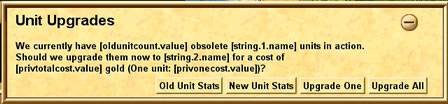
Madd_Mugsy has designed a Unit Updater for his home made mod. I am currently working on the unit arrays in order to adapt them to the Original Game and to the Apolyton Pack.
I have finished working on the Update Paths for the Original Game but as I am new to CtP, I would like to read the opinion of the veterans.
Here are the update paths for the original game:
Spy > Cyberninja
Hoplite > Legion > Pikeman > Musketeer > Machine Gunner > Marine > Plasmatica
Archer > Mounted Archer > Cavalry
Knight > Cavalry > Tank > Fusion Tank
Cannon > Artillery > Mobile SAM > War Walker
Fighter > Interceptor > Stealth Fighter
Bomber > Stealth Bomber
Trireme > Longship > Troop Ship
Greek Fire Trireme > Ship of the Line > Battleship > Plasma Destroyer
Destroyer > Plasma Destroyer
Submarine > Stealth Submarine
Paratroopers > Swarm
Should the Stealth Bomber upgrade to the Space Bomber?
Before designing the update paths of the Apolyton Packs I have a few questions. I have noticed that there are new units and that some of them even bear the same name as units from the original game:
UNIT_GREEK_FIRE_TRIREME "Fire Galley"
UNIT_TROOP_SHIP "Transport"
UNIT_SPY_PLANE "Spy Satellite"
UNIT_SPACE_MARINES "Space Marine"
UNIT_FUSION_TANK "Hovertank"
UNIT_NOBLE "Noble"
UNIT_SIEGE_ENGINE "Siege Engine"
UNIT_HORSE_ARCHER "Horse Archer"
UNIT_CRUISE_MISSILE "Cruise Missile"
UNIT_HELICOPTER "Helicopter"
UNIT_MISSILE_CRUISER "Missile Cruiser"
UNIT_ALPHA_TRANSPORTER "Alpha Transporter"
Could someone confirm me if those units are coming as a replacement (like it seems to be the case with the "Hovertank" replacing the "Fusion Tank") or as an addition to the original units (like the "Horse Archer" and the "Siege Engine")?
Last edited by Tamerlin on 20-05-2004 at 04:38
|
|
| |
|
| |
|
| |
|
| |
|
| |
|
|
|
Madd_Mugsy
|
 |
Vancouver, Canada
Feb 2001
time: 21:36
|
|
quote:
Originally posted by Tamerlin
It seems that the "[" and "]" keys are not working properly. Can a unit be upgraded after it has received an order. Can a unit be upgraded after the turn you discovered the advance triggering the update process?
|
By default, upgrade messages are turned off. So you'll need to press "[" or change the code from:
code:
trigger 'trigStartUp' when (IsHumanPlayer(g.player) && (g.year == 0)) {
  	DisableMessageClass(987);
	DisableMessageClass(789);
	SetActionKey(1,"[");
	SetActionKey(2,"]");
}
to:
code:
trigger 'trigStartUp' when (IsHumanPlayer(g.player) && (g.year == 0)) {
  	EnableMessageClass(987);
	EnableMessageClass(789);
	SetActionKey(1,"[");
	SetActionKey(2,"]");
}
Also, pressing either key only takes effect on the next turn. It will not remove an existing notification/message.
Yes, a unit can be upgraded after receiving an order, thus allowing for extra movement. Not sure of a way around this w/out looping through all the units again - The CreateUnit function doesn't return the unit it created (I don't think - it's be a while since I looked into this). It'd be nice to replace the new units orders with the old units orders, thus automatically fortifying all your new pikemen, for example.
Yes, a unit can be upgraded the same turn you discover the advance. But, because of the fact that there are only global variables and that I didn't want to write a million lines of code to make separate upgrade functions for each unit/tech, you can only upgrade one type of unit each turn. If you choose not to upgrade, it will prompt you again next turn.
quote:
Originally posted by Tamerlin
It seems that the AI is not upgrading its units before you upgrade at least one of yours. 
|
This is definitely not the case, as when I wrote and tested the AI upgrades, I did not myself perform any upgrades and the AI was still able to do so without difficulty. You can sometimes tell when it's upgrading, as there will be a loud death cry/explosion between turns as all it's old units are killed off. This probably screws up the score though
On a separate note, I found the other bug I initially mentioned but could not remember in the other thread. If you upgrade units that are together (part of an army) you will only get one new unit, and you will lose your whole army. It treats the army as a single unit. Ie: My army has three interceptors, two stealth bombers - I upgrade the interceptors to space fighter. Whoops, now instead of 5 units, I have one. So split up your armies before upgrading. Let me know if anyone finds a way around this, because it can be a pain in the ass, if you forget to split 'em up.
L8r.
|
|
| |
|
|
|
Tamerlin
|
|
Toulouse (South-western France)
Apr 2002
time: 06:36
|
|
quote:
Originally posted by Madd_Mugsy
By default, upgrade messages are turned off. So you'll need to press "[" or change the code from: ...
Also, pressing either key only takes effect on the next turn. It will not remove an existing notification/message. |
Thanks a lot, I was actually afraid of having done something wrong.
quote:
Yes, a unit can be upgraded after receiving an order, thus allowing for extra movement. Not sure of a way around this w/out looping through all the units again - The CreateUnit function doesn't return the unit it created (I don't think - it's be a while since I looked into this). It'd be nice to replace the new units orders with the old units orders, thus automatically fortifying all your new pikemen, for example. |
The problem is the same with the CtP2 Updater2, a new unit being created in the process, the said unit can receive a new order.
quote:
Yes, a unit can be upgraded the same turn you discover the advance. But, because of the fact that there are only global variables and that I didn't want to write a million lines of code to make separate upgrade functions for each unit/tech, you can only upgrade one type of unit each turn. If you choose not to upgrade, it will prompt you again next turn. |
I was actually mislead by the fact the "[" and "]" keys only come into effect the turn after they are selected. 
quote:
This is definitely not the case, as when I wrote and tested the AI upgrades, I did not myself perform any upgrades and the AI was still able to do so without difficulty. You can sometimes tell when it's upgrading, as there will be a loud death cry/explosion between turns as all it's old units are killed off. This probably screws up the score though |
I was once again mislead by the way the Updater is working as it is as if it were creating a unit a few tiles away before moving it to the place where the older units was. 
quote:
On a separate note, I found the other bug I initially mentioned but could not remember in the other thread. If you upgrade units that are together (part of an army) you will only get one new unit, and you will lose your whole army. It treats the army as a single unit. Ie: My army has three interceptors, two stealth bombers - I upgrade the interceptors to space fighter. Whoops, now instead of 5 units, I have one. So split up your armies before upgrading. Let me know if anyone finds a way around this, because it can be a pain in the ass, if you forget to split 'em up. |
By splitting an army do you mean that "unlocking" the units in the same tile is enough? 
Thanks for your help Madd_Mugsy. 
|
|
| |
|
| |
|
| |
|
|
|
Madd_Mugsy
|
|
Vancouver, Canada
Feb 2001
time: 21:36
|
|
So I looked into that stupid stacked units all getting scrapped when updated bug.
Replace the main function with this:
code:
messagebox 'msgReplaceUnits'
{
	Title(ID_TITLE_upgrade_query);
	MessageType("TP_QUEUE_EMPTY_AFTER_UNIT");
	MessageClass(789);

	i = 0;
	onecost = 0;
	oldunitcount = 0;
	while (i < player.totalunits)
	{
		SetUnitByIndex(1, g.player, i);
		if (unit.type == oldunittype)
		{
			oldunitcount = oldunitcount + 1;
		}
		i = i + 1;
	}

	if(oldunitcount>0) {

		if(IsHumanPlayer(g.player)) {

			onecost = (newunitcost) - (oldunitcost);

			if (onecost <= player.gold)
			{
				KillClass(g.player,987);
				MessageClass(987);

				privoldunittype=oldunittype;
				privnewunittype=newunittype;
				privoldunitcost=oldunitcost;
				privnewunitcost=newunitcost;

				privtotalcost = (privnewunitcost*oldunitcount) - (privoldunitcost*oldunitcount);
				privonecost = privnewunitcost - privoldunitcost;

				if (privtotalcost <= player.gold && oldunitcount>1)
				{
					Button(ID_BUTTON_Do_upgrade)
					{
						AddGold(player, -privtotalcost);
						i = 0;
						while (i < player.totalunits)
						{
							SetUnitByIndex(1, player, i);
							if (unit.type == privoldunittype)
							{
								oldunitlocation = unit.location;

								if(UnitsInCell(oldunitlocation)>1)
								{
									SetOrder(1, 13);
									AddOrder(unit, oldunitlocation);
								}

								SetOrder(1, 56);
								AddOrder(unit, oldunitlocation);

								CreateUnit(player, privnewunittype, oldunitlocation, 0);
							}
							else
							{
								i = i + 1;
							}
						}
						KillClass(g.player, 987);
					}
				}
				Button(ID_BUTTON_Do_one_upgrade)
				{
					AddGold(player, -privonecost);
					i = 0;
					while (i < player.totalunits)
					{
						SetUnitByIndex(1, g.player, i);
						if (unit.type == privoldunittype)
						{
							oldunitlocation = unit.location;

							if(UnitsInCell(oldunitlocation)>1)
							{
								SetOrder(1, 13);
								AddOrder(unit, oldunitlocation);
							}
							SetOrder(1, 56);
							AddOrder(unit, oldunitlocation);
							CreateUnit(player, privnewunittype, oldunitlocation, 0);
							KillClass(player, 987);
							message(g.player,'msgReplaceUnits');
						}
						else
						{
							i = i + 1;
						}
					}
				}
				Button(ID_BUTTON_LibraryNew)
				{
					LibraryUnit(privnewunittype);

				}
				Button(ID_BUTTON_LibraryOld)
				{
					LibraryUnit(privoldunittype);

				}
				if (oldunitcount>1)
				{
					Text(ID_TEXT_upgrade_query);
				}
				else
				{
					Text(ID_TEXT_upgrade_one_query);
				}
			}
			else
			{
				Abort();
			}
		}
		else
		{
// AI Player
			KillClass(g.player,978);
			MessageClass(978);
			privoldunittype=oldunittype;
			privnewunittype=newunittype;
			i = 0;
			while (i < player.totalunits)
			{
				SetUnitByIndex(1, player, i);
				if (unit.type == privoldunittype)
				{
					oldunitlocation = unit.location;
					KillUnit(unit.1);
					CreateUnit(player, privnewunittype, oldunitlocation, 0);
				}
				else
				{
					i = i + 1;
				}
			}
			KillClass(g.player, 978);
		}
	}
	else
	{
		Abort();
	}
}
All I did was add a check to see if there were more than 1 unit in the cell and if there were to run the ungroup order before the disband order.
I'm also trying to come up with a way to make this updater work with a key press on a stack by stack / unit by unit basis, but I can't seem to get the unit context when I use the trigger
code:
trigger 'keytest' when (key.3.pressed && unit.selected) // where key.3 = "U"
{
//do stuff
//in here the unit context is invalid?  but it works if I remove the key.pressed part of the trigger
}
Any ideas?
L8r.
|
|
| |
|
| |
|
|
|
Madd_Mugsy
|
|
Vancouver, Canada
Feb 2001
time: 21:36
|
|
I got it working with the unit.fortified trigger - but i didn't see a unit.sleeping (or whatever) trigger to catch the sleep button - is there one?
This is what it looks like (early, early draft):
code:
trigger 'WarriorUpgrade' when (unit.fortified && HasAdvance(g.player, ID_ADVANCE_IRON_WORKING) && unit.type == UnitType("UNIT_WARRIOR"))
{
	oldunitlocation = unit.location;
	if(UnitsInCell(oldunitlocation)>1)
	{
		SetOrder(1, 13);
		AddOrder(unit, oldunitlocation);
	}

	SetOrder(1, 56);
	AddOrder(unit, oldunitlocation);
	CreateUnit(player, UnitType("UNIT_LEGION"), oldunitlocation, 0);
}
I made a quick modding tool to read and update all the advance & unit text files and GL files, and I'm going to add a function to write the updating script automatically too so there's not so much copy/pasting.
I can post it when it's closer to being done if you guys want.
L8r.
|
|
| |
|
| |
|
| |
|
|
|
1096
|
|
Hi, I'm more of a tweaker than I am a modder and I'm quite interested in having a unit updater for CTP. Could anyone show me how the files/SLICs above need to be implemented into the game? I'm sure there's quite a bit that you experts consider trivial that is well beyond me. If anyone could post a finished attachment or something to copy&paste, I would be grateful.
Edit: Ok, I read the other thread and it has helped although using that format, the game wouldn't load up and it said that "oldunitlocation" was a pre-existing symbol...or some such thing. Anyway, I just renamed it to "oul" for short and it seems to be working. I'll post again if I hit a wall.
Last edited by 1096 on 16-08-2004 at 21:17
|
|
| |
|
| |
All times are GMT. The time now is 05:36.
Apolyton Time is 00:36. |
top of page
|
|
|
Forum Rules:
You may not post new threads
You may not post replies
You may not post attachments
You may not edit your posts
|
HTML code is ON
vB code is ON
Smilies are ON
[IMG] code is ON
|
|
|
|
|
|





 18-05-2004 18:00


 For your second question, it is obvious that these units were replaced the only question is, if you just have to do it with different names, or also with different units with different properties.



 Attachment:
  Attachment:
  Attachment:


 |
|