|

|
Groc
|
|
I am playing MOO I with Windows Me. I dowloaded the game and do not have a physical manual. This creates a couple of problems:
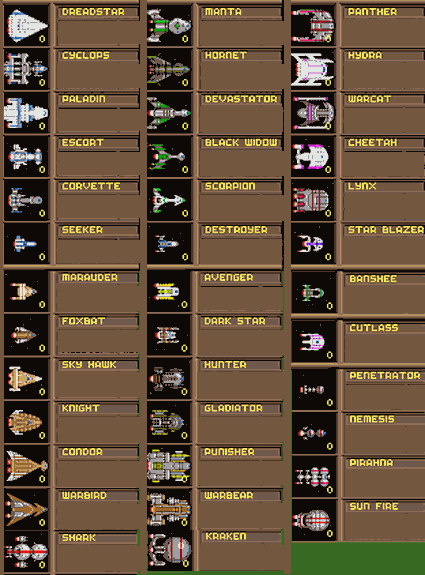
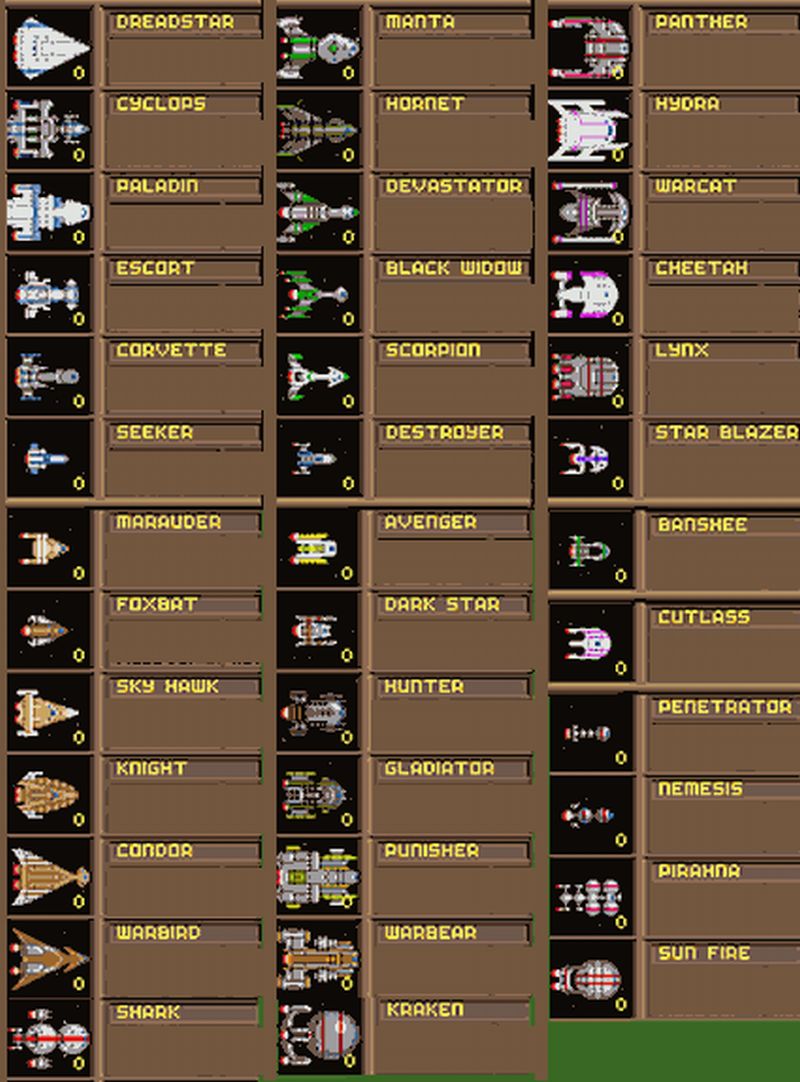
1. When asked to identify ships I have to guess. I deal with this by saving the game a lot. Is there a way to get the pictures of the ships on the internet?
2. I downloaded the manuel and a stategy guide too(from Jon Sullivan), and have saved them, but the quickest way to bring them up is keep them as a window in my internet prOOvider. To access this I have to quit the game. Is there a way access these windows without quitting MOO - that anyone knows?
Thanks very much. All help appreciated.
Last edited by Groc on 11-06-2004 at 09:28
|
|
| |
|
|
|
Groc
|
|
Thanks, DaveV and vmxa1 for your help. It solved both my problems. Apprciate it.
|
|
| |
|
|
|
Groc
|
|
Not done yet. How do I save this file so that it can be retrieved. When I first downloaded it to a file I created for MOO stuff, I then copied it another file. After that the attachment from vmxa1 was gone. It was also gone from the message forum. I didn't have a clue what was happening.
Today when I went back to the message forum, the chart was there, but when I saved it I can never retreive it. i.e. I am given no options with what to open it, and when I just hit open, it shows the files that make up the message, but never shows the chart it self. One of the files is titled "Ships". I tried to open it with my exporer, but it only shows a litte box with a red circle in it.
My apology for being so ignorant about computers, but can anyone tell me how to download, and how to retried the chart that vmxa1 sent me as an attachment?
I was tantalizingly close to not having to guess the identiy of the ships, but was thwarted completely.
All help greatly appreciated.
|
|
| |
|
|
|
Groc
|
|
Well, dah, I think I did everthing as you guys suggested. I tried them all three times. And still no picture opens from the hard drive. Thanks for the explaination about the non html folder and html file, that helps make sense. The html file did open, but the pics were not there. The non html file still stumps me, and that is where the pics are, right?
When I saved it to disc, same thing. I have the file and the folder. explorer opens the file as on the hard drive the pics were not included.
So, Im still stumped. Call me stumpy. I am using Windows Me, AMD 450, 256 Ram. Does my computer have anything to do with this. Apparently it works for you guys when you do what you told me to do. Why doesn't it work for me? Any more help, and patience available. I appreciate you taking the time to answer me. Any advise, reasoning why it doesn't work for me?
I saved it as, right clicked on the file, not the folder, and the message on the forum opens, but the pics are not there.
Thanks again.
|
|
| |
|
|
|
Ljube
|
 |
Belgrade
May 2003
time: 06:36
|
|
quote:
Originally posted by Groc
Well, dah, I think I did everthing as you guys suggested. I tried them all three times. And still no picture opens from the hard drive. Thanks for the explaination about the non html folder and html file, that helps make sense. The html file did open, but the pics were not there. The non html file still stumps me, and that is where the pics are, right?
When I saved it to disc, same thing. I have the file and the folder. explorer opens the file as on the hard drive the pics were not included.
So, Im still stumped. Call me stumpy. I am using Windows Me, AMD 450, 256 Ram. Does my computer have anything to do with this. Apparently it works for you guys when you do what you told me to do. Why doesn't it work for me? Any more help, and patience available. I appreciate you taking the time to answer me. Any advise, reasoning why it doesn't work for me?
I saved it as, right clicked on the file, not the folder, and the message on the forum opens, but the pics are not there.
Thanks again. |
Did you get my mail sent to *** containing an attachment (a gif file) and did you follow the procedure I explained in my earlier post?
Last edited by Ljube on 13-06-2004 at 05:56
|
|
| |
|
|
|
Groc
|
|
Weel, guess what? It still didn't bring up the pics. I cannot open the folder with explorer. I am not given that option. Only option I am given with the folder is "open". So, I couldn't follow your advice, as much as I would have liked to. I appreciate your repeated efforts fo help me. Really. Any other suggestions.
I don't know why I am not give the option to open the folder in explorer. Is there a way to do this manually as it were. (Hey, I know nothing!)
Again, thanks.
|
|
| |
|
|
|
vmxa1
|
 |
Oviedo, Fl
Nov 2001
time: 21:36
|
|
The folder should be allow open with Windows Explorer, not IE. The html, should be open with IE or what ever broswer you use.
I don't currently have ME on my PC's (well I do have it dual booted on one), but I used Win98Se last week to play with these types of files.
I used windows explorer and copied and delete items, including pics. So are you saying you cannot double click the folder and have it open?
IIRC someof your post, I think you were able to open with windows explorer (calling it just explorer form now on).
Once that was done, could you the select views and pick details?
If so, do you see gif files and maybe some others?
If so what happened when you DB click one? Did it open with Paint?
Did you download Irfanview?
Last edited by vmxa1 on 02-06-2004 at 01:37
|
|
| |
|
|
|
Groc
|
|
Hello Again,
Have been just playing the game instead of trying to resolve my saving to hard drive problem. My apology for keeping you waiting. Vxma1, I did as you suggested. I got to the folder via detail, there were no gif files. There were a couple of files called ships but ther were lbx files. Paint would not open them.
Ljube-ljcvetko. no, sorry, I don't have word. When I tried to open the ships.gif file (in the folder) I ge the promopt," This is not a vialid bitmap file, or it's format is not currently supported. I downloaded irfanView. When I opened and pointed to the ship_gif file, irfanView said, " ships?1.gif is an ART file with incorrect extension. And that irfanView could not open ART files." It also called it an "unknow file."
The good news is that I printed the page, and so gat a copy of the the pics that I can use! This relieves my need to have the pics, but like you, would like to solve this puzzle as to how to read it on my hard drive.
So, the new information is: When I open open the folder with windows explorer: l. go to View/Details/Paint, it shows itself as an lbx file. 2. if I db click on it and try to open it with irfanView, irfanView tells me it is an ART file with incorrect extension.
Does this mean that my computer has done something unique when it saved the forum message?
Actually, I went to the library to print the page. I don't have a printer. It offered me a gif file right on the forum message. I clicked on it an printed it. No problem.
However, my computer treats it differently. Again. I thank you, very much for all you help. It IS very much appreciated.
Any new revelations, inspirtations?
|
|
| |
|
|
|
Groc
|
|
Ta Dah!!! Wow!!! Whoopie!!! It works!!!!. Thanks vmxa1. Both ways that your last message said to do , worked. But, only for the image that you e-mailed me. It still wouldn't work for the image that was on the forum. But, who cares about that!!!. Why that doesn't work is a question for those that know more about computers than I do. Acturally your methods only worked on desktop. Could not get the file to open where I saved it in program files. Now I have the issue of always seeing the file on the desk top Looks like if I keep a copy of the forum page with the image on it I can save that to desktop whenever I want to play MOO. Come to think of it, to clarify, saved the attachment, the second one, the enlarged one, to desktop and that was the one that worked. I don't recall is I got an attachment through the email link. If I did I don't have it any more. But, like I said, I can save the second attachment to desktop, and it works fine, with either method you said. So.....
That's about it then. I very much appreciate you persistamce in seeing me to the end of this. Thanks, thank you, and thanks again. Be seein you.
Groc
|
|
| |
|
|
|
Groc
|
|
vmxa1, you were right. The file saved on desktop was a jpeg, and the first one was a gif. When I copied the jpeg to my MOO folder, it worked fine. (For some reason when I saved the jpeg directly to the MOO file it got turned into a gif file and would't open.)
Now, I can create a short cut to use when I play game. It works fine now.
Again, thanks. Again, I appreciated your help.
Groc
P.S. Now that you have solved the problem for me, I will be removing my thread from the forum, once I find out how to do that, so my email address isn't out there for every Tom, Dick, and Harry dude to see.
P.P.S. Thanks, again.
|
|
| |
|
|
|
Groc
|
|
Thanks Ljube-ljcvetke, That will work. ( ...and thanks for your earlier help too.)
|
|
| |
All times are GMT. The time now is 05:36.
Apolyton Time is 00:36. |
top of page
|
|
|
Forum Rules:
You may not post new threads
You may not post replies
You may not post attachments
You may not edit your posts
|
HTML code is ON
vB code is ON
Smilies are ON
[IMG] code is ON
|
|
|
|
|
|





 26-05-2004 09:42


 Attachment:
  Attachment:

 |
|