|
| |
|

|
Aspsusa
|
|
[Lengthy preamble]
Hi, I've been playing smac on and off since it came out, mostly at a very low level (like other ppl play solitaire  ) and never tried any kind of multiplay. Never really been much into scenarios, creating my own factions and such either. Bought crossfire but tired of it pretty quickly. Now mostly play with all movies and sound turned off. ) and never tried any kind of multiplay. Never really been much into scenarios, creating my own factions and such either. Bought crossfire but tired of it pretty quickly. Now mostly play with all movies and sound turned off.
[/lengthy preamble]
Now I have stumbled on a problem:
I recently had to get a new laptop (HPcompaq nc4000) and of course I want to play smac on it too. It works very well, I didn't even have to reinstall or anything! (just copied the directory from my old laptop, w2000=>xpPro, too!)
BUT this new lightweight baby doesn't have the keys for moving around (arrows, PgUp, PgDn, End, Home) in such a place that it is really possible to play without scratching your head for at least half a minute when I want to move a unit diagonally.
I have tried searching the game for any way of re-assigning the keys but haven't found anything helpful at all. I tried searching this forum (and generally googling) but I can't come up with search terms that would give me meaningful answers.
Is it possible to change the keys controlling movement?
How?
And if it isn't, anyone have any idea of some work around for this problem? (like some kind of alternate keyboard layout I could run together with smac)
Please, please help - I know this is a very trivial question but I am just too stupid to figure it out.
|
|
| |
|
|
|
Commy
|
 |
St. Louis, MO, USA
Mar 2004
time: 05:36
|
|
Personally, I don't like moving units with the keyboard for a couple of reasons:
Sometimes, I easily make mistakes...
Sometimes, I get confused which keys to press, especially when it is 4 in the morning and school is in like 3 hours...
And lastly, sometimes when you move a unit into a fungus square using the keyboard, the unit doesn't go into the square, but you still get the effects of moving into that square. So like, if I want to move from square A to square B, and square B is fungus, and square B has a unity pod, and I attempt to move into square B using the keyboard, sometimes my unit will still stay in square A, but I still somehow open the Unity pod. Strangely enough, the Unity pod is still there, and you can actually "open" the pod again. And, say if the pod opens a new river or gives a bonus resource, the bonus would appear in square A, not the square with the Unity Pod. Strange...
But anyway, either use the mouse on the laptop, or get a normal mouse that can be connected to the laptop. Or, you can always use your special resonance abilities...
|
|
| |
|
|
|
Aspsusa
|
|
Thanks for the tips.
I tried the mouse-technique but I fear it is not for me - too slow and I find that I still prefer to use the arrow keys, so a lot of switching back and forth.
The tip about PgUp/Dn being right and home/end being left is nice if I could only remember it (lets hope practice makes perfect or I find another solution) - on my keyboard Pg-keys are to the *left* and home/end to the right.... sigh.
That USB-keypad is an idea - if I ever happen upon one dirtcheap I might even buy one.
But it does bug me that this laptop has an embedded numerical keypad that would work quite well if I could only find some way of using it (obviously when you hit numlock you only get the numerical functions of it)!
I do agree with you, Sikander, using the keyboard is almost always more efficient than mousing. It was only when I started using laptops with touchpads that I stopped being extremely anti-mouse when it came to *everything* (being of the opinion that localised versions of software that change the hotkeys to something else should be banned as detrimental to work-efficiency and the mental health of users...).
|
|
| |
|
|
|
Enigma_Nova
|
|
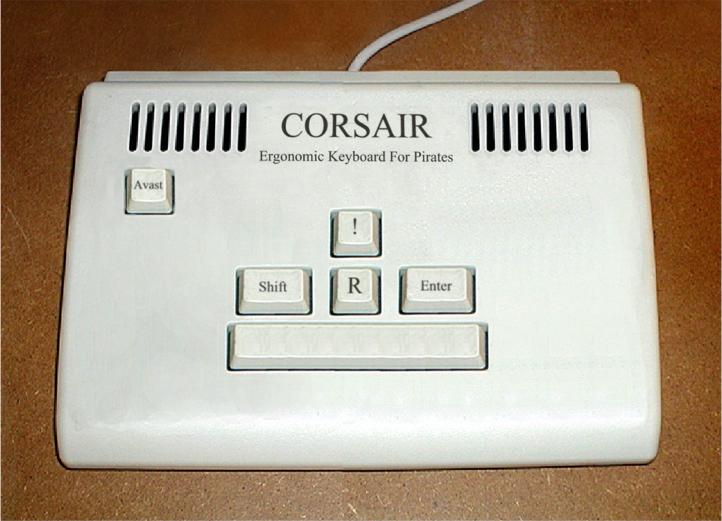
Where the hell are CTRL, ALT and DEL?
|
|
| |
|
|
|
Enigma_Nova
|
|
Problem is, your comp would restart if you try to type Avast! and all you could say would be RRRrrRRrrrrRRRrrr!
What happens if you press SHIFT-! ?
|
|
| |
All times are GMT. The time now is 05:36.
Apolyton Time is 00:36. |
top of page
|
|
|
Forum Rules:
You may not post new threads
You may not post replies
You may not post attachments
You may not edit your posts
|
HTML code is ON
vB code is ON
Smilies are ON
[IMG] code is ON
|
|
|
|
|
|





 15-06-2004 23:47





 I don't think I'd ever get the hang of going left to move right.
 )
)
 Attachment:

 |
|