|

|
Zeiter
|
|
Here's the spreadsheet. I'll explain how to use it in a minute.
Edit: I've made a ton of revisions and improvements, including more analysis and graphs. It's also easier to follow now. Here's version 2.0:
 Attachment: turn rate spreadsheet - ver. 2.0.zip Attachment: turn rate spreadsheet - ver. 2.0.zip
This has been downloaded 1 time(s).
Last edited by Zeiter on 30-07-2004 at 15:47
|
|
| |
|
|
|
Zeiter
|
|
Okay, first of all, I made this spreadsheet on my home computer, which runs on windows 98, which is quite a bit different than 2000 or XP (gah, I need to get XP!). I don't know if they programmed 2000 and XP to handle files from 98 and earlier. Hopefully they did, and everyone won't have any trouble opening this file.
This spreasheet computes how long it takes each turn for each team to play their turn. It also computes a running average of each teams turn playing length. All values are usually in minutes unless I specified otherwise.
All that is needed is for the user to enter in the timestamps of the ACDG turn tracking thread posts. It's relatively simple. Just enter the day of the month in the day column (column I), the hour where it says hour, (in military time. Thus, 11 pm is 23) which would be in column J, and then the minute in the minute column (column K). A couple of important notes when entering in the time stamp:
*My time stamps are in CDT, -6 hours from GMT. If you want to enter or edit data into the spreadsheet, you will either have to mentally change the time, change your time zone in your profile on Apolyton, or change all of the data.
*When you enter a new month, you'll have to change column H too. What you'll have to do is add however many days were in the previous month to the running total. Thus, if a turn is posted on August 1st at 10:34 pm, you would enter the following data:
Column H: 31
Column I: 1
Column J: 22 (remember, military time. You can change your timestamps to be displayed in military time in your profile on Apolyton. This will save you some mental effort).
Column K: 34
The number 31 will remain in the H column all throught the timestamps in August. Then, in September, you'll add another 31 to that column, so a timestap for September 4 at 7:43 am would be...
Column H: 62
Column I: 4
Column J: 7
Column K: 43
What do you do when you get finished with a month that has only 30 days? Just add 30 instead of 31 to column H. Thus, a timestamp for October 16 at 9:23 am would look like:
Column H: 92
Column I: 16
Column J: 9
Column K: 23
You get the idea.
Column C displays what turn it is, and column A displays which team it applies to. Column B displays the amount of time the corresponding team used to play the corresponding turn. For example, it took the Data Angels 296 minutes to play turn 2104.
Columns D through G show the exact same information, except the information is organized by teams for easier analysis.
Columns M through Q show running averages for time taken playing turns for each faction. Data in these columns is only valid up to the point where timestamps are entered in. You'll notice that past turn 2121 Morgan's averages are negative. Those values will change as new information is entered in.
I'll be updating this spreadsheet and posting the revised versions at 10 turn intervals, but feel free to edit it for yourself. If anyone wants more features (like standard deviation or something) just let me know and I'll add them to the spreadsheet. I'll also be monitoring the values for trends and unexpected spikes. If I see anything interesting I'll let you guys know. If anyone wants any specific info, I'll be happy to divulge it. I'm also going to construct some graphs based on this data, maybe tonight, if I can stay awake, or maybe tomorrow. 
And if anyone has any questions, feel free to ask.
Last edited by Zeiter on 30-07-2004 at 13:08
|
|
| |
|
|
|
Zeiter
|
|
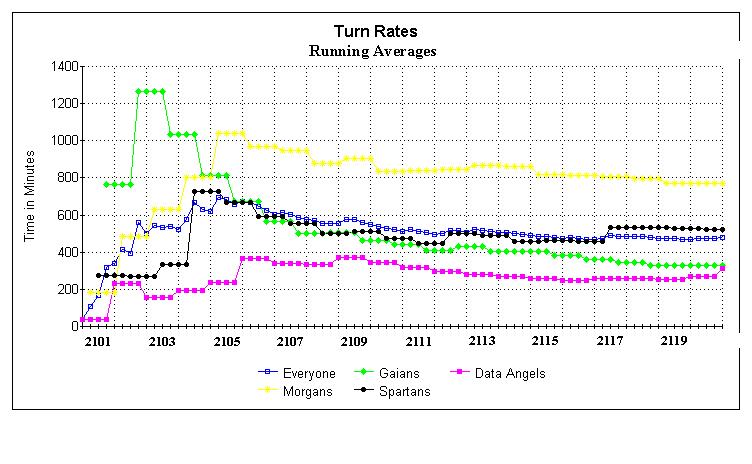
Here are the running averages for turn playing rates in graphical form:
 Attachment: turn rates running averages.jpg Attachment: turn rates running averages.jpg
This has been downloaded 34 time(s).
|
|
| |
|
|
|
Zeiter
|
|
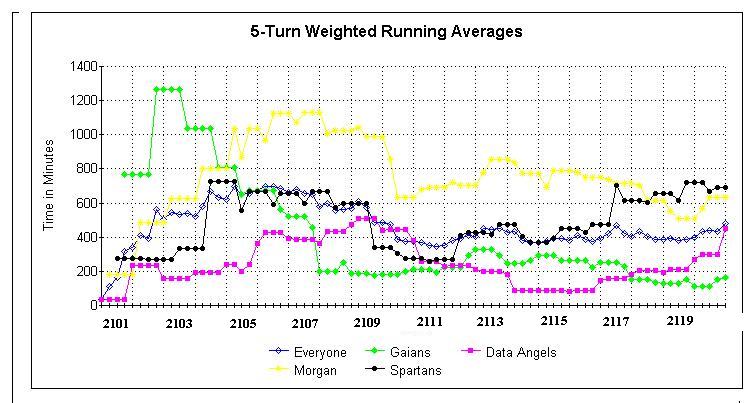
Here's a graph showing 5-turn weighted averages for turn playing rates. What this means is that the average for each turn is computed from the last 5 turns. As the turns progress, the old ones get thrown out of the computations. The first 5 turns are handled a bit differently, of course, as they don't have 5 previous turns to factor in.
This method does a much better job of showing trends. We'll be able to spot any spikes in the data very easily with this method.
Attachment: 5-turn rates running averages.jpg
This has been downloaded 31 time(s).
|
|
| |
|
|
|
Zeiter
|
|
5-turn weighted averages for turn 2120:
Everyone: 483 minutes/turn
Gaians: 165 minutes/turn
Data Angels: 449 minutes/turn
Morgans: 632 minutes/turn
Spartans: 694 minutes/turn
|
|
| |
|
|
|
Zeiter
|
|
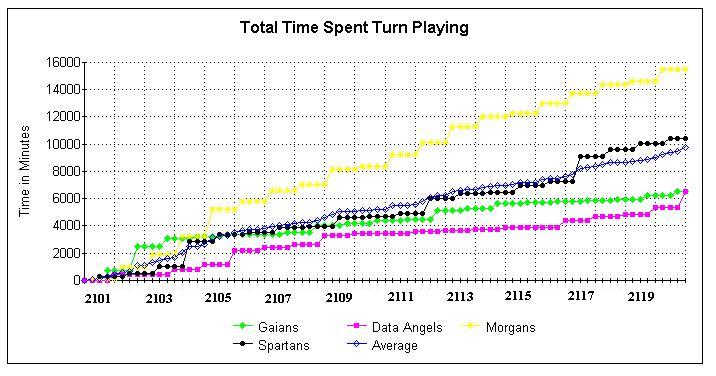
Total time spent turnplaying by 2120:
Gaians: 6,563 minutes
Data Angels: 6,553 minutes
Morgans: 15,451 minutes 
Spartans: 10,426 minutes
Average: 9,748 minutes
Last edited by Zeiter on 30-07-2004 at 15:05
|
|
| |
|
| |
|
|
|
Zeiter
|
|
No, my computer doesn't have MS office, Lotus, excel or any of those.
Ah, here we go, try downloading this. I saved the spreadsheet in .xls format. Maybe this will help:
Attachment: turn rate spreadsheet xls format - ver. 2.2.zip
This has been downloaded 2 time(s).
Last edited by Zeiter on 30-07-2004 at 22:48
|
|
| |
|
|
|
Primus Pilus
|
|
ok, i got your spreadsheet and will look at it.
|
|
| |
All times are GMT. The time now is 05:34.
Apolyton Time is 00:34. |
top of page
|
|
|
Forum Rules:
You may not post new threads
You may not post replies
You may not post attachments
You may not edit your posts
|
HTML code is ON
vB code is ON
Smilies are ON
[IMG] code is ON
|
|
|
|
|
|






 30-07-2004 12:09


 the Morgans are slowpokes.
 Relatively speaking, of course. Everyone's going at a breakneck speed right now.


 At least I can post these graphs.


 |
|