|
| |
|

|
Zeiter
|
|
Hehehe, I've been fooling around with spreadsheets lately, and recently I thought about trying to make an RPG game out of SMAC on a spreadsheet. Well, 4 days and a couple thousand if/then equations later, the ACDG3 rpg game is finished.
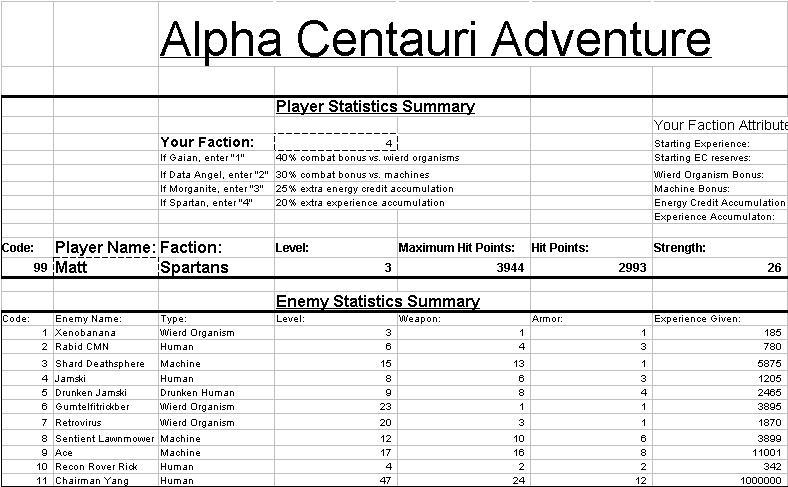
Basically, it's like one of those really old rpg games from the 1980's. You move around on a map, fight enemies that randomly appear, gain experience and gold (in this case, energy credits) and you can buy better weapons and armor, potions to restore health (longevity vaccine and clinical immortality vials), etc. The object of this game is to make a dangerous journey to The Hive and defeat Chairman Yang and his entourage in rpg combat. Along the way you'll fight 10 different kinds of enemies. Here's a screenshot to show:
 Attachment: acagame.jpg Attachment: acagame.jpg
This has been downloaded 88 time(s).
|
|
| |
|
|
|
Zeiter
|
|
Now, I must warn you all: this game will probably seem VERY boring, except for the slight novelty value. It requires a tiny bit of player input to make it work. But for the most part, it runs on its own, which I thought would never happen. The hardest thing was getting the combat engine to work right. And even now I'm not totally sure that its working 100% as I intended, but it seems to be working well enough from the little bit I've played on it.
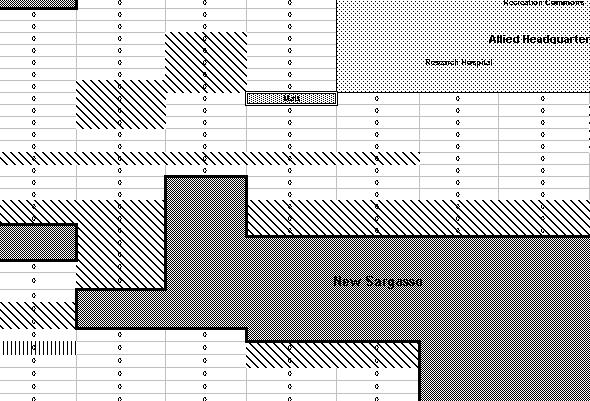
Here's another screenshot, this one of part of the World Map:
Attachment: acagame2.jpg
This has been downloaded 86 time(s).
|
|
| |
|
|
|
Zeiter
|
|
Yeah, I've got this whole summer off from school, and there's not much else to do but read, check the ACDG, and find something else to occupy my time with. This last week, it's been trying things out with spreadsheets.
The biggest hair-pulling-out inducer for me was getting the combat engine to work properly. First I kept getting "ERR" in the cells, until I realized that sometimes the equations were having to divide by 0. So I got that fixed, but then I would get wierd combat results, like my level 1 character doing 20,000 damage. So I got that fixed (I think :lol but then I had to figure out a way to tally the experience and ECs after each battle. Then I had to incorporate factional bonuses, the two healing items, and some other stuff into it all. Designing the combat engine alone took 2 days of over 10 hours a day. The other stuff wasn't quite so bad. Building the random enemy generator on the map was tedious but straightforward. But overall, the whole project took about 4 days of work. It started out as a simple "Gee, I wonder if I could do this..." and gradually snowballed in complexity. Anyway, I hope you are able to open it. but then I had to figure out a way to tally the experience and ECs after each battle. Then I had to incorporate factional bonuses, the two healing items, and some other stuff into it all. Designing the combat engine alone took 2 days of over 10 hours a day. The other stuff wasn't quite so bad. Building the random enemy generator on the map was tedious but straightforward. But overall, the whole project took about 4 days of work. It started out as a simple "Gee, I wonder if I could do this..." and gradually snowballed in complexity. Anyway, I hope you are able to open it.
|
|
| |
|
| |
|
| |
|
|
|
Zeiter
|
|
Yeah, it does require a fair amount of input from the user right now. Of course since I'm the one who designed it, it isn't hard for me to keep track of what I must do, but to some random person trying to play this for the first time it would be mighty confusing. Ideally, I'd like to have:
*The enemy code pop up automatically when an enemy is encountered on the random map, instead of the user having to go up and enter in the code his/herself
*I'd like to modify the battle engine so that there's no need for the "READY?" button. Right now, if leave that button as showing a "1", when you start a new battle, combat damage will be exchanged on the first round of combat, which will result in the enemy's defense being calculated as being "1", which will cause the player to deal over 20,000 damage. I wish I could figure out an automatic way to delay the start of the battle until after the enemies' information has been loaded into the battle arena. Did that make any sense? 
Well, as it is, until I perform the modifications as you suggested, we could still do that group rpg game that you mentioned, and I could be the one who carries out all of the orders. Again, thanks for all of the help!
|
|
| |
|
|
|
Zeiter
|
|
Okay, I've got the spreadsheet open, and I'm checking the things you said one by one.
quote:
When I open the file, it says L93 has a circular reference. Is this normal? |
Hmmm, whenever I open it up, it always says there's a circular reference, but it doesn't tell me where it is. I checked L93, and there shouldn't be any circular references there.
quote:
If you go to Tools/Options/Calculation and check the iteration box this should solve the circular reference problem, if the circular reference is indeed intensional. |
I've seen this option on the newer windows spreadsheet programs, but sadly, my windows 98 spreadsheet doesn't have a calculation tab or box under tools/options.
quote:
Formula P13 is in error. Should be "=(M13*5+11)-T13", instead of T6. |
Hehehe, actually it should be "=(M13*5+11)". The -T6 part is left over from when I was trying to incorporate some special abilities into the game. I had a nerve gas special ability where it gave +50% attack, but it decreased your strength permanently each time you used it by 1. I originally had the "nerve gas used this # of times" value in cell T6. But then I decided to drop the special abilities stuff for the time being, as it was making things drastically more complex. I may put them back in at some point, once I get the game generally running well. But anyway, correction made.
Now I'm gonna try using that Vlookup function. I'll get back to you with my success/failure with that in, hopefully, an hour or two.
|
|
| |
|
|
|
Zeiter
|
|
Well, I've come up with something that removes the need for the user to type in "1" in the ready box. I typed in "=IF(J38>3,1,0)" in I38. Then, in J38, I typed in "=IF(J50=0,0,(IF(J50>0,(J38+1),J38)))". (Yes, another one of those iterations. But hey, it seems to work.) So, when the player loads the enemies into the battle arena, the battle automatically waits 3 turns to begin. This gives the battle arena time to load in the enemy information before the battle starts. And now this works by the user just hitting the F9 key instead of having to type in "1" into the ready box. To help the user out, I also added a text box that says "Battle will begin in..." in cel I39. Then in cell J39, I put,
" =IF(J38=0,4,IF(J38=1,3,IF(J38=2,2,IF(J38=3,1,IF(J3
8>3,"Battle Has Begun!",0)))))"
This gives the user a little countdown for when the battle will start. They just hit F9 to progress the countdown, and then when the battle begins, "Battle Has Begun!" pops up in cell J39. Then, when the user deletes the enemy codes from the battle arena, everything resets. I think I may move cells I38 and J38 now, as they are unnecessary for the user to see. I'll probably put them over with the other blackened out information blocks. So, what do you think? Is this a good, user-friendly way to handle the start of the battle? It seems to me that the countdown method is self-explanitory enough.
|
|
| |
|
|
|
Zeiter
|
|
Alright! I've simplified and automated the battle process so that all the user has to do is punch in the enemy code(s) and choose who they will attack. Everything else runs itself. I've also made the batte arena easier to follow so that the user can keep their screen centered on one spot for the entire battle and still see everything they need to see.
quote:
Also P50=0 is wrong, should be P50=false. |
I double checked it, and it running fine the way it is.
quote:
Excel doesn't work this way. You need to write VB codes for this. |
It seems to be working well enough at the moment, so I'll leave it as it is.
Right now, if I could just make the map movement less combersome, I'd be thrilled. I read your suggestion, but I'm really confused as to how to do this:
quote:
Say you have a little menu in the right corner of your screen where your character's position is in the middle. Then the player choose from the menu which direction he will go. A onupdate event macro/script will do the actual move and copy/paste for him, and to test if there is a monster around him. If so then it brings up the battle screen. In the battle screen there is a fight botton. When the player looks over everything (his stats etc) and chosen the enemy he click on fight. Then the random result generates and if he wins the script added the ecs and experiences for him, and then delete the enemy from the battle screen and reset everything else. Basically this would be in a entirely graphical interface instead of the actual spreadsheet, you have different buttons for different things. |
I'm sorry, but I have no idea what an onupdate event macro/script is.   What are vb codes and macro/scripts? Where do you type them in (in the cell's formula bar?)? What are vb codes and macro/scripts? Where do you type them in (in the cell's formula bar?)?
I'm going to post a revised version of the game soon, once I update the tutorial and doublecheck everything one last time. And I'd also like to figure out a better way for moving around on the map. If you could explain that top paragraph a little more, perhaps I could incorporate that into my spreadsheet too. That would be freakin' awesome, to just move around without having to copy/paste every move.  Anyways, thanks a ton for all of the suggestions. Anyways, thanks a ton for all of the suggestions.
|
|
| |
|
| |
|
|
|
Snowflake
|
 |
falling, once again
Apr 2003
time: 23:33
|
|
Ok. Open your spreadsheet, Tools/Macro/Record New macro.
Fill the popup window with macro name (suggest "movement")and shortcut key (I suggest "m").
Click on ok. Then click on the stop button.
Tools/Macro/Macros..., select the macro you just entered (movement), Edit. Paste the following before "End Sub".
code:
Dim PlayerName As String
Dim MyDirection As String

PlayerName = Range("K13").Value
Range("R77").Activate

Cells.Find(What:=PlayerName, After:=ActiveCell, LookIn:=xlValues, LookAt:= _
        xlWhole, SearchOrder:=xlByRows, SearchDirection:=xlNext, MatchCase:=False _
        ).Activate
MyDirection = Application.InputBox("Enter a direction (E, S, W, N)")
If MyDirection = "S" Then
    ActiveCell.Value = ""
    ActiveCell.Offset(1, 0).Value = PlayerName
    If ActiveCell.Offset(0, 1).Value <> "" Then
        ActiveCell.Formula = ActiveCell.Offset(0, 1).Formula
    Else: If ActiveCell.Offset(0, -1).Value <> "" Then ActiveCell.Formula = ActiveCell.Offset(0, 1).Formula
    End If
    ActiveCell.Offset(1, 0).Select
End If
Test it by pressing "ctrl m". You'll notice I only wrote movement for moving South. So you can only fill the input box with "S" when you are testing. If it works fine, then you can go ahead and do the other three directions. Let me know if you don't understand the script. The offset(x,y) means the cursor goes down x row and y columns to the right.
When everything works you can then fine tune it, for example you can decide if you want to use capitalized letters for directions and such.
|
|
| |
|
|
|
Zeiter
|
|
I'm sorry, but there exist nothing under tools, or anywhere, that says macro on the version I'm using. All I see under tools is:
*Spelling
*Sort
*Easy Calc
*Create new chart
*Rename chart
*Delete chart
*Duplicate chart
*Recalculate now
*Customize toolbar
*Options
And then I checked under options, and there still wasn't anything that said "macro". I guess it's because I'm using windows 98. Thanks for the help anyway.
Overall, I'm pretty satisfied with its workings now, although I need to tweak things in the gameplay like the amount of experience for each monster. I played through it once, and it was waaaay too easy to gain levels, so I'm going to go back and tweak that. And then I'll probably post a final version sometime soon. But thanks for pointing out all the little errors.
And if you really want to, you can try inserting the vbcode and macro stuff yourself. I hold no copyright on it. Once again, thanks for everything.
|
|
| |
All times are GMT. The time now is 05:33.
Apolyton Time is 00:33. |
top of page
|
|
|
Forum Rules:
You may not post new threads
You may not post replies
You may not post attachments
You may not edit your posts
|
HTML code is ON
vB code is ON
Smilies are ON
[IMG] code is ON
|
|
|
|
|
|






 03-08-2004 12:12


 Attachment:


 Oh well, I might get XP soon.
 |
|