Apolyton Archive  |  Preserved copy of the Apolyton Civilization Site and its forums as they stood in September 2005. Read-only; nothing here can be posted to or replied to.  |  Forum index |  About this archive |  The 1998–2001 UBB forums
Today on Apolyton WARDELL INTERVIEW PROMO A.C.S. HISTORY CHAPTER 4 GET CIV4 /w FREE PLUS! A.C.S. PHOTO GALLERY GET A.O.M. V1.1
Apolyton Civilization Forums
main| civ2| civ3| civ4| smac| ctp2| ron| moo3| galciv| galciv2| alt| about|
ApolytonPLUS | register | search | faq | new posts | pm (-/-) | upload | members
hall of fame new! | civgroups | civgroups news | interviews | the column | radio | chat | directory | news | store | PLUS
Apolyton Civilization Forums : Powered by vBulletin version 2.0.3 Apolyton Civilization Forums > Alternative Civs > Clash of Civilizations > Demo 5 Interface
Show a Printable Version | Email This Page to Someone! | Receive updates to this thread | Report this to Apolyton news!
04.Sep: `FC` 2.0.5 COMPLETED AND RELEASED
27.Jul: `FC` 2.0.4 COMPLETED AND RELEASED
16.Jul: `FC` 2.0.3 COMPLETED AND RELEASED

bottom of page
  
Author
Thread   
Pages (2): [ 1   2   ]
< Last Thread     Next Thread > Post New Thread     Post A Reply
LDiCesare is offline LDiCesare
King
La Ferté sous Jouarre France
Jan 2001
time: 05:13
Talking  Old Post 24-05-2001 15:47
Edit/Delete Message Reply w/Quote
#31 Report this post to a moderator
Inflate your Upload Space

Gary, I like your suggestions in general.
Here are a few ideas.
I think left-clicking an army in the map view should select it, ptobably highlighting it in the units frame.
Left click in units frames should select the TF/unit. Then you can decide on moving it.
Now, moving should be done by selecting the target square, thus no longer in unit frame.
As for right click, again I agree with what you say.
The military code uses orders for armies, so you could have a list of available orders in this right-click. Typical orders include:
Attack, Garrison, Sentry. There are also some orders like scouting which are implemented but don't mean much at TF level now. The right click, or some button, could be used to select the current order of the army. Note that orders usually have a target square, so you don't say move and garrison in square X but garrison in square X. That could be easy I think for the player to give the order and then select the target square (if different from current location).
I think it could be possible to have some button rather than doing all right-click, also. I think both would be needed.
Although right-click for pop-up menus is regular in windows, it has several drawbacks: on MAc, you have only one button, so if Clash was ever to run on Mac, it would cause problems to need 2 buttons. Also, I got lots of comments at work, where we use a lot of right-click contextual menus, that users don't find them, so an alternate way to do it could be fine:
I suggest left-click to select, and either right click or use one button in the frame to access menus.
Also, we could have two buttons, one for TF management (adding, removing armies from it, merging TFs) and one for giving the default or current order to the army.
It would be cool also to display the current order (although in D5 units will tend to teleport so the various orders won't change much).

Gary Thomas is offline Gary Thomas
Prince
New Zealand
Mar 2001
time: 17:13
  Old Post 25-05-2001 00:09
Edit/Delete Message Reply w/Quote
#32 Report this post to a moderator
Got spare money?

A way to cope with the MAC system, is to give the units frame exactly the same menu as the pop-up menu. This has the disadvantage that a unit to reassign would then have to be selected later (if appropriate). However I don't think that that is a big problem.

I am not enthusiastic about using an ordinary left click to select a unit within a TF. I envisage players, in a hurry, accidentally selecting a unit, while trying to selct a TF, then giving it an order to move, then wondering why nothing happens.

Possibly a double click would work though.

Cheers.

Mark_Everson is offline Mark_Everson
Clash of Civilizations Project Lead
Canton, MI
Jan 1970
time: 00:13
  Old Post 25-05-2001 23:06 Visit Mark_Everson's homepage!
Edit/Delete Message Reply w/Quote
#33 Report this post to a moderator
Support Apolyton, pre-order Civilization IV

Gary, my comments on Units Panel Suggestions:

I think your proposals are reasonable, with the following caveat...

quote:
My preferred action is to have a right mouse click both select a unit, and produce a pop-up menu - this is again in line with general Windows practice. The menu would have options like the following (all of which, I think, could be easliy implemented for D5):
Assign unit to new TF
Assign unit to slected TF (Snip)


I agree with you that this approach is best for people who absolutely will not read manuals, or are utter newbies with the software. We can certainly limp through with this approach for demo 5. However, I think this way to do it is extremely inefficient and annoying for players who have moved more than negligibly up the learning curve of the game. Suppose I want to take three units in a given square that are in different TFs, and generate a new TF with them. With your approach it takes seven separate actions to do this. Two to do something with each unit, and one to select the TF associated with the first unit shifted as the selected TF for further operations. My approach does this in four actions (one click to select each, and one key press or menu choice at player discretion). I don't mind having the first implementation be your suggestion, if you don't mind the expectation that it will eventually also have to be done something like my way in addition to yours!

As a side note TFs will also be able to be given orders to intercept friendly / enemy TFs and FE if friendly join up with the existing TF. That way when you make a new unit you can just tell it to go join a TF, or even better have it set so it automatically goes and joins a particular TF.

I agree with Laurent that we should also show current orders for the active TF in either the Units Panel, or elsewhere as text, and perhaps also on the map itself if we can express the order graphically. FE "go to X and Fortify" could show arrows for movement to square, and an 'F' at the end, or a pick/shovel or something.

Gary Thomas is offline Gary Thomas
Prince
New Zealand
Mar 2001
time: 17:13
  Old Post 27-05-2001 04:24
Edit/Delete Message Reply w/Quote
#34 Report this post to a moderator
Remove this text

It is true that it takes seven actions to make a task force from three units in different task forces using the mouse alone. If you feel that you will be doing this many times during each move then probably the system should be designed to optimise it. If, on the other hand, you think you are likely to do that once or twice a game, or perhaps not at all in a game, then perhaps the system should be optimised for other things.

Adding the orders I listed in my post to Laurents extra ones, and allowing for a few extras we haven't thought of yet gives quite a few potential orders. So you wind up with something like

T Assign unit to new TF
U Assign unit to slected TF
A Assign whole TF into selected TF
B Assign all TFs into selected TF
C Split this TF up into separate new TFs, one unit per TF
D Select this TF
E Disband this unit
F Undo last action
G Fortify this TF
H Place this TF on sentry status
I Place this TF on garrison status
J Move this TF to a waypoint
K Move this TF to the capital
L Scout with this unit
etc etc

And you have to remember that the arrow keys move the selected unit, and do not scroll the map as they might be expected to.

To this it is necessary to add the key shortcuts needed for economics, technology choices, diplomacy, and whatever else comes up.

With a game of this complecity, I would guess at perhaps a hundred key meanings to be remembered. The game would then be largely an exercise in calling up the help (it would have to have on-line help - looking up a manual all the time would be impossible). Except for a few common actions (and I don't think that forming a new task force from three units in different TFs is a common action) no player can be expected to remember such a list, newbie or not.

There is also the point that 1. a mouse click to select a unit, 2. a key press to define the action, requires the hand and the attention to move from the mouse and screen to the keyboard, rather than remaining with the mouse/screen combination. There is plenty of ergonomic evidence to suggest that the mouse/keyboard combination is generally slower.

If the other option "one menu choice at the player's option" is used, then the menu must be selected, and the right entry clicked. The problem I have with that is that selecting a unit, then going to an apparently unrelated menu is not intuitive. You have to remember that everybody starts with no knowledge of the game - as a newbie in fact. Any idiosynchratic "feature" that is added increases the numbe of people who will try the game and give up.

In any case, for keyboard enthusiasts, it is extremely easy to switch modes, so the player can decide for themselves. Then we can a vote on the Forum to see which is preferred.

Cheers.

Mark_Everson is offline Mark_Everson
Clash of Civilizations Project Lead
Canton, MI
Jan 1970
time: 00:13
  Old Post 27-05-2001 07:42 Visit Mark_Everson's homepage!
Edit/Delete Message Reply w/Quote
#35 Report this post to a moderator
Help yourself to an AD-FREE life

Gary:

I hear you, and as I said go ahead and use your way as a first implementation. But I think we will eventually need to do it both (or several) ways. I personally am sure I will find orders boxes popping up every time I go to do something like regroup units into a TF to be a real eyesore. But we will start it out your way, and then see what the playtesters think. Best will be if we in the long term have a variety of input options so that everyone can have an entry method for orders etc. that they find pleasing to deal with.

Gary Thomas is offline Gary Thomas
Prince
New Zealand
Mar 2001
time: 17:13
  Old Post 27-05-2001 08:43
Edit/Delete Message Reply w/Quote
#36 Report this post to a moderator
Support Apolyton buy from Amazon

My current implementation for D5 has my system as the default, but typing the letter K (or k) flips it over to the other system.

However, even then, a LEFT click will select a TF, a RIGHT click will select a unit (rather than the other way round as in the original specification). This is because I couln't be bothered swapping the responses. However, if there is sufficient public demand I could fix that. But I still feel that TFs will be selected far more often than units.

If I get the time (hahahahahaha...) I will add Laurent's suggestion, with a third set of options, in which selection will be entirely by position - click on a unit to select it, on a TF frame to select that.

Cheers

Mark_Everson is offline Mark_Everson
Clash of Civilizations Project Lead
Canton, MI
Jan 1970
time: 00:13
  Old Post 28-05-2001 04:16 Visit Mark_Everson's homepage!
Edit/Delete Message Reply w/Quote
#37 Report this post to a moderator
Enter the AD-FREE zone

quote:
Originally posted by Gary Thomas
My current implementation for D5 has my system as the default, but typing the letter K (or k) flips it over to the other system.

(snip)

If I get the time (hahahahahaha...) I will add Laurent's suggestion, with a third set of options, in which selection will be entirely by position - click on a unit to select it, on a TF frame to select that.


K sounds good.

On setting selection of units or TFs entirely by position, that should Not require substantial work. It was Already implemented that way in the original UnitCanvas code.

Gary Thomas is offline Gary Thomas
Prince
New Zealand
Mar 2001
time: 17:13
  Old Post 29-05-2001 00:30
Edit/Delete Message Reply w/Quote
#38 Report this post to a moderator
Increase the size of your Attachments

quote:

On setting selection of units or TFs entirely by position, that should Not require substantial work. It was Already implemented that way in the original UnitCanvas code.


Didn't realize that. In that case it will take no work, and hence shouldn't take very long.

Cheers.

Gary Thomas is offline Gary Thomas
Prince
New Zealand
Mar 2001
time: 17:13
  Old Post 31-05-2001 00:15
Edit/Delete Message Reply w/Quote
#39 Report this post to a moderator
Suffering from ads?

I originally intended that there be a key (K) to switch between the "keyboard" mode (use T to combine units into a new task force) and the "mouse" mode (popup menu). Because there appears to be a strong probability of more settings of this kind, I decided to make to a menu item. In addition the main control bar will have an Options button which will bring up a popup menu. This option menu will include such things like preferred GUI settings, and presumably other things later.

Cheers

Mark_Everson is offline Mark_Everson
Clash of Civilizations Project Lead
Canton, MI
Jan 1970
time: 00:13
Thumbs up  Old Post 31-05-2001 03:34 Visit Mark_Everson's homepage!
Edit/Delete Message Reply w/Quote
#40 Report this post to a moderator
Support Apolyton, buy GURPS/ Alpha Centauri

Excellent Idea!

LDiCesare is offline LDiCesare
King
La Ferté sous Jouarre France
Jan 2001
time: 05:13
Question  Old Post 04-06-2001 14:37
Edit/Delete Message Reply w/Quote
#41 Report this post to a moderator
Browse Apolyton AD-FREE

It would be cool to be able to drag and drop a unit into a TF in order to add it to the TF.
We might even have that to drop out of the TF box...
What do you think?

Gary Thomas is offline Gary Thomas
Prince
New Zealand
Mar 2001
time: 17:13
  Old Post 06-06-2001 20:56
Edit/Delete Message Reply w/Quote
#42 Report this post to a moderator
Suffering from ads?

I am working on it. However the pickup of the unit might conflict with other things like the popup menu. It may require setting an option. Then players could assess which system they prefer.

In any case, not until after D5.

Cheers

Last edited by Gary Thomas on 07-06-2001 at 19:27

Richard Bruns is offline Richard Bruns
King
NC, USA
Nov 1999
time: 06:13
  Old Post 11-11-2001 05:06 Visit Richard Bruns's homepage!
Edit/Delete Message Reply w/Quote
#43 Report this post to a moderator
Bump Put an end to popups!

We're talking about the interface again, so I thought I'd haul this old thread back up.

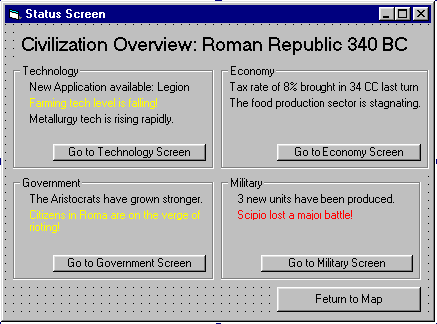
I think that we do need an overview screen that shows the highlights of all models. This would provide a single look at the most important aspects of the civ. It could also be the information panel that pops up every turn, replacing the info box.

Here's a possibility. Note that it is smaller than the real one would be, in order to fit on the forums. There would be a frame for each model, and each frame would need to be bigger to accomodate more information. The real overview would probably fill the whole screen:

Attachment: status screen.bmp
This has been downloaded 10 time(s).

Mark_Everson is offline Mark_Everson
Clash of Civilizations Project Lead
Canton, MI
Jan 1970
time: 00:13
  Old Post 11-11-2001 05:43 Visit Mark_Everson's homepage!
Edit/Delete Message Reply w/Quote
#44 Report this post to a moderator
Support Apolyton buy from Amazon

Hi Richard:

Your overview screen is definitely where I'd like to be eventually. But there is a thread on just this topic that you should read, and ideally move your post and file into. It is Gui and was only like 12 posts down, you must have just missed it. I would like to lock this one, since its basically all out of date. But I'll wait to give you a chance to grab the post here and copy it over.

 
Pages (2): [ 1   2   ]
< Last Thread     Next Thread > Post New Thread     Post A Reply
All times are GMT. The time now is 05:13.
Apolyton Time is 00:13.
    top of page
Rate This Thread:
Forum Jump:
Forum Rules:
You may not post new threads
You may not post replies
You may not post attachments
You may not edit your posts
HTML code is ON
vB code is ON
Smilies are ON
[IMG] code is ON


Contact Us - Apolyton Civilization Site - Support Us!

Building a better Apolyton through better information. Click here and take our poll!
Non-US visitors, click here!

Powered by: vBulletin Version 2.0.3
Copyright ©2000, 2001, Jelsoft Enterprises Limited.

Page generated in 0.0587 seconds (92.38% PHP - 7.62% MySQL) with 30 queries
Page Loading Time:

Support Apolyton: Amazon USA | Amazon UK | Amazon DE | Amazon FR |
Support Apolyton and get FREE PLUS, Buy from Chips&Bits: Galactic Civilizations | Galactic Civilizations: Deluxe Edition | Call to Power 2 | Civilization: The Boardgame | GURPS/ Alpha Centauri | Alpha Centauri | Civilization IV | Civilization III: Complete |


Front Page | Civilization IV | Civilization III | Civilization II | Call to Power II | Alpha Centauri | Master of Orion III
Rise of Nations | Galactic Civilizations | Galactic Civilizations II | Misc
Alt.Civs | Civ I | C:CtP I | About | News | Directory | Apolyton Store | Forums | Chat | Columns | Interviews | Newsletter
Scenario League | CSC | Clash of Civs | Spanish Site | CtP Maps | Cradle of Civ | WesW's Ctp1/2 Site | Civ3 Haven

apolyton.net | apolyton.com | civilization2.net | civilization3.net | civilization4.net | civilizationiv.info | calltopower.net | galciv.net | galciv2.net | moo3.net