 |

|
Jon Miller
|
|
I am having the won't start problem with this game (only other games who have it are starcraft and Rome:TW (that I have tried)). The problem probably relates to me using WinXP 64bit, but I am interested in a workarround if anyone knows any. As far as I can tell, I click on the thrones and patriots shortcut and nothing happens.
Jon Miller
|
|
| |
|
|
|
Pissed Consumer
|
|
I have enough everything. I just downloaded the newest graphics card. I know I have enough MHZ and RAM, and I have enough space on my HD for it to work. I still don't know why it's not working.
|
|
| |
|
|
|
Pissed Consumer
|
|
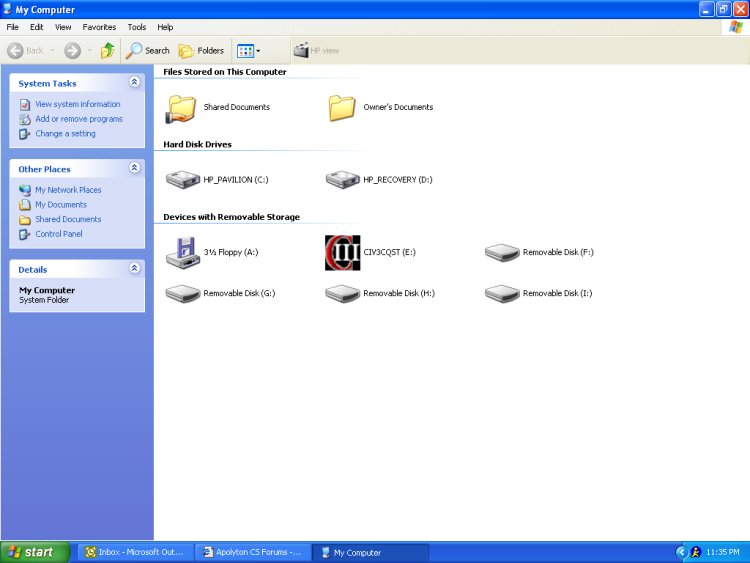
Yup. I've tried opening the game this way too, it's in the E drive. Nothing.
|
|
| |
|
|
|
Grandpa Troll

|
 |
I owe..I owe..it's off to work I go
Jul 2000
time: 00:19
|
|
also..check this out:
I. Audio Troubleshooting
Check with your sound board manufacturer for the latest DirectX-compatible drivers.
Following are the known audio issues and workarounds:
· Audio stops playing: If some parts of the in-game audio (including combat sounds) stop playing after the game has been running for a while, add the -sw3Dsound command-line option to the Rise of Nations shortcut. To do so, left-click the shortcut and click Properties, and then in the Target box type -sw3Dsound at the end of the existing text. Click Apply and OK.
· Audigy 2: Using an Audigy 2 sound board may interfere with SafeDisc, the encryption technology used to protect Rise of Nations. To resolve this issue, disable the Audigy 2 splash screen. Also, if you play a DVD, you must restart your computer before running Rise of Nations.
· Aureal Vortex: Rise of Nations audio may not function with Aureal sound cards. To resolve this issue, turn off the hardware acceleration. From the Start menu, point to Settings, and then choose Control Panel. Double click Sounds and Audio Devices and select the Audio tab. Click the Advanced button in the Sound Playback section and then click the Performance tab. Move the Hardware Acceleration slider to None and click Apply.
· SoundBlaster Live!: Using this sound card when running Rise of Nations on a Windows XP operating system may degrade game performance. To resolve this issue, turn off the hardware acceleration for this sound card. From the Start menu, point to Settings, and then choose Control Panel. Double click Sounds and Audio Devices and select the Audio tab. Click the Advanced button in the Sound Playback section and then click the Performance tab. Move the Hardware Acceleration slider to None and click Apply.
· SoundBlaster Live! Wave: Sound will only come from one speaker when using the 5.1.2535.0 driver. To resolve this issue download and install the latest drivers from http://www.soundblaster.com.
· Onboard sound: Some audio hardware included on motherboards is not currently supported.
· DirectX: If you experience audio problems using DirectX, connect to the DirectX Web site for the latest troubleshooting information, as explained in the “DirectX Troubleshooting” section preceding.
|
|
| |
|
|
|
Pissed Consumer
|
|
I don't have any of those soundcards, or any of those CD Drives. I'm just going to return the game. It's not worth all this.
|
|
| |
|
|
|
Jon Miller
|
|
I have a x800 pro
an athlon64 3500
a raptor 36GB harddrive
1 GB of RAM
Windows XP 64bit
It is not the best system arround, but it is pretty kickass.
sorry I didn't reply earlier, I didn't see any posts here for the longest time
Jon Miller
My ASUS board has unboard sound which I use
|
|
| |
|
|
|
Jon Miller
|
|
I am the (a) one having the issue
(if you read the first post...)
Jon Miller
|
|
| |
|
|
|
Jon Miller
|
|
anyone can help me?
JM
|
|
| |
|
|
|
Jon Miller
|
|
I have 1 GB of memory, so that should be a problem (it is a new machine)
And I just click on it, and I get a error report thing saying that there was a problem, there is never any time for me to press any buttons.
Jon Miller
|
|
| |
|
|
|
Jon Miller
|
|
well, it does install
so I don't think it is a cirrupted program
Jon Miller
|
|
| |
|
|
|
Jon Miller
|
|
hmm
I have discovered that Rise of Nations works fine
it is Thrones and Patriots that won't work
The error is before it checks for the CD
how do you stop it from trying to load the splash screen?
Jon Miller
|
|
| |
|
|
|
solo
|
|
Lowell, MA USA
Jan 2001
time: 05:19
|
|
Some other ideas:
I assume you have downloaded the latest version of DirectX from Microsoft and have the latest drivers for your video card and sound system.
I've heard that SP2 (Microsoft XP service pack 2) can keep some games from running properly. If it is installed, you might try disabling it's firewall, since this "feature" can interfere with games.
You may have something else running on your system, too, such as anti-virus software that interferes with the game. A way to test this is to boot into safe mode and try running the game.
Another common problem with the Thrones and Patriots expansion is "gathering exception errors". When I downloaded the latest patch using the game's update option, this problem was resolved for me. By the way, I never had this problem with the original RoN, so this may be what is happening to you. This is easiest to check first and the most likely cause of your problem. Just insert your CD and click on update instead of play. Then try to play the game.
Finally, it may just be an issue with XP 64 bit, which is new and possibly incompatible with many games designed on XP 32. If this is the case you could create another partition on your drive and install XP32 and the game there. Whether you want to create a dual boot system depends on how badly you want to play the game.
One question? Which Asus board are you using?
Last edited by solo on 09-01-2005 at 21:29
|
|
| |
|
|
|
solo
|
|
Lowell, MA USA
Jan 2001
time: 05:19
|
|
An upgrade, and the article is a bit dated.
My new Athlon 64 zips right along under 32 bit XP.
When XP 64 bit drivers and other software catch up, I'm sure it will feel like getting a new CPU upgrade.
|
|
| |
All times are GMT. The time now is 05:19.
Apolyton Time is 00:19. |
top of page
|
|
|
Forum Rules:
You may not post new threads
You may not post replies
You may not post attachments
You may not edit your posts
|
HTML code is ON
vB code is ON
Smilies are ON
[IMG] code is ON
|
|
|
|
|
|






 13-11-2004 04:34


 Attachment:


 |
|
.jpg)