|
| |
|

|
vovan
|
|
I have set up a Subversion server for the Clash of Civilizations on my site that can be used for version control. Here is how to use it:
1. If you are using Windows, the easiest way to go is get a graphical client that integrates with the Explorer and allows you to easily interact with SVN. A good client that I use is TortoiseSVN: http://tortoisesvn.tigris.org/. The documentation on the Tortoise site should be enough to get you started with it. If you are using a different operating system, or if you don't want to use a graphical client, you can always use the command-line svn client: http://subversion.tigris.org/.
2. Once you have your client set up, check out from the following URL: http://www.vovan.net/svn/clash/trunk. (You can also point your browser to that URL, if you only want to view the files, but not necessarily download them to your machine.)
3. Notice that it asks you for a username and password. To obtain those, please email vovan AT vovan DOT net and in the body of the email specify the desired username and password. Also, because I get plenty of spam on that address, please put [Clash] in the subject of the email somewhere so my spam filter doesn't kill the email. Finally, if you are not Mark or Laurent or someone else I know is working on the project, please do give me some way of knowing you should be allowed to view the repository. Like ask Mark to email me or have him post here, or something. 
4. Alright, once you get your username and password set up, you can view the repository at any time through a browser, and you can also check out from the repository and commit the changes you made. Note that the first checkout will take some time because the repository is pretty big - over 10MB. The consequent updates will be much faster, as only the changed files will be transferred to your machine.
Here is a list of people that currently have access to the repository:
Apolyton username - SVN username
vovan - vovan
alms66 - alms66
LDiCesare - LDiCesare
Mark_Everson - Mark_Everson
Gary Thomas - gthomas
(You mostly want to know people's SVN username so that you can use the "Blame" feature to know who changed the code that causes a bug. If you want to do that.)
Note that I have added an Ant build file, so you can easily compile and run the application, by simply typing "ant run", which will automatically recompile the sources that need recompiling, and will run the game.
Last edited by vovan on 29-11-2004 at 04:41
|
|
| |
|
|
|
vovan
|
|
Also, in case we would like to use it, I set up a bug tracking system at: http://www.vovan.net/bugzilla. If we want to, we can use that to keep track of issues in the game.
|
|
| |
|
|
|
vovan
|
|
quote:
Originally posted by Mark_Everson
Is there a way to give visitors read-only access? That way we could give people access without worrying about them mucking things up. |
Mark,
Yes, that is quite possible. If you would like me to give someone a read-only account (I don't suppose you want the code readable by everyone), just say so.
Vovan
|
|
| |
|
|
|
LDiCesare
|
|
La Ferté sous Jouarre France
Jan 2001
time: 05:19
|
|
I don't care if you put the code in access to anyone, but you'll just have to put up a license of some kind to avoid trouble. I'm not in lawyers things, but any license which says that you can't sell the game or the modified game without your approval would do.
|
|
| |
|
|
|
LDiCesare
|
|
La Ferté sous Jouarre France
Jan 2001
time: 05:19
|
|
I just committed my first changes. Probably created some empty revisions when I insisted to use 'import' instead of 'check out'... <lame excuse>But then at work we have commands of adl_import and adl_co which both do some kind of check out. </lame excuse>
I hope I didn't forget anything and it all builds on the remote server. Great to have this, and TortoiseSVN is very nice. Having integrated icons rocks (I asked that at work but the poor girl who's in charge of our tools answered wisely that she'd probably never be given the time to give us that functionality).
|
|
| |
|
|
|
vovan
|
|
quote:
Originally posted by Mark_Everson
BTW cool pic Vovan!
|
Thank you.
quote:
Originally posted by Mark_Everson
Ok, in the old email code system when I got a zip from someone they usually said what big things they had done, and how to use it. With this system it's a mystery what was done, other than whatever is mentioned on the forum.
Personally I would still like to see an email notification of what has been done when something has been updated. How can we handle this?
|
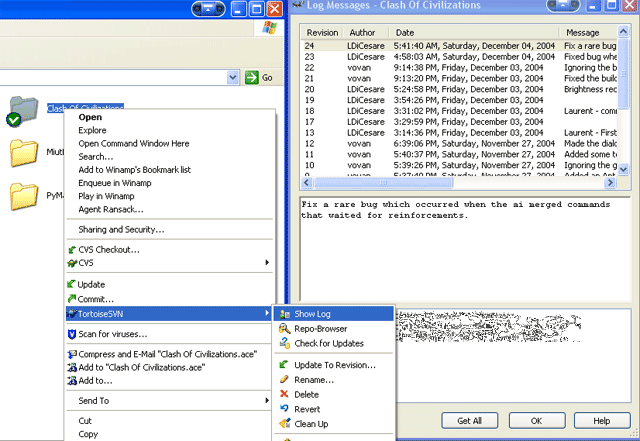
Mark, there are several ways to handle this without any extra notifications. One thing you could do is the following. You have the clash directory containing the checked out version of the repository on your hard drive right? So, you right-click it and hit "Update". That will bring your local copy up to date with the global copy. Now, you will see a list saying which files were updated. The list has thre buttons: "Show Log", "OK", and "Cancel". Click the "Show Log" button. That will bring up the list of revisions you just got. For instance, I just updated, and it says:
Revision 24, Author LDiCesare, Date 5:41:40 AM, Message "Fix a rare bug which occurred when the ai merged commands that waited for reinforcements."
When I click that update to select it, I see which three files were modified. I can double-click a file, and that will bring up a diff view, where you can see precisely what was changed.
If you would like to view this at a later date, you can always right-click your directory, select the TortoiseSVN submenu, and then click the "Show Log" button. That will again show you precisely what updates were made recently, and what was changed.
quote:
Originally posted by Mark_Everson
Unfortunately, I get the feeling that most of my limited Clash time this weekend is going to be "invested" in getting this thing to work given my limited knowledge. |
If you have trouble with anything, feel free to ask.  This is a very convenient system, so if something is a pain in the ass, then ask, maybe you are not doing something right. I don't want this to be painful. This is a very convenient system, so if something is a pain in the ass, then ask, maybe you are not doing something right. I don't want this to be painful.
Vovan
|
|
| |
|
|
|
LDiCesare
|
|
La Ferté sous Jouarre France
Jan 2001
time: 05:19
|
|
This system doesn't prevent mailing for major updates, but it's really not necessary to send an email everytime.
In fact, I'll tend to do 2 kinds of commits.
- Big commits (probably on Firdays and Saturdays) when I've finished a lot of things done during the week. These will get a big message about what happened, but I'll forget some things.
- Small commits. I've probably made about 10 of these already . If I change a set of files for one identified bug, it's simpler in order to track the bug to deliver it in a separate transaction. I don't want to flood the system with one-file updates though. Vovan, do you know how SVN scales? It makes a revision for the whole tree every time one does a commit, but I believe it's just a logical number and doesn't eat extra disk space? If that's the case, I'll make several small deliveries, each with detailed explanation, separate one from another, because it can help track things in the long run. . If I change a set of files for one identified bug, it's simpler in order to track the bug to deliver it in a separate transaction. I don't want to flood the system with one-file updates though. Vovan, do you know how SVN scales? It makes a revision for the whole tree every time one does a commit, but I believe it's just a logical number and doesn't eat extra disk space? If that's the case, I'll make several small deliveries, each with detailed explanation, separate one from another, because it can help track things in the long run.
Mark, believe us, this system rocks in comparison with the send-by-e-mail. I never used TortoiseSVN before this week end (though I used things like sniff, CVS...) and I'll hate it that we have something more scalable (database based and not filebased) but so much less user-friendly at work on monday...
|
|
| |
|
|
|
vovan
|
|
quote:
Originally posted by LDiCesare
Vovan, do you know how SVN scales? It makes a revision for the whole tree every time one does a commit, but I believe it's just a logical number and doesn't eat extra disk space? If that's the case, I'll make several small deliveries, each with detailed explanation, separate one from another, because it can help track things in the long run. |
Laurent,
The version of SVN I have installed currently does actually use BerkeleyDB for storing the repository, and they have a clever revision tracking system (you can read about it in the documentation on their site), so it scales fairly well, IMO. As far as "flooding" the system with many commits, definitely don't worry about it! It doesn't make a whole new copy of the repository every time you commit. In fact, I would encourage you to do one-file commits instead of big ones, because that way, it is easier to keep track of changes, and unroll them if need be.
For what it's worth, I'll tell you that we used SVN for a college project this semester with my teammates, and we were very satisfied with it. Right now, the project is finished, and looking at SVN, I see that we made ~1000 revisions, with the whole thing being ~35K lines of code plus assets like graphics and sounds.
|
|
| |
|
|
|
LDiCesare
|
|
La Ferté sous Jouarre France
Jan 2001
time: 05:19
|
|
I'm sure it scales up to certain limits and will be perfect for Clash. But at work, we have in the tens (maybe even hundreds) of millions of lines of code, and I am not sure subversion scales up to that. Anyway, when they tried CVS way back then, it didn't, so we have something else.
I'll probably do big commits because I can't access the web during the week (most of the time). But I'll go for per-file commit as much as I can.
|
|
| |
|
|
|
vovan
|
|
quote:
Originally posted by LDiCesare
I'm sure it scales up to certain limits and will be perfect for Clash. But at work, we have in the tens (maybe even hundreds) of millions of lines of code, and I am not sure subversion scales up to that. Anyway, when they tried CVS way back then, it didn't, so we have something else. |
Oh, yes, I was thinking about Clash above. I don't really know how well it would work for huge projects.
|
|
| |
All times are GMT. The time now is 05:19.
Apolyton Time is 00:19. |
top of page
|
|
|
Forum Rules:
You may not post new threads
You may not post replies
You may not post attachments
You may not edit your posts
|
HTML code is ON
vB code is ON
Smilies are ON
[IMG] code is ON
|
|
|
|
|
|






 28-11-2004 03:47


 Attachment:

 |
|