|
| |
|

|
mart7x5
|
|
It is just my recent discovery. Maybe it has been already known to most of persons here, but not for me.
In the readme.txt I found:
ADDITIONAL TWEAKS:
...
DirectDraw=0
Settings this to 0 disables DirectDraw. This disables the automatic window
resolution resizing during program launch.
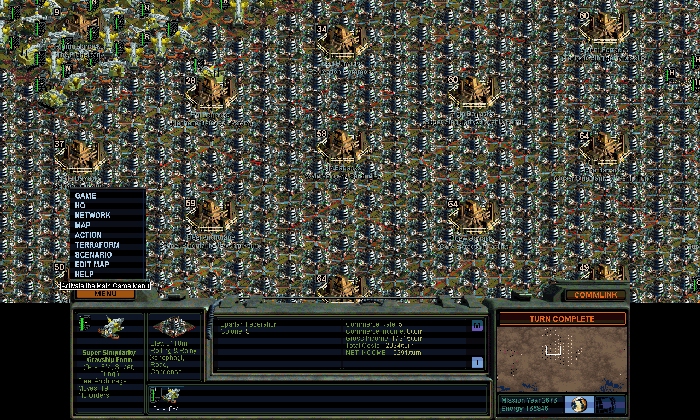
So I did just that. I expected the game to have some problems with graphics drawing, but it was not so. I use active matrix with resolution 1400x1050, and you know that streatching lower resolutions to higher ones in such cases makes really awfull things to graphics. To my surprise smax started using 1400x1050 resolution. I just see more map now in better detail. Only the "window-control panel" in the lower part is centered but not stretched, so there are like two black squares in left and right corners.
And this is probably also important:
Win XP Home,
DirectX 9
|
|
| |
|
|
|
mart7x5
|
|
what patches do you have installed? what dx version? what OS?
|
|
| |
|
|
|
mart7x5
|
|
quote:
Originally posted by Dissident
I wish I could figure out how to change my resolution. |
Maybe your present screen resolution is just 1024x768? See on the desktop what it says.
and also as noticed by Blake see if your new line is under [Alpha Centauri] and not under [Preferences] .
|
|
| |
|
|
|
mart7x5
|
|
I think game defaults to your desktop screen resolution if it is 1024x768 or 800x600. If you do not have that line in the ini file, larger resolutions than 1024x... do not work, just game creates the "dx screen" with 1024x768, this is how I understand it. When having the line in the ini turning off the directdraw, you may use the resolution of the screen even if it is larger than 1024, as can be seen from our experiences.
You will have to adjust your monitor resolution from your desktop, remember though that some monitors cannot run some resolutions even if their video drivers allow for it. That depends on technical capablities of your monitor, check it in the manual, there should be something like recommended resolution.
Be careful, though, in extreme cases you might damage some hardware or have problems with the system. Once I changed resolution too much and had too fix things in safe mode.
|
|
| |
|
|
|
epsilonx
|
|
quote:
Originally posted by mart7x5
DirectDraw=0
Settings this to 0 disables DirectDraw. This disables the automatic window
resolution resizing during program launch.
[/i]
So I did just that. I expected the game to have some problems with graphics drawing, but it was not so. I use active matrix with resolution 1400x1050, and you know that streatching lower resolutions to higher ones in such cases makes really awfull things to graphics. To my surprise smax started using 1400x1050 resolution. I just see more map now in better detail. |
LUCKY!!! My LCD monitor runs at 1280x1024 but I can't get SMAX to run at that resolution. This Direct Draw setting is already at 0. I also tried setting the Video Mode line to 1280 instead of 1024... what's yours set to?
(I'm using WinXP Pro SP2, DirectX 9.0c, nVidia FX5200)
I'm also using the terranx.exe patch that allows me to run it without the CDs, and the ForceOldVoxelAlgorithm=1 line so I can run it on my P4-2.5GHz.
|
|
| |
|
|
|
epsilonx
|
|
I don't have an [other] section. But I tried that, and it still doesn't work.
|
|
| |
|
|
|
mart7x5
|
|
I have XP Home, only 3 SP2 fixes, I am not sure they are all, mobility radeon 9000, DX 9.0b
no video mode line in ini:
code:
[PREFERENCES]
ForceOldVoxelAlgorithm=1
[Alpha Centauri]
ds3d=1
eax=1
FastUnitAnim=0
SmoothUnitAnim=0
MainFontSize=16
InterludeFontSize=16
DisableOpeningMovie=1
Prefs Format=12
Difficulty=5
Map Type=3
Top Menu=4
Faction=1
Preferences=111000000010001001111110000111
More Preferences=111110101111011111010100
Semaphore=00000000
Announce=111111111011111111
Rules=1100000111110
Customize=2
Custom World=2, 1, 1, 1, 1, 2, 2,
Time Controls=1
WindowsFileBox=0
Latest Save=
Faction 1=PEACE
Faction 2=UNIV
Faction 3=MORGAN
Faction 4=HIVE
Faction 5=SPARTANS
Faction 6=USURPER
Faction 7=CARETAKE
Latest Scenario=
Main Volume=127
Voice Volume=85
Music Volume=63
SFX Volume=95
Latest Map=
Gamma Correction=125
Net Session=LukMart
Net Name=Marcin
Custom Map X=40
Custom Map Y=80
WindowsFileBox=1
DirectDraw=0
|
|
| |
|
|
|
Commy
|
 |
St. Louis, MO, USA
Mar 2004
time: 05:16
|
|
Really? Does that actually do that? No, that's not what I did though...
My Orbital defenses supposedly failed to destroy the incoming PB, yet my base was still there. The land sunk like it does when a PB hits, all my units were gone, and all the terrain improvements dissappeared, but here was my base, sitting there at -127. I had the cloning vats, and so it "grew" one pop each turn by counting down, or I guess up, to zero...
Man, that was before I even knew about apolyton. I tried to get the same results again on the editor. I couldn't get it to happen with a PB, but somehow I did it by excessive population, no colony pods, sorry.
Anyway, I got SMAX and later downloaded the 2.0 patch for SMAX, so I suppose that will never happen again. I have heard, but never tested, the new limit for base sizes is 250...
|
|
| |
|
|
|
Xian
|
|
OHMYGODITWORKEDICANTBELEIVETHISISHAPPENNING
It worked!
Im @ 1280x1024, which is not the same as the thread authors!
Wow, just when i thought I'd be able to give up my smax addiction... thx!
|
|
| |
All times are GMT. The time now is 05:16.
Apolyton Time is 00:16. |
top of page
|
|
|
Forum Rules:
You may not post new threads
You may not post replies
You may not post attachments
You may not edit your posts
|
HTML code is ON
vB code is ON
Smilies are ON
[IMG] code is ON
|
|
|
|
|
|






 24-12-2004 18:44


 )
) Attachment:


 |
|