|
| |
|

|
Asher
|
 |
Calgary, Alberta
Nov 1999
time: 22:16
|
|
Huzzah.
http://messenger.msn.com/
More new features than you can shake a stick at.
I'm actually like Muggins. The first one is free, and you can get unlimited free ones if you know a few of its quirks.
quote:
1) Sign into MSN Messenger 7 (duh!).
2) Go to Actions > Get More From Messenger.
3) Click Dynamic Display Pictures and select BlueMountain Display Pictures.
4) Click Muggins.
5) Pick your favorite Muggin and start customizing.
6) When you've finished, click Already Have a Pin?
7) Enter this code: bluemountainmuggin.
8) Your free Muggin will automatically download to MSN Messenger 7 (depending on the user activity on that site this can take quite a few seconds). |
Muggins are display characters you customize (think about all of those Flash-based avatar building tools). They also have "dynamic emotions". So when you make a happy face like " ", he'll automatically animate a grin and look all happy, etc. It's something I find surprisingly enjoyable for conversations. ", he'll automatically animate a grin and look all happy, etc. It's something I find surprisingly enjoyable for conversations.
Also, personalized status messages, skinned contacts window, etcetc.
A new version of "MessPatch" is due out very soon to the latest build, which lets you remove ads and customize other stuff. You can download it now, it's got an Update feature for when the new version is posted: http://www.mess.be/pafiledb/pafiled...download&id=618
|
|
| |
|
|
|
Locutus

|
|
ACS CTP1/2 Manager & Civ4 Co-Manager
|
 |
Hengelo, The Netherlands
Nov 1999
time: 06:16
|
|
Muggins is not what MSN needs. What MSN needs is to dock on the side of the screen, like ICQ. To display the time messages were sent, like ICQ. To allow you to send messages when someone is offline, like ICQ. To have a usable history function, like ICQ. To give you a sound alert when you receive a message while gaming, like ICQ. To not send the message when pressing Enter so you can type multi-line messages hassle-free, like ICQ. To not default to online status after reboot but remember the previous setting, like ICQ. To display people who are online on top regardless of what group they're in, like ICQ. To allow you to email all members of a group, like ICQ. To support exchanging of contact lists, like ICQ. To be compatible with ICQ, like ICQ.
In other words, people should stop using that crappy program and recognize ICQ's superiority 
|
|
| |
|
|
|
Maquiladora
|
|
Yeah I wish MSN had sound notification in games, or I wouldnt use ICQ, even Yahoo has it. I think they just fixed the default status thing after reboot in this new version though.
|
|
| |
|
|
|
Asher
|
|
Calgary, Alberta
Nov 1999
time: 22:16
|
|
I stopped using ICQ after ICQ98. The only thing ICQ is superior to is crashability, ugly interfaces, non-functional interfaces, annoying names "XtraZ!!!!!", etc.
ICQ was the predominant messenger for almost everyone I know, and I know of no one in real life who uses ICQ anymore. Those that do use ICQ do so with Trillian or GAIM.
quote:
Originally posted by Locutus
Muggins is not what MSN needs. What MSN needs is to dock on the side of the screen, like ICQ. |
Wouldn't know, never used that in ICQ, nor do I use it in clients like GAIM that I use at work.
quote:
To display the time messages were sent, like ICQ. |
Are you that forgetful?
1) The message history shows the date/time messages were sent
2) It says when the last message was received on the bottom of the screen
Why would you need the time beside each message? That's something I've always found exceptionally useless.
quote:
To allow you to send messages when someone is offline, like ICQ. |
Define "instant message". Clearly you and I have different opinions of what it is.
When you send a message to someone not online on MSN, it composes an email to them. When you log on with MSN, it tells you if you have unread email.
Further, the user has an option if they want the offline messages to be sent to their cell phone as a SMS message. That's what I do. I don't want people sending me full-out messages when I'm not online -- that's what email is for. If I am online, send me an instant message.
Two different functionalities, and I actually never did like that with ICQ. In fact, ICQ's offline messages were unreliable back-in-the-day I used them.
quote:
To have a usable history function, like ICQ. |
It does.
quote:
To give you a sound alert when you receive a message while gaming, like ICQ. |
So turn off the option that suppresses alerts while you game? That might help. 
quote:
To not send the message when pressing Enter so you can type multi-line messages hassle-free, like ICQ. |
CTRL-Enter does that. "Enter" sends. Since most messages are not multiline, having "enter" by default send the message seems far more practical to me. It's another example where ICQ is a terrible program from a usability perspective. It has an identity crisis -- ICQ is so full of crap that it forgets it is an instant messenging program.
quote:
To not default to online status after reboot but remember the previous setting, like ICQ. |
MSN7 does that.
quote:
To display people who are online on top regardless of what group they're in, like ICQ. |
Contacts -> Sort Contacts By -> Online/Offline Status
I can see how you missed that one, it's kind of hidden!
quote:
To allow you to email all members of a group, like ICQ. |
Have you tried right-clicking on the group.
quote:
To support exchanging of contact lists, like ICQ. To be compatible with ICQ, like ICQ. |
The last thing I want is for ICQ and MSN to be compatible. ICQ is spam-infested hell with a horrible network design that opens itself up to such crap...
ICQ is stale, dated, and obsolete. The only people using it these days seem to be Europeans. I have no explanation why.
ICQ is the biggest piece of crap I've ever seen, even crappier than RealPlayer.
Shame on you. 
|
|
| |
|
|
|
Locutus
|
|
ACS CTP1/2 Manager & Civ4 Co-Manager
|
|
Hengelo, The Netherlands
Nov 1999
time: 06:16
|
|
quote:
Originally posted by Asher
I stopped using ICQ after ICQ98. The only thing ICQ is superior to is crashability, ugly interfaces, non-functional interfaces, annoying names "XtraZ!!!!!", etc. |
Funny, that's exactly how I feel about MSN.
quote:
ICQ was the predominant messenger for almost everyone I know, and I know of no one in real life who uses ICQ anymore. Those that do use ICQ do so with Trillian or GAIM. |
Everyone I know who actually knows how to use a PC (i.e. everyone excluding family, neighbours and other PC n00bs etc) use ICQ because they realize its superiority. Only those n00bs that don't know better and use MS products for everything use MSN.
quote:
Are you that forgetful? |
I shouldn't have to remember it, plus, yes, I have many things on my head, I really can't be arsed to remember. More importantly, my PC is on all day, but I'm not nearly always using it. I want to be able to see at a glance who sent what when, especially when I wasn't there (and especially in multi-person conversations).
I should only have to use the history function for archival purposes, but in MSN I have to use it on a daily basis.
MSN's history function (a) was non-existant until very recently (b) is probably the most unusable history function I've ever used (it's a small miracle it at least has a basic search function) (c) is ridiculously hard to find (most people don't even know it exists at all) and get to, especially if you consider that MS makes it so important by not including timestamps on messages.
quote:
Define "instant message". Clearly you and I have different opinions of what it is. |
Most of my email is spam. The last thing I need is more spam. And emails consisting of oneliners are worse than spam. Plus, most of the people I know use their msn/hotmail address only as dump for spam so email sent to their accounts will never be read. I use my POP3 email adress for MSN, so I don't get a message when I have unread mail, and I only check my mail once a day (I spend way to much time on email already, not gonna keep track of that all day). Finally, if I want to email someone I can frackin' well decide so myself, I don't need MSN to decide for me if I should email or use something else.
quote:
Two different functionalities, and I actually never did like that with ICQ. In fact, ICQ's offline messages were unreliable back-in-the-day I used them. |
The more useful functionality a messenger supports, the better. Of course, that's something MS doesn't realise, they're content adding utterly useless crap like smilies and such. I'll use one of those crappy java chat programs if I want 'funny' animated smilies...
ICQ has never failed me in the delivery department, which is more than I can say for MSN.
You call that usable? 
It takes like 6 or 7 mouse-clicks to get to (which is 5 or 6 too many), the layout is confusing, it doesn't have any sort or filter options, long messanges force you to sidescroll to read them (that's proof MSN is evil right there), it does not allow exporting of messages, it does not ANY actions on individual messages or on a selection of messages (delete, forward, reply, print, etc -- and there's no UI option for copying, you have happen to know the keyboard short-cut, which most MSN users (read: n00bs) don't), etc, etc...
quote:
So turn off the option that suppresses alerts while you game? That might help. |
So where in MSN is this option then? If it exists at all, it's not working, unless they fixed it recently...
quote:
CTRL-Enter does that. "Enter" sends. Since most messages are not multiline, having "enter" by default send the message seems far more practical to me. |
A lot of my messages *are* multi-line, and Enter has since the beginning of time (well, since the invention of type writers) represented new line, changing that functionality is plain evil.
Well, about time. At this pace, MSN might just become remotely useable by about 2047...
quote:
Contacts -> Sort Contacts By -> Online/Offline Status
I can see how you missed that one, it's kind of hidden! |
Thank you, finally! Yes, it is hidden, on ICQ it's a nice clear button on the 'front page' and also the default option, which is quite helpful for something that 99,99% of all users will want to use as default...
quote:
Have you tried right-clicking on the group. |
Yup, that allows you to send an IM to everyone who's online, but not to email.
quote:
The last thing I want is for ICQ and MSN to be compatible. ICQ is spam-infested hell with a horrible network design that opens itself up to such crap... |
Spam invested? I've never experienced any spam on ICQ and I've used it for almost its entire existance...
quote:
ICQ is stale, dated, and obsolete. |
It's functional and userfriendly. It does everything MSN does, did it long before MSN did and has always done it 20 times better.
quote:
The only people using it these days seem to be Europeans. |
Funny, a good number of people (if not a majority) on my contact list are from non-European countries. The people on my MSN list are without exception European (of course, most of them are family, neighbours and other PC n00bs who I help keep their PCs running IRL, so that's not really a fair comparison).
quote:
I have no explanation why. |
Maybe because we actually recognize quality when we see it, rather than follow the Walmart herd?
quote:
ICQ is the biggest piece of crap I've ever seen, even crappier than RealPlayer. |
Funny, that's just how I feel about MSN. In fact RealMedia is a heavenly piece of software compared to MSN...
|
|
| |
|
|
|
Adagio

|
|
quote:
Originally posted by Locutus
Muggins is not what MSN needs. What MSN needs is to dock on the side of the screen, like ICQ. To display the time messages were sent, like ICQ. To allow you to send messages when someone is offline, like ICQ. To have a usable history function, like ICQ. To give you a sound alert when you receive a message while gaming, like ICQ. To not send the message when pressing Enter so you can type multi-line messages hassle-free, like ICQ. To not default to online status after reboot but remember the previous setting, like ICQ. To display people who are online on top regardless of what group they're in, like ICQ. To allow you to email all members of a group, like ICQ. To support exchanging of contact lists, like ICQ. To be compatible with ICQ, like ICQ.
|
I agree with almost everything here...
The "send msg when not online" is defently something I miss in messenger
quote:
When you send a message to someone not online on MSN, it composes an email to them. When you log on with MSN, it tells you if you have unread email |
It does? So far neither me nor any of my friends has recieved any emails of such...
Any even if it did so it wouldn't be useful at all since most of my friends uses and "just spam" email adress to log in to messenger, so they never actually reads the mails they get on that address
quote:
Originally posted by Locutus
In other words, people should stop using that crappy program and recognize ICQ's superiority |
Same do I, but none of those I talk to on regular basis uses ICQ anymore so I've stopped using it too 
|
|
| |
|
| |
|
| |
|
|
|
Asher
|
|
Calgary, Alberta
Nov 1999
time: 22:16
|
|
quote:
Originally posted by Locutus
I shouldn't have to remember it, plus, yes, I have many things on my head, I really can't be arsed to remember. |
Why does it matter? All you need is the sequence. If you need to look up anything other than when the last message is, view the history. That's not a very common occurance.
quote:
MSN's history function (a) was non-existant until very recently (b) is probably the most unusable history function I've ever used (it's a small miracle it at least has a basic search function) (c) is ridiculously hard to find (most people don't even know it exists at all) and get to, especially if you consider that MS makes it so important by not including timestamps on messages. |
(a) doesn't matter
(b) is rhetoric
(c) is stupid -- honestly, what are you talking about? When you open a new chat, it opens the previous conversation in a gray font for reference. To access the full history, right click on the Contact and select "View Message History". Or in the conversation window, File -> View Message History". What is the problem in its usability, or in its accessibility?
quote:
Most of my email is spam. The last thing I need is more spam. And emails consisting of oneliners are worse than spam. Plus, most of the people I know use their msn/hotmail address only as dump for spam so email sent to their accounts will never be read. I use my POP3 email adress for MSN, so I don't get a message when I have unread mail, and I only check my mail once a day (I spend way to much time on email already, not gonna keep track of that all day). Finally, if I want to email someone I can frackin' well decide so myself, I don't need MSN to decide for me if I should email or use something else. |
The point is, it's not an "instant message" if you send it to someone offline. Plus I really don't trust the ICQ servers, way too many offline messages were lost of mine for it to be useful.
Instant messenging is, by definition, talking to someone instantly while they're online. Sending text to someone who is offline is accomplished by email. That's what the two things were designed for.
There's a reason ICQ is about the only messenger that has "offline messenging", and there's a reason most people just don't care.
quote:
The more useful functionality a messenger supports, the better. Of course, that's something MS doesn't realise, they're content adding utterly useless crap like smilies and such. I'll use one of those crappy java chat programs if I want 'funny' animated smilies... |
The thing is, ICQ doesn't get it. MSN's marketshare is increasing and ICQ has eroded.
As for adding in "utterly useless crap"...that's what ICQ does. MSN is designed around a -- and I cringe using this word -- user experience. It's something Apple has been doing for a while now to great success, and MS started doing with WinXP and new versions as well.
ICQ just looks ugly and dated, even the latest version. The interface design is a nightmare -- there are buttons everywhere! The interface is my primary beef. It's just terrible, classic text-book case of a bad interface.
Even fundamentals of it, like having an "ICQ number" -- why the hell do I need a number? flashbacks to Compuserve....44327484752@compuserve.com emails.
The icons are all terrible -- what the hell does the guy "leaping" icon in the top right mean, for example?
There's an overload of buttons without a clear sense of focus...
The list goes on and on.
quote:
You call that usable?
It takes like 6 or 7 mouse-clicks to get to (which is 5 or 6 too many) |
Right click -> View Message History...
Don't see how it can get any easier. Maybe you have terrible mouse accuracy, I don't know how else to explain your 6-7 figure.
quote:
the layout is confusing |
How the hell is it confusing?
It's a table with 5 columns: Date, Time, From, To, Message
quote:
it doesn't have any sort or filter options |
Eh? Sort by what? Filter by what?
quote:
long messanges force you to sidescroll to read them (that's proof MSN is evil right there) |
Err, no, they linewrap. This is proof that you don't know what you're talking 'bout right here.
quote:
it does not allow exporting of messages |
Why do you need to export it? The message archives are saved in an XML file with public schemas, and you can copy/paste it when needed. I don't understand why there's an export requirement.
quote:
it does not ANY actions on individual messages or on a selection of messages (delete, forward, reply, print, etc |
That's one reason why I hated ICQ -- it overcomplicates something simple.
If you want that kind of functionality, just use frickin' email. Why do you want to print a single message...I guess I can see where ICQ's target demographic is -- users that prefer overly complicated, buggy crap that misses the point.
quote:
So where in MSN is this option then? If it exists at all, it's not working, unless they fixed it recently... |
Under the "General" tab...the first one the Options show you.
quote:
A lot of my messages *are* multi-line, and Enter has since the beginning of time (well, since the invention of type writers) represented new line, changing that functionality is plain evil. |
Again, since the vast majority of instant messages are single-line for most people, it makes sense to minimize the amount of work needed to send. It makes much more sense to type then hit "enter" to continue than tab-enter...
The typewriter comparison is stupid on its face. I don't see you saying it's just plain evil not to have to carriage return after every line either...
quote:
Thank you, finally! Yes, it is hidden, on ICQ it's a nice clear button on the 'front page' and also the default option, which is quite helpful for something that 99,99% of all users will want to use as default...
[quote]Yup, that allows you to send an IM to everyone who's online, but not to email. |
Why are you wanting to email everyone through an Instant Messenger group?
Do you not understand the concept of an email client?
quote:
Spam invested? I've never experienced any spam on ICQ and I've used it for almost its entire existance... |
Holy hell, you have to be kidding me. I hadn't logged onto my ICQ account for years, logged in and had 50 messages from "girls" asking me to check out their "photo galleries"...
quote:
It's functional and userfriendly. It does everything MSN does, did it long before MSN did and has always done it 20 times better. |
You kill me.
Take an interface design course, look at it from a psychology perspective -- the interface is a classically terrible interface.
quote:
Funny, that's just how I feel about MSN. In fact RealMedia is a heavenly piece of software compared to MSN... |
All you have to do is watch the ridiculously stupid and unprofessional "ICQ5 feature tour" with the woman with a peculiar accent to know all you need to know.
ICQ is coded by inept programmers who still can't "get it right" after having a HUGE headstart on everyone else, and a rabid fanbase of core users who don't see just how bad it is.
|
|
| |
|
| |
|
| |
|
| |
|
|
|
Asher
|
|
Calgary, Alberta
Nov 1999
time: 22:16
|
|
quote:
Originally posted by St Leo
MSN is bundled with Windows. Microsoft is leveraging its monopoly to increase MSN's mindshare. |
Windows Messenger is bundled with Windows, though they do use the same network.
I don't know anyone who uses Windows Messenger though.
quote:
Uh, MSN's email-address-as-id doesn't make much sense either. |
Yes, it does. It allows integration with email -- consider that you're sending an email to someone, then you see the indicator that they're online...just by entering their email. Instead of sending that email, you IM them. Or...you receive an email from them but have a question, instead of replying you notice that he's online, so you just IM him for a quick answer.
We use this all the time at work, since the work emails function as our Sametime IDs, which is integrated with Lotus. Very handy.
Plus, you need to give one form of contact out -- "this is my email and MSN".
quote:
Gaim does everything I need, but my parents use a webcam to chat with people of their generation, so I have MSN installed for them.
Oh, and I have Gaim customized to do a new-line on Enter and send on Ctrl+Enter. I like sending multi-line messages. |
I use gaim at work, with the Meanwhile and Gaim-encryption plugins.
Gaim is nowhere near being as stable as it needs to be. In particular, the mousehandling code post-1.1 is whacky. It steals event listeners so I can't mouse click on anything in GAIM until I reboot the computer...frustrating as hell.
|
|
| |
|
| |
|
|
|
VetLegion
|
|
Unfortunately I also had to install MSN Messanger.
I have family in different countries so we use it to converse with them, since it is cheaper than phone, and we also sometimes use a webcam.
Here are my main beefs with that program:
- Zero to minimal backwards compatibility. Each time they made an upgrade, I had to make the upgrade too.
- No fullscreen for webcam. My grandmother would be very happy to see people she is talking to, but she is old and she can't see anything on the small video box even when set to Large. The setting should be a percentage, not three levels with largest being, what, 200x200 pixels? Even NetMeeting (now obsolete) has fullscreen.
- Crappy diagnosis. The program rarely works from the first try, and you never know why. Is firewall blocking it? Is the microphone plugged in? You clicked accept and nothing happens - why?
- No offline messaging. Well, if it is so much based on usability, why doesn't it have this? If it is tailored to the unexpirienced user, it should facilitate it. It comes "natural" to many people (including me, and I am tech savy and know the protocols involved) that messages sent to someone should be delivered.
- Bad voice transfer. I know it's not a professional VoIP program of any kind, but functional buffering would be decent. I often use it over 56k, and the voice transfered is corrupted. It's almost unusable. And I'm not talking about lag either, it's not the delay that bothers me, it's that when I recieve sound it is interrupted and broken. 56k is, by the way, more than enough bandwidth for phone conversations.
- People think the email I created for use with Messanger (and thus rarely check) is my real email, so they send email there.
Frankly, the program is so user unfriendly, so optionless and half-finished, that I wouldn't use it at all if I could persuade my family to try something else. But they're older people, once they're used to something, it's impossible for them to change habits. Unfortunately.
|
|
| |
|
|
|
Asher
|
|
Calgary, Alberta
Nov 1999
time: 22:16
|
|
We'll agree to disagree.
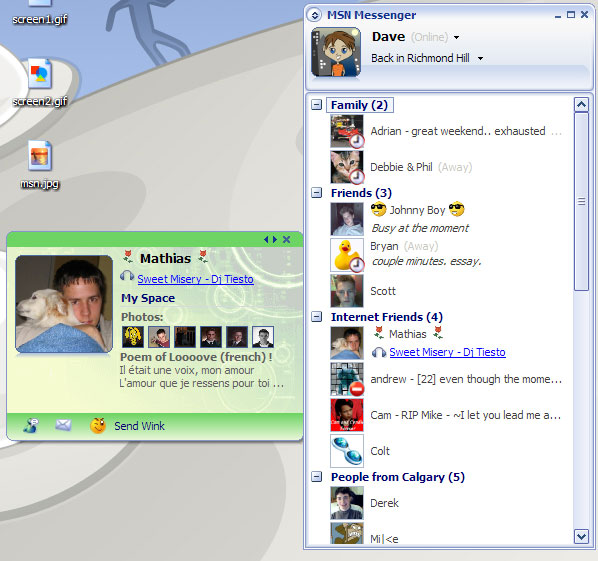
Here's the new MSN's contact-card system...it pulls in all the user's pictures he has posted, his blog posts, profile, contact info, etc.
 Attachment: msn2.jpg Attachment: msn2.jpg
This has been downloaded 81 time(s).
Last edited by Asher on 11-04-2005 at 08:54
|
|
| |
|
|
|
Atahualpa
|
 |
Hawthrone
Mar 1999
time: 06:16
|
|
I have more ICQ than MSN contacts and I am using Trillian, so I don't want to judge on the clients. As for the protocols, I think both have their advantages, to me they come down to just these: MSN has an IM-group chat, but ICQ has offline messages (for internet telephone I use Skype).
Both have the "user blabla is typing a message..." feature which I would rather not like. I feel this is cutting into my privacy. But pretty everyone you talk to wants it to have enabled, so far I haven't figured out yet how to disable that in Trillian 3 (if that is possible).
In any case since I have both ICQ and MSN accounts, Trillian is the way to go. I used to have an AIM account, but forgot the password. I also tried Jabber recently, but ugh that's strange and it didn't really offer anything visibly new, that others don't offer.
I use offline messages more often than group chat though, so I prefer to use the ICQ network over MSN. MSN not supporting offline messages I guess is just to cut down on server resources
About SPIM, I haven't received one for ages, not over ICQ and not over MSN.
|
|
| |
|
|
|
Drogue
|
 |
Omnipresent conscience
Oct 2002
time: 05:16
|
|
quote:
Originally posted by Locutus
Muggins is not what MSN needs. What MSN needs is to dock on the side of the screen, like ICQ. To display the time messages were sent, like ICQ. To allow you to send messages when someone is offline, like ICQ. To have a usable history function, like ICQ. To give you a sound alert when you receive a message while gaming, like ICQ. To not send the message when pressing Enter so you can type multi-line messages hassle-free, like ICQ. To not default to online status after reboot but remember the previous setting, like ICQ. To display people who are online on top regardless of what group they're in, like ICQ. To allow you to email all members of a group, like ICQ. To support exchanging of contact lists, like ICQ. To be compatible with ICQ, like ICQ.
In other words, people should stop using that crappy program and recognize ICQ's superiority |
Most of these are solved my Messenger Plus!, and some of them - having those online on top, emailing members of a group, etc. already exist on MSN 6.
|
|
| |
|
|
|
Asher
|
|
Calgary, Alberta
Nov 1999
time: 22:16
|
|
By the way, MSN Messenger 7.0 has full-screen video conferencing as well, and updated audio/video codecs for improved quality.
http://www.winsupersite.com/reviews/msn_messenger7.asp
quote:
Have you ever had one of those "old moments"? Where you realize, maybe for the first time, that you're no longer part of the age bracket that advertisers are targeting like rabid wolves? My most obvious old moment came a few months ago, when my cell phone made a ringing sound I had never heard before. Turns out I was receiving a text message, a feature I didn't even realize my cell phone had. Struggling with the UI on the phone, I tapped out my first-ever (and, as it turns out, last) text message and then clicked the Send button. Here's the complete message I sent, which was in response to the question I had just received:
K
Yep, I'm too old to be tapping complicated SMS text messages on a tiny cell phone keypad. In the same vein, I'm probably too old for many of the fun features in MSN Messenger 7.0. But the differences between SMS and instant messaging (IM), for me anyway, are vast: IM has joined email and the phone as one of the gotta-have-it communication tools today. And, increasingly, IM is valuable as a work-oriented tool, though of course MSN Messenger is geared largely at consumers (read: normal people). And that's just fine. But because of the many very useful features Microsoft has added to this release, it's one that both consumers and business people will want to check out. If you've been ignoring IM for some reason, or are looking for the next big thing in IM, MSN Messenger 7.0 is an impressive upgrade to an already well-designed communications tool. And if you're already an MSN subscriber of some kind, all the better: Microsoft has crafted an incredible amount of integration with other MSN services into this product. It's a model the rest of Microsoft would do well to emulate.
This review will focus solely on the new features in MSN Messenger 7.0. Looking through my archives, I'm not quite sure why I haven't reviewed previous MSN Messenger versions, as I'm a long-time user of the product and, as it turns out, subscriber to MSN Premium. The last MSN Messenger product I mentioned on this site was MSN Messenger 5, which was included with MSN 8 (see my review). That was two and a half years ago. A lot has happened in that time.
Historical perspective
The first version of MSN Messenger debuted in 1999, before the term "instant messaging" had any resonance with average PC users. Back then, the quirky Israeli program ICQ had started the IM revolution, though previous Internet and network "chat" programs, like UNIX talk and Pow-Wow were obvious influences. In the early days of MSN Messenger, Microsoft worked hard to make the application compatible with the competition, primary AOL Instant Messenger (AIM). However, after that work was repeatedly thwarted by AOL, Microsoft backed off and steadily improved its own product instead.
Today, MSN Messenger is phenomenally successful in its own right. According to Microsoft, over 155 million active users log on to MSN Messenger service every month, making it one of the most often used Internet-based applications ever created. (To put that figure in perspective, four year ago, MSN Messenger had just 5 million users.)
The previous major MSN Messenger version, MSN Messenger 6, debuted in April 2003. This version added animated emoticons, personalized backgrounds for chat windows, customizable display pictures, message logging capabilities, and other features. MSN Messenger 6.1, released in November 2003, added compatibility with SPOT watches through MSN Direct and improved digital ink capabilities for Tablet PC users. MSN Messenger 6.2 debuted in April 2004. This version included the MSN Toolbar as an optional install and a Shared Browsing feature for subscribers of the MSN Dial-up, Plus, and Premium services.
What's new in MSN Messenger 7.0
MSN Messenger 7.0 is a significant upgrade over previous 6.x versions, which should be obvious when you open the main MSN Messenger window for the first time after upgrading (Figure). Though MSN Messenger 7.0 carries on with the same optional "borderless" window style first offered in MSN Messenger 6.x, the new version also features a wide range of visual changes that hint at the many new features.
In previous versions, Messenger supported a customizable name and display picture, and would append your online status (online, busy, etc.) to the latter. Now, even these basic features are significantly updated. In addition to standard display pictures, MSN Messenger 7.0 supports Dynamic Display Pictures (DDPs), which can be animated to react to emoticons you type in chat windows (like for smiley or for frown). You can also manually set a DDP to a specific emotion, including happy, sad, angry, or love. We'll look at this functionality more in the personalization discussion, below.
Additionally, when you click on your own display picture in Messenger 7.0, your Contact Card displays (Figure). This small window provides a range of personal information and links to other MSN services. You can access other users' Contact Cards by clicking their picture in the main Messenger window (Figure). But Messenger 7.0 takes this capability a bit further with another new feature called a gleam, that visually reminds you when one of your contacts has updated their MSN Spaces blog or other personal information. Gleams appear as small orange stars next to contact pictures in the main MSN Messenger window (Figure).
Contact Cards can hold a wealth of information for contacts that are busy using MSN services. In addition to basic contact info, the Contact Card will also display links to their latest Spaces updates. If you "flip" the card around, by clicking on the small double-arrow graphic, you can access email and phone number information for that contact (Figure).
In previous MSN Messenger versions, many people used the customizable name feature to provide simple status information. For example, during a recent trip to Ireland, I changed my display name to "Paul [in Ireland March 23-29]" so that my contacts would remember that I was away, and when I would return. You can still do this in Messenger 7.0, if you want, but this version also sports a new customizable personal message field that lets you get creative and communicate messages to all our contacts. In the main Messenger window, you can edit this message simply by clicking on the text box that's right below your display name (Figure). Or, you can click the down arrow and enable a cool new feature that automatically changes your personal message when you're listening to music. Instead of your personal message, contacts will see the name and artist of the song you're listening to with either Windows Media Player or Apple iTunes (yes, seriously: It integrates with iTunes) (Figure). And that song name is a link. When you or one of your contacts clicks it, the appropriate page in MSN Music loads (Figure).
Below the personal message field in the main Messenger window is the MSN status notification area, which provides quick links to Hotmail (email), My Space (your blog on MSN Spaces), and MSN Today, a Web-based news and current events synopsis.
Along the left side of the main Messenger window, you'll see a list of tabs that provide access to other MSN services. The first tab, which displays your MSN Messenger contacts list, is of course the default. Other tabs include MSN Alerts, MSN Messenger (with links to Alerts, emoticons, and information about integrating Messenger with Hotmail and mobile phones), CNBC at MSN Money (stocks), MSN Dating & Personals at Match.com, Xbox and Xbox Live (video games), MSN Entertainment (MSN Music, Radio Plus, and other services), MSN Games (online gaming), MSNBC (news), and MSN Autos, respectively.
In the MSN Messenger contacts list, you'll see a list of your contacts, optionally organized by groups you define (some, like Family and Friends are provided to get you started). Each contact includes a gleam (if they've updated their MSN Spaces blog or other personal information), a display picture, a display name, their online status (if not online), and their personal message (assuming they're using MSN Messenger 7.0 and have enabled this option). The personal message is displayed in italics to differentiate it.
The main window also includes a search box for MSN Search and, annoyingly, an advertisement. Since I pay for MSN Premium, I feel that Microsoft should turn off this ad. I don't have a problem with ads in free products, but paying customers shouldn't have to deal with that.
Overall, the main MSN Messenger 7.0 window is colorful and busy and will likely appeal to the younger crowd that no doubt dominates the services ranks. Because I use MSN Premium, however, I rarely see the MSN Messenger main window, and instead use MSN's desktop-mounted sidebar to access contacts. This product, of course, has not been updated to support the new features in MSN Messenger 7.0. Hopefully, an update is forthcoming: I do miss the more colorful Messenger 7.0 display, which makes MSN Premium look bland by comparison.
Chat windows are only slightly different from those of Messenger 6.x. Like the main Messenger window, these windows can be displayed without traditional window borders (Figure), which is attractive, and can be customized with per-contact color schemes. However, there are a number of subtle improvements. You can now access the Contact Card for the contact you're chatting with directly from the chat window, and various personalization features, like Winks, Packs, and Nudges, are all readily available from the new toolbar (we'll look at those features below).
A new Search button lets you perform shared searches. You enter text in the message pane, click Search, and then MSN Messenger displays MSN Search results, for both chatters, directly in the Sent Messages pane (Figure). You can also perform other kinds of MSN Search-based searches by right-clicking on any text in the chat window and choosing Search, which displays a sub-menu (Figure). From here, you can choose Shared Search, which displays the results for both chatters, or any of the other choices, which open a new window on your machine only and displays the appropriate results. You can even search for files on your own machine from here, which is pretty handy, assuming you've already installed MSN Toolbar Suite (see my preview), which is required for that feature.
Finally, the MSN Messenger 7.0 chat window also supports handwriting-based messages in addition to the more typical typewritten messages, and it does so on all PCs, not just Tablet PCs. In such a case, you would simply draw within the Message pane with your mouse (and the results are predictably craptacular) (Figure). Tablet PC users will now see three input options: Handwriting, Handwriting as text (where the Tablet PC's text recognition engine comes into play and translates your scribbles into text), and normal Text.
Now that we've covered the basics, let's look at some of the major new functionality in MSN Messenger 7.0.
Live video conversations and peer-to-peer audio conversation
While previous MSN Messenger versions supported audio and video chatting, or what we might called video conferencing, MSN Messenger 7.0 significantly ups the quality level with better synchronization between the audio and video, and larger video sizes (including full screen). Furthermore, audio and video have been separated in this release so that you can start video-only conversations (Webcam) or full video conversations that include both audio and video (Figure). And if both people in the conversation have a Webcam, you can do full-screen video chats, which is pretty impressive (Figure).
If you conduct a conversation that involves audio, MSN Messenger will attempt to connect the two users directly, using a PC-to-PC peer-to-peer connection that bypasses MSN's servers for better performance and quality. Quality will still vary depending on your connection type of course, and users with broadband connections communicating with other broadband-based users will get the best results.
In the case of both video and audio, MSN Messenger has been engineered to automatically navigate across most of the consumer-oriented firewalls that users will typically own. That means no more complicated set ups, and no more worrying about what firewall DMZs are and how to open ports.
New personalization features
While most of the following features are squarely aimed at the kiddie crowd, MSN Messenger does include an amazing array of new personalization options. I briefly mentioned Dynamic Display Pictures (DDPs), above. You can construct your own DDP by clicking on the small down-arrow below your display picture in a chat window and then choosing Create Dynamic Display Picture. This will launch an IE-like window that navigates to the Blue Mountain Web site, where you can choose from four different types of DDPs: Muggins, Characters with moods, Creaticons, or regular pictures (Figure).
Muggins are the most elaborate. To create one, you walk through a wizard that lets you specify such attributes as eyes and mouth, hair style and color, body style, accessories, props, background scenes, and moods (Figure). The latter option defines which moods your mugging will display: By default, you get sad, wink, and happy, and you can add three more (angry, shocked, etc.). Muggins, alas, cost $3 each per computer, or what Microsoft now calls a micropayment. But the results are kind of interesting, if you're into that kind of thing. Aside from providing a cartoon representation of yourself, the muggin will also respond to what you type, assuming you are into typing emoticons. Type smiley characters-- --for example, and your muggin will smile broadly (Figure). And so on.
Characters with moods are simpler cartoons that come with six stock moods (Figure). They cost $1.50 each and don't involve a complex wizard because they're precanned. Creaticons are similar, but without the moods (Figure). Instead, you can add your own text to one of the pre-made graphics and position it wherever you'd like. The good news? Creaticons are free. Blue Mountain also offers regular pictures for free: These are premade graphics to which you can't add text or any other embellishment, correctly sized for use in Messenger (Figure). There are numerous genres of regular pictures, including sports, humor, art, animals, and so on. Some are available in packs of five.
In Messenger 7.0, Microsoft has added numerous other major personalization changes that affect chat windows. The first, Winks, lets you send a Flash-like animation to the screen of the person you're chatting with (Figure). You select the Wink to send from a Winks toolbar button in the chat window (Figure) and then fire away. I find Winks to be extremely annoying, but again I'm not 17 years old. Fortunately, they can be turned off with an option in Messages pane of the Messenger Options dialog.
The second major addition is called a Nudge. Like a Wink, it's designed to get the attention of the person you're chatting with. But a Nudge jiggles both of your chat windows in a way that is so annoying I almost want to make a movie of it so you can see it here. Instead, I'll just note that Nudges, like Winks, can be turned off from the Messages pane of the Messenger Options dialog.
Continuing in the micropayment trend, Theme Packs cost $1.50 and include regular display pictures, backgrounds (for customizing the chat window background), and emoticons (Figure). Again, I'm old and stuff. But I just can't get into this kind of thing.
In a similar vein, the new Conversationator (available from the Activities button in a chat window), expands the chat window to include a bizarre, sponsored ... something (Figure) ... that enlivens the conversation, I guess. You can also share photos and files, and perform other activities. And the online games include free and paid versions, some of which are decent.
Security and privacy features
Given the current security climate, it should come as no surprise that Microsoft has added many security and privacy enhancements to MSN Messenger. These are all most welcome. First, you can configure the client to display your status as "Busy" or "Away" when you logon to the service, instead of the more typical "Online."
MSN Messenger 7.0 also includes integration protection against spam and spim (instant message spam), though Microsoft isn't discussing its efforts in detail for obvious reasons. However, before someone can send you an instant message, they must add you to their contacts list, which will help avoid unwanted messages. Finally, if you're using an antivirus package--and you are, right?--you can configure MSN Messenger 7.0 to use that software to scan any files you receive through the service.
Availability
MSN Messenger 7.0 is a free download, available from the Microsoft Web site. It runs on Windows XP, 2000, Me, or 98.
Conclusions
Don't let my curmudgeonly old age fool you. I may be closer to retirement age than the average age of a typical MSN Messenger 7.0 user, but it's a cool and colorful program. And I'll be using it every day. I don't have any real complaints--the annoying stuff can be turned off for the most part--and the video and audio enhancements are huge. If you spend a lot of time using IM, the client you use will largely be determined by which network(s) your friends are on, so it's not like a new version of MSN Messenger will cause a lot of AIM or Yahoo! Messenger users to jump ship. But if you're already using MSN Messenger (or, God help you, Windows Messenger), this version is a no-brainer. Highly recommended. |
The final version even has integrated support for iTunes.

|
|
| |
|
| |
All times are GMT. The time now is 05:16.
Apolyton Time is 00:16. |
top of page
|
|
|
Forum Rules:
You may not post new threads
You may not post replies
You may not post attachments
You may not edit your posts
|
HTML code is ON
vB code is ON
Smilies are ON
[IMG] code is ON
|
|
|
|
|
|





 09-04-2005 01:59








 |
|