|
| |
|
| |
|
| |
|
| |
|
| |
|

|
Mercator
|
 |
Sorekara no Nanimo
Jan 1970
time: 06:17
|
|
And it's possible with just arcane magic too:
quote:
Source: Advanced Scenario Design by Leon Marrick
Adding rivers after you start designing your scenario
It has long been thought that rivers could only be created in the map editor. Now, thanks to LeMay and Harlan Thompson, this is revealed not to be the case. To create rivers:
1. Open up the rules.txt file and change the base time for engineers to transform terrain in the cosmic principles section to zero (0). Also in the rules.txt file, temporarily change the terrain that all the terrains you plan to alter are transformed into to "no". After you have finished making rivers, change them back.
2. Create three (or more on other terrain types. For example, mountains take eight) engineers on each of the squares you want rivers to appear. Lastly, create any unit of that civilization off to one side (see next step for why).
3. Select the unit off to one side, and give it any order. This "initializes" the method, and tells the program that all future sets of engineers will be making funky terrain. Without using the mouse, issue the "o" (transform) command to engineers on the squares you want rivers to appear on as they start blinking in turn. As the third engineer on a desert, plains, or grassland square (or more on any other terrain) receives the transform command, the terrain will turn into a odd river/coal/desert combination.
4. To restore the proper terrain type, simply use the cheat menu to alter terrain. All the funny-looking graphics will disappear, but the river will remain.
*NOTE: For a happy moment, I thought that this method could be exploited to create resource squares in any location I wanted. Sadly, my hopes were dashed (by various limitations and mismatched or missing graphics). |
|
|
| |
|
|
|
AGRICOLA
|
|
Canadian bush & Florida
Feb 2003
time: 00:17
|
|
Before I fire my hexediting acolyte, does this process work on an existing city square or does one have to raze the city, do the magic and then rebuild the city?
quote:
4. To restore the proper terrain type, simply use the cheat menu to alter terrain. All the funny-looking graphics will disappear, but the river will remain. |
AFAIK, the cheat menu command to alter terrain does not work on an existing city square.
|
|
| |
|
| |
|
|
|
AGRICOLA
|
|
Canadian bush & Florida
Feb 2003
time: 00:17
|
|
The Suez River hath turned the once dusty hamlet of Suez into a tropical paradise.
 Attachment: dicta-map3.zip Attachment: dicta-map3.zip
This has been downloaded 1 time(s).
|
|
| |
|
|
|
Tigey
|
|
quote:
Originally posted by curtsibling
@Kobra:
Sadly, the ToT format save files do not load in the map editor! 
|
I'm not sure if this has been sorted now, but the "Coal/River" method does work if a city is on top of the square you want to add a river to, it just requires one or two more steps...
Follow steps 1 thru 3 as normal.
Alternate step 4: Use another engineer to irrigate the coal square, it should turn immediately into desert.
Alt Step 5: Edit rules.txt or use the FW editor to temporarily make desert squares change into grassland or whatever terrain you want when irrigated (or transformed, whatever floats your boat), and change the time required to do this to "1"
Alt Step 6: Apply rules to game, create an settler/engineer in the city, use him to irrigate/transform the desert terrain into the one you want. Remove the temporary changes you made to rules/.txt
EDIT: Ah, too late, Agricola's sorted it. But this method is still valid in future...
|
|
| |
|
| |
|
|
|
Eivind IV
|
 |
History will be kind to me for I intend to write it.
Aug 2002
time: 06:17
|
|
quote:
Originally posted by curtsibling
Dude, let me say that I highly value you recommendations! |
Glad you do. Let me just say that I'm not trying to teach you cartography  , just do my part in helping out. , just do my part in helping out.
quote:
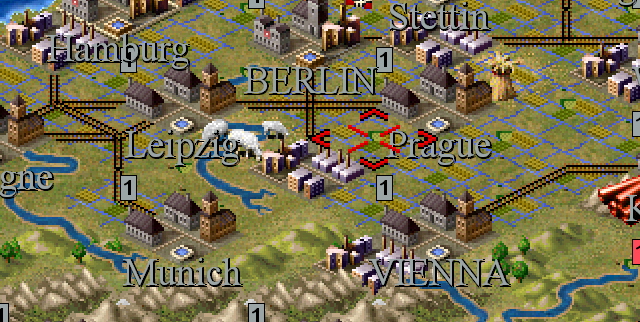
Originally posted by curtsibling And my mistake about Vienna/Prague, I had Wroclaw in mind!
So in regards to Prague, I will make that tweak![/SIZE] |
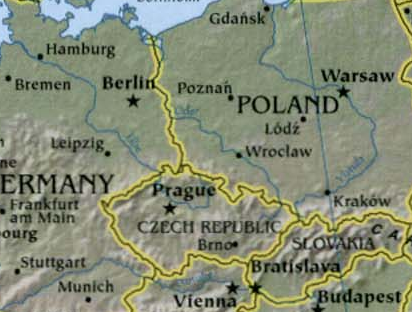
Ther reason I chose 129,51, was to make it consistant with Leipzig, which also btw is too far to the left. But then again, this Euro map is really small, so it's hard to find the absolute coordinates. I understand
quote:
Originally posted by curtsibling
But as for Berlin/Warsaw, take a look! |
Can't argue with that, but it surely isn't in coherence with my maps of Europe. I'm reading from an atlas from Dorling Kendersley, and it shows Warsaw just as much to the south of Berlin, if you draw out a leveled line from Berlin, as Wien is to the right from a line plumbed from Berlin. Not trying to do it into a bigger deal than it really is, just saying that we read from different Euro maps
|
|
| |
|
| |
|
|
|
Sarsstock
|
|
Well Curt the map looks great as always. I'm curious however, what is the reason for the Commonwealth being represented by two different civ's? Is it meant to represent the international status Canada. South Africa and Australia had developed as they're own nations? Forgive me if these questions have already been asked.
Also, now that there is a Dictator ToT moving ahead in development, does this mean we can expect a Vendetta ToT along with a Soviet Steel ToT in the future?
|
|
| |
All times are GMT. The time now is 05:17.
Apolyton Time is 00:17. |
top of page
|
|
|
Forum Rules:
You may not post new threads
You may not post replies
You may not post attachments
You may not edit your posts
|
HTML code is ON
vB code is ON
Smilies are ON
[IMG] code is ON
|
|
|
|
|
|






 20-04-2005 12:43


 Attachment:


 |
|