|
Winston
|
 |
Danmark
Mar 1999
time: 06:30
|
|
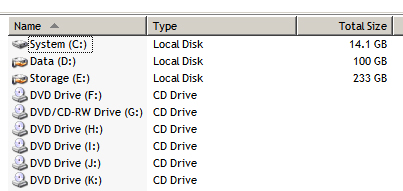
What kind of drives do you have, how are they partitioned, and how large is your folders+subfolders structure?
In Windows, the size of the HDD's is shown in Windows Explorer. To get the number of folders + subfolders on the different HDD's, I think you need to right-click -> Properties for each top-level folder and add up the number of subfolders, then the number of top-level folders. Maybe there's an easier way, maybe you think it's too much work. But I did it! Took me just a couple of minutes.  Which was just a tiny fraction of the time it took me to get the formatting right for the table below. Which was just a tiny fraction of the time it took me to get the formatting right for the table below. 
code:
Drive Type Size # of folders
A: Floppy - -
C: HDD 1, part. 1 19.5 GB 2,163
D: HDD 2 12.1 GB 942
E: HDD 1, part. 2 92.2 GB 2,487
F: CD-RW - -
G: CD-R - -
H: DVD-RW (ext.) - -
Total 123.8 GB 5,592
Last edited by Winston on 06-09-2005 at 14:09
|






 06-09-2005 13:51



 Attachment:
  |
|
 |
|