Apolyton Archive  |  Preserved copy of the Apolyton Civilization Site and its forums as they stood in September 2005. Read-only; nothing here can be posted to or replied to.  |  Forum index |  About this archive |  The 1998–2001 UBB forums
Today on Apolyton WARDELL INTERVIEW PROMO A.C.S. HISTORY CHAPTER 4 GET CIV4 /w FREE PLUS! A.C.S. PHOTO GALLERY GET A.O.M. V1.1
Apolyton Civilization Forums
main| civ2| civ3| civ4| smac| ctp2| ron| moo3| galciv| galciv2| alt| about|
ApolytonPLUS | register | search | faq | new posts | pm (-/-) | upload | members
hall of fame new! | civgroups | civgroups news | interviews | the column | radio | chat | directory | news | store | PLUS
Apolyton Civilization Forums : Powered by vBulletin version 2.0.3 Apolyton Civilization Forums > Miscellaneous > Archive > AC-General/Help/Strategy-Archive > network node and alien artifact
Show a Printable Version | Email This Page to Someone! | Receive updates to this thread | Report this to Apolyton news!

bottom of page
  
Author
Thread    < Last Thread     Next Thread > Post New Thread     Post A Reply
Lefty Scaevola is offline Lefty Scaevola
Emperor
San Antonio TX USA
Oct 2000
time: 23:14
Question  Old Post 27-07-2001 22:50
Edit/Delete Message Reply w/Quote
#1 Report this post to a moderator
network node and alien artifact Support Apolyton or Terrorists Win

If there any indicator on the a base screen that informs you whether its network node (if any) has already been connected to an artifact?

Sprayber is offline Sprayber

Emperor
Dixie
Oct 2000
time: 23:14
  Old Post 27-07-2001 22:54
Edit/Delete Message Reply w/Quote
#2 Report this post to a moderator
Support Apolyton

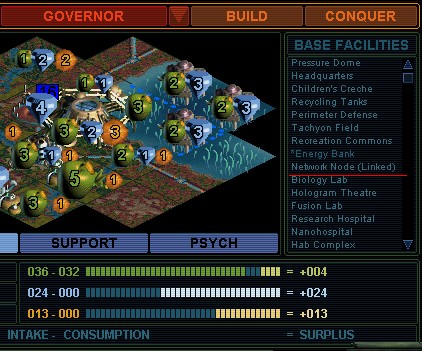
In the upper right hand corner of your base screen where all your facilities are listed there should be a (linked with artifact) or maybe just (linked) next to the listing for the network node.

Sprayber is offline Sprayber

Emperor
Dixie
Oct 2000
time: 23:14
  Old Post 27-07-2001 22:58
Edit/Delete Message Reply w/Quote
#3 Report this post to a moderator
Browse Apolyton AD-FREE

i just checked. it just says (linked).

Nadexander is offline Nadexander
Warlord
Saratoga, California
Mar 2001
time: 21:14
  Old Post 27-07-2001 23:32
Edit/Delete Message Reply w/Quote
#4 Report this post to a moderator
Re: network node and alien artifact Put an end to popups!

quote:
Originally posted by Lefty Scaevola
If there any indicator on the a base screen that informs you whether its network node (if any) has already been connected to an artifact?


Also if you use the go to city command when an alien artifact is selected and it will have an "(unlinked node)" next to cities with unlinked nodes.

Lefty Scaevola is offline Lefty Scaevola
Emperor
San Antonio TX USA
Oct 2000
time: 23:14
Question  Old Post 28-07-2001 02:40
Edit/Delete Message Reply w/Quote
#5 Report this post to a moderator
Suffering from ads?

I do not have any "linked" notation by network nodes in my bases facilities list, either with smax w 2.0 patch, or smac with no patch. Would one of my preference settings affect this? I have detailed menus selected. Is there some patch beside the official ones?

Lefty Scaevola is offline Lefty Scaevola
Emperor
San Antonio TX USA
Oct 2000
time: 23:14
  Old Post 28-07-2001 04:30
Edit/Delete Message Reply w/Quote
#6 Report this post to a moderator
Avatar Enlargement: We've got the solution

The go to with atifact works, but I can find any linked in the base screen.

Sprayber is offline Sprayber

Emperor
Dixie
Oct 2000
time: 23:14
  Old Post 28-07-2001 09:25
Edit/Delete Message Reply w/Quote
#7 Report this post to a moderator
Support Apolyton, buy Alpha Centauri

quote:
Originally posted by Lefty Scaevola
I do not have any "linked" notation by network nodes in my bases facilities list, either with smax w 2.0 patch, or smac with no patch. Would one of my preference settings affect this? I have detailed menus selected. Is there some patch beside the official ones?


I have all the patches and it should work. Here is where it should be. Anyone else know what the problem could be?

Attachment: node.jpg
This has been downloaded 143 time(s).

Lefty Scaevola is offline Lefty Scaevola
Emperor
San Antonio TX USA
Oct 2000
time: 23:14
  Old Post 28-07-2001 21:09
Edit/Delete Message Reply w/Quote
#8 Report this post to a moderator
Support Apolyton, buy Call to Power 2

MY base screens do not show that. Must be either a game setting or maybe a screen resolution setting. Should not be the latter, since smax is machine with a high resolution 19" monitor. I will try monkying around with some settings. May be some obscure non intuitive setting in the warning preferences.
Thanks guys.

Lefty Scaevola is offline Lefty Scaevola
Emperor
San Antonio TX USA
Oct 2000
time: 23:14
  Old Post 28-07-2001 21:13
Edit/Delete Message Reply w/Quote
#9 Report this post to a moderator
Support Apolyton buy from Amazon

One possibility on my samx computor, I have applied the smax patch, which I assumed to coverboth games in the same directory, but not the smac patch (and I do not play smac on this machine). Should I have installed both patches?

RedFred is offline RedFred
King
Vancouver
Jun 1999
time: 21:14
  Old Post 28-07-2001 23:05
Edit/Delete Message Reply w/Quote
#10 Report this post to a moderator
Support Apolyton

No, it totally doesn't matter which patch you have, if any. Both SMAC and SMACX should show "network node (linked)" on the base screen regardless.

Lefty, I have never seen or heard of the problem you are describing.

Ned is offline Ned
Prince
of Aptos, CA
Oct 1999
time: 21:14
  Old Post 28-07-2001 23:46
Edit/Delete Message Reply w/Quote
#11 Report this post to a moderator
Enter the AD-FREE zone

I'm sorry, but I too do not have and have never seen "linked" next to a Network Node in the base screen. I also do not believe this is a settable option from any menu. It rather appears to be differences in the game.

I am running the Alien Crossfire Expansion Pack with the v.2 patch. US. Windows ME.

Ned

Ken Hinds is offline Ken Hinds
Prince
USA
Mar 1999
time: 00:14
  Old Post 28-07-2001 23:48
Edit/Delete Message Reply w/Quote
#12 Report this post to a moderator
Remove this text

I've got SMAC with the 4.0 patch installed (all the nice new event pictures, new landmarks, etc.) but I don't get the "(linked)" indicator in either new games started since the patch was installed or in any of the older ones started under 1.0. Is this feature possibly from a SMAX patch or the original expansion disk install?

I have not installed any of the crossfire patches since I didn't think that I could change from regular AC to Crossfire just by installing a patch file. Does installing the Crossfire patches update the regular game files also even without the expansion pack installed?


Lefty, right now the only way that I know of to tell that you have linked an artifact with the node is to move the artifact to the city and wait one turn before trying to link the artifact. After that you will not get the option to link to the node if the node is already linked. You always seem to get the option upon the initial arrival of the artifact, but then the voice message plays with the pop-up box telling you to take it to an unlinked node.

Ken

Paul is offline Paul
Emperor
Zwolle, The Netherlands
Mar 1999
time: 06:14
  Old Post 29-07-2001 01:11 Visit Paul's homepage!
Edit/Delete Message Reply w/Quote
#13 Report this post to a moderator
Inflate your Upload Space

I also don't get the "linked" behind my nodes in the base screen.

Darius is offline Darius
Prince
Connecticut, USA
Mar 2000
time: 00:14
Exclamation  Old Post 29-07-2001 01:53
Edit/Delete Message Reply w/Quote
#14 Report this post to a moderator
Avatar Enlargement: We've got the solution

It depends on the screen resolution. To test this, I just opened the same turn in 800x600 and 1024x768. With the 800x600 resolution, I got the "linked" indicator. With the 1024x768 resolution, I did not. I suspect it has to do with subtle differences in the screen layouts and font sizes.

Note that if you use the "Video Mode" command in the Alpha.ini file, it will override the resolution you have set for Windows.

Darius

Lefty Scaevola is offline Lefty Scaevola
Emperor
San Antonio TX USA
Oct 2000
time: 23:14
  Old Post 29-07-2001 03:09
Edit/Delete Message Reply w/Quote
#15 Report this post to a moderator
Full PM-box? Change here!

That an ass backwards quirk: more resolution you get less info.

Kassiopeia is offline Kassiopeia
Emperor
Jyväskylä, Finland
Jul 2001
time: 07:14
  Old Post 29-07-2001 03:17 Visit Kassiopeia's homepage!
Edit/Delete Message Reply w/Quote
#16 Report this post to a moderator
Full PM-box? Change here!

quote:
Originally posted by Darius
It depends on the screen resolution. To test this, I just opened the same turn in 800x600 and 1024x768. With the 800x600 resolution, I got the "linked" indicator. With the 1024x768 resolution, I did not. I suspect it has to do with subtle differences in the screen layouts and font sizes.

Note that if you use the "Video Mode" command in the Alpha.ini file, it will override the resolution you have set for Windows.

Darius


Thanks, I was really puzzled why I don't see it. But I'
m not changing my great resolution for SMAC!

big_canuk is offline big_canuk
King
Leamington, ON, Canada
Jul 2000
time: 00:14
  Old Post 29-07-2001 18:32
Edit/Delete Message Reply w/Quote
#17 Report this post to a moderator
Suffering from ads?

I have adjusted alpha.ini before, but can't find the help for it again, yet.

What is the help file for it, or alternatively, what is the syntax for the "video-mode" line. Since it fills the screen anyway, it shouldn't make any difference in one's real resoulution, right?

Using 800x600 should just give us more info. I'll be curious to see if anything else changes.

Darius is offline Darius
Prince
Connecticut, USA
Mar 2000
time: 00:14
  Old Post 29-07-2001 19:07
Edit/Delete Message Reply w/Quote
#18 Report this post to a moderator
Enter the AD-FREE zone

Sorry, the name of the file is actually "Alpha Centauri.ini". The syntax is "Video Mode = 1024" or "Video Mode = 800". This sets the resolution for the game, overriding the Windows resolution setting.

If you reduce the resolution to the 800 setting, the result is that you will see a much smaller portion of the map. I find it difficult to play that way, so I use the 1024 setting even though I don't get the "linked" indication.

There are a few other subtle differences in the screen layouts under different resolution settings. I forget exactly what it was now, but when I was new and using the 800 resolution, there was something I couldn't find, but it was there on the 1024 setting.

Darius

big_canuk is offline big_canuk
King
Leamington, ON, Canada
Jul 2000
time: 00:14
  Old Post 29-07-2001 19:12
Edit/Delete Message Reply w/Quote
#19 Report this post to a moderator
Support Apolyton, buy GURPS/ Alpha Centauri

Thanks Darius!

Yes at 800 it would be smaller, but then you could just zoom to get to where you like the resolution anyway, right?

big_canuk is offline big_canuk
King
Leamington, ON, Canada
Jul 2000
time: 00:14
  Old Post 29-07-2001 19:31
Edit/Delete Message Reply w/Quote
#20 Report this post to a moderator
Enter the AD-FREE zone

Ah, you're right. I think I will live with 1024x768

The map can be made right, with XX, but it is a bit smaller 'cause the none map displays at the bottom are bigger.

But I don't like the info screens. For example, you can only see 4 units in a base without scrolling instead of 7 or 8?? with 1024.

Ah well, I'll try the "goto" command, and just remember which bases have been linked.

Thanks anyway.

bc

  < Last Thread     Next Thread > Post New Thread     Post A Reply
All times are GMT. The time now is 05:14.
Apolyton Time is 00:14.
    top of page
Rate This Thread:
archivepost
Forum Jump:
Forum Rules:
You may not post new threads
You may not post replies
You may not post attachments
You may not edit your posts
HTML code is ON
vB code is ON
Smilies are ON
[IMG] code is ON


Contact Us - Apolyton Civilization Site - Support Us!

Building a better Apolyton through better information. Click here and take our poll!
Non-US visitors, click here!

Powered by: vBulletin Version 2.0.3
Copyright ©2000, 2001, Jelsoft Enterprises Limited.

Page generated in 0.0500 seconds (91.64% PHP - 8.36% MySQL) with 31 queries
Page Loading Time:

Support Apolyton: Amazon USA | Amazon UK | Amazon DE | Amazon FR |
Support Apolyton and get FREE PLUS, Buy from Chips&Bits: Galactic Civilizations | Galactic Civilizations: Deluxe Edition | Call to Power 2 | Civilization: The Boardgame | GURPS/ Alpha Centauri | Alpha Centauri | Civilization IV | Civilization III: Complete |


Front Page | Civilization IV | Civilization III | Civilization II | Call to Power II | Alpha Centauri | Master of Orion III
Rise of Nations | Galactic Civilizations | Galactic Civilizations II | Misc
Alt.Civs | Civ I | C:CtP I | About | News | Directory | Apolyton Store | Forums | Chat | Columns | Interviews | Newsletter
Scenario League | CSC | Clash of Civs | Spanish Site | CtP Maps | Cradle of Civ | WesW's Ctp1/2 Site | Civ3 Haven

apolyton.net | apolyton.com | civilization2.net | civilization3.net | civilization4.net | civilizationiv.info | calltopower.net | galciv.net | galciv2.net | moo3.net