|
| |
|

|
Huntred
|
|
Hello,
Sorry if this appears again, I've had some difficulty in maintaining a connection. I've posted this on Civ3 Help but wanted any other ideas from the General site.
System:
P3-500
256MB
Riva TNT - 16MB RAM, Detonator Drivers 21.83
DirectX 8
Win98SE
Install went fine (excepting the registration wants a great deal of information).
Issue 1:
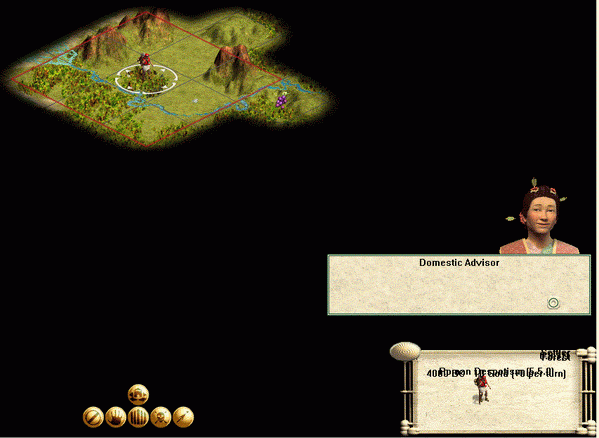
There is something funky with the text being displayed both on the main menu screen and in the game screen. The best way I could describe it is that multiple lines of text are being displayed on the same line, making quite a jumble. The main menu I don't care so much about, however this problem carrys over into the actual game. to where I cannot read the lower right information which tells me about the unit, it's location, what year it is, etc.
Issue 2:
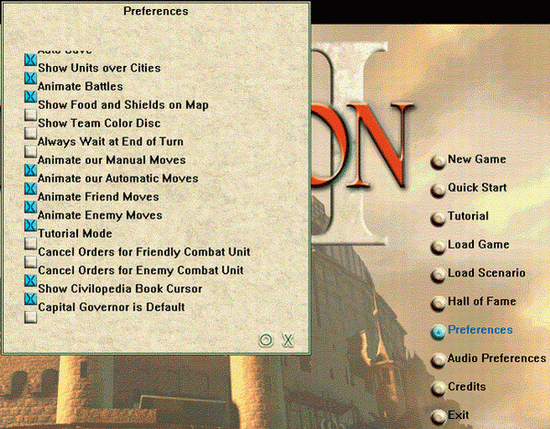
Preferences menu is screwed up a bit where the selection items are out of alignment with their corresponding check boxes - this isn't just aesthetic, it's to the point to where I cannot tell for certain what I'm checking off.
Issue 3:
I have the sneaking suspicion that my Domestic Advisor is trying to tell me things however the text is not coming across and I just see a blank window. In the tutorial game, I see her face and her text box but it's empty. After toying around with the units for a few years, she pops up again - again blank.
I haven't actually gone through the tutorial or manual yet however the readme didn't have anything to offer on the subject. I'll have more time to fiddle and read tonight and I have another graphics card that I will try to plunk in the box to see if that makes a difference.
Other ideas welcome.
Thanks.
 Attachment: overlap.gif Attachment: overlap.gif
This has been downloaded 1618 time(s).
|
|
| |
|
|
|
Huntred
|
|
Just a shot of what I'm talking about with regard to preferences. I believe the text is only shifted up by a half notch but I'm not certain.
Attachment: misalign.gif
This has been downloaded 1623 time(s).
|
|
| |
|
|
|
Huntred
|
|
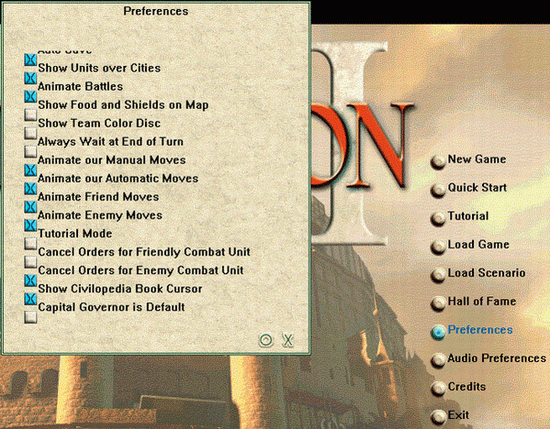
Just a shot of what I'm talking about with regard to preferences. I believe the text is only shifted up by a half notch but I'm not certain.
Attachment: misalign.gif
This has been downloaded 1563 time(s).
|
|
| |
|
|
|
LdyMox
|
|
I have having the same problem. Which makes the game unplayable.
Win98SE
256 RAM
Voodoo 3
Viewsonic G90F 19 inch monitor
AMD 500
Direct X 8 (all new updates)
Do you per chance have a large amunt of fonts installed like me? There is a font file named LSANS.TTF I am going to check if it got installed right
|
|
| |
|
|
|
Huntred
|
|
I don't believe so - I'm not big into fonts so I doubt I have much more than the standard compliment.
While the game is fairly unplayable like this, it's very tourable. What little I have seen of the landscape is beautiful. I liked the 3D terrain - and especially features like how one can see a mountain "off in the distance" (outside of the 3x3 visibility grid). Also, one can't "cheat" like in SMAC where you can get an idea as to the nature of the surround terrain by the grid contour.
|
|
| |
|
|
|
jglidewell
|
|
manassas va usa
Feb 2001
time: 00:15
|
|
quote:
Originally posted by Huntred
Hello,
Other ideas welcome.
Thanks. |
On windows you can select how much hardware acceleration you use. I had a similiar porblem to this with Railroad Tycoon. After adjusting the acceleration to a minimum there were no more troubles and the screen would show normal.
|
|
| |
|
|
|
LdyMox
|
|
Ok I made sure that font was installed, reinstalled OpenGL and DirectX8a and still no change.
|
|
| |
|
|
|
LdyMox
|
|
Ok I also reinstalled my video drivers. Still no change.
Sir Fraxis could you e-mail me if you do get a resolution? [ Tammy@wodgraphics ] or at least post it on this thread? The game is simply unplayable until this is fixed for me.
|
|
| |
|
|
|
Dan Magaha FIRAXIS
|
 |
The Metropolis known as Hunt Valley
Mar 2000
time: 00:15
|
|
quote:
Originally posted by Boris Godunov
I'm not having these issues at all, but isn't there a line in the readme.txt about the font issue? Not sure...
Dan, my music is skipping horribly and I had to shut it off. It's not affecting gameplay at all, but it was very annoying. Any ideas? |
Just the usuals, drivers, etc.. did you do a full install? What OS are you running?
One other interesting DirectX thing I found out recently that may help you is that apparently MS ships DirectX with debugging turned on in nearly every module, and this consumes precious CPU cycles. There is a control panel applet you can download, drop it into your system folder, and then you can access it via control panel and see if debugging is turned on, and if so, you can turn it off. It helped stop stuttering sound on some other games I play quite a bit (Unreal Tournament notably) though truthfully I've never had any sound problems with Civ III.
I'll see if I can find a link to that applet, it may help some of you out.
Dan
|
|
| |
|
|
|
LdyMox
|
|
Also if I try to build a city it says" Unable to allocate bufffer. Terminating program" and then the program well terminates. I never had aany graphic card problems. I'll try playing with the hardware acelleration some.
|
|
| |
|
|
|
Huntred
|
|
quote:
Originally posted by rockville
In case you didn't see this in the other thread that you started on this...
Are you using a desktop theme? If you change your desktop settings back to the defaults does the problem remain? |
No real scheme - I think it's stock (or stockish) colors with a black background. Modest (~12) shortcuts. No active desktop features turned on. It's my very boring computer.
(The still-delayed flagship machine is a based off an EPoX-8KHA+ so I've got problems all around).
BTW - please folks, don't get bitter or panicy about this. I don't think there's a mass problem with the game as judged by the number of people in the general thread who seem to be having a good ole time. This is affecting just a couple folks - and believe me, it's definitely my week for machine rebellion (don't ask about my Tivo either)...
|
|
| |
|
|
|
Huntred
|
|
quote:
Originally posted by LdyMox
Also if I try to build a city it says" Unable to allocate bufffer. Terminating program" and then the program well terminates. I never had aany graphic card problems. I'll try playing with the hardware acelleration some. |
FYI - I have the exact same problem. I hadn't tried to build a city before - I was too busy walking around.
I have 279MB free (it's not much but I'm in a big state of transition right now). Windows is managing the swap file.
Please let me know if you get a solution sent to you - pooky@smart.net I'll do the same to Tammy@wodgraphics
Thanks.
|
|
| |
|
|
|
LdyMox
|
|
What do I do with directx.cpl?
quote:
Originally posted by Dan Magaha FIRAXIS
Boris,
The trusty 'Poly forums here wouldn't let me attach the file (it's really small, but the extension isn't allowed), so I put it up on our website. Just note the standard legal mumbo-jumbo; this isn't an official patch, we don't support this, etc.
http://www.firaxis.com/directx.cpl
Follow the instructions I laid out above, you may find your debugging level set high on one or more DX components. Turning them to off should increase performance, but your mileage may vary.
Dan |
|
|
| |
|
|
|
LdyMox
|
|
I didn't do anything in the [WINDOWS]/System32 so I tried the [WINDOWS]/System folder and got the control panel DirectX applet. So far any changes have not helped. But I have not tried them all.
quote:
Originally posted by Dan Magaha FIRAXIS
Doh! Didn't realize the message with the instructions didn't go through because of the attachment.
You need to copy the file into your [WINDOWS]/System32 directory, then you will have a "DirectX" control panel applet available. Open it up and you should be able to click around on the tabs in there and see if debugging levels are turned on for various components of DirectX (sound, 3D, etc.) Turn them to "Off" and you should see some performance gain, especially if you're using an older/slower PC.
Dan |
|
|
| |
All times are GMT. The time now is 05:15.
Apolyton Time is 00:15. |
top of page
|
|
|
Forum Rules:
You may not post new threads
You may not post replies
You may not post attachments
You may not edit your posts
|
HTML code is ON
vB code is ON
Smilies are ON
[IMG] code is ON
|
|
|
|
|
|





 30-10-2001 20:58





 ). Windows wanted to do one of those quickie reboots but it had a minor lockup so I had to reset. Same issue with the fonts. I swtiched back to "full" and the quickie reboot worked.


 |
|