|
| |
|

|
Rasbelin

|
 |
Tampere (Tammerfors), Finland
Nov 1999
time: 07:16
|
|
I promised to post today my own personal Civ III FAQ. So this is the FAQ I promised. It also includes several Civ III HOW-TOs based on questions asked on ACS Forums. I made this information package, because I wanted to have it separately from the official ACS Civ III FAQ thread. Feel free to give comments! Nosy questions on why I didn't include it in the official FAQ aren't welcome, sorry. I really hope that this posting would help some of those who have trouble with Civ III. 
CIV III FAQ
When is the first official patch going to be released and what will it include?
There's currently no official information available that would state the date for the first patch to be released, but I think that these quotes from the Civ III Release Party (30th October) on ACS might give you somekind of a clue what might be expected.
quote:
[ACS_MarkG] Jeff, i assume that the first patch is near?
[Jeff_Morris] I would hope to get it out by the end of november...but no promises
[ProvostHarrison] So it is going to be a downloadable patch or a sold expansion patch
[Jeff_Morris] Hard to say....We'd love to make it a patch...but no decision has been made
[Mike_Breitkreutz_FIRAXIS] I'm working on the patch and working on creating a new library... Sid's handling Golf
[Mike_Breitkreutz_FIRAXIS] I don't know what the full plans for the patch are yet because I'm mostly handling updates to the editor and we haven't had a formal meeting to discuss what's going to be in the patch...
[Mike_Breitkreutz_FIRAXIS] I believe starting locations are randomized for balancing issues but again, I'm working on that for the patch. That seems like a no-brainer to me.
[faded_glory] How long till MP patch/ EP for Civ3?????
[Mike_Breitkreutz_FIRAXIS] That I don't know....
[Icedan] heard there's a patch in the works, when's it comin?
Mike_Breitkreutz_FIRAXIS] Not sure when the patch will be available but we are working on one...
|
My personal vision is that the bug fix will at least fix the unbalanced corruption and the current memory leaks that cause the game to crash for many civers. I assume that the patch will be available on Firaxis' website free of charge, and not on any payment basis.
Where can I find the Civ III manual?
The manual can also been found on the Civ III CD-ROM as a PDF document. You can use the PDF manual by doing this:
1. Insert the Civ III CD-ROM into your CD-ROM drive.
2. Open My Computer or Windows Explorer.
3. Access the CD-ROM drive by clicking the appropriate icon.
4. Open the directory called Manual.
5. If you don't have any program currently installed on your PC that can open PDF files (like Adobe Acrobat Reader), you must first install Adobe Acrobat Reader 5.0 provided on the CD-ROM. You may do that by clicking on the ar500enu.exe file in the same folder. After that follow the given instructions.
6. Click on the Civ3manual.pdf file for accessing it.
7. The PDF manual will be opened and you may now read it.
Where can I find answeres to questions while playing the game?
Where can I see the specs for a certain unit or anything like that?
You can find easily answeres to such questions by consulting the
Civilopedia that can be found inside Civ III. You can easily access
it whenever you want, by simply clicking on the Aa button in the upper margin.
This is the Civilopedia button (marked with the red circle):

How can I capture screenshots in Civ III?
You will need a program that can take screen captures in any program being run. You can find different freeware capturing programs by following this link to Download.com. There are many shareware and other capture softwares available too, but I recommend any freeware program, because you can use it free of charge, without using any "free" warez versions of commercial programs. Freeware programs also tend to be smaller, so downloading them is faster.
For using the capturing software, you should refer to the help section of the program, because there's no common rules for using screen capturing software.
Please notice that a program officially supporting (see software abilities or general specifications) DirectX, will more likely work when trying to take screenshots in Civ III.
Screen capturing abilities can also be found in some graphics editing programs like Paint Shop Pro. At least I'm currently using PSP for taking screenshots.
CIV III HOW-TOs
Preparing your PC for installing and running Civ III
1. Check that your PC fulfills the minimun requirements. Windows 9x/ME/2000/XP, PII 300 MHz, 32 Mb RAM, 1024x768 resolution.
2. Make sure that you have enough free hard disk space. If not, uninstall useless software and delete unnecessary files. The Civ III installation needs 550 Mb (music and videos are run from the CD) or 700 Mb (full installation) space. Please also note that while playing the game, you also need about 50 Mb free disk space for temporary swap files (these will be deleted after exiting the game). Remember that you will also need an additional 100-150 Mb free disk space for the OS (in this case Windows). That file space will needed all the time when running the OS, so always keep at least 100-150 Mb space free on your hard drive.
3. Enable the "Smooth edges of screen fonts" option by thicking the option in the Display Properties. The option can be found in Control Panel -> Display -> Effects -> Visual Effects -> Smooth edges of screen fonts. That will improve the look of the fonts in Civ III. It's recommendable to be done.
4. Update your DirectX to version 8.0a or greater, unless you already have done that. DirectX 8.1 can be found on the DirectX website and the DirectX 8.0a on the Civ III CD-ROM.
5. Adjust your display's configuration, so that the 1024x768 (the game automatically runs in this mode) resolution is properly configured. Changing the refresh rate might be a worthy idea, because most users of larger monitors (19" and greater) don't usually use that resolution, so they might not even have configured it. At least it's good the check that the current settings for 1024x768 are working.
Changing the screen resolution used by Civ III
A quote from the Civ III readme...
quote:
Quoted from the Civ III readme...
Ini file tweaks: The first time Civilization III is run, it will create a file called 'civilization3.ini'. The following lines can be added and allow you to tweak the game:
KeepRes=1 - When set to 1, your desktop resolution will be what the game uses. 1024x768 screens will be centered, but you will be able to see much more of the map on one screen.
|
How to do this?
1. Open the Civ III directory and click on the file called Civilization3.ini. The file will be opened in Windows Notepad.
2. Insert a new line with the text: KeepRes=1.
3. Save the altered file by selecting Save from the File menu.
4. Run Civ III for testing the new settings.
Changing the refresh rate for the resolution used by Civ III
These instructions will work only under Win 95/98/ME/XP!
You can do this by changing the general Windows refresh rate for the resolution you're using for Civ III.
1. Select the screen resolution you want to configure for the Civ III use. Remeber that the same settings will be used under Windows whenever you use the resolution in question.
2. After selecting the resolution you want to modify, click Apply and follow the instructions. After that, click the Advanced... or Advanced Properties (depends on the Windows version) button.

3. Select the refresh rate you want to use for the selected resolution from the pulldown menu.
4. Click Apply and follow the instructions.

5. You may now return to your previous resolution without losing the new settings for the resolution you have just modified. These settings will be used, when you use the resolution next time; for instance when running Civ III. You may now also try the new configuration (if the modified resolution is especially used
for Civ III) by starting Civ III.
Hopefully some of this information helped you.
Rasbelin
Edit: Corrected the resolution tweak FAQ.
Last edited by Rasbelin on 24-11-2001 at 15:46
|
|
| |
|
|
|
Zealot
|
 |
Lisboa, Portugal
Jun 2000
time: 05:16
|
|
quote:
Originally posted by Rasbelin
How can I capture screenshots in Civ III?
You will need a program that can take screen captures in any program being run. You can find different freeware capturing programs by following this link to Download.com. There are many shareware and other capture softwares available too, but I recommend any freeware program, because you can use it free of charge, without using any "free" warez versions of commercial programs. Freeware programs also tend to be smaller, so downloading them is faster.
For using the capturing software, you should refer to the help section of the program, because there's no common rules for using screen capturing software.
Please notice that a program officially supporting (see software abilities or general specifications) DirectX, will more likely work when trying to take screenshots in Civ III.
Screen capturing abilities can also be found in some graphics editing programs like Paint Shop Pro. At least I'm currently using PSP for taking screenshots.
|
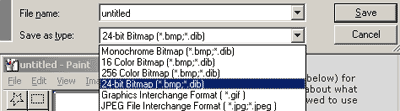
Oh for Crying Out Loud! I just pressed the "Print Sceen" key, opened Paint (included in every Windows version), reduced the picture 50%, saved as JPEG and posted on the Official Bug list!
Quick, easy and clean! 
Nice work on the rest of the FAQ!  
|
|
| |
|
| |
|
| |
|
| |
|
|
|
Nemo
|
 |
of no one.
Apr 1999
time: 23:16
|
|
quote:
Originally posted by Polonius
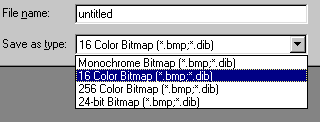
I have the original (non SE) Windows 98 and Paint saves as BMP. JPEG or GIF. But apparently the extra abilities (JPEG and GIF) come if you have some of the Office applications installed (which I do).
Just airing some new knowledge I read a few minutes ago elsewhere on this forum! |
thanks. i was wondering, because i have used '95(a,b,c,d), '98 (1st, 2nd ed.) ME, NT4, and NT5 (a.k.a. w2k) and they ALL had it. But, they ALL also had Office
so, that probably would explain it 
|
|
| |
All times are GMT. The time now is 05:16.
Apolyton Time is 00:16. |
top of page
|
|
|
Forum Rules:
You may not post new threads
You may not post replies
You may not post attachments
You may not edit your posts
|
HTML code is ON
vB code is ON
Smilies are ON
[IMG] code is ON
|
|
|
|
|
|






 23-11-2001 22:36


 Attachment:

 |
|
 |
|