|
| |
|

|
Marla
|
|
Paris, France.
Nov 2001
time: 05:16
|
|
Hey, 
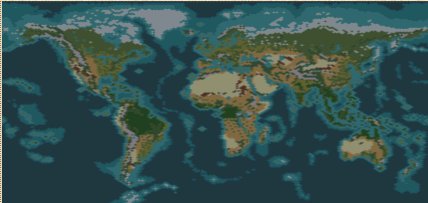
I'm writing in here because I guess many people want to play with all civilizations in correct starting positions. It's really easy to do so. That's why I won't post saved games, this way, you would play with the civilization, the rules and the difficulty level you want.
Message Edited:
It's now even more easier than ever !
There's only ONE file to download, the map above. It's a self extractor that will automatically install every files in the correct folders.
What to do to get correct locations:
1- Open civ3, choose new scenario and then marla's map.
2- Choose your rules to play and save the game in 4000BC as FIX.SAV
3- Go on the start menu and click "correct start positions" (no need to quit civ3)
4- Load FIXED.SAV
Note: You really need 30 seconds to do it and when you load your edited saved game, you're not in the black and you don't see the map where you used to appear on the first time.
Thanx to Vonotar for that version. I would also like to thank Gramphos cause he already helped a lot with his copy tool before.[/I]
 Attachment: marla's world map 1.13.zip Attachment: marla's world map 1.13.zip
This has been downloaded 247 time(s).
Last edited by Marla on 12-12-2001 at 06:56
|
|
| |
|
|
|
Marla
|
|
Paris, France.
Nov 2001
time: 05:16
|
|
The Civ3 editor has been made really fast to me.
- There's no possibility to designate the civilization that will start here.
- There's no possibility to put cities and units to the map (which is quite more important than roads or irrigation when you build a scenario).
- There's no minimap in the editor ! There's not even a zoom !!
- You can't make run a custom mod with another custom map !! For example, I had to add new city names to the file of the map to have that, It's not possible to load the mod with city names added.
|
|
| |
|
|
|
PapaLenin
|
|
Finland
Nov 2001
time: 05:16
|
|
Thanks really much. The only thing I needed in pach was this and they didn't make it. I am glad that there is someone who actually understands what civ3 has to be like. They should hire you in civteam and kick everyone else out =). Though one question is this the converted civ2 map or the shitty civ3 map. ( havent got time to play yet) ?
|
|
| |
|
|
|
Marla
|
|
Paris, France.
Nov 2001
time: 05:16
|
|
It's not a converted civ2 map, it's not an improved version of the original map, it's a fully new created map.
Actually, the map size has been edited. It's 204x256 which looks quite big I must admit. BUT! In here land/sea ratio is respected: ocean fills around 2/3 of the map.
So compared to a 180x180, there's not really more land (I agree it remains huge).
I've made a huge plan of the map on paper to get a fully proportionated map (the original map is the Miller's Cylindrical projection of the earth, which looks to me like the most accurate one for Civ3... knowing that the Civ3 map is actually... a cylindar).
Ressources allocation has been made as a balance of accuracy, esthetic and of course gameplay.
Well, I advise everyone to read the readme files for more information on the map. You can get a general view of the map simply on opening it through the map editor.
|
|
| |
|
|
|
Jersey
|
|
Marla,
I had some trouble using your mods....Maybe I'm an idiot, I don't know. Which cpf files do you use, and what exactly do you do with them? thanks.
|
|
| |
|
| |
|
|
|
Marla
|
|
Paris, France.
Nov 2001
time: 05:16
|
|
NOTE: To XP or Patched Civ3 users:
Well, I've heard that people got issues to make run Gramphos CopyTool properly with xp or the patch.
Here's another way to get the correct locations using Mortioso's Civbreed :
1 - Save your 4000 BC game as FIX.SAV
2 - Go back to windows.
3 - Run the file run_this.bat in the saved game folder.
4 - Launch civ3 and open the new saved game FIXED.SAV
INSTALLATION: Normally when you extract the zip it installs every files in the correct folder, you don't need to download anything else than this zip to make it works, everything is here.
=> If the extraction doesn't install everything in the correct folder, here's what you should do:
you must create folders to make it works:
1- Inside the Civ3 folder, you must create a folder called: EXTRAS
2- Inside the Extras folder, you must create two folders: MARLAMAP and CIVBREED
After, you must put each files in the good folder:
1- Civbreed and its readme in the CIVBREED folder
2- Marlamap.c3b in the MARLAMAP folder
3- run_this.bat in the SAVES folder
4- Marla.bic and its readme in the SCENARIOS folder
Normally the extraction does that already, you don't have to do all that unless it didn't extract it correctly.
Thanx to Vonotar for this alternative
Here's the zip folder you should download:
Edited Message: The file has been removed since a newer version is available on the top of the thread.
Last edited by Marla on 13-12-2001 at 00:35
|
|
| |
|
|
|
dr.charm
|
|
I'm having a problem with your Earth map (which looks very good by the way). The problem is this... the science doesn't work. What I mean is, you can't choose which project to research from within the science advisor screen. Anyone else have this problem?
Cheers,
Dr. Charm
|
|
| |
|
|
|
Marla
|
|
Paris, France.
Nov 2001
time: 05:16
|
|
Okay... civbreed is included in the last file posted...
Well, Vonotar is preparing a self extractor file that will automatically put every files in the correct folders. It will be even more easier to put correct locations, just a click in the start menu.
He already send me a version but it don't work totally, that's why I won't post it now. But I'm sure the result will be neat.
Just wait a bit... that version will certainly be here on tomorrow.
|
|
| |
|
|
|
Marla
|
|
Paris, France.
Nov 2001
time: 05:16
|
|
ok, that's only because the joan.zip file is still in your temporary items folder on your hard disk. The computer recognizes the file you want to download as the file you had downloaded before and just popup the old one. (the message has been edited, I've replaced a file by another)
Normally, when you click on it and joan appears, the zip folder isn't named "marla's world map 1.13.zip" but "joan d'arc.zip".
What you can do is to download the file on another thread... for apolyton, go on civ-Files forum.
If it's the same there, you can go on www.civfanatics.com in the downloads section there's, another "mirror" (that's how we say now?) of the file is there.
|
|
| |
|
|
|
PapaLenin
|
|
Finland
Nov 2001
time: 05:16
|
|
Thank you got it work now though used the civbreed. But there is problem with science advisor. Someone else told about thats so I guess you are aware of that. Any options to correct this one??
And thanks really much
|
|
| |
|
|
|
Dida
|
|
lines on the tech tree don't get drew correctly when using this scenerio. any way to fix that?
|
|
| |
|
|
|
Marla
|
|
Paris, France.
Nov 2001
time: 05:16
|
|
Tech tree, science advisor, technology queue, etc...
whatever is the way to call the problem, the patch sould fix it normally... so I advise you to download the patch (1.16f)
I haven't downloaded the patch already, but people told me it solves the problem
Correct Starting Locations
The game still randomize starting locations, it's how it works with the civ3 game.
So normally, if you had no worries in the installation of the self extractor:
1- start a new game on the map with the rules you want, save BEFORE founding the first city in 4000.BC. Save the game as FIX.sav
2- go in the start menu (quit the game if it's easier to you but there's no need). Click on "put the correct locations" in the map menu...
3- You need to load a new game, it's NOT fix.sav but FIXED.SAV... it's not the same file.
Hope it helps...
|
|
| |
|
|
|
Nathan
|
|
St. Louis
Dec 2001
time: 23:16
|
|
Marla,
Great map. I really appreciate the effort. I had a problem with the French where after I went through the steps my settler was in the middle of the ocean. Has anyone else had this problem?
Nathan
|
|
| |
All times are GMT. The time now is 05:16.
Apolyton Time is 00:16. |
top of page
|
|
|
Forum Rules:
You may not post new threads
You may not post replies
You may not post attachments
You may not edit your posts
|
HTML code is ON
vB code is ON
Smilies are ON
[IMG] code is ON
|
|
|
|
|
|






 09-12-2001 08:59


 Attachment:



 Anyway, I just wanted to chime in and let you know that I think the map is absolutely fantastic!

 ...
...




 |
|