|

|
:) Smiley
|
 |
USCA, Berkeley
Feb 2001
time: 21:16
|
|
Take a look at the Asian city graphics for modern day and you know, hey it don't look like that.
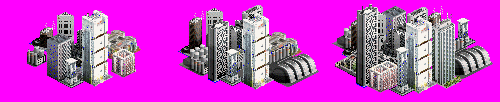
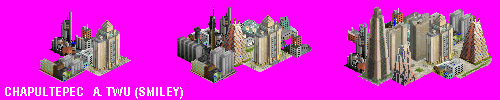
So here's Smiley's City Set #1- Shinjuku
This one is designed to look like a Japanese city in real life.
Since my CIV III don't work (Stupid bugs!) I haven't been able to test it yet. Someone wanna do that for me?
More city sets are coming!
 Attachment: smiley_shinjuku.zip Attachment: smiley_shinjuku.zip
This has been downloaded 1500 time(s).
Last edited by :) Smiley on 14-12-2001 at 03:32
|
|
| |
|
|
|
darkangel
|
|
Multimedia Developer - Tokyo, Japan
Nov 2001
time: 14:16
|
|
Good work Smiley!
Why does your Civ not work? Is it font issues?
|
|
| |
|
|
|
darkangel
|
|
Multimedia Developer - Tokyo, Japan
Nov 2001
time: 14:16
|
|
You need to check your pallet. The Shinjuku wall shows the transparent around the city.
|
|
| |
|
|
|
Mizaq
|
|
San Diego
Nov 2001
time: 21:16
|
|
go to this thread near the bottom is a link to pkzipfix which will correc the problem with the taipei zip (I've used and now have those graphics in game).
|
|
| |
|
|
|
Mizaq
|
|
San Diego
Nov 2001
time: 21:16
|
|
it defaults to attachment, but that's just it it defaults, but can be changed. lets say you clink on a link to download a file and it brings up the save file as box:
1. rename the file from "attachment" to "cake"
2. click on where it says file type: attachment and then use the drop down menu to select all files
3. click ok or save or whatever and then once you have downloaded it unzip it
4. if it won't unzip (says some kind of error) use pkzipfix on the file from the dos prompt or the run line and then once that is complete open up the pkzipfix.zip file and voila!
|
|
| |
All times are GMT. The time now is 05:16.
Apolyton Time is 00:16. |
top of page
|
|
|
Forum Rules:
You may not post new threads
You may not post replies
You may not post attachments
You may not edit your posts
|
HTML code is ON
vB code is ON
Smilies are ON
[IMG] code is ON
|
|
|
|
|
|






 09-12-2001 21:43


 Attachment:
  looks cool cant wait to see more
 Smiley


 lol
lol


 |
|