|
| |
|

|
Dale
|
 |
Sir! Why do you keep clicking on me?
Dec 2000
time: 15:16
|
|
Hey all. Demo 1's now here! YAY!  I finally got it out. I finally got it out.
Anyways, let me know what you think of it. Just a few things:
- There's 3 players in the game so far (don't MOD it for more, you won't get any units).
- Units are hardcoded for this demo as I ran out of time to setup a MOD file for it. There's a range of units to show what's in the game so far.
- Any question please post here. 
- Here's the readme.txt file:
***************************************
HISTORY OF EMPIRES!
Version: 0.1.0 (Alpha)
***************************************
I'd like to thankyou for trying out the demo of my game. This game is a Civilisation style game. It will be completely freeware and be the basis of my programming folio. So if you're in Melbourne, and need a programmer, let me know.
To INSTALL:
-----------
Unzip the downloaded .ZIP file to a seperate directory.
That's it.
To RUN:
-------
Run the executable: HoE.EXE
To PLAY:
--------
Well, there isn't much yet to play with, but here goes:
- Click "New Game" to start.
- Map scrolls with mouse to the edges of the screen.
- "End Turn" ends your turn and starts the next nation (seen by the flags near the info box).
- Left click on a unit and then use the arrow keys to move a unit.
- "Menu" takes you back to the menu.
- "File" -> "Quit" to exit the game.
Feedback:
---------
Please let me know what you think, any bigs you find, suggestions, critisms, etc. You may do so at the Apolyton Alt-Civs forums. http://apolyton.net
OR: email dale.kent@alphawest6.com.au
Thanks for trying.
Dale
EDIT:
Deleted attachment. New version below.
Last edited by Dale on 18-12-2001 at 07:37
|
|
| |
|
|
|
Dale
|
|
Sir! Why do you keep clicking on me?
Dec 2000
time: 15:16
|
|
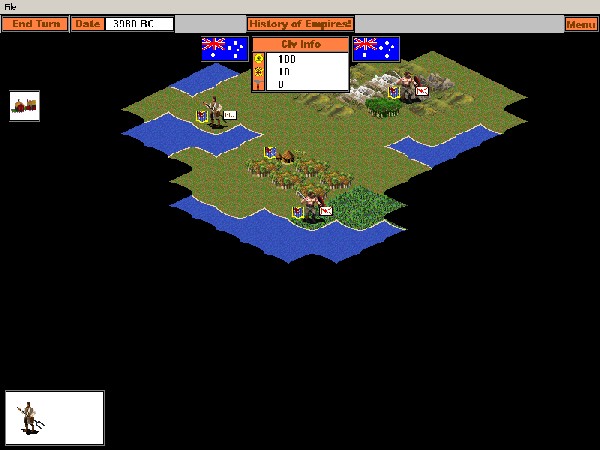
Demo 0.1.1 (Unit movement complete)
- Two units per square max (select from selection box)
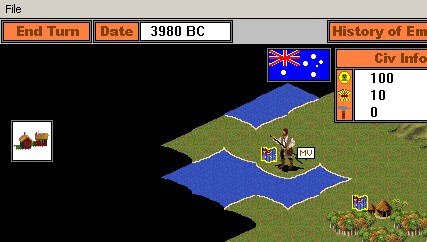
- Civ flags for units, and MV icon to indicate movement left
- Movement rates complete
- MODable scenario.his file to initialise where units begin in new game
- MODable map.his file to initialise terrain layout in map
Enjoy. Any probs let me know.
Readme:
-----------
quote:
***************************************
HISTORY OF EMPIRES!
Version: 0.1.1 (Alpha)
***************************************
I'd like to thankyou for trying out the demo of my game. This game is a Civilisation style game. It will be completely freeware and be the basis of my programming folio. So if you're in Melbourne, and need a programmer, let me know.
To INSTALL:
-----------
Unzip the downloaded .ZIP file to a seperate directory.
That's it.
To RUN:
-------
Run the executable: HoE.EXE
To PLAY:
--------
Well, there isn't much yet to play with, but here goes:
- Click "New Game" to start.
- Map scrolls with mouse to the edges of the screen.
- "End Turn" ends your turn and starts the next nation (seen by the flags near the info box).
- Left click on a unit and then use the arrow keys to move a unit.
- "Menu" takes you back to the menu.
- "File" -> "Quit" to exit the game.
NOTES:
------
- Your units will move such that up on the keyboard (north) is up-right on the map (map north).
- Two icons are displayed for each unit: a flag to indicate owner, an MV icon which shows if movement is available for the selected unit.
- To switch between units on a square (two units possible per square) click on the unit picture in the selection box bottom-left. The select box will reflect whose move it is (left unit).
- You are able to MOD the "*.his" files if you wish. At this point, it's best to only MOD "scenario.his" which holds the unit start locations, and "map.his" which reflects the map terrain (see below for explanation).
Modding:
--------
Scenario.his:
- Allows you to define start locations of civ's units.
- File order (DO NOT DELETE "Units:" FROM TOP LINE!)
At this point, and do nothing. Ensure these are set to "999" or your unit will not load into the map.
Map.his:
- Allows you to draw your own map.
- Please make sure you width, height dimensions are more than 15, 40. I haven't put catches in for this yet, so it'll load but act wierd.
- Terrain type is specified in "terrain.his".
0 - Mountain1
1 - Mountain2
2 - Hill1
3 - Hill2
4 - Forest1
5 - Forest2
6 - Grassland
7 - Plains
8 - Tundra
9 - Dessert
10 - Snow
11 - Swamp
12 - Ocean
- File order (DO NOT CHANGE THIS ORDER!)
MapWidth:
MapHeight:
<0,0> <1,0> <2,0> ........
...................
...................
<0,n> <1,n> <2,0> ........
Feedback:
---------
Please let me know what you think, any bugs you find, suggestions, critisms, etc. You may do so at the Apolyton Alt-Civs forums. http://apolyton.net
OR: email dale.kent@alphawest6.com.au
Thanks for trying.
Dale
|
 Attachment: hoe011.zip Attachment: hoe011.zip
This has been downloaded 32 time(s).
Last edited by Dale on 18-12-2001 at 07:30
|
|
| |
|
| |
|
|
|
Miznia
|
 |
Madison WI
Jul 2001
time: 23:16
|
|
Well, I'll post despite your being away...
I didn't see any ability to settle, so maybe I got the wrong version, or it's not out yet.
Curiously, if I run HoE from windowed DOS, it will change screen modes and fill up the whole screen, but from full-screen DOS, it would just change back to my default 1024x768 and occupy the upper-left corner of the screen.
The speed of execution is a lot better at full-screen (scrolling is fine), but I couldn't scroll down. Scrolling was very slow when it was just in the corner, but I could scroll up and down. I do think that switching to a time-based scroll is a good idea. It might fix the minor annoyance I have, that in order to scroll left, for instance, I have to jiggle the mouse up and down, as well, to maintain scrolling. My computer is incidentally 533MHz.
It took me awhile to figure out how movement worked. I was clicking too high on units to select them, I think. It also seems that there's no diagonal movement, with keypad 7913.
Nice first demo. You're eventually going to have to have some automatic unit-selection, though, or it will make my wrist hurt to play!
|
|
| |
All times are GMT. The time now is 05:16.
Apolyton Time is 00:16. |
top of page
|
|
|
Forum Rules:
You may not post new threads
You may not post replies
You may not post attachments
You may not edit your posts
|
HTML code is ON
vB code is ON
Smilies are ON
[IMG] code is ON
|
|
|
|
|
|





 14-12-2001 08:53


 Attachment:
  )
)


 |
|