|
| |
|

|
Richard Bruns
|
|
NC, USA
Nov 1999
time: 06:18
|
|
Copied from Military thread:
I said:
quote:
If I read the dataformat document correctly, the econ xml gives me the ability to put orders in sub-categories in the GUI. So I can have combined arms units at the top level of the tree, and elements at a lower level. (or the other way around) |
and Mark replied:
quote:
Very Cool idea, but not implemented. And I hadn't forseen going quite that far with it. Certainly combined with Lee's tree stuff on the econ gui, it would take care of my objections to the two basic views of army units. For now you can only use the specific categories and sub-categories in the econ.xml file. That is because those correspond to existing java classes in the code.
But it might not take that much work to get where you want to be. To be specific you would be happy if there were more than one "army unit" sub-class under military? There would be an "army unit C" for combined and an "army unit E" for mono-element units. I will keep this capability in mind as I implement the more-flexible category and sub-category structure. No guarantees but it seems it can be done fairly easily.
Anyone else see any problems with the approach? |
Instead of making the playher choose between two sub-layers, the combined arms units can appear at the top layer, as per the current plan. Then there is a sub/category option to make single-element units.
So the standard units are in the Military category, becoming available and obsolete as tech advances. Units that may not be used as much, like special purpose units or single element units, are in subcategories like Military-Elements or Military-Special
So teh player sees a tree like:
code:
+Technology
-Military
    Trireme
    Legion
    Siege Weapons
    +Elements
    -Special Units
        Explorers
        Engineers
+Infrastructure
|
|
| |
|
|
|
LDiCesare
|
|
La Ferté sous Jouarre France
Jan 2001
time: 05:18
|
|
Letting know one small change I did: The tax rate is now no longer set in the econ orders frame but in the ruler frame, as it is a directly negociated policy (btw should this be negotiated or negociated?).
Thus in order to change tax rate, one has to use the ruler panel. The results of the new policy won't be seeable until the turn when they are applied (next turn).
I left the textfield in the econ frame, but made it read-only. The only drawback I see with this is that the player won't be able to see the quantities produced next turn if they change the tax rate. Note that predicting the side effects of tax rate change (riots...) would be needed in order to predict the econ output correctly.
|
|
| |
|
|
|
alms66
|
|
Louisiana
Oct 1999
time: 23:18
|
|
I'm reviving this thread again because it is nearing the time that it will be essential to have a new econ interface.
I’m going to post several screenshots of interfaces from various games, for the benefit of those who might not own these particular games, so that they can follow the discussion. Then I’ll start the discussion, with my own ideas.
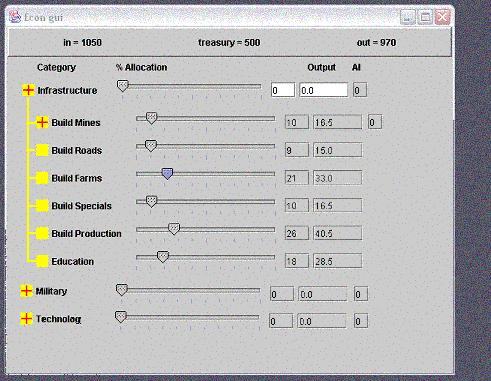
Thus far, from this thread, this has been one of my favorite proposals:
 Attachment: test.jpg Attachment: test.jpg
This has been downloaded 14 time(s).
|
|
| |
|
|
|
alms66
|
|
Louisiana
Oct 1999
time: 23:18
|
|
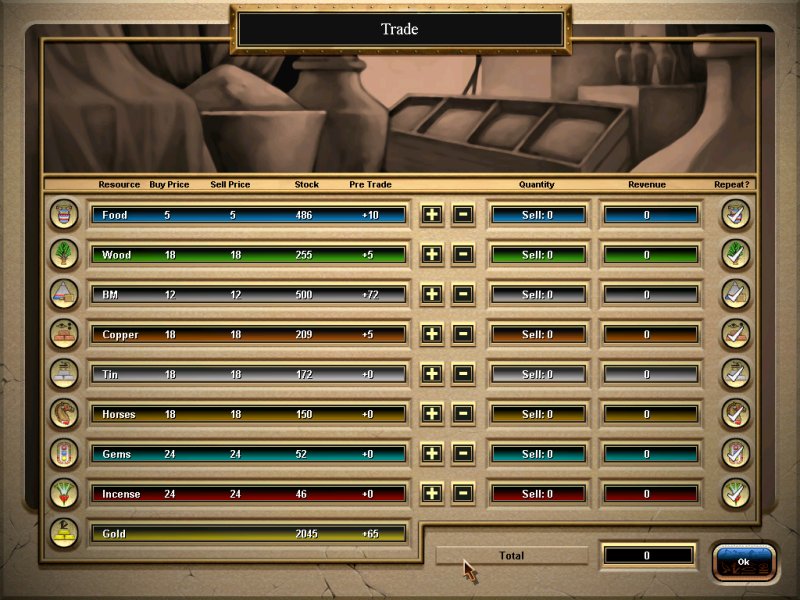
A good trading screen from Chariots of War:
Attachment: image1.jpg
This has been downloaded 16 time(s).
|
|
| |
|
|
|
alms66
|
|
Louisiana
Oct 1999
time: 23:18
|
|
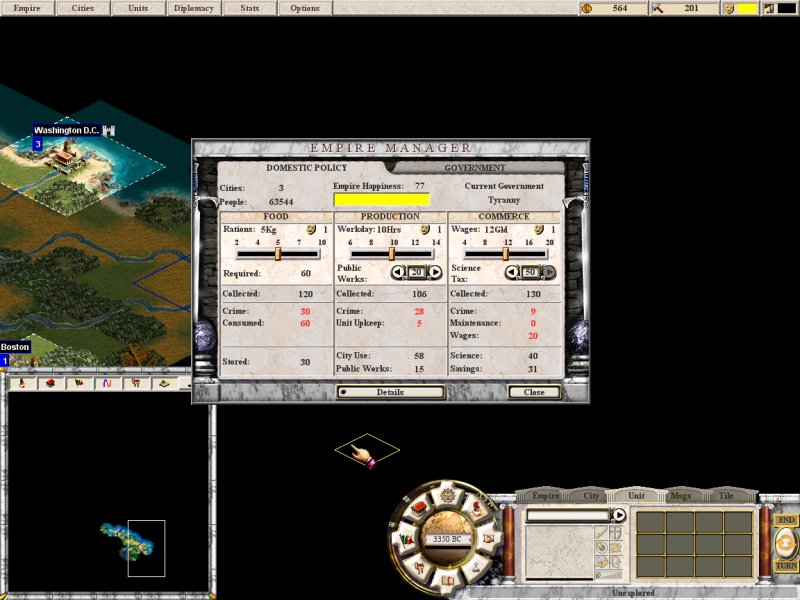
A good overview of the Civ's Economy from CTP2
Attachment: image2.jpg
This has been downloaded 15 time(s).
|
|
| |
|
|
|
alms66
|
|
Louisiana
Oct 1999
time: 23:18
|
|
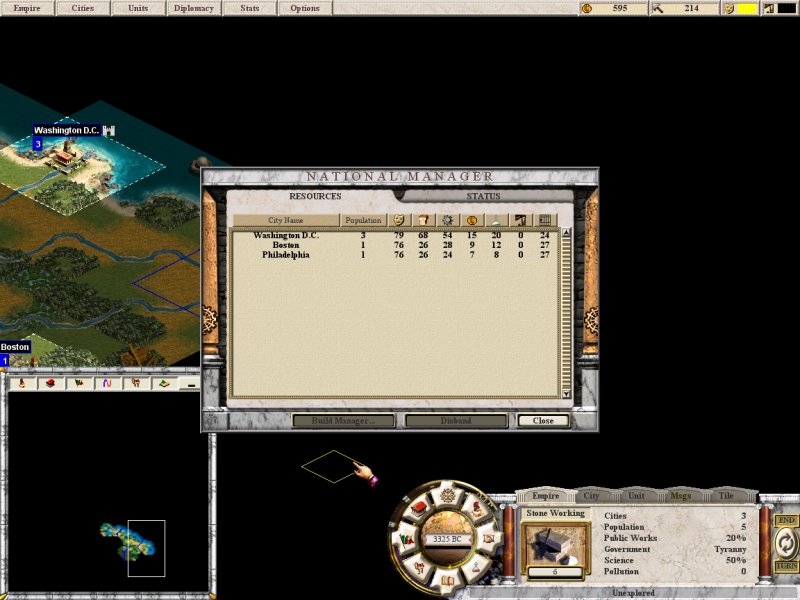
Another shot from CTP2
Attachment: image6.jpg
This has been downloaded 15 time(s).
|
|
| |
|
|
|
alms66
|
|
Louisiana
Oct 1999
time: 23:18
|
|
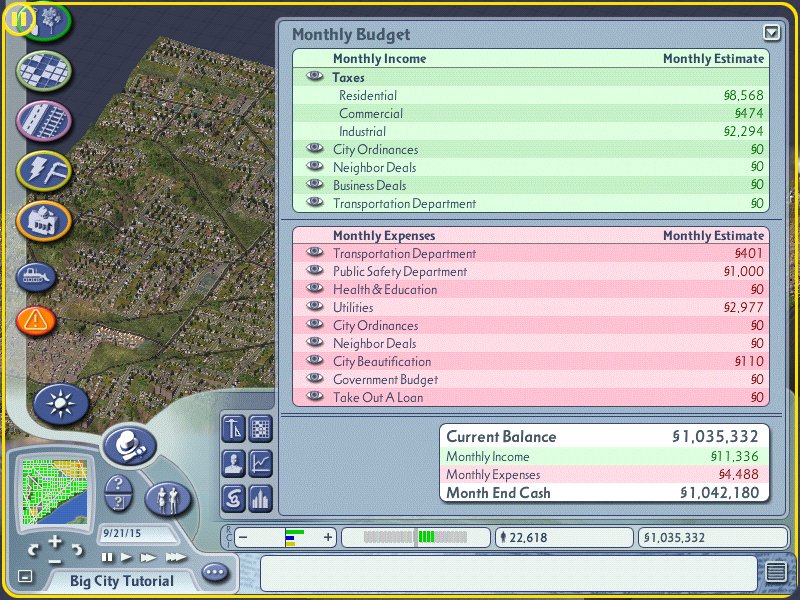
SimCity4's overview screen
Attachment: image1.jpg
This has been downloaded 15 time(s).
|
|
| |
|
|
|
alms66
|
|
Louisiana
Oct 1999
time: 23:18
|
|
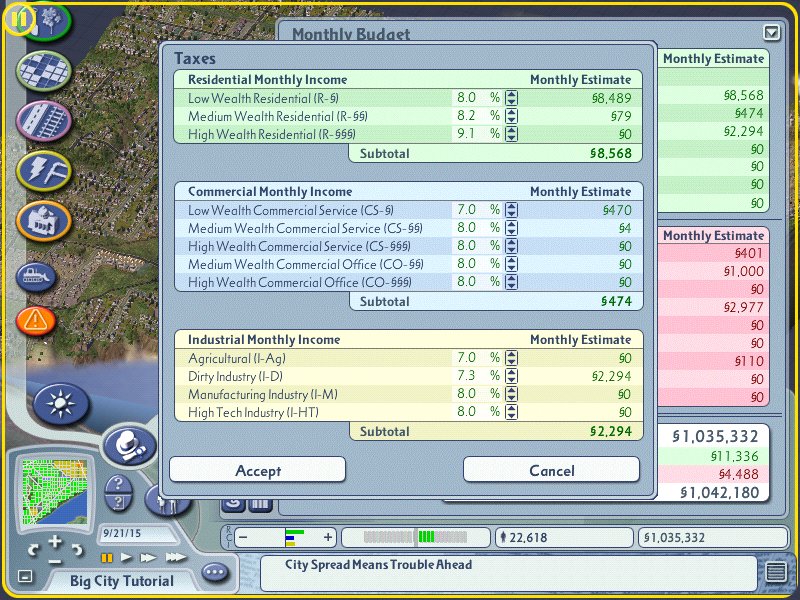
Tax details:
Attachment: image2.jpg
This has been downloaded 15 time(s).
|
|
| |
|
|
|
alms66
|
|
Louisiana
Oct 1999
time: 23:18
|
|
Infrastructure Upkeep:
Attachment: image3.jpg
This has been downloaded 15 time(s).
|
|
| |
|
|
|
alms66
|
|
Louisiana
Oct 1999
time: 23:18
|
|
Even more Infrastructure Details:
Attachment: image4.jpg
This has been downloaded 15 time(s).
|
|
| |
|
|
|
alms66
|
|
Louisiana
Oct 1999
time: 23:18
|
|
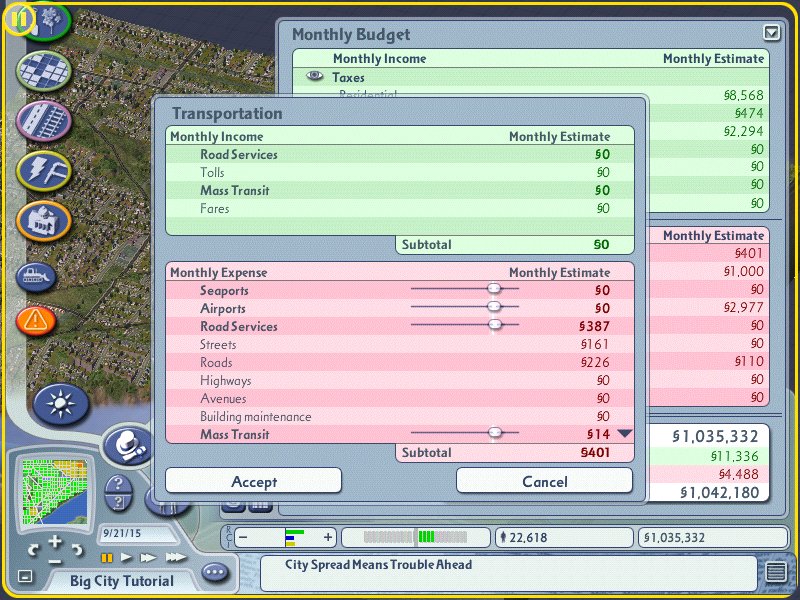
Transportation Infrastructure:
Attachment: image5.jpg
This has been downloaded 15 time(s).
|
|
| |
|
|
|
alms66
|
|
Louisiana
Oct 1999
time: 23:18
|
|
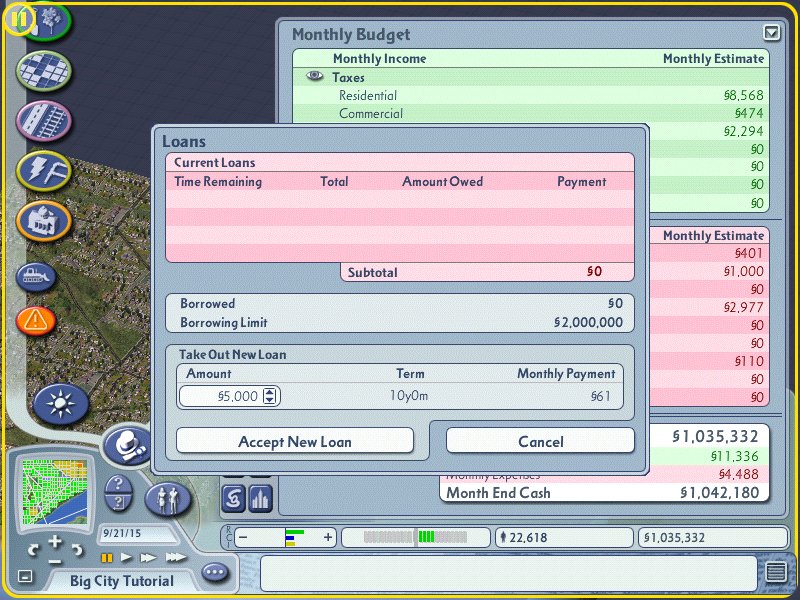
And Loans:
Attachment: image6.jpg
This has been downloaded 14 time(s).
|
|
| |
|
|
|
alms66
|
|
Louisiana
Oct 1999
time: 23:18
|
|
But, by far, the best game to look at for ideas on what the interface should look like is Superpower2. I highly recommend that everyone download and play the demo. You may or may not like the game, but the interfaces are brilliant and very close to what we want to do with Clash. That is a very high level window which gives all needed info, and the ability to drill down and see even more info and micromanage galore, if you choose.
And here's a few screenshots from that game, for those who can't download the demo (it's huge).
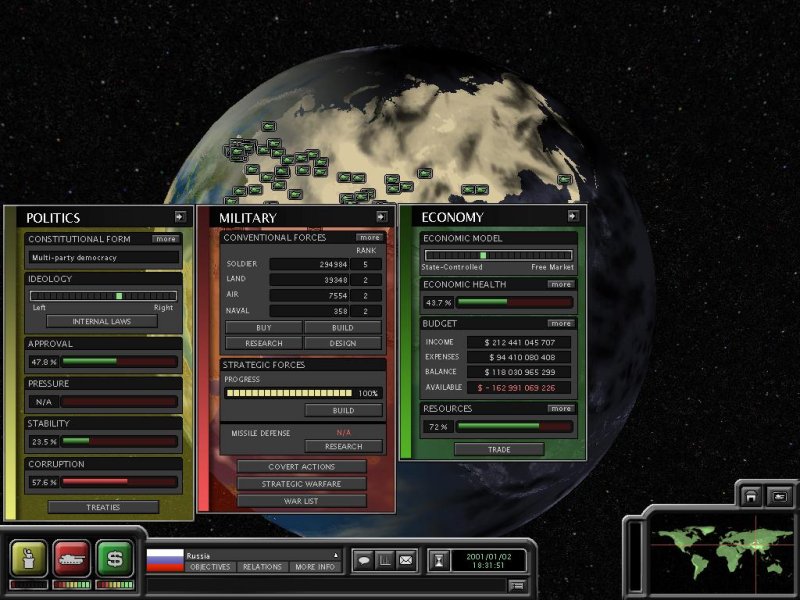
The Overview Panels:
(Politics = Diplomacy, Militar & Economy - We'll also have Technology and others perhaps)
Attachment: image1.jpg
This has been downloaded 14 time(s).
Last edited by alms66 on 03-01-2005 at 08:28
|
|
| |
|
|
|
alms66
|
|
Louisiana
Oct 1999
time: 23:18
|
|
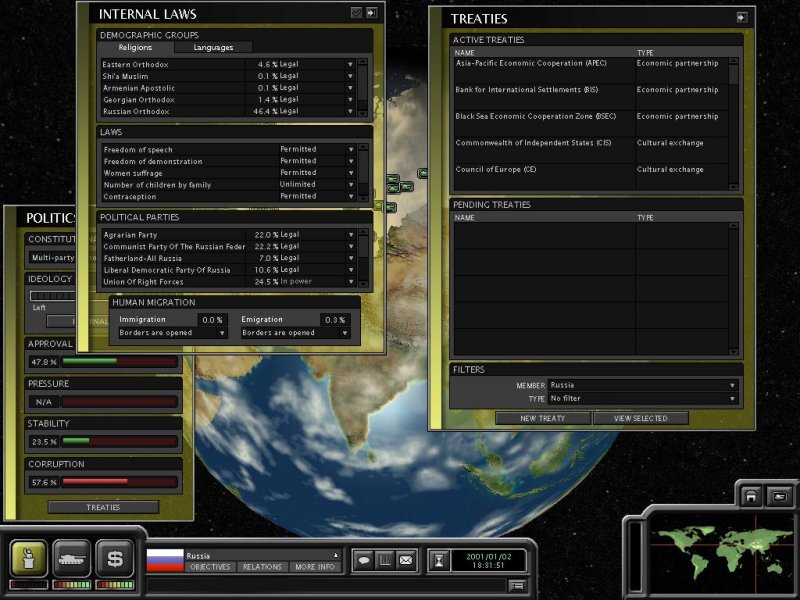
Politics Detail Panels:
Attachment: image2.jpg
This has been downloaded 14 time(s).
|
|
| |
|
|
|
alms66
|
|
Louisiana
Oct 1999
time: 23:18
|
|
Military Detail Panels:
Attachment: image3.jpg
This has been downloaded 14 time(s).
|
|
| |
|
|
|
alms66
|
|
Louisiana
Oct 1999
time: 23:18
|
|
Economy Details (Part 1):
Attachment: image4.jpg
This has been downloaded 14 time(s).
|
|
| |
|
|
|
alms66
|
|
Louisiana
Oct 1999
time: 23:18
|
|
Economy Details (Part 2):
Attachment: image5.jpg
This has been downloaded 14 time(s).
|
|
| |
|
|
|
alms66
|
|
Louisiana
Oct 1999
time: 23:18
|
|
I’ll do a screenshot by screenshot rundown, starting with my first post, with comments on them and how they relate to Clash.
Screenshot 1 (From this Thread)
I like trees. Actually, I love trees. They are an enormously efficient way of compacting a vast amount of data into a very small space. We must make extensive use of them. This shot in particular isn’t very detailed, but it’s a start.
What I'd do is split the panel in two, with the tree on the left and the info and slider on the right. I'd also put that top bar of info on the right side. IMO, this would be a much cleaner and rather good design.
Screenshot 2 (Chariots of War)
I’m not sure how the player will affect trading, except that he can set tariffs. This could be a good screen to model the tariff setting panel on. Have each resource listed on the left and tariff levels on the right, including special modifiers for favored nation and economic treaties.
Screenshot 3 (CTP2)
I really like CTP2’s interface. The wheel in particular and the details to the right of it (lower right-hand corner). Again, this is an excellent example of compressing a large amount of data into a small space, but this time, with tabs (Empire, City, Unit, Msg, etc.). We must also make extensive use of tabs.
The Empire Manager Screen has very little that could be used for Clash, IMO.
Screenshot 4 (CTP2)
The National Manager Screen may be useful to us. It shows how much food, crime, research, pollution, and production is produced by a city, as well as the happiness level, population, and on the Status tab, what each is building.
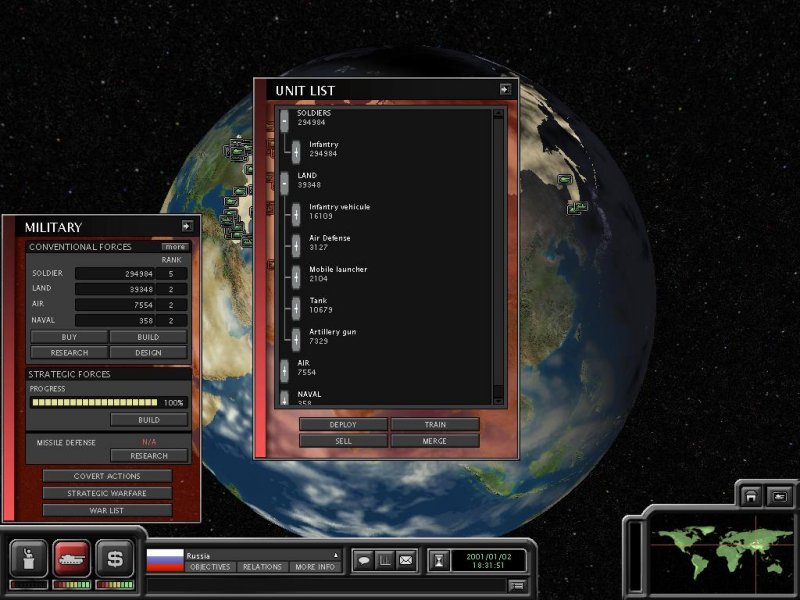
Screenshot 5 (SimCity4)
I like the bottom portion of the Budget window. It should be used on our highest level econ interface, though we’d use turn, instead of month. The rest of it is ok, but trees would be useful here.
I want to see a real budget tree in Clash. I want spending to go into the red and hurt the economy.
Screenshot 6 (SimCity4 Taxes)
I like the tax breakdown here. We could do it by social class and ethnicity, even religion perhaps?
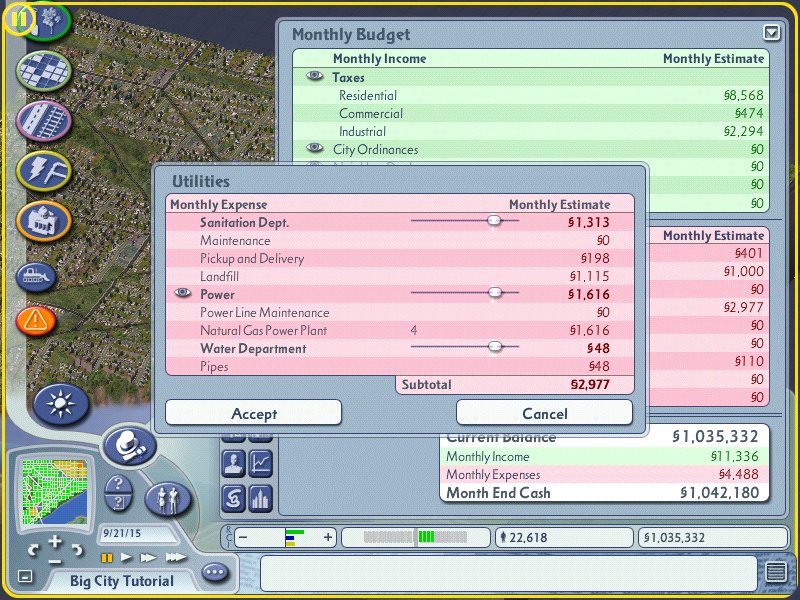
Screenshot 7 (SimCity4 Utilities)
This is a good example of upkeep sliders on Infrastructure. The vertical white line indicates ideal spending, while less hurts and more helps, to a point.
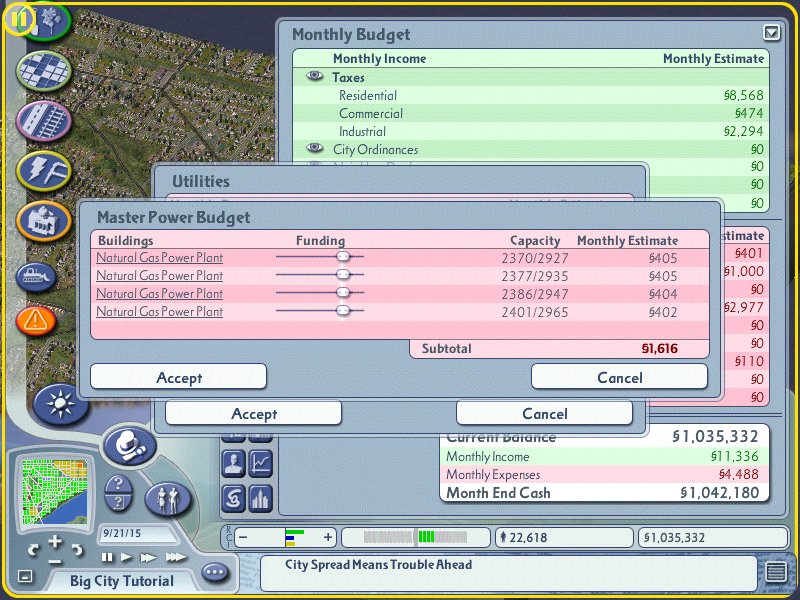
Screenshot 8 (SimCity4 More detail on Utilities)
This is probably useless for us, but I wanted to show it, just in case.
Screenshot 9 (SimCity4 Transportation)
Just a second example of Infrastructure upkeep stuff.
Screenshot 10 (SimCity4 Loans)
Loans are a nice feature of SimCity, but the money comes from nowhere. In Clash, it will come from other countries, and possibly, from private banks in more modern times?
Superpower 2
Screenshot 1
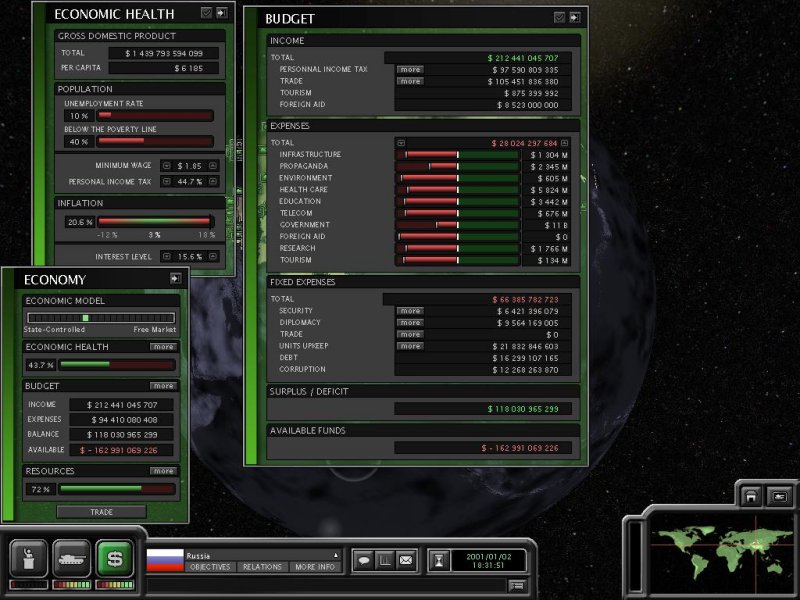
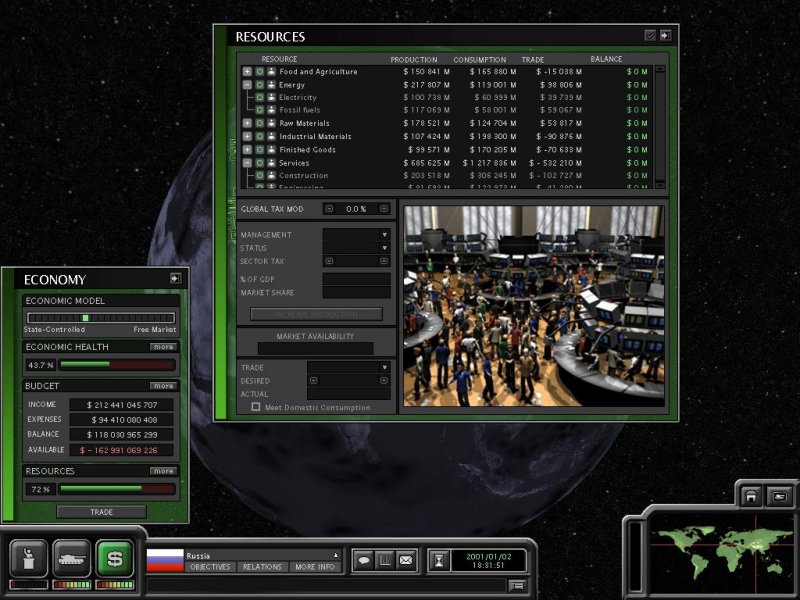
These overview panels are ideal examples of what we need for Clash. In Clash, we’ll have many areas (Military, Economy, Diplomacy, Technology, etc.), each with a single button that brings up the overview window.
No player should be required to go beyond this point, if he doesn’t want to. There should be very general orders and info here. Orders such as “Increase Government Spending” for when you feel you’re raking in too much money, “Increase Military Strength” for when you feel you need it. The opposite should be possible on the same slider. That’s another gem in the interface toolkit… sliders. I like em.
The other screenshots are just detail really, and we’ll have to decide what to put on which ones, and even which ones are needed in the first place. These shots may help in the decision process.
Last edited by alms66 on 03-01-2005 at 08:33
|
|
| |
|
|
|
alms66
|
|
Louisiana
Oct 1999
time: 23:18
|
|
quote:
Originally posted by Mark_Everson
Well, it might be essential or it might not. But I wouldn't spend too much time on this right now b/c we don't have anyone to do the programming. I don't have time to code it, and lack any real knowledge of gui programming. Laurent has too much on his plate and hates gui coding. It would be a great project for someone new that was good with gui, but we haven't had much in the way of new recruits recently. |
I've sort of got my hands full with the tech tree, tutorials and graphics. Once the tutorials and first run of the tech tree are out though, it should require much less effort to keep up with the tech tree changes than it requires to set it up, and graphics can progress at whatever slow pace they progress at*, so I'll look into it then. I did lots of custom GUI stuff for EIT, which wasn't too difficult, and I did some stuff with MFC for the tools while developing EIT, and that was even easier. So if Java's Swing stuff is along the lines of MFC, I suspect it's not really that difficult to do. I'm with Laurent though, I hate doing it.
quote:
Originally posted by Mark_Everson
Thanks for posting all the shots, they'll be useful eventually. I may motivate myself to try some ads at some game programming sites to see if we can get someone that way. However historically such people have been very hit-and-miss and tend to consume as effort in time etc. as they contribute. |
I know what you mean. I posted several ads on those sites, and got mostly flakes. It's best to just post a general help wanted ad and bump it every few weeks or so, if you're going to do it at all.
*I've also placed ads for artists in a few spots (Gamedev, Garagegames, deviantArt, etc.) I have nearly 30 tiles (mostly units) which could be drawn for the game, if we had someone, so there's plenty of work for artists.
|
|
| |
|
|
|
alms66
|
|
Louisiana
Oct 1999
time: 23:18
|
|
I'd also like to add here that it would be a good idea to incorporate the idea of 'Ranking' into each area of the game. Thus if the player has the largest and best military He is Rank 1 in military, if his economy is the best, Rank 1 Economy, if he has the most allies & treaties Rank 1 Diplomacy, etc. This would be the player's (and the AI for that matter) overall indication of where their empire is in the world stage.
|
|
| |
|
|
|
alms66
|
|
Louisiana
Oct 1999
time: 23:18
|
|
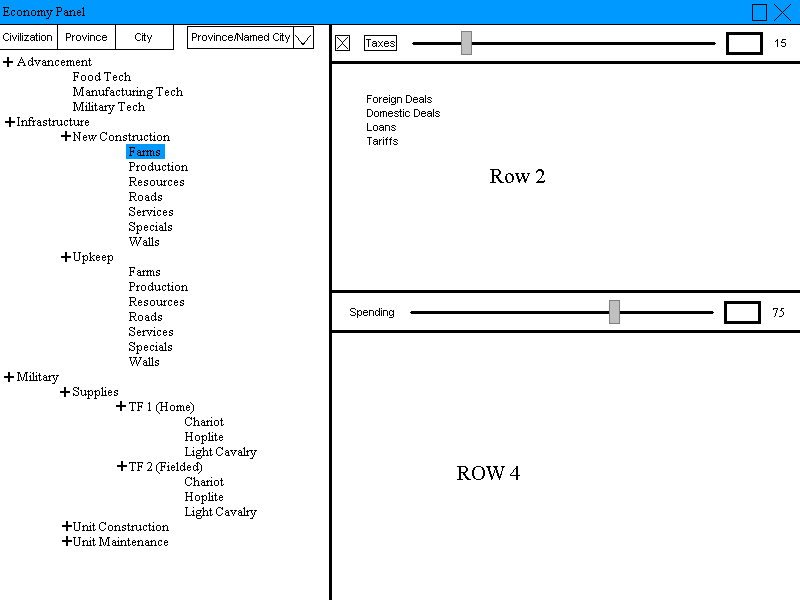
Here is a very crude mock-up for the Economic GUI, similar to the one I did for the Technology GUI:
The top blue bar is the typical windows bar.
The left-hand pane is the “Budget Tree”. Note that what is displayed is what is currently used in most scenarios as of demo 8. The three tabs across the top allow the user to switch between the three economic levels, Civ, Province & Square. Each level in the tree must total 100%. So Advancement + Infrastructure + Military must equal 100%, while Food Tech, Manufacturing Tech and Military Tech must equal 100%, for example.
The Province/Named City drop box allows the user to select a Province by name if the Province tab is selected or a city (only named city tiles) if the City tab is selected. When the Civ tab is selected, the box is non-functional (this is the easy way out, ideally you could select another civ and see whatever information your spy network gives you). This box is merely a convenience. The user can still click on the main map to select his target City (tile), Province or Civ.
The right-hand pane is the “Information Pane”, and is liable to change depending on which particular node in the Budget Tree is actually selected (Note that the pane is grayed out when no nodes are selected). I’m going to describe this pane, “row” by “row”.
Row1: This row consists of the “Taxes” slider (1-100), an edit box and the number display. This sets all tax categories to the same level. The “Taxes” button can be clicked to bring up a more detailed popup window with further tax level breakdowns. The button to the far left is either gray (meaning the slider is active and all levels are equal) or red (meaning this slider is inactive since some or all of the tax levels in the detailed popup are not equal). Clicking that button when it is red, changes it to gray and resets the tax levels on the popup, while clicking it when gray does nothing.
Row2: This row consists of a number of buttons. Currently, they are unorganized, due to there being a rather large amount of space to fill here. I felt it was pointless to lay them out, until I can find more things to include here. Maybe you guys can help me out with that?
Row3: This row consists of the “spending” slider (1-100), an edit box (to enter an exact number), and the number setting display (displays the actual number set). This controls the % of money put into the selected node in the Budget Tree.
Row4: This space will be filled with the current “Econ Stats” popup window.
Again, feel free to ask for more explanation, and suggestions are welcomed.
 Attachment: economy.gif Attachment: economy.gif
This has been downloaded 6 time(s).
|
|
| |
|
| |
All times are GMT. The time now is 05:18.
Apolyton Time is 00:18. |
top of page
|
|
|
Forum Rules:
You may not post new threads
You may not post replies
You may not post attachments
You may not edit your posts
|
HTML code is ON
vB code is ON
Smilies are ON
[IMG] code is ON
|
|
|
|
|
|





 28-02-2003 14:03


 |
|