Apolyton Archive  |  Preserved copy of the Apolyton Civilization Site and its forums as they stood in September 2005. Read-only; nothing here can be posted to or replied to.  |  Forum index |  About this archive |  The 1998–2001 UBB forums
Today on Apolyton WARDELL INTERVIEW PROMO A.C.S. HISTORY CHAPTER 4 GET CIV4 /w FREE PLUS! A.C.S. PHOTO GALLERY GET A.O.M. V1.1
Apolyton Civilization Forums
main| civ2| civ3| civ4| smac| ctp2| ron| moo3| galciv| galciv2| alt| about|
ApolytonPLUS | register | search | faq | new posts | pm (-/-) | upload | members
hall of fame new! | civgroups | civgroups news | interviews | the column | radio | chat | directory | news | store | PLUS
Apolyton Civilization Forums : Powered by vBulletin version 2.0.3 Apolyton Civilization Forums > Alternative Civs > Freeciv > Editing Freeciv graphics the easy way
Show a Printable Version | Email This Page to Someone! | Receive updates to this thread | Report this to Apolyton news!
04.Sep: `FC` 2.0.5 COMPLETED AND RELEASED
27.Jul: `FC` 2.0.4 COMPLETED AND RELEASED
16.Jul: `FC` 2.0.3 COMPLETED AND RELEASED

bottom of page
  
Was this post helpful? (Time out:0 days after 30-04-2002, 02:21)
Yes
Don't know
No
It needs a banana!
View Results [Edit Poll (moderators only)]
Author
Thread    < Last Thread     Next Thread > Post New Thread     Post A Reply
CapTVK is offline CapTVK
King
Voorburg, the Netherlands, Europe
Jan 1970
time: 05:19
  Old Post 30-04-2002 02:19 Visit CapTVK's homepage!
Edit/Delete Message Reply w/Quote
#1 Report this post to a moderator
Editing Freeciv graphics the easy way Suffering from ads?

A quickguide for windows users: Editing Freeciv graphics the easy way


Anyway who has tried out Freeciv might have also taken a look at the graphic files lcoated in the data directory. There you'll find various tilesets. They do share one thing : they're all saved in the P(ortable) N(etwork) G(raphics) PNG format.


So can I edit and change the graphics? Yes, as easy as you can with the original Civ2 graphics. As long as you have a graphic editor which can load& save PNG you shouldn't have much problems. In the following screens I'll show how easily it can be done with an old version of PSP. But any modern graphic editor will do.


Step 1: Choose your subject and load the original Freeciv graphic file

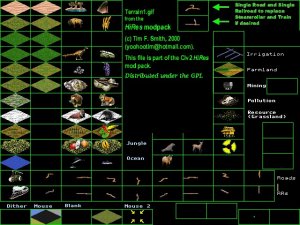
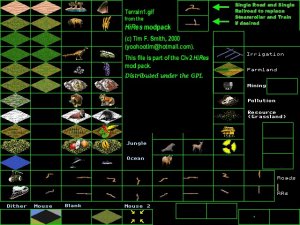
I never was a personal fan of the gold and iron resource squares in Tim Smith's Hires set so that's where we'll start. Let's open up terrain1.png in the /data/hires directory. For pageloading convenience I've converted the PNG to JPG for now.

Attachment: terrain1-step1.jpg
This has been downloaded 296 time(s).

Last edited by CapTVK on 30-04-2002 at 02:38

CapTVK is offline CapTVK
King
Voorburg, the Netherlands, Europe
Jan 1970
time: 05:19
  Old Post 30-04-2002 02:23 Visit CapTVK's homepage!
Edit/Delete Message Reply w/Quote
#2 Report this post to a moderator
Inflate your Upload Space

Step2: Check the palette transparency

Just like graphic GIF files, PNG has an option for setting the background colour to transparent. In the case of Civ2 it's a curious pink colour that serves as the background. Freeciv uses standard black as the transparent background colour.
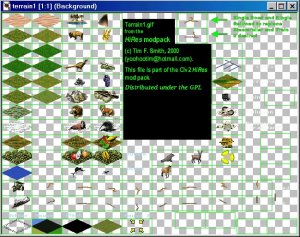
In PSP you can turn off the background colour with the option view palette transparency in the colors menu. Let's see how terrain1.png looks without the black background:

Attachment: terrain1-step2.jpg
This has been downloaded 295 time(s).

Last edited by CapTVK on 30-04-2002 at 02:43

CapTVK is offline CapTVK
King
Voorburg, the Netherlands, Europe
Jan 1970
time: 05:19
  Old Post 30-04-2002 02:24 Visit CapTVK's homepage!
Edit/Delete Message Reply w/Quote
#3 Report this post to a moderator
Inflate your Upload Space

Step3: Understanding Transparency


Wait a minute! If the background colour is black and has now been made invisible. Does that mean I can't use black in my own graphics!? If so, why can still see that large black rectangle on the screen?

There's a good question which you have already answered yourself:
There are several types of black, and only one type can be made transparent. Standard black has the values R=0 G=0 B=0 I=0 If you use the eye dropper and move over the black rectangle you'll see it has a differing value: R=0 G=0 B=0 I=192. It isn't the same! That's the reason why this black rectangle still shows up. As long as you a slightly different type of black your're okay*

(*unless you WANT your units to be invisible in the game, a trick that sometimes is used by scenario makers )

CapTVK is offline CapTVK
King
Voorburg, the Netherlands, Europe
Jan 1970
time: 05:19
  Old Post 30-04-2002 02:25 Visit CapTVK's homepage!
Edit/Delete Message Reply w/Quote
#4 Report this post to a moderator
Support Apolyton, buy Civilization: The Boardgame

Step4: Changing and editing graphics

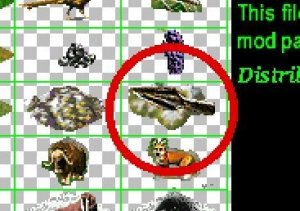
Now that we understand transparency, we'll get to the nitty gritty: editing. I'll presume you understand standard editing and how cut and paste works. Looks closely at the picture below and you'll see I've already changed the Freeciv gold resource square to the standard Civ2. That just leaves the Freeciv iron square circled in red. Looks a bit like a spearpoint doesn't it? Well, I prefer the standard Civ2 one so let's load up the terrain1.gif from the original Civ2

Attachment: terrain1-step4.jpg
This has been downloaded 294 time(s).

CapTVK is offline CapTVK
King
Voorburg, the Netherlands, Europe
Jan 1970
time: 05:19
  Old Post 30-04-2002 02:28 Visit CapTVK's homepage!
Edit/Delete Message Reply w/Quote
#5 Report this post to a moderator
Support Apolyton, buy Civilization III: Complete

Step 5 Copy and Paste


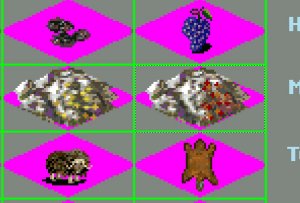
First we'll copy& paste the Civ2 iron resource square and save it as a file

Attachment: terrain1-step5.jpg
This has been downloaded 289 time(s).

Last edited by CapTVK on 30-04-2002 at 02:42

CapTVK is offline CapTVK
King
Voorburg, the Netherlands, Europe
Jan 1970
time: 05:19
  Old Post 30-04-2002 02:29 Visit CapTVK's homepage!
Edit/Delete Message Reply w/Quote
#6 Report this post to a moderator
Increase Your PM Length

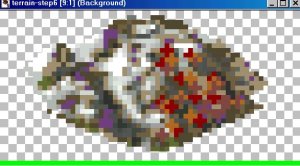
step 6 Editing and settings transparency


Now we'll remove the pink and gray and replace it with the standard black colour and set the background colour (once again R=0 G=0 B=0 I=0) to transparent. After that we make the background invisible The end result will look like this:

Attachment: terrain1-step6.jpg
This has been downloaded 290 time(s).

CapTVK is offline CapTVK
King
Voorburg, the Netherlands, Europe
Jan 1970
time: 05:19
  Old Post 30-04-2002 02:31 Visit CapTVK's homepage!
Edit/Delete Message Reply w/Quote
#7 Report this post to a moderator
Inflate your Upload Space

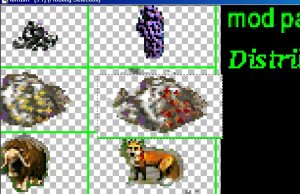
step7: Pasting in the new graphics


Now that the transparency has been set we can copy&paste it into the Freeciv terrain1.png. I've included the green line to make it easier to line up the square over the old one.

(Just a tad more to the left.... )

Attachment: terrain1-step7.jpg
This has been downloaded 285 time(s).

CapTVK is offline CapTVK
King
Voorburg, the Netherlands, Europe
Jan 1970
time: 05:19
  Old Post 30-04-2002 02:33 Visit CapTVK's homepage!
Edit/Delete Message Reply w/Quote
#8 Report this post to a moderator
Support Apolyton, buy Civilization III: Complete

Step8: Tidying up

Everything seems okay so let's deactivate the view palette transparency-option in the colors menu and see the results (in JPG format):

Attachment: terrain1-step8.jpg
This has been downloaded 282 time(s).

CapTVK is offline CapTVK
King
Voorburg, the Netherlands, Europe
Jan 1970
time: 05:19
  Old Post 30-04-2002 02:35 Visit CapTVK's homepage!
Edit/Delete Message Reply w/Quote
#9 Report this post to a moderator
Support Apolyton, buy Call to Power 2

step9 Conclusion and suggestions

In this guide you learned how easy it is to change the graphics in Freeciv for windows. You can edit all the Freeciv graphic files in the same way as long as your graphic program supports PNG and know how to set the background to transparent.


As a final suggestion I would like to draw your attention to my plan to create a new set, named Apolyton , for Freeciv based on various tiles and units created by the Civ2 scenario makers. If anyone would like to donate some units or help out please contact me by email or via this forum.

Chaos Engine is offline Chaos Engine
Settler

May 2002
time: 05:19
  Old Post 12-05-2002 13:58
Edit/Delete Message Reply w/Quote
#10 Report this post to a moderator
Lose 30 kilos (of popups)

ooooooouuhhh...... great guide!

CapTVK is offline CapTVK
King
Voorburg, the Netherlands, Europe
Jan 1970
time: 05:19
  Old Post 12-05-2002 17:16 Visit CapTVK's homepage!
Edit/Delete Message Reply w/Quote
#11 Report this post to a moderator
Browse Apolyton AD-FREE

quote:
Originally posted by Chaos Engine
ooooooouuhhh...... great guide!


Ehmm...thanks..but I've been busy coming up with something better!


WATCH THIS SPACE

LoD is offline LoD
Prince
Warsaw, Poland
Jan 2000
time: 06:19
  Old Post 16-06-2002 15:27 Visit LoD's homepage!
Edit/Delete Message Reply w/Quote
#12 Report this post to a moderator
Support Apolyton

Nice guide! Now, if I only knew how to manipulate PNG transparency settings in Picture Publisher ...

CapTVK is offline CapTVK
King
Voorburg, the Netherlands, Europe
Jan 1970
time: 05:19
  Old Post 16-06-2002 16:33 Visit CapTVK's homepage!
Edit/Delete Message Reply w/Quote
#13 Report this post to a moderator
Help yourself to an AD-FREE life

quote:
Originally posted by LoD
Nice guide! Now, if I only knew how to manipulate PNG transparency settings in Picture Publisher ...


Isn't Picture Publisher more of a photo editor? I can imagine transparency settings buried away somewhere deep in the picture settings. You could try PaintShopPro (I still use the ancient version 5.0) or the open source graphic editor the GIMP (comparable in options to PSP but easier in direct use).

LoD is offline LoD
Prince
Warsaw, Poland
Jan 2000
time: 06:19
  Old Post 03-07-2002 13:33 Visit LoD's homepage!
Edit/Delete Message Reply w/Quote
#14 Report this post to a moderator
Support Apolyton

Yes, PP's more suited for photoediting, but usually I get away with using it for more, err, 'designer' ends. It has transparency controls for the GIF, but none for PNG as it seems. I'll have to try GIMP I think. Thanks for the reply.

Straybow is offline Straybow
Emperor
SG(2)… gone but not forgotten
Jan 1970
time: 23:19
  Old Post 05-11-2002 04:15 Visit Straybow's homepage!
Edit/Delete Message Reply w/Quote
#15 Report this post to a moderator
Full PM-box? Change here!

I have tried GIMP but I can't seem to get it going. Everything seems fine until I load an image (eg, Civ2 units.gif) and I get an error saying it can't load the brush type (click OK then ctd). Unfortunately, the help provided on Tor Lillquist's page seems more geared toward unix users.

maubp is offline maubp
Chieftain

Oct 2002
time: 05:19
  Old Post 05-11-2002 15:00
Edit/Delete Message Reply w/Quote
#16 Report this post to a moderator
Avatar Enlargement: We've got the solution

I had been converting the PNG into GIF files, which also support transparency. I could then use Microsoft Paint Brush (the version in windows 2000) to edit the GIF.

However, as a side effect of the conversion, seems to have merged the two different blacks into plain black. I had wondered what was happening - you post helped me understand this.

I plan to use a using gastly pink (like in Civ 2 tiles) for the transparancy colour. In Paint Brush goto Image, Attributes to set the transparancy colour.

See the thread High(er) Resolution Tilesets.

Peter

Last edited by maubp on 05-11-2002 at 15:05

maubp is offline maubp
Chieftain

Oct 2002
time: 05:19
  Old Post 09-11-2002 17:01
Edit/Delete Message Reply w/Quote
#17 Report this post to a moderator
Support Apolyton, buy Civilization 2

I have given up on doing transparency in Microsoft Paint Brush, instead I have been editing the tiles there, but using Microsoft Photo Editort to convert to PNG and set the transparency colour.

Maybe I should get round to reinstalling linux - last time it was fine until I used Windows 2000 to reformat an NTFS partition to FAT, and that stopped anything booting!

What tools do you all recommend on either Windows, or Linux (the Gimp?)

Straybow is offline Straybow
Emperor
SG(2)… gone but not forgotten
Jan 1970
time: 23:19
Angry  Old Post 06-01-2003 09:12 Visit Straybow's homepage!
Edit/Delete Message Reply w/Quote
#18 Report this post to a moderator
Aaarrgh Support Apolyton or Terrorists Win

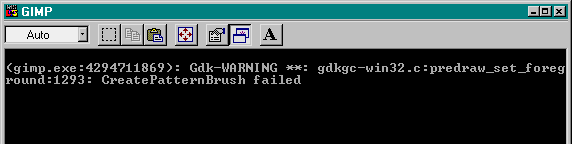
Tried again d/l the zips, install, then load a gif and get this

Attachment: gimperrormsg.png
This has been downloaded 80 time(s).

LarryN is offline LarryN
Settler
Wroc³aw- Poland
Jan 2002
time: 06:19
  Old Post 10-01-2003 05:23 Visit LarryN's homepage!
Edit/Delete Message Reply w/Quote
#19 Report this post to a moderator
Support Apolyton or Terrorists Win

quote:
Originally posted by maubp

Maybe I should get round to reinstalling linux - last time it was fine until I used Windows 2000 to reformat an NTFS partition to FAT, and that stopped anything booting!

For sure, you should ;-)
quote:

What tools do you all recommend on either Windows, or Linux (the Gimp?)


Yes. (For Win..) too.

  < Last Thread     Next Thread > Post New Thread     Post A Reply
All times are GMT. The time now is 05:19.
Apolyton Time is 00:19.
    top of page
Rate This Thread:
Forum Jump:
Forum Rules:
You may not post new threads
You may not post replies
You may not post attachments
You may not edit your posts
HTML code is ON
vB code is ON
Smilies are ON
[IMG] code is ON


Contact Us - Apolyton Civilization Site - Support Us!

Building a better Apolyton through better information. Click here and take our poll!
Non-US visitors, click here!

Powered by: vBulletin Version 2.0.3
Copyright ©2000, 2001, Jelsoft Enterprises Limited.

Page generated in 0.0525 seconds (90.63% PHP - 9.37% MySQL) with 33 queries
Page Loading Time:

Support Apolyton: Amazon USA | Amazon UK | Amazon DE | Amazon FR |
Support Apolyton and get FREE PLUS, Buy from Chips&Bits: Galactic Civilizations | Galactic Civilizations: Deluxe Edition | Call to Power 2 | Civilization: The Boardgame | GURPS/ Alpha Centauri | Alpha Centauri | Civilization IV | Civilization III: Complete |


Front Page | Civilization IV | Civilization III | Civilization II | Call to Power II | Alpha Centauri | Master of Orion III
Rise of Nations | Galactic Civilizations | Galactic Civilizations II | Misc
Alt.Civs | Civ I | C:CtP I | About | News | Directory | Apolyton Store | Forums | Chat | Columns | Interviews | Newsletter
Scenario League | CSC | Clash of Civs | Spanish Site | CtP Maps | Cradle of Civ | WesW's Ctp1/2 Site | Civ3 Haven

apolyton.net | apolyton.com | civilization2.net | civilization3.net | civilization4.net | civilizationiv.info | calltopower.net | galciv.net | galciv2.net | moo3.net