Apolyton Archive  |  Preserved copy of the Apolyton Civilization Site and its forums as they stood in September 2005. Read-only; nothing here can be posted to or replied to.  |  Forum index |  About this archive |  The 1998–2001 UBB forums
Today on Apolyton WARDELL INTERVIEW PROMO A.C.S. HISTORY CHAPTER 4 GET CIV4 /w FREE PLUS! A.C.S. PHOTO GALLERY GET A.O.M. V1.1
Apolyton Civilization Forums
main| civ2| civ3| civ4| smac| ctp2| ron| moo3| galciv| galciv2| alt| about|
ApolytonPLUS | register | search | faq | new posts | pm (-/-) | upload | members
hall of fame new! | civgroups | civgroups news | interviews | the column | radio | chat | directory | news | store | PLUS
Apolyton Civilization Forums : Powered by vBulletin version 2.0.3 Apolyton Civilization Forums > Miscellaneous > Archive > CtP2-Creation/AI/Mods/Scenarios-Archive > CTPEd v0.2beta Release
Show a Printable Version | Email This Page to Someone! | Receive updates to this thread | Report this to Apolyton news!

bottom of page
  
Author
Thread   
Pages (6): [ 1   2   3   4   5     >> ]
< Last Thread     Next Thread > Post New Thread     Post A Reply
J Bytheway is offline J Bytheway
Emperor
England
Jul 2001
time: 05:19
  Old Post 15-05-2002 23:29 Visit J Bytheway's homepage!
Edit/Delete Message Reply w/Quote
#31 Report this post to a moderator
Full PM-box? Change here!

Is the default project (default.ced) really in c:\Activision\CTP2\ctp2_data\CTPEd\ - that's the only file it should be accessing at that stage.

I can make the error more informative. The fact that it quits is primarily a safety measure - it's much easier than trying to recover from a sudden lack of project file. Nevertheless, I'll try to fix it.

I knew there would be bugs, but I didn't think it would be this bad... My apologies to everyone. Please don't give up on me...

J Bytheway is offline J Bytheway
Emperor
England
Jul 2001
time: 05:19
  Old Post 15-05-2002 23:44 Visit J Bytheway's homepage!
Edit/Delete Message Reply w/Quote
#32 Report this post to a moderator
Full PM-box? Change here!

OK, I should probably make this more clear: The ProjectPath in the ini file is essentially only used for locating default.ced (and also as the default directory when saving.opening projects). Yours points to c:\Activision\CTP2\ctp2_data\CTPEd\ (by means of the %c abbreviation), but since you said you had installed in another directory I suspect that might be wrong.

J Bytheway is offline J Bytheway
Emperor
England
Jul 2001
time: 05:19
  Old Post 16-05-2002 01:08 Visit J Bytheway's homepage!
Edit/Delete Message Reply w/Quote
#33 Report this post to a moderator
Remove this text

(Chain posting again, I'm sorry)
To address your concerns I have released v0.2.1. Full copy available at same place as before, update at:
[Edit: File removed - obsolete]
(unzip into installation directory)

Changes in this version:
Reworded the incorrect version error.
Made the path not found error which some people have experienced more clear.
If you try to open an invalid project file then the program no longer crashes.
Reworded the readme to make it clearer.
Added a structure file for govern.txt.

BigMc: For you, I have created a zip containing most of the relevant files at:
http://ctpmodmakers.250free.com/JBTW/CTPEdNoS.zip
This comes with no setup proram, unzip this into your preferred installation directory and try to run. You may be lacking in some .ocx files - if that is the case then tell me, and I shall provide them.

Last edited by J Bytheway on 18-08-2002 at 00:35

Pedrunn is offline Pedrunn
King
of Natal, Brazil
Jul 2001
time: 02:19
  Old Post 16-05-2002 03:40
Edit/Delete Message Reply w/Quote
#34 Report this post to a moderator
Increase Your PM Length

quote:
Originally posted by J Bytheway
I knew there would be bugs, but I didn't think it would be this bad... My apologies to everyone. Please don't give up on me...

This project is so handy to modders that I would say to you:

"Dont give up on us just because things went bad!"

Maquiladora is offline Maquiladora
Emperor

Jun 2001
time: 05:19
  Old Post 16-05-2002 07:21 Visit Maquiladora's homepage!
Edit/Delete Message Reply w/Quote
#35 Report this post to a moderator
Remove this text

I found a little bug while editing govern.txt. Whereby when i try to open the file in my project, it doesnt recognise any of the ProfessionalUnits fields under any of the governments.

J Bytheway is offline J Bytheway
Emperor
England
Jul 2001
time: 05:19
  Old Post 16-05-2002 15:22 Visit J Bytheway's homepage!
Edit/Delete Message Reply w/Quote
#36 Report this post to a moderator
Put an end to popups!

Whoops - must have missed one of the fields. Sorry... I foolishly forgot to check that it actually worked . Does that mean, then, that you've actually got past the start-a-project phase?

Maquiladora is offline Maquiladora
Emperor

Jun 2001
time: 05:19
  Old Post 16-05-2002 16:50 Visit Maquiladora's homepage!
Edit/Delete Message Reply w/Quote
#37 Report this post to a moderator
Support Apolyton, buy GURPS/ Alpha Centauri

heh yeah it does. I sorta of created a new .txt document named it what my project was (unknown) and then changed it to a .ced file. Then opened it and went from there. Dont ask me why i did it like that, it solved something at the time though So far its saved me helluva lot of typing

So far there have been a couple of bugs, but no more than youd make typing the whole lot out.

Last edited by Maquiladora on 16-05-2002 at 16:56

J Bytheway is offline J Bytheway
Emperor
England
Jul 2001
time: 05:19
  Old Post 17-05-2002 02:13 Visit J Bytheway's homepage!
Edit/Delete Message Reply w/Quote
#38 Report this post to a moderator
Inflate your Upload Space

I'm working currently on finishing off structure files for all those data files which are present in the GL. Just hit a problem with the Wonders because they have to have an article in gl_str.txt, which my interface doesn't cater for at present. Next step after that may be a GL defragmenter - the way it is edited currently tends to leave the entries in the wrong order, and doesn't get rid of the obsolete ones.

Maquiladora: Glad to see someone's making progress at least, even if you cheated . What do you mean by a 'couple of bugs'? Anything I could assist with, or just your typing errors. If anyone wants it it would be extremely easy to incorporate something that cross-checks all the fields to make sure they refer to real things. e.g. every ObsoleteAdvance really is an advance. Would that be useful?

Martin, Pedrunn, Big Mc: Any progress. I might actually make a ini file generator to work out the paths like Pedrunn suggested (which is much harder than it sounds). I really can't believe the amount of trouble that file is causing...

Keep the feedback coming please.

Pedrunn is offline Pedrunn
King
of Natal, Brazil
Jul 2001
time: 02:19
  Old Post 17-05-2002 07:37
Edit/Delete Message Reply w/Quote
#39 Report this post to a moderator
Support Apolyton, pre-order Civilization IV

quote:
Originally posted by J Bytheway
Martin, Pedrunn, Big Mc: Any progress. I might actually make a ini file generator to work out the paths like Pedrunn suggested (which is much harder than it sounds). I really can't believe the amount of trouble that file is causing...

Keep the feedback coming please.

Actually i did not even tried after the second attempt. But after reading Maquiladora's posts i got excited again.
I'll keep you informed.

Maquiladora is offline Maquiladora
Emperor

Jun 2001
time: 05:19
  Old Post 17-05-2002 16:00 Visit Maquiladora's homepage!
Edit/Delete Message Reply w/Quote
#40 Report this post to a moderator
Support Apolyton buy from Amazon

quote:
Originally posted by J Bytheway
Maquiladora: Glad to see someone's making progress at least, even if you cheated . What do you mean by a 'couple of bugs'? Anything I could assist with, or just your typing errors.


Ok well the one main bug ive come across is when editing units.txt. I wanted to create a new archer and so i thought the easiest way to save all the field typing would be to copy the default archer from the original units.txt and paste it into a clear field id just inserted at the top, and then edit as i needed. So, i did this but when the file was exported and i looked at the new archer (UNIT_ARCHER_TES) it altered this in its list.....

ExertsMartialLaw
DeathEffectsHappy
CanReform UNIT_ARCHER_TES {
Sound SOUND_ID_REFORM_CITY
Effect SPECEFFECT_REFORMCITY
}

that was under the new archer, and under the one id copied it from it altered that one too, which i thought very weird, to...

DeathEffectsHappy
CanReform UNIT_ARCHER {
Sound SOUND_ID_REFORM_CITY
Effect SPECEFFECT_REFORMCITY
}

same effect really. That was using the copy/paste method, creating a new unit straight off the bat it did the same thing except when CanReform was turned off it did the same next to all the other variables, like SlaveUprising , InvestigateCity etc.. which if you create lots of units then export to find all that, can be kind of annoying. Luckily i only made 3 new units all with the same bug happening so it wasnt hard to go down and fix all 3 and the 2 original ones id copy/pasted from.

The only others ive tried are advances.txt and buildings.txt which worked great.

J Bytheway is offline J Bytheway
Emperor
England
Jul 2001
time: 05:19
  Old Post 17-05-2002 17:50 Visit J Bytheway's homepage!
Edit/Delete Message Reply w/Quote
#41 Report this post to a moderator
Support Apolyton, buy GURPS/ Alpha Centauri

Curious. I think I know what the problem is. Shouldn't be too hard to fix. (Famous last words?)

Martin Gühmann is offline Martin Gühmann
Emperor
Berlin, Germany
Mar 2001
time: 06:19
Post  Old Post 17-05-2002 21:44 Visit Martin Gühmann's homepage!
Edit/Delete Message Reply w/Quote
#42 Report this post to a moderator
Put an end to popups!

OK I got it to work afterwards I I replaced

ProjectPath %c\CTPEd\

by

ProjectPath C:\Activision\mods\CTPEd\
in the CTPed.ini.

Another problem I see is that you have for example in the unit.txt to many entries, it would be better if they would be listed in one colunm instead in lines, so that you have the scroll bar on the right instead on the bottom. Another option that would be good would be the possibility of rezizing the entry list window so that I can see the full names of the entries in the text file.

In the window I would rename the Append button to Add like in TileEdit and it is more common.

But this way is much more powerful to edit text files, I just realized that I forgot two entries for TERRAIN_GRASSLAND_GOOD_ONE (yeah I made a structure file for the Goods.txt), but actual this doesn't matter, as these entries doesn't work anyway in CTP2. But this tool give you the overview about one DB.I think I will use the prerequisite and consequence field for showing me the required terrain and the other goods on that terrain. But to this later.

I think I have also to say something to the Great Library but to this one later.

-Martin

J Bytheway is offline J Bytheway
Emperor
England
Jul 2001
time: 05:19
  Old Post 17-05-2002 21:59 Visit J Bytheway's homepage!
Edit/Delete Message Reply w/Quote
#43 Report this post to a moderator
Support Apolyton buy from Amazon

quote:
Originally posted by Martin Gühmann
Another problem I see is that you have for example in the unit.txt to many entries, it would be better if they would be listed in one colunm instead in lines, so that you have the scroll bar on the right instead on the bottom.


Hmm.. I can see the advantages of that. Perhaps I'll make it optional to do so. The main thing I was trying to do with the current interface was fit as much as possible into a small space. This is because I'm working on 800x600 resolution, so I have problems fitting much on the screen.

quote:
Another option that would be good would be the possibility of rezizing the entry list window so that I can see the full names of the entries in the text file.


You can already do that - that's what the grey rectangle is for between the list of entries and the section for fields.

quote:
In the window I would rename the Append button to Add like in TileEdit and it is more common.


I was trying to make it clear that the new entry will be added at the end of the list. Add seemed a bit too general.

quote:
But this way is much more powerful to edit text files, I just realized that I forgot two entries for TERRAIN_GRASSLAND_GOOD_ONE (yeah I made a structure file for the Goods.txt), but actual this doesn't matter, as these entries doesn't work anyway in CTP2. But this tool give you the overview about one DB.I think I will use the prerequisite and consequence field for showing me the required terrain and the other goods on that terrain. But to this later.


At the moment you could have problems with gl_str.txt when editing the goods and/or terrain - this is an issue which I have fixed in the newest version (not yet released).

The prerequisite field can, at present, only refer to other entries of the same file - this would require them to refer to entries in different files. That wouldn't work. I could change that - I'll try and remember to have it on a list of things to do.

J Bytheway is offline J Bytheway
Emperor
England
Jul 2001
time: 05:19
  Old Post 18-05-2002 00:58 Visit J Bytheway's homepage!
Edit/Delete Message Reply w/Quote
#44 Report this post to a moderator
Update v0.2.2 Get a bigger avatar today!

Updated to v0.2.2. Full install as before, update at:
[Edit: File removed - obsolete]

New in this version:

Made the comments associated with fields appear in the status bar
Made structure files for goods.txt, wonder.txt, terrain.txt, speceffectid.txt
Corrected errors in govern.txt structure file
Fixed bug in editing of gl_str.txt for terrain/goods
Added support for articles (for wonders)
Updated other structure files to reflect new system
Made small changes to CTPEd.txt
Fixed other misc minor bugs (including that found by Malquiladora)

If you've made any structure files yourself, then you should know that you might have to alter them. If they are of format 1 and the following line is 't':

t //Whether this file references GL entries (see below)

Then you must add the following directly underneath:

f //Whether the entries have an article

(If you wanted this true you would also need to add an article suffix as demonstrated in wonder.ces)

Last edited by J Bytheway on 18-08-2002 at 00:39

Maquiladora is offline Maquiladora
Emperor

Jun 2001
time: 05:19
  Old Post 19-05-2002 01:17 Visit Maquiladora's homepage!
Edit/Delete Message Reply w/Quote
#45 Report this post to a moderator
Support Apolyton, pre-order Civilization IV

Ok, i installed the update, but i cant open my project made from the previous version. Was this intended/unavoidable? And if so is it fixable somehow?
I also cant create a new project under the new update. It gives me this error in both instances-

run time error 1035
filed allows multiple but has no arguments

J Bytheway is offline J Bytheway
Emperor
England
Jul 2001
time: 05:19
  Old Post 19-05-2002 01:27 Visit J Bytheway's homepage!
Edit/Delete Message Reply w/Quote
#46 Report this post to a moderator
Support Apolyton, pre-order Civilization IV

My fault entirely - I forgot to include the new version of the executable in the zip (Duh! ) - it was trying to use new structure files with the old rules. Sorry. Should be fixed now - download update at same place (CTPEd022.zip).

J Bytheway is offline J Bytheway
Emperor
England
Jul 2001
time: 05:19
  Old Post 19-05-2002 01:38 Visit J Bytheway's homepage!
Edit/Delete Message Reply w/Quote
#47 Report this post to a moderator
Increase Your PM Length

If anyone ever has similar problems again just after an update then check the version number in the status bar and ensure it agrees with what I said it should be. If it doesn't then it probably means I've put the wrong executable version in again.

Martin Gühmann is offline Martin Gühmann
Emperor
Berlin, Germany
Mar 2001
time: 06:19
Post  Old Post 19-05-2002 02:07 Visit Martin Gühmann's homepage!
Edit/Delete Message Reply w/Quote
#48 Report this post to a moderator
Got spare money?

Just tried to open my GM1_goods.txt, and I wasn't abe to open it with your version of the goods.ces. You forgot the food, production and GLHidden flag also they don't work but they can appear in this file. Here is a fixed version of the goods.ces.

-Martin

Attachment: goods.zip
This has been downloaded 3 time(s).

J Bytheway is offline J Bytheway
Emperor
England
Jul 2001
time: 05:19
  Old Post 19-05-2002 02:12 Visit J Bytheway's homepage!
Edit/Delete Message Reply w/Quote
#49 Report this post to a moderator
Support Apolyton, buy Civilization III: Complete

I was trying to declutter the interface - it seemed silly to allow modification of superfluous fields. I plan a more cunning way of achieving this in the next version. Essentially the fields will be listed as 'broken' in the structure file so that it doesn't bother to generate controls for them on the form. Will require big changes to the structure files, though .

Martin Gühmann is offline Martin Gühmann
Emperor
Berlin, Germany
Mar 2001
time: 06:19
Post  Old Post 19-05-2002 02:35 Visit Martin Gühmann's homepage!
Edit/Delete Message Reply w/Quote
#50 Report this post to a moderator
Remove this text

I know decluttering the interface is a good idea therefore you should have the option to hide some fields maybe by default.

But unfortunatly I just encountered another problem. As I tried to create a new project or to create one from a gamefile.txt I got the error message: Runtime Error 76 Path not found. In the *.ini I should have set the right path. To make shure I attach it here again.

-Martin

Attachment: ctped.zip
This has been downloaded 6 time(s).

J Bytheway is offline J Bytheway
Emperor
England
Jul 2001
time: 05:19
  Old Post 19-05-2002 02:40 Visit J Bytheway's homepage!
Edit/Delete Message Reply w/Quote
#51 Report this post to a moderator
Support Apolyton, buy Civilization III: Complete

Aaargh! No!! I could have sworn I hadn't changed anything in that part of the program. When exactly does this occur?

Martin Gühmann is offline Martin Gühmann
Emperor
Berlin, Germany
Mar 2001
time: 06:19
  Old Post 19-05-2002 02:57 Visit Martin Gühmann's homepage!
Edit/Delete Message Reply w/Quote
#52 Report this post to a moderator
Avatar Enlargement: We've got the solution

I just unzipped the latest patch into the CTPEd folder. Than I tried to open the program got another error, because the patch overwrote the *.ini, so I had to modify it again. After the modification started CTPEdit, clicked on Preject > New. Or on Project > Open than loaded my *.cep file and clicked on GM1_goods.txt. Or on Project > Read from Gamefile.txt than tried to open a gamefile.txt. I have no idea the path looks ok.

-Martin

J Bytheway is offline J Bytheway
Emperor
England
Jul 2001
time: 05:19
  Old Post 19-05-2002 03:19 Visit J Bytheway's homepage!
Edit/Delete Message Reply w/Quote
#53 Report this post to a moderator
Get a bigger avatar today!

Sorry about overwriting the ini file - that shouldn't have been in the update (I'll change that in a moment).

The problem you're having now looks like it's caused by something else - are you saying that it loads the project OK but then you get a paths error when you try to open a file from the project window? The only file it should be trying to access then is the data file itself (GM1_goods.txt in your example). The path and filename for that are set in the project file so you might check there but they shouldn't have changed with the new install...

Try the attached minor revision of the executable - it won't fix the problem but it should give a better version of the error message so that we can see what's happening.

Attachment: ctped023.zip
This has been downloaded 10 time(s).

Martin Gühmann is offline Martin Gühmann
Emperor
Berlin, Germany
Mar 2001
time: 06:19
  Old Post 19-05-2002 03:34 Visit Martin Gühmann's homepage!
Edit/Delete Message Reply w/Quote
#54 Report this post to a moderator
Increase Your PM Length

OK, with this error message I found the problem I did not modified the CTPPath in the CTPEd.ini again. But I found another bug if I click on Project > New and I won't to use the Abrechen button (I think Cancel or Abort button in English) than I can click 1000 times on this button but the Project save as box wouldn't close.

-Martin

J Bytheway is offline J Bytheway
Emperor
England
Jul 2001
time: 05:19
  Old Post 19-05-2002 03:37 Visit J Bytheway's homepage!
Edit/Delete Message Reply w/Quote
#55 Report this post to a moderator
Support Apolyton

Yeah... I remember finding that one but I forgot about it. Whoops. Thanks for reminding me.

child of Thor is offline child of Thor
Emperor
UK
Jan 2002
time: 05:19
  Old Post 25-05-2002 00:30
Edit/Delete Message Reply w/Quote
#56 Report this post to a moderator
Support Apolyton, pre-order Civilization IV

Hi,
I know it's hardly been a week but i was wondering how you are going on this? Any chance of a 'latest' screen shot thingy of it? The above posts scare me a bit so at the momment untill the experts are happy i'm waiting just abit untill i try it.

J Bytheway is offline J Bytheway
Emperor
England
Jul 2001
time: 05:19
  Old Post 25-05-2002 00:39 Visit J Bytheway's homepage!
Edit/Delete Message Reply w/Quote
#57 Report this post to a moderator
Support Apolyton

I'm currently (even as I type these words) working on v0.3.0 I've uncovered several knotty bugs that are not simple to untangle, and there are some fairly significant changes (though they won't show on the surface). Exams loom so progress is slowed, but I think I can arrange a screenshot.

J Bytheway is offline J Bytheway
Emperor
England
Jul 2001
time: 05:19
  Old Post 28-05-2002 23:44 Visit J Bytheway's homepage!
Edit/Delete Message Reply w/Quote
#58 Report this post to a moderator
Support Apolyton buy from Amazon

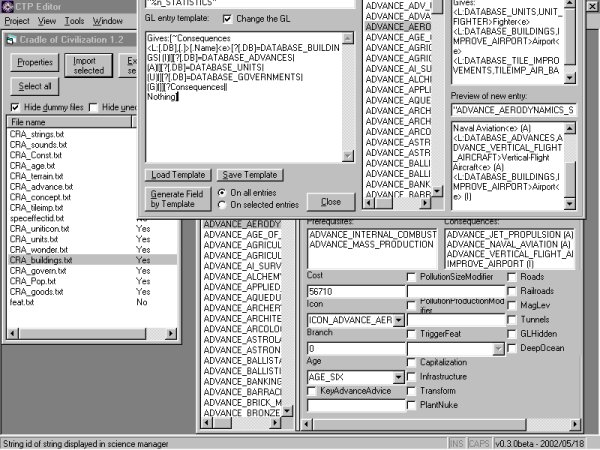
Here's that screenshot (sorry it took so long - silly exams again). The window that's half way off the top of the screen is the Great Library tool, below that is the window for editing Advance.txt.

Nothing very exciting for those who've seen the previous versions. As I said, the latest changes don't show much on the surface.

Version 0.3.0 is proceeding well if slowly - I finally fixed a problem that had had me frustrated for days. I think I'll release before I make all the changes which I had intended, but I haven't decided yet.

Attachment: ctpedscr.jpg
This has been downloaded 93 time(s).

J Bytheway is offline J Bytheway
Emperor
England
Jul 2001
time: 05:19
  Old Post 01-06-2002 02:43 Visit J Bytheway's homepage!
Edit/Delete Message Reply w/Quote
#59 Report this post to a moderator
Update v0.3.0 Browse Apolyton AD-FREE

Full install as before, update at:
http://ctpmodmakers.250free.com/JBTW/CTPEd030.zip

Changes in this version (and the minor release previous) (The following includes info on things you must change to continue to use your own project and structure files, my structure files are updated in the zip - but the easiest way to update your project is to reimport from its gamefile.txt):

v0.3.0beta

Made cancel button work in New Project dialog
Fixed crashing bug caused when you opened a project over an existing one
Added keyboard shortcuts for menu options
Added support for multiple substructures (that was a nightmare)
Made structure files for concepts.txt, pop.txt, tileimp.txt.
Fixed misc. minor bugs
Made big changes to the structure files to account for:
pop.txt having gl_str entries but not GL entries
(I later found that this was unnecessary, but never mind)
other files having broken entries (now optionally won't appear)
concept.txt not having a space between a field value and a '}'
tileimp.txt not having spaces between ':' and field values
This means all files are now moved to v0.2
Changes which must be made to reflect new file version:
To project files:
after the delimiter line add the lines:

code:
: //Break on right quasi-delimiter } //Break on left quasi-delimiter

To structure files:
after the line:
code:
t //Whether this file references GL entries (see below)

add the line:
code:
t //Whether this file has entries in gl_str.txt

(if this is indeed true, otherwise use f)
Amongst the lines:
code:
DefaultIcon //The field which ... DATABASE_WONDERS //Name of database for GL hyperlinks WONDER_ //The prefix which identifies ... _ARTICLE //The article suffix

(Where they exist) rearrange them to the order shown

v0.2.3beta

Imroved error message for files which could not be found


I didn't do everything I wanted. I think that this version is a lot more stable than previous ones, but it looks and works pretty much the same from the outside. Hopefully more features should be coming soon (my list of things to do is growing, not shrinking - sorry I haven't implemented (m)any of your suggestions Martin, but I am taking notice and they are planned. Honest ), but exams continue so it won't be soon. I thought I'd better get this release out to reduce crashes.

Martin Gühmann is offline Martin Gühmann
Emperor
Berlin, Germany
Mar 2001
time: 06:19
Post  Old Post 01-06-2002 03:39 Visit Martin Gühmann's homepage!
Edit/Delete Message Reply w/Quote
#60 Report this post to a moderator
Full PM-box? Change here!

OK, so far two bugs found:

Tile Improvements have not only an enabling advance but they can have optional an obsolete advance for each terrain type as well.

Another problem is that it is not necessary to have in this entry a space between the entry and {. Like here:

TILEIMP_LAND_GOOD_ONE{

So I got here an error: In file GM1_tileimp.txt on line 4444
Found icon
Expected: {

The line above contains it but without a space.

-Martin

 
Pages (6): [ 1   2   3   4   5     >> ]
< Last Thread     Next Thread > Post New Thread     Post A Reply
All times are GMT. The time now is 05:19.
Apolyton Time is 00:19.
    top of page
Rate This Thread:
archivepost
Forum Jump:
Forum Rules:
You may not post new threads
You may not post replies
You may not post attachments
You may not edit your posts
HTML code is ON
vB code is ON
Smilies are ON
[IMG] code is ON


Contact Us - Apolyton Civilization Site - Support Us!

Building a better Apolyton through better information. Click here and take our poll!
Non-US visitors, click here!

Powered by: vBulletin Version 2.0.3
Copyright ©2000, 2001, Jelsoft Enterprises Limited.

Page generated in 0.0728 seconds (91.69% PHP - 8.31% MySQL) with 31 queries
Page Loading Time:

Support Apolyton: Amazon USA | Amazon UK | Amazon DE | Amazon FR |
Support Apolyton and get FREE PLUS, Buy from Chips&Bits: Galactic Civilizations | Galactic Civilizations: Deluxe Edition | Call to Power 2 | Civilization: The Boardgame | GURPS/ Alpha Centauri | Alpha Centauri | Civilization IV | Civilization III: Complete |


Front Page | Civilization IV | Civilization III | Civilization II | Call to Power II | Alpha Centauri | Master of Orion III
Rise of Nations | Galactic Civilizations | Galactic Civilizations II | Misc
Alt.Civs | Civ I | C:CtP I | About | News | Directory | Apolyton Store | Forums | Chat | Columns | Interviews | Newsletter
Scenario League | CSC | Clash of Civs | Spanish Site | CtP Maps | Cradle of Civ | WesW's Ctp1/2 Site | Civ3 Haven

apolyton.net | apolyton.com | civilization2.net | civilization3.net | civilization4.net | civilizationiv.info | calltopower.net | galciv.net | galciv2.net | moo3.net