|
| |
|
| |
|

|
Martin Gühmann
|
 |
Berlin, Germany
Mar 2001
time: 06:19
|
|
The advance of using CTPEd is that you can really accellerate the mod developing process. In return you give up controll over text files, actual something that someone don't want to do if he is used to edit the text files. Therefore it is necessary that the text files stay intact as a whole that includes the comments as well. For example my GM1_strategies.txt is full of comments, usually to indicate the changes who made them what was the original settings and huge outcommented sections to restore the original variables easily. This file also contains some information about the single fields. Of course some of the stuf isn't needed anymore and could be removed but not everything, and I want to decide what is not necessary anymore.
quote:
Originally posted by J Bytheway
Moving GLHidden somewhere else is easiest of all - that requires only repositioning it in terrain.ces. |
Actual in this case tileimp.ces, but I think it has be checked in all of these files, the best thing would be to modify the files so that you can find the entries there where they occur in the original text files.
quote:
Originally posted by J Bytheway
I don't really see any way to preserve the other comments in the file though... I think that would require a major overhaul at least, and I can't see what rules could be followed to determine what should be put where or where that information should be stored. Have you any ideas on the former problem? |
Every line could have a comment at its end. So there are two cases a line contains a comment or it doesn't contain a comment. But actual lienes that doesn't contain a comment only, contain an entry like Icon and the arguments or like GLHidden. In the end comments are just strings.
A little bit more difficuilt are the ones that starts with the line, but it is actual no problem, too. But this comment has a location in the file that could be extracted, for example lies the coment between two tileimprovement bodies or within a tileimprovement body, if it does lie between two entries within a tile improvement body then it could be attached to the upper entry and the nuber of new lines between the upper entry and the comment could be counted and maybe reduced to one space line if you have more space lines then one.
So for the formatting it should be possible to define the format in a script file so it could be easily changed. From the current data structure of CTPEd it would be the best if we would use a standart format. So the entry for a tile improvement for example should start at the begining of the line everything that is in the main body of the tile improvement entry (the stuff between these brackets {}) should have first a tab before the text starts. Such a bracket } gets one line and will have the same number of tabs before like the line where you find the opening one. One space between the opening bracket and the text before, a new line after the opening bracked. Finally one space between an entry and its argument.
Finally I would like to request another feature, in order to reduce the costs for the techs in the APOL_advances.txt I opened two times CTPEd to have two windows of CTPEd. So it would be good to have a compare file feature so that I can open a file of my project and open another file from somewhere of my hard drive for comparision.
-Martin
|
|
| |
|
|
|
J Bytheway
|
 |
England
Jul 2001
time: 05:19
|
|
quote:
Originally posted by Martin Gühmann
Actual in this case tileimp.ces, but I think it has be checked in all of these files, the best thing would be to modify the files so that you can find the entries there where they occur in the original text files. |
That's what I did, but GLHidden never appears in the original tileimp.ces, and was at the end in most of the other files with the same flag, so I put it at the end.
quote:
Every line could have a comment at its end...
[snip]
...upper entry and the comment could be counted and maybe reduced to one space line if you have more space lines then one. |
I thought initially that this would cause an untenable increase of memory consumption (estimates from my initial plan ran to 32MB RAM for MM2_units.txt just to contain the information that said "there's no comments anywhere" but I've thought of a much better way to do it now, which should be much more efficient (unless a file has a huge quantity of comments, like one on every third line...)
I could do the following:
Any comment outside of the brackets of any entry is associated with the entry below it and will be reinserted there (or shifted to the bottom of the file if you delete the entry, possibly with the option to delete it).
Any comment within an entry will be associated with the field instance preceding it (noting whether it was on the same line as that instance, or a subsequent one), and will be shifted to the start of the entry if you delete that field instance, or else to the end of the file if you delete the whole entry (again, possibly with the option for deletion). The comments at the end of the file or the start of an entry would be a special case. I wouldn't store blank lines, but I would store lines containing only a #. Would that do?
quote:
So for the formatting it should be possible to define the format in a script file so it could be easily changed. |
Here's a sample from the way it's coded now, after I spent a few moments cleaning up the code:
code:
TILEIMP_ADVANCED_MINES {
Icon ICON_TILEIMP_ADVANCED_MINES
Tooltip TOOLTIP_TILEIMP_SELECT_MINE2_BUTTON
Statusbar STATUSBAR_TILEIMP_SELECT_MINE2_BUTTON
Level 2
Class: Mine
ConstructionTiles 1
ConstructionTiles 15
ConstructionTiles 16
CantBuildOn TERRAIN_WATER_BEACH
CantBuildOn TERRAIN_WATER_DEEP
CantBuildOn TERRAIN_WATER_RIFT
CantBuildOn TERRAIN_WATER_SHALLOW
CantBuildOn TERRAIN_WATER_SHELF
CantBuildOn TERRAIN_WATER_TRENCH
CantBuildOn TERRAIN_WATER_VOLCANO
Excludes: ATM
Excludes: Farm
Excludes: LandDetector
Excludes: Mine
Excludes: OceanFarm
Excludes: OceanDetector
Excludes: OceanATM
Excludes: Structure1
Excludes: Structure2
Excludes: OceanMine
TerrainEffect {
Terrain TERRAIN_DESERT
Terrain TERRAIN_GRASSLAND
Terrain TERRAIN_PLAINS
BonusProduction 10
BonusGold 5
EnableAdvance ADVANCE_FAKE
ProductionCost 800
ProductionTime 2
TilesetIndex 17
}
TerrainEffect {
Terrain TERRAIN_BROWN_HILL
Terrain TERRAIN_HILL
Terrain TERRAIN_WHITE_HILL
BonusProduction 20
BonusGold 5
EnableAdvance ADVANCE_FAKE
ProductionCost 1000
ProductionTime 2
TilesetIndex 17
}
TerrainEffect {
Terrain TERRAIN_BROWN_MOUNTAIN
Terrain TERRAIN_MOUNTAIN
Terrain TERRAIN_WHITE_MOUNTAIN
BonusProduction 30
BonusGold 5
EnableAdvance ADVANCE_FAKE
ProductionCost 1200
ProductionTime 2
TilesetIndex 17
}
}
I can (relatively) easily implement variable indent - but should this be stored at the level of files, projects or CTPEd as a whole? I would tend to the last option, possibly put it in the preferences.
If you want blank lines between fields e.g. between the lines:
code:  Terrain TERRAIN_WHITE_MOUNTAIN
  BonusProduction 30
then I guess that info should go in the *.ces file. What do you think?
Is there anything else you'd like to be able to change?
quote:
Finally I would like to request another feature, in order to reduce the costs for the techs in the APOL_advances.txt I opened two times CTPEd to have two windows of CTPEd. So it would be good to have a compare file feature so that I can open a file of my project and open another file from somewhere of my hard drive for comparision. |
I'm glad you're around to keep my nose to the grindstone  - that's another tough one, but I'll see what I can do. What kind of detail would you like - and in what format? I'm thinking a list of the entries in each not in the other, and another list of those entries which changed from one to the other, with a summary of the differences and shortcuts to jump to the entries editing window for each. - that's another tough one, but I'll see what I can do. What kind of detail would you like - and in what format? I'm thinking a list of the entries in each not in the other, and another list of those entries which changed from one to the other, with a summary of the differences and shortcuts to jump to the entries editing window for each.
Next you're going to ask for me to impliment application of mod updates via diff  (although I believe that could actually be done anyway without confusing the matter by involving CTPEd). (although I believe that could actually be done anyway without confusing the matter by involving CTPEd).
I was planning to do multi-lingual support next (which will be another big job...). What's most urgent for you?
|
|
| |
|
|
|
Martin Gühmann
|
|
Berlin, Germany
Mar 2001
time: 06:19
|
|
quote:
Originally posted by J Bytheway
That's what I did, but GLHidden never appears in the original tileimp.ces, and was at the end in most of the other files with the same flag, so I put it at the end. |
Yes my addition but actual in the case of the tileimp.txt it doesn't look good at the end of the tileimp body, therefore I inserted after the class entry.
quote:
Originally posted by J Bytheway
I could do the following:
Any comment outside of the brackets of any entry is associated with the entry below it and will be reinserted there (or shifted to the bottom of the file if you delete the entry, possibly with the option to delete it). Any comment within an entry will be associated with the field instance preceding it (noting whether it was on the same line as that instance, or a subsequent one), and will be shifted to the start of the entry if you delete that field instance, or else to the end of the file if you delete the whole entry (again, possibly with the option for deletion). The comments at the end of the file or the start of an entry would be a special case. I wouldn't store blank lines, but I would store lines containing only a #. Would that do? |
That should it do but I would insert a blanc line between a comment and an entry.
quote:
Originally posted by J Bytheway
I can (relatively) easily implement variable indent - but should this be stored at the level of files, projects or CTPEd as a whole? I would tend to the last option, possibly put it in the preferences. |
I think all the files of a mod should have the same layout. That leads me to another thing CTPEd overwrote every file that I imported as I used the export function actual it should only overwrite the files that have been modified, so you can keep track if you have a new version of a mod which files have been modified from the last version, of course the export all files option should be also available. (Maybe I missed here something but that is the option that I only have when I close CTPEd.) So both features are global ones and should be stored therefore on the level of CTPEd.
quote:
Originally posted by J Bytheway
If you want blank lines between fields e.g. between the lines:
code:
  Terrain TERRAIN_WHITE_MOUNTAIN
  BonusProduction 30
then I guess that info should go in the *.ces file. What do you think? |
Yes I want this, and I think there is actual no other place where it could be stored as the *.ces file.
But now to the numbers of the spaces your example code looks better, but of course the blank lines are missing. Another thingis the number of spaces before a line starts in a substructure: It is not enough, in the original tileimp.txt you have three spaces per substructure, that should be the minimum. But actual tabs instead of spaces would reduce the file size, so I would prefer tabs.
quote:
Originally posted by J Bytheway
I'm glad you're around to keep my nose to the grindstone - that's another tough one, but I'll see what I can do. What kind of detail would you like - and in what format? I'm thinking a list of the entries in each not in the other, and another list of those entries which changed from one to the other, with a summary of the differences and shortcuts to jump to the entries editing window for each.
Next you're going to ask for me to impliment application of mod updates via diff (although I believe that could actually be done anyway without confusing the matter by involving CTPEd).
I was planning to do multi-lingual support next (which will be another big job...). What's most urgent for you? |
Yeah CTPEd has to get as good as possible, to make modding of CTP2 much easier then the limited modding in Civ3 with its editor allows. Altough the translation work is based on comparising files (especial the GL). The file comparision would be a step to multi-lingual support. So comparing files has the higher priority.
For the level of details: As I want to compare files and of course to change the stuff in one of the files, in order to get the best stuff of a file the comparision tool needs editing abilities, so the level of details could be just the changes (one option) or everything (the other option). Since we have the controls in one column, it could be realized that you have on the left side the contend list of the one file and on right side the contend list of the entries (for instance the tileimps list) of the other file. In the middle you have all the fields of the entry. Of course if you don't need the comparision tool it is disabled.
-Martin
|
|
| |
|
|
|
J Bytheway
|
|
England
Jul 2001
time: 05:19
|
|
quote:
Originally posted by Martin Gühmann
Yes my addition but actual in the case of the tileimp.txt it doesn't look good at the end of the tileimp body, therefore I inserted after the class entry. |
I've moved it to just above the TerrainEffect.
quote:
That should it do but I would insert a blanc line between a comment and an entry. |
Indeed
quote:
I think all the files of a mod should have the same layout. That leads me to another thing CTPEd overwrote every file that I imported as I used the export function actual it should only overwrite the files that have been modified |
Keeping trank of modifications is surprisingly difficult, I tried to implement this previously and eventually abandoned the attempt, but I'll add it to the list.
quote:
both features are global ones and should be stored therefore on the level of CTPEd. |
I think I agree.
quote:
Another thingis the number of spaces before a line starts in a substructure: It is not enough, in the original tileimp.txt you have three spaces per substructure, that should be the minimum. But actual tabs instead of spaces would reduce the file size, so I would prefer tabs. |
I dislike tabs on principle because they are different lengths in different places, and I tend towards smaller indents in general, but I'll add the option to use tabs, multiple spaces or whatever the user desires.
quote:
The file comparision would be a step to multi-lingual support. So comparing files has the higher priority. |
I'm not so sure about that, I envision them as quite different, but I may be able to use some of the features developed for one in the other.
quote:
For the level of details: As I want to compare files and of course to change the stuff in one of the files, in order to get the best stuff of a file the comparision tool needs editing abilities, so the level of details could be just the changes (one option) or everything (the other option). Since we have the controls in one column, it could be realized that you have on the left side the contend list of the one file and on right side the contend list of the entries (for instance the tileimps list) of the other file. In the middle you have all the fields of the entry. Of course if you don't need the comparision tool it is disabled. |
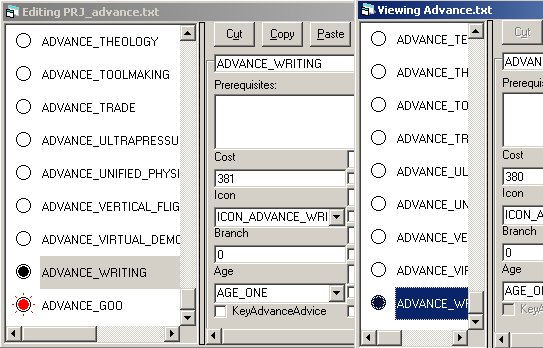
As a step on the way I have made it possible to open an Entries Editing window for files outside the project (though only one of each kind at present, that could be changed (with a little difficulty) if you think you'd want more). It is also impossible to edit the other file at present, but that is easy to change, and from what you say I take it that you would like the ability to edit files outside the project.
The lists of entries used in the window support icons, which could be used to quickly display which entries are not present in the other file, and which are different, with the editing ability implicit. That would be the simplest option.
Alternatively (probably additionally), I could create a new window for comparative purposes with more detail (like where two entries differ) but which referred you back to the editing windows for modification.
I think I'll do the first now, and the second if there is demand/time.
|
|
| |
|
|
|
Martin Gühmann
|
|
Berlin, Germany
Mar 2001
time: 06:19
|
|
quote:
Originally posted by J Bytheway
Keeping trank of modifications is surprisingly difficult, I tried to implement this previously and eventually abandoned the attempt, but I'll add it to the list. |
Could this be done by just comparing the contend of the file in the memory and the file on the harddrive, when you save the project?
quote:
Originally posted by J Bytheway
As a step on the way I have made it possible to open an Entries Editing window for files outside the project (though only one of each kind at present, that could be changed (with a little difficulty) if you think you'd want more). It is also impossible to edit the other file at present, but that is easy to change, and from what you say I take it that you would like the ability to edit files outside the project. |
Comparing two files at once is good, I don't know if three or more files are really necessary but I know that I already did this by hand.
quote:
Originally posted by J Bytheway
The lists of entries used in the window support icons, which could be used to quickly display which entries are not present in the other file, and which are different, with the editing ability implicit. That would be the simplest option.
Alternatively (probably additionally), I could create a new window for comparative purposes with more detail (like where two entries differ) but which referred you back to the editing windows for modification.
I think I'll do the first now, and the second if there is demand/time.
|
I think this is the way to go then I can see if the more detailed one is really necessary.
Just to make shure about the layout:
Don't forget the layout of the agecitystyle.txt this file has a different one the entries of the Sprites substructure all in one line, I tried to create a agecitystyle.ces but I wasn't able to get it working as I tried to load the agecitystyle.txt I got an runtime error about dublicated keys and CTPEd quitted. I made also a citystyle.ces, I got it working but without, the agecitystyle.ces I can't import the agecitystyles.
You can find the three *.ces files I made in the attachment. The third file is for the substructure "Sprites" in the agecitystyle.txt.
-Martin
|
|
| |
|
| |
|
| |
|
| |
All times are GMT. The time now is 05:19.
Apolyton Time is 00:19. |
top of page
|
| archivepost |
|
Forum Rules:
You may not post new threads
You may not post replies
You may not post attachments
You may not edit your posts
|
HTML code is ON
vB code is ON
Smilies are ON
[IMG] code is ON
|
|
|
|
|
|






 27-07-2002 20:18


 Attachment:

 Attachment:
 to try it at the momment(!), although I'm looking forward to trying it soon
 the classic sale's pitch
 |
|