Apolyton Archive  |  Preserved copy of the Apolyton Civilization Site and its forums as they stood in September 2005. Read-only; nothing here can be posted to or replied to.  |  Forum index |  About this archive |  The 1998–2001 UBB forums
Today on Apolyton WARDELL INTERVIEW PROMO A.C.S. HISTORY CHAPTER 4 GET CIV4 /w FREE PLUS! A.C.S. PHOTO GALLERY GET A.O.M. V1.1
Apolyton Civilization Forums
main| civ2| civ3| civ4| smac| ctp2| ron| moo3| galciv| galciv2| alt| about|
ApolytonPLUS | register | search | faq | new posts | pm (-/-) | upload | members
hall of fame new! | civgroups | civgroups news | interviews | the column | radio | chat | directory | news | store | PLUS
Apolyton Civilization Forums : Powered by vBulletin version 2.0.3 Apolyton Civilization Forums > Civilization III > Civ3-Files > TERRAIN: Muddy flood plains
Show a Printable Version | Email This Page to Someone! | Receive updates to this thread | Report this to Apolyton news!
16.Sep: 7 NEW FILES
15.Sep: TRIAL + NO SLEEP = ONE GAME
13.Sep: PATCH THE PREVIOUSLY UNPATCHABLE

bottom of page
   - CIV3 CONQUESTS $29.99 - CIV3 from $9.99
Author
Thread    < Last Thread     Next Thread > Post New Thread     Post A Reply
Yurt is offline Yurt
Warlord
Vancouver, BC
Jan 2002
time: 21:19
  Old Post 25-05-2002 05:21
Edit/Delete Message Reply w/Quote
#1 Report this post to a moderator
Graphic: Muddy flood plains Support Apolyton, buy Civilization: The Boardgame

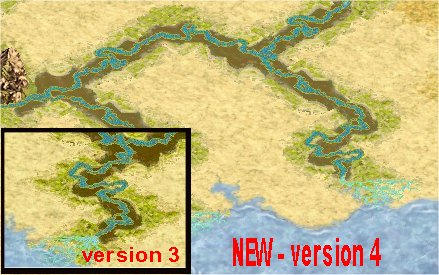
I made these flood plains to look like the recently flooded Nile, with thick gooey brown mud lining the banks and some grassiness between the mud and the river.

VERSION 4
The mud has been lightened to fit better with the rest of the terrain. I also added a bit more variety to the mud's colours.

version 3 replaced after 167 downloads
version 2 replaced after 74 downloads
version 1 replaced after 33 downloads

Attachment: floodplain4_yurt.zip
This has been downloaded 184 time(s).

Last edited by Yurt on 28-12-2002 at 04:44

Yurt is offline Yurt
Warlord
Vancouver, BC
Jan 2002
time: 21:19
  Old Post 25-05-2002 05:22
Edit/Delete Message Reply w/Quote
#2 Report this post to a moderator
Avatar Enlargement: We've got the solution

Screenshot. Version 4.

Attachment: bigfloodpln4.jpg
This has been downloaded 191 time(s).

Last edited by Yurt on 28-12-2002 at 04:43

Level is offline Level
Warlord
Utah, USA
May 2002
time: 22:19
  Old Post 25-05-2002 10:09
Edit/Delete Message Reply w/Quote
#3 Report this post to a moderator
Support Apolyton

Looks good, the one that is not muddy is a desert coast tile.

Yurt is offline Yurt
Warlord
Vancouver, BC
Jan 2002
time: 21:19
  Old Post 28-05-2002 08:49
Edit/Delete Message Reply w/Quote
#4 Report this post to a moderator
Support Apolyton or Terrorists Win

It is flood plain, I checked in CivEdit. You can see the green around it but the brown doesn't show up.

Is this going to get moved to the files forum any time soon? It is a complete file.

Humphman2 is offline Humphman2
Settler
Sydney, Australia
Apr 2002
time: 15:19
  Old Post 29-05-2002 15:24
Edit/Delete Message Reply w/Quote
#5 Report this post to a moderator
How do you change .pcx files? Support Apolyton, pre-order Civilization IV

Yurt, how did you modify/create these pcx files??! I have tried to change some of the terrain files using Photoshop, but the saved .pcx files do not compute when I try running the game! Pink triangles everywhere! It seems that they have a locked format which won't accept cutting and pasting of jpg colour samples..

Please help me!

Gramphos is offline Gramphos
ACS Civ III Files Manager, Prince of Development
Chalmers, Sweden
Apr 2001
time: 06:19
  Old Post 29-05-2002 15:57
Edit/Delete Message Reply w/Quote
#6 Report this post to a moderator
Suffering from ads?

You need to keep it in 8 bit pallette format.

Yurt is offline Yurt
Warlord
Vancouver, BC
Jan 2002
time: 21:19
  Old Post 31-05-2002 03:52
Edit/Delete Message Reply w/Quote
#7 Report this post to a moderator
Increase Your PM Length

I used PaintShop Pro but they're pretty similar. All I did was save the palette and then load it when I was done. The mud was more colourful before but the palette reduced it.

Humphman2 is offline Humphman2
Settler
Sydney, Australia
Apr 2002
time: 15:19
  Old Post 31-05-2002 19:27
Edit/Delete Message Reply w/Quote
#8 Report this post to a moderator
Support Apolyton, buy Civilization 2

Thanks guys! I'll try that..

It's still a bit lousy to restrict the spectrum of colours that you can use in the pallette, don't you think? Oh, well.. There goes my idea to put a Guernica on every hilltop!

Yurt is offline Yurt
Warlord
Vancouver, BC
Jan 2002
time: 21:19
  Old Post 04-06-2002 09:13
Edit/Delete Message Reply w/Quote
#9 Report this post to a moderator
Support Apolyton, buy Civilization 2

I will probably release a version two sometime in the near future, with larger mud banks and more green.

Yurt is offline Yurt
Warlord
Vancouver, BC
Jan 2002
time: 21:19
  Old Post 07-06-2002 08:45
Edit/Delete Message Reply w/Quote
#10 Report this post to a moderator
Support Apolyton, buy Alpha Centauri

Version 2 added - more mud, more green. I updated the file and screenshot above.

kvn299 is offline kvn299
Settler

Dec 2001
time: 00:19
  Old Post 21-06-2002 07:03
Edit/Delete Message Reply w/Quote
#11 Report this post to a moderator
Getting the colors/transparencies right Help yourself to an AD-FREE life

I saw some discussion about color problems. I spent some time today playing with the graphics and here's how I was able to use my own colors without losing the transparencies.

I used Paint Shop Pro 7.

1. I opened the original file.
2. I increased the number of colors to 16 million to give me something to work with.
3. I made the changes I wanted.
4. I converted the image back into 256 colors, with custom (optimized octree) palette.
5. Now here's the tricky part and it's not the easiest, I'm sure... however, I'm learning this like most of you... In order for the transparencies to work, you need to have the Light Green (0.255.0) in the 254 spot (it should be the next to the last color on the palette). Likewise, Magenta (255.0.255) needs to be in spot 255 (the last color). You have to edit the palette to add these colors.
6. Now, I had problems because the green and magenta colors were in the palette but not in those spots. Simply adding them into the right spot didn't work. That's because the existing magenta/green areas are painted from the wrong color location. You need to add green/magenta to spots 254/255, then paint them into the areas they will be active. To do this, I just edited the palette and changed the "bad" green/magenta some other colors (that change will be seen in the image), then painted the transparencies from spots 254 & 255.

Voila.. wordy and probably not as detailed as it should be but the two important things are: green and magenta = 254 & 255; transparencies must be painted from those spots.

Kevin

Yurt is offline Yurt
Warlord
Vancouver, BC
Jan 2002
time: 21:19
  Old Post 21-06-2002 22:01
Edit/Delete Message Reply w/Quote
#12 Report this post to a moderator
Support Apolyton buy from Amazon

I'll try that. You change a colour by double clicking on it when you're in edit palette, right?

Yurt is offline Yurt
Warlord
Vancouver, BC
Jan 2002
time: 21:19
  Old Post 21-06-2002 23:16
Edit/Delete Message Reply w/Quote
#13 Report this post to a moderator
Support Apolyton or Terrorists Win

Version 3 posted. See top for details.

kvn299 is offline kvn299
Settler

Dec 2001
time: 00:19
  Old Post 22-06-2002 17:23
Edit/Delete Message Reply w/Quote
#14 Report this post to a moderator
Support Apolyton buy from Amazon

Yes... you're right..

Colors - Edit Palette, double click on colors to turn on Dropper tool. Select new color.

The tileset is looking very nice, by the way!

sieboldii is offline sieboldii
Settler

Jan 2002
time: 23:19
Question  Old Post 09-07-2002 17:05
Edit/Delete Message Reply w/Quote
#15 Report this post to a moderator
Less Brown Mud Help yourself to an AD-FREE life

Yurt,

Over at CvfFanatics you mentioned that you were going to try a less brown mud. What ever happened to that idea?

The dark brown mud does seem to be a little stark in contrast to the normal terrain colors.

Yurt is offline Yurt
Warlord
Vancouver, BC
Jan 2002
time: 21:19
  Old Post 29-08-2002 11:08
Edit/Delete Message Reply w/Quote
#16 Report this post to a moderator
Support Apolyton, buy Call to Power 2

I was busy for about a month straight recently, first on vacation and then doing volunteer work. I guess I forgot about it completely. Now that you remind me, I might still give it a try.

Conqueror is offline Conqueror
King
UAC research complex
Dec 2001
time: 07:19
  Old Post 26-10-2002 01:46
Edit/Delete Message Reply w/Quote
#17 Report this post to a moderator
Great Work ! Increase Your PM Length

Great ! Now i can finally tell which tile is actually a flood plain. Nice work.

Yurt is offline Yurt
Warlord
Vancouver, BC
Jan 2002
time: 21:19
  Old Post 28-12-2002 04:08
Edit/Delete Message Reply w/Quote
#18 Report this post to a moderator
Enter the AD-FREE zone

Okay, I've finally decided to take another stab at this.

I basically just adjusted the brightness and contrast to change the mud, but I also added a bit of variety to the mud's colours. It's a bit hard to notice (brown is brown) but it's there.

Last edited by Yurt on 28-12-2002 at 04:36

  < Last Thread     Next Thread > Post New Thread     Post A Reply
All times are GMT. The time now is 05:19.
Apolyton Time is 00:19.
    top of page
Rate This Thread:
Forum Jump:
Forum Rules:
You may not post new threads
You may not post replies
You may not post attachments
You may not edit your posts
HTML code is ON
vB code is ON
Smilies are ON
[IMG] code is ON


Contact Us - Apolyton Civilization Site - Support Us!

Building a better Apolyton through better information. Click here and take our poll!
Non-US visitors, click here!

Powered by: vBulletin Version 2.0.3
Copyright ©2000, 2001, Jelsoft Enterprises Limited.

Page generated in 0.0473 seconds (89.22% PHP - 10.78% MySQL) with 30 queries
Page Loading Time:

Support Apolyton: Amazon USA | Amazon UK | Amazon DE | Amazon FR |
Support Apolyton and get FREE PLUS, Buy from Chips&Bits: Galactic Civilizations | Galactic Civilizations: Deluxe Edition | Call to Power 2 | Civilization: The Boardgame | GURPS/ Alpha Centauri | Alpha Centauri | Civilization IV | Civilization III: Complete |


Front Page | Civilization IV | Civilization III | Civilization II | Call to Power II | Alpha Centauri | Master of Orion III
Rise of Nations | Galactic Civilizations | Galactic Civilizations II | Misc
Alt.Civs | Civ I | C:CtP I | About | News | Directory | Apolyton Store | Forums | Chat | Columns | Interviews | Newsletter
Scenario League | CSC | Clash of Civs | Spanish Site | CtP Maps | Cradle of Civ | WesW's Ctp1/2 Site | Civ3 Haven

apolyton.net | apolyton.com | civilization2.net | civilization3.net | civilization4.net | civilizationiv.info | calltopower.net | galciv.net | galciv2.net | moo3.net