|
KingJoshi
|
|
Columbus, Ohio
Jun 2002
time: 00:20
|
|
A thread has been started at CivFanatics: http://forums.civfanatics.com/showt...&threadid=24447
where you can see a screenshot, read about it, and download the program. There's no harm in posting the stuff here as well I guess.
If you have questions, or suggestions, feel free to ask.
UPDATED: v0.3.2 - Fixed a simple feature. When you double click on any file in the listboxes, the default program opens it.
UPDATED: v0.3.1 - Added one simple feature. When you double click on any file in the listboxes, the default program opens it.
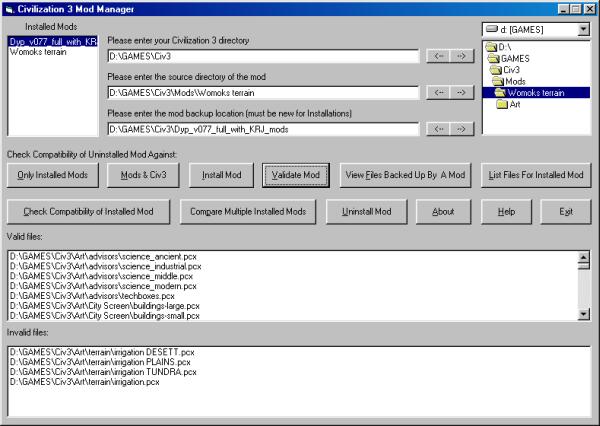
UPDATED: version 0.3 is here. A LOT OF IMPROVEMENTS! you can download it at the bottom of this post. You can see a screenshot below.
v0.3 *IMPORTANT*
**- Instead of "Setup.ini" the program now uses "ModManger.ini". This file stores some directory information and locations of all mods installed. The file is read in as records so each line MUST HAVE 78 characters and then the CARRIAGE RETURN and LINE FEED. The "UnInstall.log" file has not been changed, so it is SIMPLE to get your previous mod installations (by a previous version of this program) to be recognized.
When you start the program, it'll ask for the "ModManager.ini" location. Since this is the first time you're running it, it shouldn't exist yet. Choose the folder location where this program is stored. The file will be created and the program will start.
To import your previous installations, find their directory and store them in the textboxes. When you close the application, the textboxes are saved in the "ModManager.ini" file. Then, open "ModManager.ini"
and copy the location of the mod and paste it at the end of the file. *You need to copy the newline character as well.* The easiest way to do this is to get the cursor at the beginning of the line, Hold SHIFT, and then press down. The whole line should be highlight and you can
copy and then past at the end of the file.
- I got all my ideas for this release from Neale Lonslow's Civ3ModLdr. It's another Civ3 Mod Manager, but when I tried it, it didn't work. The files weren't backed up, so when attempting to uninstall a mod,
the files would just be missing and you couldn't play the game. He is going to fix this. If it works for you, that's great. His program seems to have a better interface and more features. However, as of
now, mine works for me at least You can find it at,
http://mumbalicious.8m.com/
- The program got a face lift and many additions. Unfortunately, the interface doesn't look any prettier and probably worse, but works well. And to me, at this moment, that's what counts. But I'm open to suggestions on how to improve it.
- Added a listbox that displays the current installed mods. Anytime a mod is clicked, the path to it's backups is displayed in the third textbox.
- Added a command button called "Only Installed Mods" that checks the mod source location and sees if the files in the subdirectory conflict with any mods currently installed.
- Added a command button called "Mods & Civ3" that checks the mod source location and sees what current files needs backing up
- Improved the Installation phase with better error checks. Also, the FreeDiskSpace check is now accurate and calculates the total size needed for both backups and the mod and compares against the free drive space.
- For "Validate Mod", not only are the valid files (those still installed) written to a file called "Validfiles.log", they are displayed in a listbox. And invalid files (mod files that have been overwritten or are missing) are written to a file called "Invalidfiles.log" and also displayed in a separate listbox.
- Added a command button called "View Files Backed Up By A Mod" that takes the path in the third textbox and reads the "UnInstall.log" file and displays what files are currently backed up. No checking is done to see if those files are still actually backed up, only the log file is
checked.
- Added a command button called "List Files For Installed Mod" that takes the path in the third textbox and reads the "UnInstall.log" file and displays what files are supposed to be with the mod. No checking is
done with the current setup, for that, use "Validate Mod"
- Added a command button called "Check Compatibility of Installed Mod" that takes the path from the third textbox and reads the "UnInstall.log" file. All files that are in conflict with any other installed mod will be displayed in one listbox. All the other files will be displayed in another. This differs from "Validate Mod"
because you could have overwritten several files from one mod and "Validate Mod" would not show that.
- Added a command button called "Compare Multiple Installed Mods" that requires 2 or more selected mods in the "Installed Mods" listbox. Any files that the selected mods are in conflict with will be displayed in a listbox.
- "Uninstall Mod" has been improved and refined.
- Added a command button called "Help" that displays this file. It goes to the same directory as the program/"ModManager.ini" file and opens "Readme.txt" with the default text editor. If this file is not in the directory, then nothing happens.
-
Updated: Added a progress bar in v0.1.2 (no other improvements, nor bug fixes or anything)
The Civ3 Mod Manager by wiwi didn't work for me, so being stupid, instead of an email, I decided to write my own. I mean this as no offense to wiwi, but I like to program, so it was a challenge for myself as well.
The program takes a mod and copies the files to the Civ3 directory and subdirectories. All files that are supposed to be overwritten are backed up. An "UnInstall.log" file is written which allows for the restoration fo the original files. I've tested it on Womok's Terrain, Dixon Wonders, and DYP mod.
It can be used as an installer by anyone creating a mod. Anyone is welcome to add this small program with their mod so people can easily install/uninstall their mod. More suggestions and directions are in the Readme.
This program does not work straight out of the box for any mod that I know of. I wanted to created a flexible design that also allows the backup of other things besides mods for Civ3. However, to get the mods to work is VERY SIMPLE and outlined in the readme file.
The program was done in Visual Basic 6.0 and if anyone wants the source, let me know. PLEASE post questions, comments, complaints, suggestions, etc. I spent a day on this so far, so I know I need to do more error checking and will be continuing to update the program, so I welcome ideas. But it works currently. But since copying whole directories to another is a powerful computer feature, becareful not to copy one drive to another
 Attachment: modmanager v0.3.2.zip Attachment: modmanager v0.3.2.zip
This has been downloaded 2499 time(s).
Last edited by KingJoshi on 06-07-2002 at 08:48
|





 06-07-2002 07:56


 Attachment:


 |
|