Apolyton Archive  |  Preserved copy of the Apolyton Civilization Site and its forums as they stood in September 2005. Read-only; nothing here can be posted to or replied to.  |  Forum index |  About this archive |  The 1998–2001 UBB forums
Today on Apolyton WARDELL INTERVIEW PROMO A.C.S. HISTORY CHAPTER 4 GET CIV4 /w FREE PLUS! A.C.S. PHOTO GALLERY GET A.O.M. V1.1
Apolyton Civilization Forums
main| civ2| civ3| civ4| smac| ctp2| ron| moo3| galciv| galciv2| alt| about|
ApolytonPLUS | register | search | faq | new posts | pm (-/-) | upload | members
hall of fame new! | civgroups | civgroups news | interviews | the column | radio | chat | directory | news | store | PLUS
Apolyton Civilization Forums : Powered by vBulletin version 2.0.3 Apolyton Civilization Forums > Miscellaneous > Archive > CtP2-Creation/AI/Mods/Scenarios-Archive > CTP II map editor manual
Show a Printable Version | Email This Page to Someone! | Receive updates to this thread | Report this to Apolyton news!

bottom of page
  
Author
Thread    < Last Thread     Next Thread > Post New Thread     Post A Reply
Choelscher is offline Choelscher
Settler

Oct 2002
time: 05:23
  Old Post 16-10-2002 08:36
Edit/Delete Message Reply w/Quote
#1 Report this post to a moderator
CTP II map editor manual Support Apolyton buy from Amazon

Hi,

Any of you guys know where I could download a decent users manual for the scenerio and map editors of CTP II? Even just a legend of the keyboard commands would be a great help. For instance, don't even know how to change the brush size in the map editor when I am trying to make up a map.

Maquiladora is offline Maquiladora
Emperor

Jun 2001
time: 05:23
  Old Post 16-10-2002 19:24 Visit Maquiladora's homepage!
Edit/Delete Message Reply w/Quote
#2 Report this post to a moderator
Remove this text

AFAIK I dont think there are any keyboard shortcuts for the editor. Theres a pretty good guide to the editor in regards to scenario making made by Hexagonian.

ModGuide

You should try making a map with the BMPtoCTP converter. Thats much easier with anything above a small sized map.

BMPtoCTP2

Immortal Wombat is offline Immortal Wombat
Prince
in perpetuity
Dec 2000
time: 05:23
  Old Post 16-10-2002 22:34 Visit Immortal Wombat's homepage!
Edit/Delete Message Reply w/Quote
#3 Report this post to a moderator
Browse Apolyton AD-FREE

ok, lets try this.

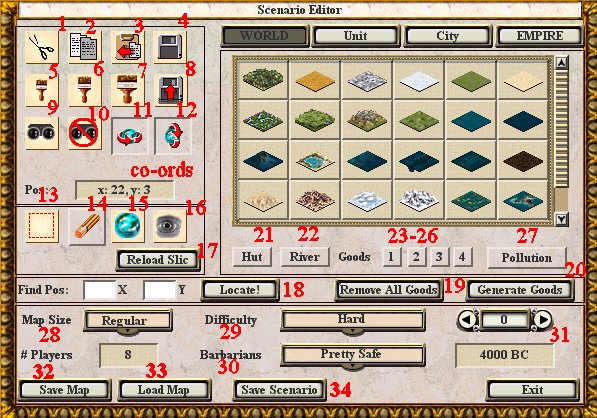
BUTTONS IN THE MAP EDITOR

1. Cut Map Area
2. Copy Map Area
3. Paste Map Area

- These work much like any such cut, copy and paste buttons in painting programs. To use them, you first have to select an area of the map using button 13, see below. Having selected a map region, you can cut it (copies it to the 'clipboard' and replaces with shallow ocean), copy it (copies to the 'clipboard' but remains present also. Once it is on the 'clipboard', you can paste the region by selecting the paste button (#3) and clicking a tile which you wish to become the TOP LEFT tile of the pasted region.

4. save map area.
-I never use this. I guess it's so you can save a segment from one map you make. why? (see #8)

5. Small brush size. One tile at a time
6. Medium brush size. I dunno, maybe 9 at a time.
7. Large brush size. Something like 25 or 36 at a time.

8. load map area.
-Cunning, no? You can now load the segment (that you saved from one map in #4) into another.

9. Set Map 'Explored'
- All players see the map as fully explored. I think this saves into the scenario, otherwise it works no difference from button #16.

10. Set Map 'Unexplored'
- Opposite of #9

11. X-wrap on/off.
- i.e. do the sides of the map connect in the game?

12. Y-wrap on/off
- i.e. do the top and bottom of the map connect?

CO-ORDS
- Displays the co-ordinates of the tile your cursor is hanging over.

13. Select portion of the map
- As used with buttons 1,2 and 3. Simply click the tile you want at a corner of the chosen region, then drag across to the opposite corner of the region and let go.

14. Eraser.
- Works like a paintbrush, but turns everything to default terrain (shallow water)

15. Reset Map
- Covers the whole map in shallow water.

16. Reveal Map
- duh...

17. Reload Slic
- You won't need this for map design, but it reloads the SLIC files that you may have changed while modding.

18. Locate!
- Type in a set of x and y co-ordinates, and press locate to center the map on them.

19. Remove all Goods
- Removes all goods...

20. Generate Goods
- Generates goods at random across the map. Different seeding pattern on each click.

21. Hut
- Place a hut on the map, or remove one by clicking this button, then clicking the hut.

22. River.
- As above, but with rivers, not huts.

23-26. Place goods
- Place (or remove) goods on the map. Most terrains only have 2 goods, so only the first two buttons work. Some mods allow the other 2 to work as well.
Button 1 places the first good for that terrain, button 2 will place a different one (but will firstly remove the first good, click again to add the second - it doesn't replace. if that makes any sense...)

27. Toggle Pollution on/off

28. Map Size.
Select the map size you want. This will reload the map as a blank all-sea map, so copy any regions you want to keep.

29. Difficulty
- Select one of the 6 difficulty levels.

30. Barbarians.
- Select one of the 4 barbarian levels.

31. Date Roller
- Change the year in the game by scrolling backwards and forwards.

32. Save Map
- Save the map to a map file. Then you can reload it later, or publish it, or something.

33. Load Map
- So you can continue working on it I guess. You have to have saved it first.

34. Save scenario.
- Save the whole scenario (map, rules, etc. ) to a scenario file, which you are asked to place in the scenario structure. Select the scenario fo your choice, and click save. The press 'back' outwards.

Attachment: ctp2-editor.jpg
This has been downloaded 146 time(s).

SMIFFGIG is offline SMIFFGIG
Prince
Great Britain
Jul 2002
time: 05:23
  Old Post 17-10-2002 02:01 Visit SMIFFGIG's homepage!
Edit/Delete Message Reply w/Quote
#4 Report this post to a moderator
Browse Apolyton AD-FREE

Grrr i so wish there was an option in game to play flat maps

Martin Gühmann is offline Martin Gühmann
Emperor
Berlin, Germany
Mar 2001
time: 06:23
Post  Old Post 17-10-2002 22:25 Visit Martin Gühmann's homepage!
Edit/Delete Message Reply w/Quote
#5 Report this post to a moderator
Support Apolyton buy from Amazon

quote:
Originally posted by SMIFFGIG
Grrr i so wish there was an option in game to play flat maps


To do this you could try this: Open the userprofile.txt and find there the lines:

XWrap=Yes
YWrap=No

Change both to No and enable after saving the write protection of the userprofile.txt.

Then start a new game, and you should find you on a map without X and Y wrap a flat map.

-Martin

  < Last Thread     Next Thread > Post New Thread     Post A Reply
All times are GMT. The time now is 05:23.
Apolyton Time is 00:23.
    top of page
Rate This Thread:
archivepost
Forum Jump:
Forum Rules:
You may not post new threads
You may not post replies
You may not post attachments
You may not edit your posts
HTML code is ON
vB code is ON
Smilies are ON
[IMG] code is ON


Contact Us - Apolyton Civilization Site - Support Us!

Building a better Apolyton through better information. Click here and take our poll!
Non-US visitors, click here!

Powered by: vBulletin Version 2.0.3
Copyright ©2000, 2001, Jelsoft Enterprises Limited.

Page generated in 0.0416 seconds (87.50% PHP - 12.50% MySQL) with 31 queries
Page Loading Time:

Support Apolyton: Amazon USA | Amazon UK | Amazon DE | Amazon FR |
Support Apolyton and get FREE PLUS, Buy from Chips&Bits: Galactic Civilizations | Galactic Civilizations: Deluxe Edition | Call to Power 2 | Civilization: The Boardgame | GURPS/ Alpha Centauri | Alpha Centauri | Civilization IV | Civilization III: Complete |


Front Page | Civilization IV | Civilization III | Civilization II | Call to Power II | Alpha Centauri | Master of Orion III
Rise of Nations | Galactic Civilizations | Galactic Civilizations II | Misc
Alt.Civs | Civ I | C:CtP I | About | News | Directory | Apolyton Store | Forums | Chat | Columns | Interviews | Newsletter
Scenario League | CSC | Clash of Civs | Spanish Site | CtP Maps | Cradle of Civ | WesW's Ctp1/2 Site | Civ3 Haven

apolyton.net | apolyton.com | civilization2.net | civilization3.net | civilization4.net | civilizationiv.info | calltopower.net | galciv.net | galciv2.net | moo3.net