|

|
GhostTX
|
|
Texas
Nov 2002
time: 23:23
|
|
Win 2K
Pentium 400Mhz
250MB Ram
4GB HD
3D Rage Pro AGP w/4MB (Desktop res at 1280x1024)
Legacy(?) audio
DirectX 8.1
Trying to get MOO2 to run on the box at work for lunchtime fun, but no love.
Launch Orion95.exe and the screen goes black for the res change, then come back to desktop and nothing happens. Desktop icons disappear and the cursor is premently set at the hourglass, though I can click on Start to reboot the system.
Tried setting the desktop to 1024x768 and also setting properties on the shortcut for window maximized, but nothing.
Help!
|
|
| |
|
|
|
GhostTX
|
|
Texas
Nov 2002
time: 23:23
|
|
Only thing on NTCompatible.com is the possible service pack 3 and logictech drivers.
This box has SP3 and no logitech drivers.
|
|
| |
|
|
|
Yolky
|
|
Ontario Canada
Oct 2001
time: 00:23
|
|
I am not computer smart but since Moo2 is an old game maybe try putting your settings to only 16true colour with 680x400 screen resulution. I know nothing of win2k.
Also do you have the patch? in know I had problems running Moo2 in windows95 but could run it in dos. When patch isnstalled had no problem running the game. Hope that helps.
Davor
|
|
| |
|
|
|
GhostTX
|
|
Texas
Nov 2002
time: 23:23
|
|
Is there a way to run the DOS version of MOO2 under Win2K?
I could live without sound...just as long as I could see it and the mouse worked.
|
|
| |
|
|
|
catullus
|
 |
Norway
Jan 1970
time: 06:23
|
|
quote:
Originally posted by vmxa1
...
Was it a memory issue?
Go to the exe properties select Mem tab. Set the three drop downs to the highest values. Check protected and use HMA boxes.
Does the game require EMS?
...
have not need the autoexec so far, so change the Config filename to point to the new one you are creating. In this file add EMM=RAM after dos=high statement. This will force emulation of EMS memory.
...
|
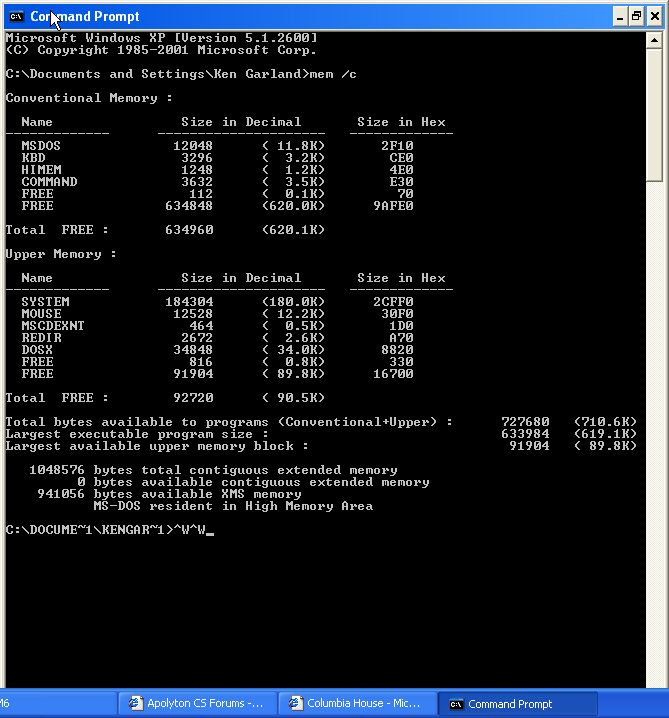
Been there, done that. No matter what I do, EMS show as 0. Long time since I did any real DOS stuff, but as I remember it, no DOS program ever can be made to access memory above 1M.
So EMS need some large free memory chunks (64K contigous free?) in the 640K to 1M area to use as cache area for the otherwise inaccesible +1M area. It might be that the PC maker already has reserved the whole 640-1024 area for other stuff, like disk cache, since very, very few programs in use today rely on EMS.
Come to think of it, I never did a classify of the 640-1024 area. Maybe it's possible to throw something out? Or disable disk cache (or whatever) in BIOS?
Oh, and IIRC, MOO may refuse to run if you give too much EMS (more than 8?) in the drop down box in the pif. 2-4M is enough for most old apps.
Anyway, I found DosBox (http://dosbox.cjb.net/) and, although graphics seem slow, MOO runs nicely now. Haven't tried adding vdmsound, yet. And not entered tactical combat.
The ability of playing MOO in a resizeable windows is fantastic.
C.
|
|
| |
|
|
|
Yolky
|
|
Ontario Canada
Oct 2001
time: 00:23
|
|
please remeber I am not very computer smart so don't flame me for this.
I had trouble once playing Moo on my computer under widows ME once.
I made a short cut on my desk top. I right clicked it and went to properties. Then clicked on memeory tab. My ems was disabled and I could do nothing to get it back. What I relised at the time was when I added my fast dsl software it disabled my ems, so I reformated my hardrive and reinstalled everything from scratch and got new software and there it was my ems was back.
I don't know how win2k or xp or anything else works so this might not be an issue but try that.
Make a shortcut to desktop, right click on the icon and select properties, then go to memory tab if you have one and select auto for your ems or any combination of numbers you have.
Tell me if this works so I can be more knowladgeable about other operating systems.
Davor
|
|
| |
All times are GMT. The time now is 05:23.
Apolyton Time is 00:23. |
top of page
|
|
|
Forum Rules:
You may not post new threads
You may not post replies
You may not post attachments
You may not edit your posts
|
HTML code is ON
vB code is ON
Smilies are ON
[IMG] code is ON
|
|
|
|
|
|





 26-11-2002 20:53





 Attachment:
  |
|