|
| |
|
| |
|

|
BeBro
|
 |
of the Krauts
Mar 2000
time: 06:24
|
|
quote:
Originally posted by Exile
Can running the batchfile screw things up with the scenario? With the overall Civ2 program? |
Well, if your batch files are not done correctly, you could screw up the scenario, eg. when you overwrite scn files (gfx, events) during the execution of a batch file, but you should find this out before the release, while testing your scn (so, if you use batchfiles, backup all scn files that are effected by the commands within your batch files before making test runs  ) )
If you´re totally unsure how your files will work, post a preview here
And as long the batch file is placed in the subfolder of your scn, and NOT in Civ2´s main folder, it cannot damage the main civ2 game files
quote:
What if I do it wrong? (cuz I always seem to, the first time). |
Depends what the modifications are that are done by the batch files. Most designers use them for implementing multiple events, so they will not work correctly if the batch files have errors. Others also use multiple rules and multiple gfx (eg. units) files which are swapped by batch files, then you have to be even more cautious while programming them.
quote:
Are different, individual batch files needed for each scenario? Do they have to be customized to function properly? If I wanted to use one, it sounds as if just looking for one that works in somebody else's scenario and copying it wouldn't work--it'd be a different batchfile w/different functions--is that right? So, to make one myself, I'd have to learn how to read the "batchfile" programs? |
This depends too - you probably cannot find batch files in other scns that do exactly the same you wish for your scn - so you can look into other scns to learn more about their batch files, but you can hardly use the same files. I used Nemo´s files as "templates", but of course I had to modify them for my purposes.
|
|
| |
|
|
|
Field Marshal Klesh
|
 |
Klesh Marshal Field
Jan 2000
time: 00:24
|
|
All of those files copied are being done simply to ensure that the player hasnt started a new game while still having the files for phase 4 or 5 cued up.
I program alot of redundancy into the batchfile, but so what? It is all done in a matter of a second (your pc doing the file copying), and if it ensures that no foul-ups occur, all the better. 
So, I hope you are following up to here. 
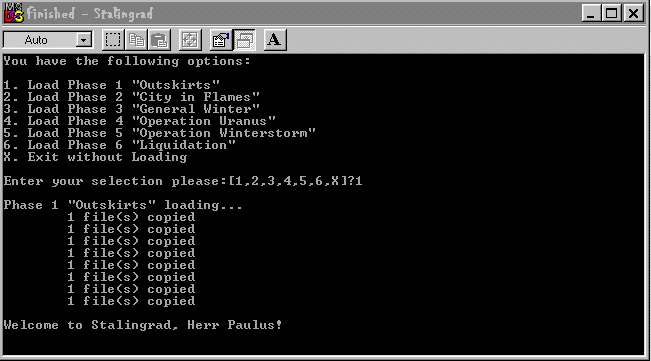
When I click phase 2 for instance, it will copy and paste all the files civ needs to read in order to function over again: terrain1&2.gif, rules.txt, game.txt, etc.
However, this time it wil not look for SummerTerrain 1&2, to be copied and renamed terrain1&2.gif, but rather it will look for WinterTerrain1&2, copy those and overwrite whatever standard-named civ files are there currently. If I have any phase2 specific unit switches, sound changed or the like, I can set it to look for them and copy them in, overwriting any changes made for phase 1.
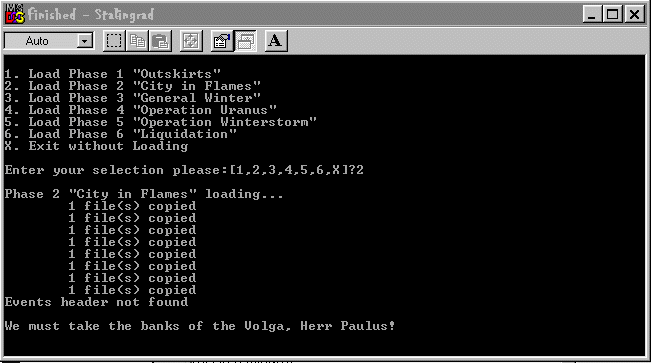
Here you will see that I have selected phase 2, and all the appropriate files have been copied. Also note the error messaage displayed: 'Events header not found'. I'll get to this in a minute. The important thing is that you see what is going on. Your pc is simply looking for files you've told it are in existance in your scenario's folder, copying them, and then pasting them in that same scenario folder with a new name for Civ to recognize. You arent touching your civII install or in anyway threatening the functioning of your machine.

 Attachment: batch3.gif Attachment: batch3.gif
This has been downloaded 122 time(s).
|
|
| |
|
|
|
Field Marshal Klesh
|
|
Klesh Marshal Field
Jan 2000
time: 00:24
|
|
Okay, so if you are with me, we shall go to that events header thing. You might notice that most of your hip scenarios with batch files will include another program in the final packaging zip: DELEVENT.exe
This miniprogram was included in your civII install in the main directory, and it serves to wipe a save file* of it's event information. When a game is saved, the file records all of the events that have triggered (so JUSTONCE events wont repeat) and possibly the events that have not been triggered, I am not sure. When you change seasons or something, the ability to use another 20 odd kb for more events is a godsend, so this is almost always used.
* Marko discovered that if you change the coding slightly in the batch language you can get it to delete the events info in .NET files as well (perfect for MP or PBEM scenarios.
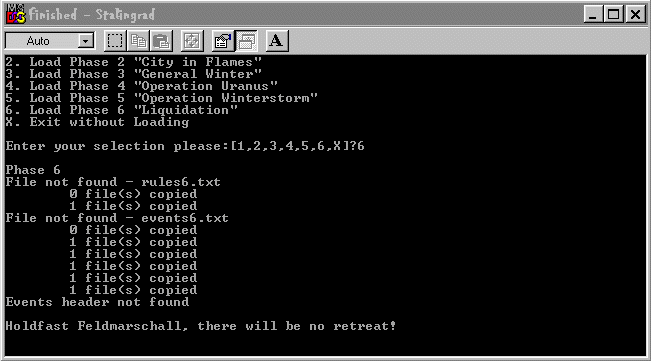
What you see in that screenshot is the fact that I didnt actually load the game in civ after selecting the phase 1 option of the batch program. Therefore no events info was recorded into the savefile. When I went to switch to phase 2, it attempted to run DELEVENT to delete the events info which was not present, resulting in the message :events header not found.
In the olden days, one had to manually drag the save file (in explorer) over the DELEVENT program to remove the events header. Letting windows do it is absolutely a help.
This should cover what a batch file does in case the others' responses weren't clear, and why they are all kinds of helpful. Next we shall move on to the deep dark chasams of actually writing one up! Wooohooo!
|
|
| |
|
|
|
Field Marshal Klesh
|
|
Klesh Marshal Field
Jan 2000
time: 00:24
|
|
Hush up there Darth.
Sorry for the delay, I had to step out for a minute or several.
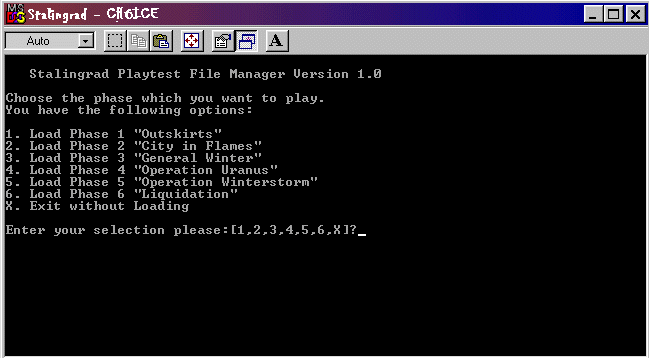
Now for the last of it we'll discuss the writing of it. Its pretty simple, and if one can understand the civII events language, one can easily understand this. Here I will post the entirety of the Stalingrad batch:
quote:
@echo off
cls
echo.
echo Stalingrad Playtest File Manager Version 1.0
echo.
echo Choose the phase which you want to play.
echo You have the following options:
echo.
echo 1. Load Phase 1 "Outskirts"
echo 2. Load Phase 2 "City in Flames"
echo 3. Load Phase 3 "General Winter"
echo 4. Load Phase 4 "Operation Uranus"
echo 5. Load Phase 5 "Operation Winterstorm"
echo 6. Load Phase 6 "Liquidation"
echo X. Exit without Loading
echo.
choice /c:123456X Enter your selection please:
if errorlevel 7 goto done
if errorlevel 6 goto Opt6
if errorlevel 5 goto Opt5
if errorlevel 4 goto Opt4
if errorlevel 3 goto Opt3
if errorlevel 2 goto Opt2
if errorlevel 1 goto Opt1
:Opt1
echo.
echo Phase 1 "Outskirts" loading...
copy rules1.txt rules.txt
copy units1.gif units.gif
copy events1.txt events.txt
copy Sterrain1.gif terrain1.gif
copy Sterrain2.gif terrain2.gif
copy cities1.gif cities.gif
copy Game1.txt Game.txt
copy sound\Missile1.wav sound\Missile.wav
echo.
echo Welcome to Stalingrad, Herr Paulus!
goto done
:Opt2
echo.
echo Phase 2 "City in Flames" loading...
copy rules2.txt rules.txt
copy units2.gif units.gif
copy events2.txt events.txt
copy Sterrain1.gif terrain1.gif
copy Sterrain2.gif terrain2.gif
copy cities1.gif cities.gif
copy Game2.txt Game.txt
copy sound\Missile2.wav sound\Missile.wav
DELEVENT SG.sav
echo.
echo We must take the banks of the Volga, Herr Paulus!
goto done
:Opt3
echo.
echo Phase 3 "General Winter" loading...
copy rules3.txt rules.txt
copy units3.gif units.gif
copy events3.txt events.txt
copy Wterrain1.gif terrain1.gif
copy Wterrain2.gif terrain2.gif
copy cities2.gif cities.gif
copy Game2.txt Game.txt
copy sound\Missile2.wav sound\Missile.wav
DELEVENT SG.sav
echo.
echo Another winter campaigning in Russia...
goto done
:Opt4
echo.
echo Phase 4 "Operation Uranus" loading...
copy rules4.txt rules.txt
copy units3.gif units.gif
copy events4.txt events.txt
copy Wterrain1.gif terrain1.gif
copy Wterrain2.gif terrain2.gif
copy cities2.gif cities.gif
copy Game2.txt Game.txt
copy sound\Missile2.wav sound\Missile.wav
DELEVENT SG.sav
echo.
echo There's been word of a Soviet breakthrough!
goto done
:Opt5
echo.
echo Phase 5
copy rules5.txt rules.txt
copy units3.gif units.gif
copy events5.txt events.txt
copy Wterrain1.gif terrain1.gif
copy Wterrain2.gif terrain2.gif
copy cities2.gif cities.gif
copy Game2.txt Game.txt
copy sound\Missile2.wav sound\Missile.wav
DELEVENT SG.sav
echo.
echo Hoth is on his way! Theres still hope!
goto done
:Opt6
echo.
echo Phase 6
copy rules6.txt rules.txt
copy units3.gif units.gif
copy events6.txt events.txt
copy Wterrain1.gif terrain1.gif
copy Wterrain2.gif terrain2.gif
copy cities2.gif cities.gif
copy Game2.txt Game.txt
copy sound\Missile2.wav sound\Missile.wav
DELEVENT SG.sav
echo.
echo Holdfast Feldmarschall, there will be no retreat!
goto done
:done
echo.
exit
quit |
The best thing to do is to alter an existing batch file as mentioned by others. Right clicking them reveals an edit option, then it is simply working within notepad. However, there are some things you should know, which you can probably just see from the example, but I'll explain anyway.
A '.' is used after an echo when you want there to be a space in what is displayed. Refer to screenshots.
echo followed by a space then text, will display that text.
choice /c: is used for making selections. They are then refered to as Options later. See that if you press 2 when prompted by the menu, then it refers farther down to :Opt 2
The errorlevels part just says that if there is a problem to go to the previous option. I dont really undewrstand this part, as most likely going to the previous option would mess things up. But hey, nemo had it in his.
The copy feature is the bread and butter. This is where you make the batch program do all the needed filechanging for you. Simply stick to the format as posted, spaces and all
copy_ rules1.txt_ rules.txt (where underscores are spaces)
Here you are first specifying the file you want copied, then what you want the new name of the copy to be. The 2nd name here should be of the type that Civ will recognize. Also note that this works with the sound folder too, because it will always be one directory deeper than the scenario folder. This is where the 'sound' (strange that the slash won't show up in the text here, should be sound-slash) part comes in. This is just you having the .wav files changed in the proper folder.
'goto done' is pretty much your ENDIF. Place it at the end of the list of commands you want performed by the selection, this finishes the program and allows you to close the actual window that the batch operates in.
Note the DELEVENT part as mentioned before. Writing it as posted will run the DELEVENT.exe on the (in this case) save file. You'll need to specify this to your players. You cannot have them saving their game with their own name (mygame.sav) because you cannot anticipate their name, and command the batch to look for said file in order to delete the events from it. Usually, you have a text event on the turn before the fileswitching is needed, prompting the player to save the game at the end of his/her turn with the specific savegame name you suggest (Imperial Centuries= IC.sav to me), run the batch selecting the new season/phase, and reload the game.....*poof* all changes made!
I think this should cover it Exile. If you still dont follow, get to me, and I'll assist or just whip one up for you when the time is needed.
And hey, does this mean you've never fought on the Red or Second Fronts?  Yikes! Yikes!
-FMK.
Last edited by Field Marshal Klesh on 01-12-2002 at 08:14
|
|
| |
|
| |
|
|
|
Cal
|
|
Hermosa Beach, California, USA
Aug 2000
time: 05:24
|
|
quote:
Originally posted by techumseh
Kull, I find that the 'Choice' file doesn't work with XP. The batch file will run, but not with the intended results, so you get a mess. At least this was my experience with the batch files for Red October once I'd switched to XP.
|
Huh? I use XP, and now that I've added the Choice file, all the batch files are working fine. 
edit: I was wrong. I just tried to load Second Front. It's all a big mess. Oh well...
edit2: I was wrong again. The reason Second Front was a big mess was because I forgot to download all of the graphics files. Choice.com has fixed things.
Last edited by Cal on 11-12-2002 at 06:01
|
|
| |
All times are GMT. The time now is 05:24.
Apolyton Time is 00:24. |
top of page
|
| archivepost |
|
Forum Rules:
You may not post new threads
You may not post replies
You may not post attachments
You may not edit your posts
|
HTML code is ON
vB code is ON
Smilies are ON
[IMG] code is ON
|
|
|
|
|
|







 30-11-2002 23:09





 Attachment:


 |
|