|
| |
|
| |
|

|
Catfish
|
|
Wollongong, Australia
Aug 2000
time: 14:16
|
|
quote:
Originally posted by fairline
Those Horsas are looking spot-bollock - any chance you can share 'em with us Catfish?  |
Well, now that it's done, yeah. I had a look at your bombers afterwards and thought that maybe I should've drawn it a little larger. The gliders in OM-G are grounded and therefore further away from the eye. The pic's a 24-bit PNG - don't worry, it's lossless.

quote:
Originally posted by fairline
I also use your terrain graphics for my version of OM-G, but I couldn't be arsed changing the beaches to river-sides. Any chance you could post your terrain as well? |
I'll get back to you on that one - I'm not quite done with it yet.
quote:
Originally posted by fairline
How do you get the game to default to units.bmp without removing the sprite file BTW? I always seem to get the animations unless I remove it. |
Since this is the WWII thread, I'll try *cough* to keep it brief. There are 3 types of sprites in ToT: 1. Animated Units (unitXX.spr), 2. Static Units (static.spr) and 3. Animated Terrain (resource.spr). There's a different method for shutting down each of them. The problem it seems is that no-one fully understands how to go about it. Since this discussion I had with Mercator, I've got it sorted, ie, everything works 100% as it's supposed to.
1. To turn off animated units: Ctrl+P (Graphic Options). Uncheck the Animated Units option. This setting is universal, so if you change it for one game type it will be the same for all others – makes things a lot easier actually. If this option is unavailable, it means that the scenario designer has checked the Unit animation lockout option in the Special Rules parameters (so don't do it!). If you don't want to mess with the scenario to fix this, just quit to the main menu, load a game where the option has not been made unavailable (eg, Original game) and change your settings there. BTW, setting the individual .SPR file overrides for each unit in the Advanced section of rules.txt to 1 will also disable animated units – the general .SPR file override (Special Rules parameters) won't.
2. To turn off static units: Most scenario designers have this one covered, so you won't have to worry about it. If the .SPR file override (Special Rules parameters) is set to 1, static.spr will not be used. "Hang on a minute," I hear you cry, "I just finished playing El Aurens, loaded Market-Garden and now I've got all of Boco's bloody WWI sprites sitting around Arnhem!" Whenever, you switch between scenarios/game types, always quit to ToT's main menu first. This will clear all of the sprites from the previous game.
3. To turn off animated terrain: Ctrl+P (Graphic Options). Uncheck the Animated Terrain option. It's basically the same as 1, with one caveat: I found a bug in ToT where one frame of the oil resource from the desert terrain slot will display even when animated terrain is turned off. Bizarre! Fortunately, there's a simple solution. In the thread I linked above, I posted a dummy (blank) resource.spr. It's a tiny file which you can drop into any scenario folder – obviously only the ones that don't have their own resource.spr file. It will be read instead of the one from the Original directory. It also has an advantage in that you can leave your terrain animations on all of the time and none of your scenarios will ever be affected by the Original game's sprites.
My settings are now as follows: custom static.spr and resource.spr files in the Original directory, Animated Units always turned off and Animated Terrain always turned on. Of course, each scenario has its own static sprite settings. I now have no problems whatsoever.
This may all sound complicated to some, but if the scenario designer upholds their part of the bargain, it should be a piece of cake for the player.
Last edited by Catfish on 05-10-2004 at 17:05
|
|
| |
|
| |
|
| |
|
|
|
Catfish
|
|
Wollongong, Australia
Aug 2000
time: 14:16
|
|
quote:
Originally posted by fairline
I must have been playing scenarios where the animation lockout option was checked perhaps.. |
Probably. Most are that way – and CivConverter automatically checks both animation lockout options. I think you and I could happily delete all of the animated unit sprites since it seems clear that we both think the original units look sh*t-awful. However, based on a number of posts I've read at CFC it's also clear that people like and use them (and I don't know what they've been snorting). That's the main reason why the user shouldn't be instructed to remove them. The only situation where you would be required to replace/move/rename the Original game's sprite files (definitely static.spr) is if you were overhauling the Original game's graphics – but this is merely stating the bleeding obvious.
|
|
| |
|
|
|
fairline
|
 |
of the wing
Sep 2002
time: 05:16
|
|
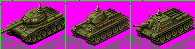
Some ToT versions of my Russian tanks:
EDIT: -deleted-
Last edited by fairline on 01-11-2004 at 22:58
|
|
| |
|
|
|
fairline
|
|
of the wing
Sep 2002
time: 05:16
|
|
A much-reworked version of my pale green Comet for ToT:
-deleted the crappy png-
Last edited by fairline on 01-11-2004 at 23:00
|
|
| |
All times are GMT. The time now is 05:16.
Apolyton Time is 00:16. |
top of page
|
|
|
Forum Rules:
You may not post new threads
You may not post replies
You may not post attachments
You may not edit your posts
|
HTML code is ON
vB code is ON
Smilies are ON
[IMG] code is ON
|
|
|
|
|
|






 03-10-2004 20:13


 BTW, do you know if the Horsas used in Market-Garden bore invasion stripes? I started playing OM-G and began fiddling with the graphics (as per usual), but I can't find any info on the appearance of the operation's Horsas. Mine currently look like this:



 Attachment:


 oh god, those are cherry.
 |
|