|
| |
|
| |
|
| |
|
| |
|

|
Catfish
|
|
Wollongong, Australia
Aug 2000
time: 14:16
|
|
quote:
Originally posted by fairline
Catfish: I'd say that first one is a pretty good rendition of Pablo's Spanish camo scheme. Now, tell me about these retouch brushes....  |
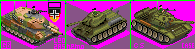
What do you want to know, eh? PSP's Retouch Brushes get a mention in my photo reduction tutorial. Since, I'm assuming you've read it,  I'm also assuming that you're aware of what they are. For the Leopard tanks, I used the Lighten/Darken brush and/or the Change To Target brush. Some of the tanks were colourised first. I'm also assuming that you're aware of what they are. For the Leopard tanks, I used the Lighten/Darken brush and/or the Change To Target brush. Some of the tanks were colourised first.
The advantage of these Retouch Brushes lies in the fact that you can manually paint over the unit whilst retaining the underlying texture. Obviously, when using the Change To Target brush, the target will be determined by the selection in the Materials palette. To change the colour, make sure the Mode is set to Color. In the case of the Leopards, I used a brush Size of 1-6 pixels, Step 1, Density 100, Thickness 100, and experimented with Hardness and Opacity. It's a pity you can't combine the Color and Lightness Modes of this brush.
Anything else, Fairline? 
Note: I won't post any more graphics until Apolyton irons out its problems with this message board. Currently, many of the graphical attachments, including the ones just posted by Pablostuka, look like a magnificent red X at my end. I also can't directly access the last page of threads that exceed 4 pages - I'm only presented with a "Cannot modify header information" warning. This message also appears at the top of every thread page.
|
|
| |
|
| |
|
|
|
Catfish
|
|
Wollongong, Australia
Aug 2000
time: 14:16
|
|
quote:
Originally posted by fairline
I 've not only read your tutorial but tried it myself (without any great success!) on some of those Warhammer 40000 miniature pics. Problem was I couldn't find the retouch brushes in PSP 7.04 until today I noticed the 'pointing finger' icon on the toolbar is in fact the retouch tool; it has a number of options but not the 'burn' feature you mentioned in the tutorial. |
The Burn brush isn't that critical if you've got the Lighten/Darken brush. It's a shame that you haven't had much success. Not all of mine are successful, but the percentage rate is climbing as I learn new methods - the Retouch Brushes and split channel colour saturation filters (eg, Hue/Saturation/Lightness) can be critical in the final stages. I’m sorry if I didn’t include the location of the Retouch Brushes in the tut, but I ran out of room in the post. For those who don’t know: they can be found in the Tools toolbar.
As I've said before, many of the Warhammer miniatures suck for photo conversions - step 2 in the tutorial, Selection Criteria, is pretty important. The Warhammer miniatures, as a general rule, have too much detail and have disproportionately large heads and hands (although these can be fixed). Rips from Warcraft 3 are actually more suitable - it's basically the same suite of creatures, anyway.
One thing about PSP version 7 (if my memory serves me correctly) is that it doesn't have scripting - believe me, this makes a difference. I use the 2 scripts from the photo reduction tutorial and the selection script from the camo tutorial. These scripts save me a hell of a lot of time.
quote:
Originally posted by fairline
I hope your not finding my questions too much of a pain in the arse, but this stuff is a genuine education for me..... I suppose I ought to read the PSP manual really |
No problem. I figure that if you (and yeah, you're still in my top 5 list ) keep improving, it can only be to everyone's advantage. I have the Try & Buy (30-day, cough, cough) version and so do not have the manual. It does have help files. Plus there are tutorials to be found on the Internet. Here's a good site, for example.
quote:
Originally posted by tanelorn
I also get the red X problem, and the message " Warning: Cannot modify header information - headers already sent by (output started at /home/apolyton/public_html/forums/global.php(439) : eval()'d code:170) in /home/apolyton/public_html/forums/admin/functions.php on line 1630"
at the top of the page just like Catfish said. Any ideas? |
I guess all you can really do is b1tch and moan in this thread, along with 97 other people, until it’s fixed. I can see some graphics, but suspect that these are cached on my HD and that if I flush my Temporary Internet Files directory, I won’t see these, either.
Edit: A temporary fix for the forum problems (if you have them) is to change your style settings to Light-Ultra.
I might post excerpts from this discussion in The Graphics Workshop thread – when the problems are sorted out, of course.
Last edited by Catfish on 11-10-2003 at 05:40
|
|
| |
|
|
|
Art of War
|
|
Hey, Pablo, when are you going to release a scenario with that Carrier in your picture in it?
|
|
| |
|
|
|
Art of War
|
|
hey, Pablo, just so you know, the Spanish have acquired Leo 2A5s from Germany, so since the scn is in 2005, they'd probably be in use.
|
|
| |
|
|
|
Art of War
|
|
true, BUT if there was a war...we know who'd win..right?
|
|
| |
All times are GMT. The time now is 05:16.
Apolyton Time is 00:16. |
top of page
|
|
|
Forum Rules:
You may not post new threads
You may not post replies
You may not post attachments
You may not edit your posts
|
HTML code is ON
vB code is ON
Smilies are ON
[IMG] code is ON
|
|
|
|
|
|






 07-10-2003 03:37


 well...but there is a little possibility or not?
 Attachment:

 . Anyway, you can see these units



 |
|


![príncipe de asturias carrier #4[1].gif](/forums/attachment/54715/pr_ncipe_de_asturias_carrier_4_1_.gif)