|

|
vovan
|
|
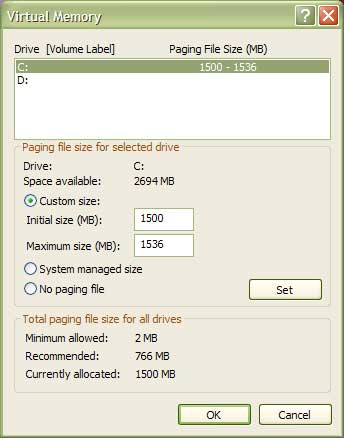
Is 190 the minimum or the maximum? I have my page file set to 1.5 GB (Of course, the recommended is 766 for my machine... I don't know how they calculate it though.)
|
|
| |
|
|
|
vovan
|
|
Aha, gotcha. And 190 is the initial, right?
Well, then like the folks in OT said, buy more RAM. For now, you could increase the paging file size, though. that might help.
Any way, here is how mine is set up:
 Attachment: paging.jpg Attachment: paging.jpg
This has been downloaded 112 time(s).
|
|
| |
|
|
|
vovan
|
|
Yeah, only 2GB free space left... I've already used up my 40GB harddrive. College documents, programming projects, all kinds of development software... That kind of stuff. (Well, plus a couple of games, of course  ) )
If you set the initial and maximum paging file sizes to more than you have right now, it might help.
1) Initial size: That will help, because when windows doesn't have enough ram, it starts using the paging file. Now, suppose it wants to put more than 190MB into the paging file (that's your initial size, right?). It will then have to allocate more disk space, and disk interactions always take time. Thus, larger initial size will probably improve your performance a bit.
3) Maximum size. Since your max is only 300 that might be a problem. In my experience, games can use up to 256MB of paging file, but remember that other applications also use it. WinXP uses it heavily (especially with so little ram as you have). My guess would be that only WinXP is taking up at least 128MB of paging. Thus, it might very well be the case that as your game progresses, you hit the limit of the paging file (though not disk space), and windows programmatically prevents further increase of it.
The moral: try increasing at least the maximum allowed size of the paging file. You have so much free space you won't notice, but that might as well solve that problem.
Oh, and if that works, I don't want an official statement that you love me - a couple screenies would be great, though.
|
|
| |
|
|
|
vovan
|
|
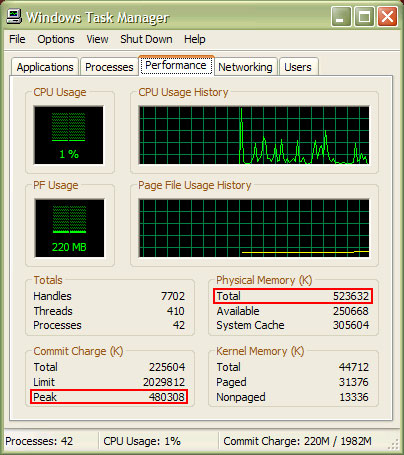
OK, something else to take into consideration when deciding whether the page file limit is the problem.
Take a look at the picture attached. That's the performance monitor of the windows task manager. (The TM is available by pressing Ctrl+Shift+Esc in WinXP.) Note the numbers I highlighted. Total is the amount of RAM available to Windows. Just below that, Available stands for how much of that RAM is currently available. In other words, that allows you to monitor how much RAM is used up.
Now, Peak is something important for you. That number shows the maximum amount of information stored in both RAM and the paging file since the computer booted up. Notice that the peak for my current session is ~480MB, that is, almost all RAM was used up at some point. Note that I have not played any games today - it is all just Windows XP, and IE. That's all. Just tells you how much windows takes up.
Now, how is this peak thingie useful to you? Simple. Reboot the comp to reset that counter, and free up the RAM from unnecessary gibberish. Then, don't run any programs, but start up RoN. Play till you crash due to the "run out of memory" error. After that, bring up the TM, and take a look at the peak. If it is very close to the amount of RAM you have + the max size of paging file (that is close to 428000; something like 380000 is already close), then yes, the paging file limit is the problem.
Attachment: tm.jpg
This has been downloaded 108 time(s).
|
|
| |
All times are GMT. The time now is 05:26.
Apolyton Time is 00:26. |
top of page
|
|
|
Forum Rules:
You may not post new threads
You may not post replies
You may not post attachments
You may not edit your posts
|
HTML code is ON
vB code is ON
Smilies are ON
[IMG] code is ON
|
|
|
|
|
|






 18-03-2003 03:42



 !
! )
)

 |
|
 |
|