Apolyton Archive  |  Preserved copy of the Apolyton Civilization Site and its forums as they stood in September 2005. Read-only; nothing here can be posted to or replied to.  |  Forum index |  About this archive |  The 1998–2001 UBB forums
Today on Apolyton WARDELL INTERVIEW PROMO A.C.S. HISTORY CHAPTER 4 GET CIV4 /w FREE PLUS! A.C.S. PHOTO GALLERY GET A.O.M. V1.1
Apolyton Civilization Forums
main| civ2| civ3| civ4| smac| ctp2| ron| moo3| galciv| galciv2| alt| about|
ApolytonPLUS | register | search | faq | new posts | pm (-/-) | upload | members
hall of fame new! | civgroups | civgroups news | interviews | the column | radio | chat | directory | news | store | PLUS
Apolyton Civilization Forums : Powered by vBulletin version 2.0.3 Apolyton Civilization Forums > Miscellaneous > Archive > Scenario League / Civ2-Creation -Archive > hex edit needed
Show a Printable Version | Email This Page to Someone! | Receive updates to this thread | Report this to Apolyton news!

bottom of page
  
Author
Thread    < Last Thread     Next Thread > Post New Thread     Post A Reply
techumseh is offline techumseh
King
of the frozen North.
Apr 1999
time: 22:27
  Old Post 03-04-2003 20:52 Visit techumseh's homepage!
Edit/Delete Message Reply w/Quote
#1 Report this post to a moderator
hex edit needed Browse Apolyton AD-FREE

Does anyone know how to hex edit to place cities right next to each other? I need a quick adjustment to a save file for ToT. Thanks.

techumseh is offline techumseh
King
of the frozen North.
Apr 1999
time: 22:27
  Old Post 05-04-2003 04:33 Visit techumseh's homepage!
Edit/Delete Message Reply w/Quote
#2 Report this post to a moderator
Tired of ads?

Are all the computer science students on spring break?
I've looked at Allard's and Mercator's papers and downloaded a hex editor. I've figured out how to change the location of a city, but I can't find the additional byte needed to make it visible. Can anyone help?

techumseh is offline techumseh
King
of the frozen North.
Apr 1999
time: 22:27
  Old Post 05-04-2003 11:49 Visit techumseh's homepage!
Edit/Delete Message Reply w/Quote
#3 Report this post to a moderator
Suffering from ads?

Never mind! I've figured it out. It took a bit of detective work, but with the excellent guides by Allard and Mercator, I was able to find the correct bytes in the save file to create multiple cities.

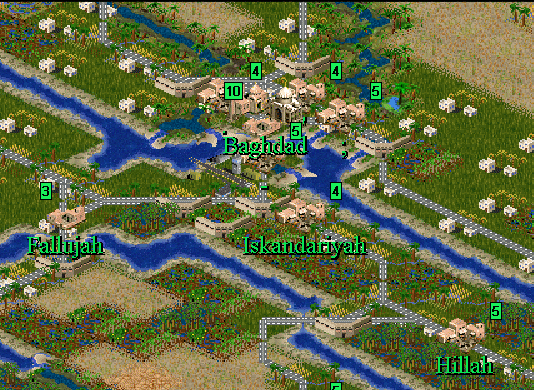
If any one wants to add multiple cities to their scenario, I might be persuaded to write a tip. It looks like it will add a lot to a scenario. Baghdad is so big....

Boco is offline Boco
Prince
who was once King for a week.
Jan 2001
time: 00:27
  Old Post 06-04-2003 04:36 Visit Boco's homepage!
Edit/Delete Message Reply w/Quote
#4 Report this post to a moderator
Increase the size of your Attachments


Good work Sherlock. Yes, I'd love to be able to edit city coordinates. It would be nice to easily create the odd-even cities that Henrik promotes. A label on the map saves a lot of readme explanations.

Baghdad! Isn't that a little far afield for a Bismarck's Germany?

Last edited by Boco on 06-04-2003 at 06:43

St Leo is offline St Leo
King of Scenario League
Member of the Apolyton Social Democratic Party
Jul 2005
time: 00:27
  Old Post 06-04-2003 06:05 Visit St Leo<br><img src=/forums/images/staff-icon.gif>'s homepage!
Edit/Delete Message Reply w/Quote
#5 Report this post to a moderator
Support Apolyton, pre-order Civilization IV

Gimme.

techumseh is offline techumseh
King
of the frozen North.
Apr 1999
time: 22:27
  Old Post 06-04-2003 12:18 Visit techumseh's homepage!
Edit/Delete Message Reply w/Quote
#6 Report this post to a moderator
Increase the size of your Attachments

OK, I'll give it a go. Boco, I shelved the Franco-Prussian war scenario because of play balance problems. I'm sure I'll finish it, but I need a break due to mounting frustration. Actually I'm supposed to be trying to finish 'Global War' with Magyar Crusader right now. I just couldn't resist making a map of Iraq as I was following the course of the war. I took a section of your middle east gigamap and modified it from there. It's perfect. I hope you don't mind.

In order to make multi-square cities, you'll first need to download a hex editor. Fortunately, they're mostly freeware. I just picked this one at random - there may be better ones: http://www.hhdsoftware.com/hexeditor.html

Now checkout two guides at Mercator's site: http://www.civgaming.net/mercator/guides.htm The paper by Allard is a comprehensive guide to hex editing (FW) civ files. The paper by Jorrit (Mercator) deals with hex editing the map portion of a sav. file. Both assume a knowledge of hex editing. Read them anyway. Lots will make more sense as we work through the process.


On William Keenan's Cradle Of Civilization site, have a look at the 2nd tip on flags and masks. Not for the ToT events language, but because at the end it explains how to convert decimal numbers into hexadecimal numbers using the built-in Windows calculator: http://coc.apolyton.net/guides/flags_masks.shtml

Let's start by backing up our save file. Baghdad has a population of 5,605,000 people, and we want each increment in city size to equal to 100 thousand people. So it would be a size 56 size city - far too big. And in far too small in area for our map. So let's say we want Baghdad to be a 5 square city, each averaging about 11 in size.

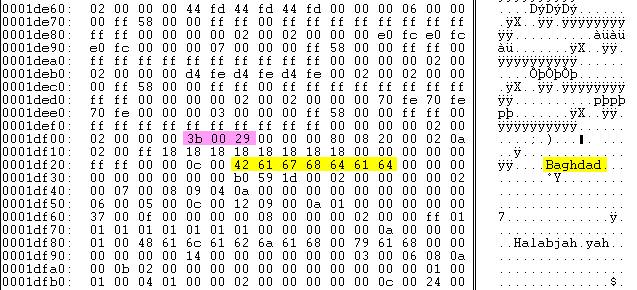
Bagdad starts as a normal, one square city located at 59,41 on our map. Let's find it in the sav. file using the hex editor. This is pretty easy, since in the right hand column, the names of cities are printed (highlighted in yellow). The corresponding hexidecimal code for 'Baghdad' is also highlighted in the centre portion. This section is the actual contents of the sav. file, consisting of many, many rows of 16 pairs of numbers, mostly empty (00). The left hand column is the 'offsets' referred to in Allard's and Mercators's papers. This is just the index to allow you locate which row you're looking for, counting in hexidecimal numbers.

Now, how do we find the coordinates of Baghdad amoung all these pairs of numbers? Well, if we look for the numbers 59 and 41, we won't find them. So let's refer to William Keenan's ToT tip and use the calculator to convert these into hexidecimal numbers: 3b,29. There they are, highlighted in pink. By changing these numbers (in hexidecimal) we can move Bagdad or any other city. But it's not that simple. More....

Attachment: hex1.gif
This has been downloaded 58 time(s).

Boco is offline Boco
Prince
who was once King for a week.
Jan 2001
time: 00:27
  Old Post 06-04-2003 18:43 Visit Boco's homepage!
Edit/Delete Message Reply w/Quote
#7 Report this post to a moderator
Support Apolyton, pre-order Civilization IV

Thanks! Must've been pretty weak beer. I'll give it a shot after I finish my annual agony with the IRS.

Glad the map was of some use. I had forgotten about that larger version. Just be careful about the placement those swamps. They came from 1915-7 maps. Hussein has drained many of them, allegedly to punish the Shiites.

Boco is offline Boco
Prince
who was once King for a week.
Jan 2001
time: 00:27
  Old Post 06-04-2003 19:12 Visit Boco's homepage!
Edit/Delete Message Reply w/Quote
#8 Report this post to a moderator
Browse Apolyton AD-FREE

I hate taxes. Okay I installed a hex editor, found a bin->hex calculator, and can follow you to this point. So now I need to change the city-present toggle of the old and new city sites?

techumseh is offline techumseh
King
of the frozen North.
Apr 1999
time: 22:27
  Old Post 06-04-2003 21:37 Visit techumseh's homepage!
Edit/Delete Message Reply w/Quote
#9 Report this post to a moderator
Support Apolyton or Terrorists Win

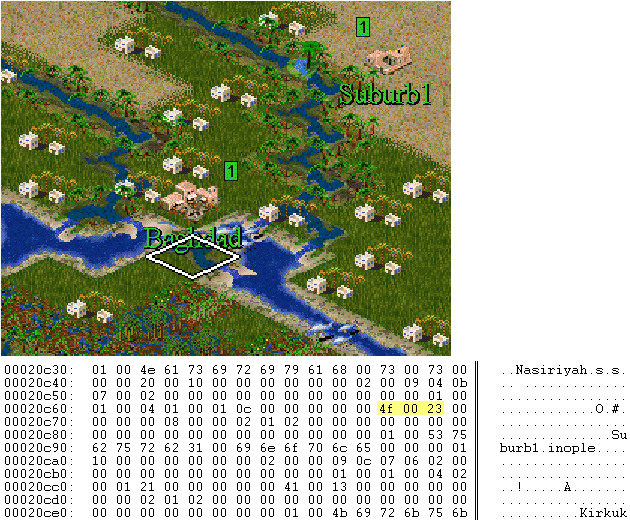
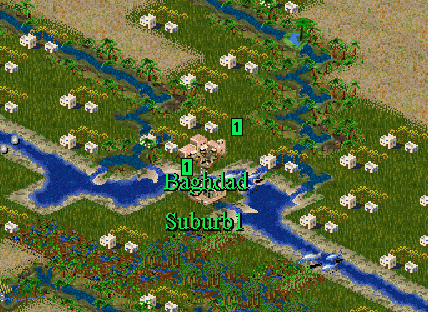
OK, OK! Start by creating the suburb city on the map at some convenient location, in this case at 79,35. We want to move Suburb1 to 75,43 (where the cursor is).

Let's convert these locations into hexadecimal:

79,35 becomes 4f,23

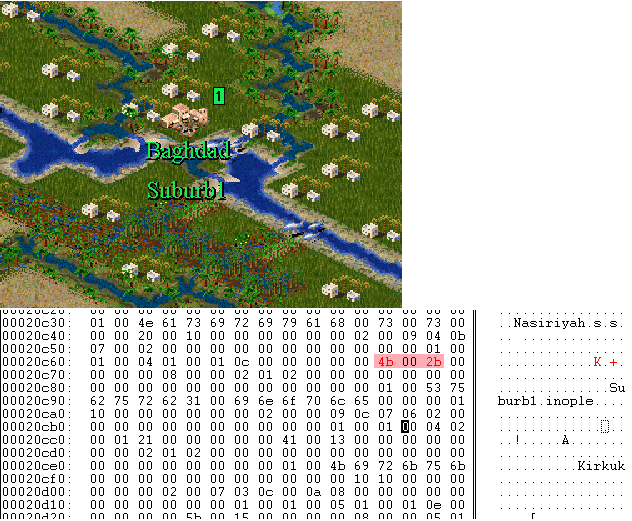
75,43 becomes 4b,2b

Now we use our hex editor to find Suburb1 and it's current location:

Attachment: illustration1.gif
This has been downloaded 50 time(s).

techumseh is offline techumseh
King
of the frozen North.
Apr 1999
time: 22:27
  Old Post 06-04-2003 21:45 Visit techumseh's homepage!
Edit/Delete Message Reply w/Quote
#10 Report this post to a moderator
Support Apolyton buy from Amazon

Now we use our hex editor to replace the old location with the new one, and voila, Suburb1 has moved to a location immediately south of Baghdad!

Except you can't actually see the new suburb, just read it's name. It's there - sort of. Finding the bytes which make it visible is the hard part. More....

Attachment: illustration2.gif
This has been downloaded 50 time(s).

techumseh is offline techumseh
King
of the frozen North.
Apr 1999
time: 22:27
  Old Post 07-04-2003 03:32 Visit techumseh's homepage!
Edit/Delete Message Reply w/Quote
#11 Report this post to a moderator
Support Apolyton, pre-order Civilization IV

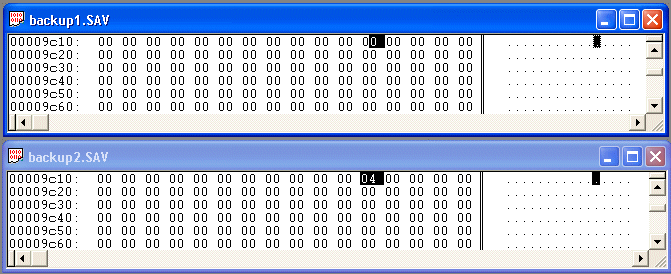
Here's where the detective work comes in. For the moment, let's restore Suburb1 to it's original spot, by replacing the original hexadecimal coordinates. Now make an exact copy of the save file. Let's call them backup1 and backup2. Open backup2 and add irrigation to the square where we want to move Suburb1, at 75,43. Save.

Now open your hex editor. Load both files. Now go to edit and select 'Compare'. A little box will appear, with 2 spots for the two files you want to compare. Select both files. Hit the start button. The hex editor will go to the first set of pairs that are different.

According to Mercator's paper, the presence of irrigation will be represented by 04 in the save file. So the compare function will show you where there is irrigation in backup2, but not in backup1. You are looking for places where backup2 has 04, but backup1 has 00. (If a road is also present it will be 10 and 14.)

Mercator says that the presence of a city is indicated by 02, so just change 04 to 02 in each place where this diference exists. There may be as few as 2 or as many as 8 places where this must be done. Ignore any other differences between the files.

Attachment: hex4.gif
This has been downloaded 43 time(s).

techumseh is offline techumseh
King
of the frozen North.
Apr 1999
time: 22:27
  Old Post 07-04-2003 03:36 Visit techumseh's homepage!
Edit/Delete Message Reply w/Quote
#12 Report this post to a moderator
Got spare money?

Now go back to the first step and change the coordinates of Suburb1 to 75,43. You have now changed the location, and found the bytes which indicate the presence of the city at it's new location, rendering it visible. Repeat for each city you want to move.

Attachment: illustration3.gif
This has been downloaded 42 time(s).

techumseh is offline techumseh
King
of the frozen North.
Apr 1999
time: 22:27
  Old Post 07-04-2003 03:39 Visit techumseh's homepage!
Edit/Delete Message Reply w/Quote
#13 Report this post to a moderator
Enter the AD-FREE zone

And here's a shot of the entire city. I gave each suburb a name of one inconspicuous punctuation mark, so only the name Baghdad would be noticable, but events could be triggered by the capture of any of the suburbs as well.

Attachment: illustration4.gif
This has been downloaded 43 time(s).

Mercator is offline Mercator
King
Sorekara no Nanimo
Jan 1970
time: 06:27
  Old Post 08-04-2003 00:06 Visit Mercator's homepage!
Edit/Delete Message Reply w/Quote
#14 Report this post to a moderator
Support Apolyton, buy Alpha Centauri


You can make the city names disappear altogether, if necessary...

You can give a city no name at all, or a name consisting of spaces only. In case of the latter, you must start the city name with alt+0160 (numeric pad).

As long as you start the city name with alt+0160, any combination of spaces and alt+0160 will be invisible (and you'll be able to get plenty of combinations if you have lots of nameless cities that need events)...

Distinguishing al those "spaced-out" cities in your events will be a pain though.

Was it "     " or was it "     "?

Boco is offline Boco
Prince
who was once King for a week.
Jan 2001
time: 00:27
  Old Post 08-04-2003 01:53 Visit Boco's homepage!
Edit/Delete Message Reply w/Quote
#15 Report this post to a moderator
Support Apolyton

Thanks, Tech, Merc, and Allard. I'll read Merc's paper to see why you need to change 2-8 instances per city.

If you need two cities with a visible but practically identical name, you can use the elipsis (Alt-0133). I've named a pair of cities EEF...Base (3 x ".") and EEF…Base (1 x Alt-0133). In the game the names are displayed in a proportional font, and it's hard to tell from a unit which one is its home city. In my Events file editor, WordPad, they look like EEF...Base and EEF…Base, and are easily distinguished.

techumseh is offline techumseh
King
of the frozen North.
Apr 1999
time: 22:27
  Old Post 08-04-2003 02:55 Visit techumseh's homepage!
Edit/Delete Message Reply w/Quote
#16 Report this post to a moderator
Suffering from ads?

I don't know why it may take more than 1 edit to make the city visible. It wasn't anything in the papers I read, just that I found a variable number of instances where irrigation appeared in one file, but not the other. So I changed them all. Perhaps it has to do with the different map views of the various civilizations?

Mercator is offline Mercator
King
Sorekara no Nanimo
Jan 1970
time: 06:27
  Old Post 09-04-2003 01:20 Visit Mercator's homepage!
Edit/Delete Message Reply w/Quote
#17 Report this post to a moderator
Support Apolyton, buy Call to Power 2

Aargh... I can't seem to be able to make up my mind about what exactly your "1 edit" is. I've been rewriting this post over and over (before actually submitting it).

There would be at most 9 places where you'd need to make changes:


  • First of all, of course the city coordinates in the cities section in the savegame.
  • Secondly, to make sure the square is recognised as a city square (so the city graphic will show up, and the square gets food and road bonuses), you must add the "city present" flag in the 2nd map data block.
  • Finally, the map views of the civs you were talking about, which is the 1st block of the map data. For this case, it's the same thing that happens with the CivFort thing I made a while ago. If you use visible fortress graphics, you'll see the problem. You can't see them yet except within range of your units/cities. The map will update as you move along.

    Make sure you only update the views for the civs that should actually see the city.

  < Last Thread     Next Thread > Post New Thread     Post A Reply
All times are GMT. The time now is 05:27.
Apolyton Time is 00:27.
    top of page
Rate This Thread:
archivepost
Forum Jump:
Forum Rules:
You may not post new threads
You may not post replies
You may not post attachments
You may not edit your posts
HTML code is ON
vB code is ON
Smilies are ON
[IMG] code is ON


Contact Us - Apolyton Civilization Site - Support Us!

Building a better Apolyton through better information. Click here and take our poll!
Non-US visitors, click here!

Powered by: vBulletin Version 2.0.3
Copyright ©2000, 2001, Jelsoft Enterprises Limited.

Page generated in 0.0419 seconds (91.46% PHP - 8.54% MySQL) with 31 queries
Page Loading Time:

Support Apolyton: Amazon USA | Amazon UK | Amazon DE | Amazon FR |
Support Apolyton and get FREE PLUS, Buy from Chips&Bits: Galactic Civilizations | Galactic Civilizations: Deluxe Edition | Call to Power 2 | Civilization: The Boardgame | GURPS/ Alpha Centauri | Alpha Centauri | Civilization IV | Civilization III: Complete |


Front Page | Civilization IV | Civilization III | Civilization II | Call to Power II | Alpha Centauri | Master of Orion III
Rise of Nations | Galactic Civilizations | Galactic Civilizations II | Misc
Alt.Civs | Civ I | C:CtP I | About | News | Directory | Apolyton Store | Forums | Chat | Columns | Interviews | Newsletter
Scenario League | CSC | Clash of Civs | Spanish Site | CtP Maps | Cradle of Civ | WesW's Ctp1/2 Site | Civ3 Haven

apolyton.net | apolyton.com | civilization2.net | civilization3.net | civilization4.net | civilizationiv.info | calltopower.net | galciv.net | galciv2.net | moo3.net