|

|
Zylka
|
|
So I've just sketched out a design that printed the lines way too thick. The lines are 1 pixel black, but resolution is at 28 or so pixels per centimeter - I should have set it around 100 per centimeter. Can I convert it to this and have all of the lines thin down at once, or do I start over?
(They're all straight edge, btw)
Thanks!
|
|
| |
|
|
|
Lord_Davinator
|
|
Kathmandu
Nov 2000
time: 10:57
|
|
ya from what I understand of your problem you probably will have to start over again
|
|
| |
|
|
|
Zylka
|
|
What I thought. Thanks, thread blows up
|
|
| |
|
|
|
Zylka
|
|
Now why oh why is my printer not printing black as black? I didn't ask for charcoal black, nor dark wispy grey, I WANT F*CKING COLD HARD BLACK
|
|
| |
|
|
|
Zylka
|
|
Nah the black ink is full, it's some retarded communication error
I hate computers
Inanimate objects were built to p*ss me off
|
|
| |
|
|
|
Zylka
|
|
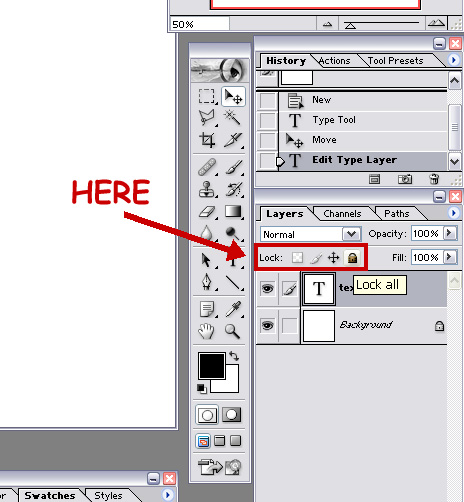
How do I unlock layers, and why do they keep locking themselves each time I reopen the program? One minute I can freely move my text around, the next it's locked
|
|
| |
|
|
|
Zylka
|
|
Thanks all
I will try another program but am almost finished the current project in photoshop. The locking won't undo and it's doing some really weird things, the program is a little corrupted
|
|
| |
All times are GMT. The time now is 05:27.
Apolyton Time is 00:27. |
top of page
|
| archivepost |
|
Forum Rules:
You may not post new threads
You may not post replies
You may not post attachments
You may not edit your posts
|
HTML code is ON
vB code is ON
Smilies are ON
[IMG] code is ON
|
|
|
|
|
|






 26-04-2003 05:13


 ). If so... well, the lines will increase in the same percentage. I mean, the lines will be 4, 5 pixels black after you resize the design, and the edges will not be straight anymore. A little blur will happen. If you want to keep them with 1 pixel, straight edges, you'll have to start over.




 Attachment:



 |
|