|

|
Leonidas
|
|
quote:
Originally posted by orange
I've never had an issue with mine. It's worked with every game I've ever had.
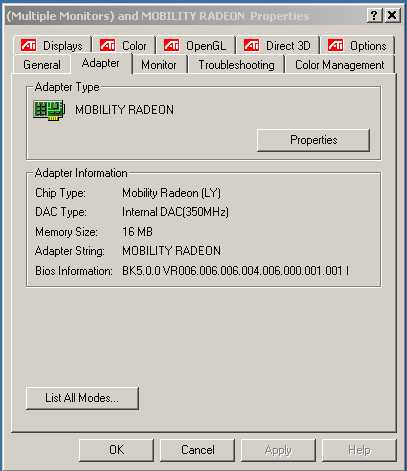
And I can't replace my Video Card...it's for a laptop, so it's soddered on. |
You're lucky you have never had a problem before. Almost all issues I have seen have been with ATI video cards and games. . .
However, it will be interesting to see if other people with ATI cards will be able to play RoN. . .
|
|
| |
|
|
|
ozimandius
|
|
I have a Radeon 9700 Pro and the demo runs great for me. I just updated to the 3.4 Cats
|
|
| |
|
|
|
Leonidas
|
|
quote:
Originally posted by diablologin
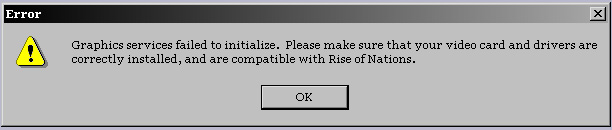
When i try to run the Rise of Nations Trial version i am getting the
Error - "This video card driver is not supported for use with
Rise of Nations. Please download the latest drivers from your
manufacturer's website."
I am running
Compaq Evo N600C laptop with windows 2000
Directx9.0a
Mobility Radeon (Radeon M6-P Driver for Windows 2000)
pls see the attched screen shot also..
what should i do  |
There are known problems with ATI's M6 chipset.
Currently, there may be some hope. 
PLEASE NOTE: No one should attempt to mess with their computer setup unless you back up your files and you know what you are doing.
Proceed with caution: Gamers have found mixed results with the following information.
Some gamers who had the M6 chipset like yours, have found a solution by using either the ATI Radeon 7200 or 7500 LTY drivers instead.
Try this:
Download:
http://pdownload.mii.instacontent.n...10-6200-efg.exe
- extract it into e.g. your temp directory (do not run setup.exe as this does not seem to work)
- go to Display properties, select Settings tab
- press Advanced, select Adapter tab
- press Properties, select Driver tab
- press Update Driver ... Welcome to the HW Update Wizard comes up
- select Install from a list or specific location (Advanced), press Next
- select Don't search. I will chose the driver to install, press Next
- select Have Disk
- Browse to your 'temp' directory where you've extracted downloaded package
- a list with many RADEON models will come up. Choose RADEON 7200, press Next, Finish, Restart etc.
Hope this helps
Best of luck.
My advice to everyone: Don't buy a video card that has the Radeon M6 chipset.
Last edited by Leonidas on 19-05-2003 at 01:38
|
|
| |
|
|
|
Leonidas
|
|
quote:
Originally posted by orange
aaaaaaaaaaaaaaaaaaaaaaaaaaaaaaaaahhhhhhhhhhhhhhhhh
hhhhhhhhhh
I did everything you said Leo, and now my computer is ****ed up! I can't put my settings to anything but 640x480 and 16 colours and on top of that the game STILL doesn't work 
How do I fix it?!?!! |
Orange:
I see that you have an ATI Rage Mobility M3 card. The instructions I gave was for the Radeon Mobility M6 card. These are two different video cards! I'm not surprised that you have video problems now.
Do you have the ATI M3/M4 Video Driver version A03 for Windows 2000?
Nothing's wrong with your computer, it should just be a matter of changing back to your old driver again.
Try each of these steps:
1) Follow these instructions:
- go to Display properties, select Settings tab
- press Advanced, select Adapter tab
- press Properties, select Driver tab
- press Update Driver ... Welcome to the HW Update Wizard comes up
- select Install from a list or specific location (Advanced), press Next
- select search, and let the computer select the driver to install, press Next
and follow the instructions. Your computer should then re-select your old M3 driver again.
OR
2) Here is ATI's web page where you can select the correct driver and download it:
http://mirror.ati.com/support/driver.html
Sorry for the mixup
EDIT: Everyone should take note of what driver your video card is currently using. This way, should anything go wrong in changing drivers, you can easily switch back to it again
Last edited by Leonidas on 18-05-2003 at 19:49
|
|
| |
All times are GMT. The time now is 05:28.
Apolyton Time is 00:28. |
top of page
|
|
|
Forum Rules:
You may not post new threads
You may not post replies
You may not post attachments
You may not edit your posts
|
HTML code is ON
vB code is ON
Smilies are ON
[IMG] code is ON
|
|
|
|
|
|






 17-05-2003 11:29


 Attachment:


 |
|
 |
|