|

|
Caligastia
|
|
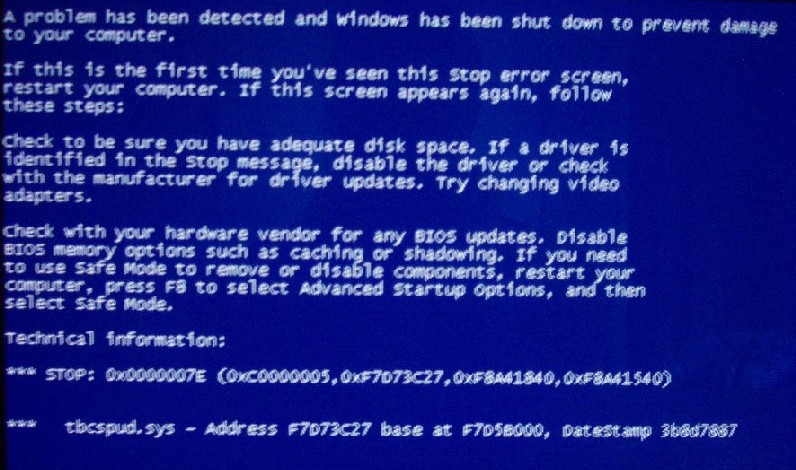
Can anyone help me? When I schedule scandisk to run the next time I reboot, it starts to run, then this message comes up so fast I can't read it. I took a photo of it and followed the directions as best I could (replaced video drivers) but it didn't make any difference. As you can see, the message names certain drivers with these weird numbers, but I don't know how to identify the drivers on my system that it is referring to. Does anyone else know what to do?
 Attachment: dcp_1490.jpg Attachment: dcp_1490.jpg
This has been downloaded 67 time(s).
|
|
| |
|
|
|
Cruddy
|
|
Will it boot in safe mode at all? If not then you've probably got a major problem with your hard disk (scan disk won't touch a seriously f***ed drive - well it won't touch mine, anyway).
HOWEVER - assuming you can get to Windows - you run scandisk from the desktop? There should be a scandisk option under accessories/system tools (may be in a different from your version of windows).
If can't find the shortcut from the startbar and you can get to Windows, do a find files for Scandisk (look for one that ISN'T a DOS application) and run that.
|
|
| |
|
|
|
Caligastia
|
|
quote:
Originally posted by SlowwHand
Try safe start and scan. |
Tried that, but it locks up. It's fine booting into safe mode when I don't have disk checking scheduled though.
|
|
| |
|
|
|
Caligastia
|
|
quote:
Originally posted by Asher
Possibilities:
1) Corrupt device driver (used at boot-time)
2) You may have a boot sector virus
3) Corrupt boot volume
So:
Scan for virii |
I have NAV, and have regularly do a complete scan of my HD.
quote:
Update drivers (you don't happen to have a Santa Cruz soundcard do you?) |
Yes I do. I already have the latest drivers for it BTW..
|
|
| |
|
|
|
Caligastia
|
|
quote:
Originally posted by Cruddy
Will it boot in safe mode at all? If not then you've probably got a major problem with your hard disk (scan disk won't touch a seriously f***ed drive - well it won't touch mine, anyway).
HOWEVER - assuming you can get to Windows - you run scandisk from the desktop? There should be a scandisk option under accessories/system tools (may be in a different from your version of windows). |
Unfortunately I don't seem to have that option. When I go to run scandisk it tells me it needs exclusive access to the drive and would I like to schedule a disk check for the next time I boot up.
|
|
| |
|
|
|
Caligastia
|
|
quote:
Originally posted by Asher
Well it's a very common problem for the Santa Cruz cards, so that may still be it. |
Really? They are known for screwing up scandisk specifically? If so I'll disable it and try again.
|
|
| |
All times are GMT. The time now is 05:28.
Apolyton Time is 00:28. |
top of page
|
| archivepost |
|
Forum Rules:
You may not post new threads
You may not post replies
You may not post attachments
You may not edit your posts
|
HTML code is ON
vB code is ON
Smilies are ON
[IMG] code is ON
|
|
|
|
|
|







 23-05-2003 05:35








 |
|