|
| |
|
| |
|

|
aneeshm
|
 |
Indore , Madhya Pradesh
Jul 2001
time: 10:58
|
|
quote:
Sorry to say, but can't say I'm entirely surprised with such an el-cheapo chipset. |
It takes a few years for computer peripherals to become as affordable in India as they are in the US (or Netherlands ). Plus , this machine was bought three years ago .
Yes , I do have integrated graphics .
What is the max onboard video memory that can be set for the onboard graphics (I will downloading the latest drivers now ) , and have 256 MB RAM , no worries there .
How can you change your onboard memory settings ?
ANd where do you download the latest drivers for the 801e ?
Is RON compatible with onboard graphics (assuming I have 32 MB video memory onboard ) ?
The readme mentions only 810 . Does that include the entire family (810e & 810e2) ?
Thanks for the replies . May save me a few thousand Rupees .
Last edited by aneeshm on 18-06-2003 at 20:20
|
|
| |
|
|
|
Locutus

|
|
ACS CTP1/2 Manager & Civ4 Co-Manager
|
 |
Hengelo, The Netherlands
Nov 1999
time: 06:28
|
|
Of course I understand you may not have much of a choice in terms of what hardware you buy, especially in a country like India. But if you have a card like that, you can't expect to be able to run each and every game on it, unfortunate as it is 
quote:
What is the max onboard video memory that can be set for the onboard graphics |
I did some research for you: the theoretical upper limit is 32MB, so you seem okay there (but there's no guarantee that you'll ever get that much, a lot depends on system configuration).
You may want to check with the DirectX tool dxdiag.exe how much memory your system indicates is available for memory. This number represents the current amount, not necessarily the maximum, but some games rely on this number to determine if enough memory is present to run. If this number is very low, RoN may simply not run because it doesn't realize that the system can allocate more memory if required.
quote:
How can you change your onboard memory settings ? |
Basically you can't. It depends entirely on how what the driver and the OS can make available.
quote:
ANd where do you download the latest drivers for the 801e ? |
Among other places here: http://downloadfinder.intel.com/scr...pport_Intel.asp
Search for "810e", you'll find graphics drivers as the first search result (latest version is 6.7).
quote:
Is RON compatible with onboard graphics (assuming I have 32 MB video memory onboard ) ? |
You'll have to ask that to Microsoft or BHG. And if it isn't, if they plan on supporting it in the future.
However, like Q Cubed said, I wouldn't be surprised if few or no onboard cards are supported though, so you're probably best off buying a seperate video card. Make sure it has at least 32MB of memory and isn't listed in the readme or anywhere else as a problematic card. Apart from that, any card will probably do (like Q Cubed said).
quote:
The readme mentions only 810 . Does that include the entire family (810e & 810e2) ? |
Again a question for BHG/MS, but assume that it does (and the 815 family as well). The differences are minimal.
quote:
Additionally , how can I change the onboard graphics in BIOS ? |
Differs per motherboard, but probably under the Plug & Play Settings (which are often under the Advanced menu). The option is usually called something like 'Primary Graphics Adapter' and you can often choose between 'Onboard', 'AGP' and 'PCI', depending on your hardware. Of course, you should only change this after you built in a new card, where the new setting depends on what kind of card it is. However, DON'T MESS WITH YOUR BIOS unless you know what you're doing. You could seriously screw up your PC if you mess up. If possibly, let someone with experience build in a new card and change your BIOS settings.
Hope that helps...
|
|
| |
|
|
|
Q Cubed
|
 |
t3h y3ll0w p3ril
Apr 1999
time: 23:28
|
|
v3800? is that an nvidia graphics chipset, an ati chipset, matrox, or something else?
pretty much any graphics card is compatible with a motherboard, so long as the connections line up. if you have an agp slot, an agp card will work on your machine. (agp slots are the ones that have a little thing at the end to lock it in, and tend to be close to the cpu/north bridge).
now, if you have onboard graphics, you'll have to go into the bios and manually turn off the onboard graphics.
one note: sometimes, you'll run into systems and bioses that don't want to work with other graphics cards. these tend to be the horrid brand-name computers, like packard bell, hewlett-packard, and compaq, among others, which seem to have tried to make everything as proprietary-shaped as possible to extract more profit from spare parts.
|
|
| |
|
|
|
Locutus
|
|
ACS CTP1/2 Manager & Civ4 Co-Manager
|
|
Hengelo, The Netherlands
Nov 1999
time: 06:28
|
|
aneeshm,
Like Q Cubed said, as long as you have an AGP slot (which I expect you have, but you'll want to check your manual or the board itself to make sure) it'll work on your motherboard. As far as RoN goes, the readme says the following:
quote:
• ASUS v-3800 Ultra: Rise of Nations may not run on computers using this video board. To resolve this problem, download and install the latest drivers from http://www.asus.com. |
So I assume this means it'll work as long as you use the latest drivers.
quote:
one note: sometimes, you'll run into systems and bioses that don't want to work with other graphics cards. these tend to be the horrid brand-name computers, like packard bell, hewlett-packard, and compaq, among others, which seem to have tried to make everything as proprietary-shaped as possible to extract more profit from spare parts. |
Actually, I work on the customer support department of one such company and normally building in custom hardware should normally work okay. At least in the case of the company I work for, the only reason why it might cause problems is not because they try to make everything proprietary-shaped but because they always try to use the cheapest components available (while selling them at ridiculously high prices -- so yes, they're still trying to fleece their customers  ). And of course, the cheaper your components are, the likelier it is they don't fully comply to standards, which can cause problems when building in 3rd party hardware (especially if this 3rd party hardware is also cheap). ). And of course, the cheaper your components are, the likelier it is they don't fully comply to standards, which can cause problems when building in 3rd party hardware (especially if this 3rd party hardware is also cheap).
Last edited by Locutus on 23-06-2003 at 15:07
|
|
| |
|
| |
|
|
|
Locutus
|
|
ACS CTP1/2 Manager & Civ4 Co-Manager
|
|
Hengelo, The Netherlands
Nov 1999
time: 06:28
|
|
The 810e is only a chipset, you need to find out exactly what motherboard you have, as different motherboards have different slots. If you don't have any manuals or anything for your PC and no dealer/helpdesk or anyone else to contact, you'll have to open the casing and look for the label on the motherboard itself (if you've never done this before it may sound a bit scary but I can assure you it's not -- you might even enjoy it  ). The label should mention both a manufacturor and a type name/number. With that information you can search the Net (or post it here and I'll see what I can do). But if you're opening the casing anyway, you might as well check for the AGP slot yourself... ). The label should mention both a manufacturor and a type name/number. With that information you can search the Net (or post it here and I'll see what I can do). But if you're opening the casing anyway, you might as well check for the AGP slot yourself...
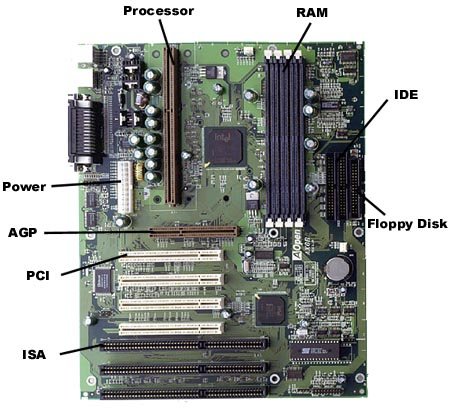
If you don't know what a motherboard looks like, it's pretty easy to find: it's the big board to which all other cards are connected, which houses the processor and fan and to which the cables from your various disk drives (HDD, CD-ROM, FDD, etc) lead. Below I've attached an image of what your average motherboard might look like. Note that PCI slots are always white so they usually stand out pretty clearly (unless they're all filled), making the motherboard easy to find. The AGP slot is always brown(ish) and otherwise looks a lot like a PCI slot.
Before you open your casing, make sure you disconnect the power! Also, before touching any components on the inside of your PC, touch some metal object first (e.g. the casing of the PC itself, if it's made of metal) to loose any static energy you might be carrying. The interior components of your PC are rather sensitive so static energy might damage them.
Should you want it anyway, you can find a lot of info on the Intel chipset on the Intel website (most of the info is very technical though): http://www.intel.com/design/chipsets/810/810e.htm
 Attachment: mobo.jpg Attachment: mobo.jpg
This has been downloaded 69 time(s).
Last edited by Locutus on 24-06-2003 at 01:14
|
|
| |
|
| |
All times are GMT. The time now is 05:28.
Apolyton Time is 00:28. |
top of page
|
|
|
Forum Rules:
You may not post new threads
You may not post replies
You may not post attachments
You may not edit your posts
|
HTML code is ON
vB code is ON
Smilies are ON
[IMG] code is ON
|
|
|
|
|
|





 11-06-2003 00:06


 . I do not own a video card , however . However , when Direct X 9.0 was improperly installed , (and I had direct x 8.0a) , the game ran at least until the movies , then gave an error that my graphics initialisation failed . Any help ?



 Sorry to say, but can't say I'm entirely surprised with such an el-cheapo chipset.


 |
|