|
| |
|

|
wervdon
|
|
I've been wanting to be able to mod these games for a while, but hit a road block with the .lbx file format that all the data is enclosed in.
Well today I ran across a website where someone who did some hex editing was nice enough to layout his findings on the file format:
http://www.xprt.net/~s8/prog/orion2/lbx/
Being a programmer myself, I decided to write a quick tool capable of extracting files from .lbx archives and rebuilding an archive from those files as a first step to being able to mod both games (I believe they use a common file format, but ive only tried this on techname.lbx so far).
The tool works like outlined below (its command line driven, ie dos prompt). I'll use the convention of typing in CAPS what you type and lower case for program output:
Dos prompt:
LBXTOOL
Build .lbx from a directory or extract an lbx to a directory? (B/E) EXTRACT (e would be enough)
Enter Filename of the lbx archive: TECHNAME.LBX
Number of files to extract: 6
Offset: File #0 = 2048
Offset: File #1 = 10653
Offset: File #2 = 19918
Offset: File #3 = 30365
Offset: File #4 = 40364
Offset: File #5 = 49846
Offset: File #6 = 58451
Exiting Tool.
The results would be that the 6 files which were archived in technames.lbx would be outputted to File1.txt through File6.txt (they may not be text files, but .txt makes it easy to edit and see...unfortunately file names are not part of the archive)
In reverse:
LBXTOOL
Build .lbx from a directory or extract an lbx to a directory? (B/E) B
Enter LBX archive name to build: TEST.LBX
# of files to include: 6 (I entered the 6)
Size of file #1 = 8605
Size of file #2 = 9265
Size of file #3 = 10447
Size of file #4 = 9999
Size of file #5 = 9482
Size of file #6 = 8605
Archiving: file1.txt (8605 bytes)
Archiving: file2.txt (9265 bytes)
Archiving: file3.txt (10447 bytes)
Archiving: file4.txt (9999 bytes)
Archiving: file5.txt (9482 bytes)
Archiving: file6.txt (8605 bytes)
Exiting Tool.
The files have to be named file1.txt through file6.txt, they are all put in test.lbx (or whatever you asked to call it).
I've only tried this on technames.lbx. So far I've successfully extracted the 6 files in the archive (they seem to be all the tech names in the game, 1 file per language). Then rebuilt the archive as test.lbx which I copied over my original techname.lbx in the moo2 folder and successfully run the game. I have not tried to make any actual modifications yet 
I'm including the source code with the lbx extractor/builder in case I made a mistake someone else can fix. I'm hoping there's enough other moo1/moo2 fans around here who have also wanted to mod the game to help find out which data files in which lbx archives control different things like research speed, etc. (I say that cause i'm hoping for a slowdown tech mod for moo2 ;P)
Note, One assumption I made which may not always be valid is the first file in the archive should always begin at position 2048 in the .lbx archive. I did this mostly because it was the case with techname.lbx and seemed reasonable enough.
Edit: Ooops, Initial version was opening the files in ascii instead of binary mode, Didn't notice my mistake till I tried to extract a large lbx file. No one had downloaded it yet though so no worries.
 Attachment: lbxtool.zip Attachment: lbxtool.zip
This has been downloaded 76 time(s).
Last edited by wervdon on 11-06-2003 at 04:44
|
|
| |
|
|
|
TheReaper
|
|
When I read your post I started to tinker around with the files myself.
I wrote a small program that essentially does exactly what yours does but I still decided to start from scratch with the info from the page you gave as reference.
I have no trouble extracting the files from even the larger archives (or so I think, the offsets seem to be right at least).
However the extracted files seem to be somewhat useless, there is no form of structure that I could make out (granted, I didn't take a too close look yet since its rather late).
When opened in Notepad all you get to see is unreadable ASCII Garbage.
Extracting the technames.lbx works flawlessly though, so I assume that what I see after extracting the game.lbx is actually what is in it.
My first guess would be that the files stored inside the lbx in some cases still need to be compressed or compiled to work with MoO, which would make them nearly uneditable in their current form.
I might be wrong though, after all this was a pretty quick and dirty job, so maybe its all just my fault 
I'll finish the program anyway (it isn't yet capable of merging txt files back into lbx since I wanted to see if I could get it to work with the larger files first).
If anyone is interested in its source I'll release that as well after I cleaned it up a little.
Last edited by TheReaper on 12-06-2003 at 03:44
|
|
| |
|
|
|
CharlesBHoff
|
|
el paso texas
May 2002
time: 05:28
|
|
Some of the files might be encode to stop people from hacking then to make MOD'S.
|
|
| |
|
|
|
CharlesBHoff
|
|
el paso texas
May 2002
time: 05:28
|
|
Many year ago I figure out how to use than hexediting to change the planet data in MOO1 and I haver than writen copy on how to do it. First you need to count bytes from the start of the star name to get the right position in the savegame files. I will post it up one day. I even use the data to make than planet where one wasnot.
|
|
| |
|
|
|
cronel
|
|
Hi, I've been messing around with the MOO1 files lately, and have figured out a bit, beyond what is already known. But I'm mostly interested in the graphics files right now, so I don't know if it's useful to you guys, as it can't be used to really change the gameplay. And I haven't yet really figured out how to view or change the graphics, because I think they are compressed using some form of RLE. However if you are interested let me know and I'll post the details.
|
|
| |
|
|
|
CharlesBHoff
|
|
el paso texas
May 2002
time: 05:28
|
|
I than not a graphic person but there is a good change that they didnot use standard graphic format at all.
|
|
| |
|
|
|
cronel
|
|
Ok, I wrote up a little page with what I could find out. It's here.
|
|
| |
|
|
|
wervdon
|
|
Nice writeup. What color depth does MOO1 run in? I can't recall off the top of my head, i'm sure its either 16 bit or palletized though. I'm just thinking its semi-likely that with moo1 at least there is some pallet information in there.
|
|
| |
|
|
|
CharlesBHoff
|
|
el paso texas
May 2002
time: 05:28
|
|
I play MOO1 on than old 486 with VGA graphic card.
|
|
| |
|
|
|
cronel
|
|
Im pretty sure it's palettized, 256 colors. The palettes I believe are found in 'font.lbx', look at this:
code:
File: moo/fonts.lbx
(subfilename) offset offset size comment
00 - No File 000003A0 928, 11864 (Fonts Style Data)
01 - No File 000031F8 12792, 652 (Border Style Data)
02 - EMPERATO 00003484 13444, 5472 (Main game palete)
03 - VORTEX 000049E4 18916, 5472 (main vortex screen)
04 - OPTIONS 00005F44 24388, 5472 (options, load, save)
05 - NEWGAME 000074A4 29860, 5472 (primary new screen)
06 - CUSTOM 00008A04 35332, 5472 (custom race selection)
07 - STARVIEW 00009F64 40804, 5472 (star/planet view)
08 - LANDING 0000B4C4 46276, 5472 (transport landings)
09 - DIPLOMAT 0000CA24 51748, 5472
10 - WINNING 0000DF84 57220, 5472
11 - COPYPRO 0000F4E4 62692, 5472
12 - COUNCIL 00010A44 68164, 5472
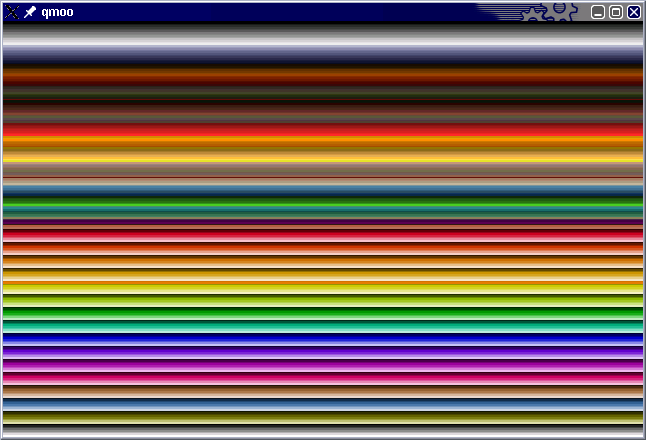
The main game palette is at 13444 in that file, and all the others to the end of the file also are palettes. These are in DAC RGB format, meaning each color is 3 numbers (RGB), in the range 1-63, which is the format that was (is) used when you set the palette directly through the graphics card ("DAC"). I made a little program to verify, that takes the palette from offset 13444 in that file and shows it, and it's pretty obvious it's the right palette , check it out (in the attachment).
So in my opinion all the graphics are palettized, in MOO1 at least.
 Attachment: snapshot1.png Attachment: snapshot1.png
This has been downloaded 241 time(s).
|
|
| |
|
|
|
wervdon
|
|
cool, looks like you got it to me.....
|
|
| |
|
|
|
wervdon
|
|
You probally would be restricted to the same pallet as above......
|
|
| |
All times are GMT. The time now is 05:28.
Apolyton Time is 00:28. |
top of page
|
|
|
Forum Rules:
You may not post new threads
You may not post replies
You may not post attachments
You may not edit your posts
|
HTML code is ON
vB code is ON
Smilies are ON
[IMG] code is ON
|
|
|
|
|
|





 11-06-2003 04:26




 Game.lbx in particular. I'm not sure if its the tool or the lbx format is different. For some reason the offsets the program outputs seem wrong, they aren't in ascending order (ie it sounds file #5 is before file #4 and such).





 |
|