|
| |
|

|
Konquest02
|
 |
Somewhere up in the trees
Jun 2002
time: 00:29
|
|
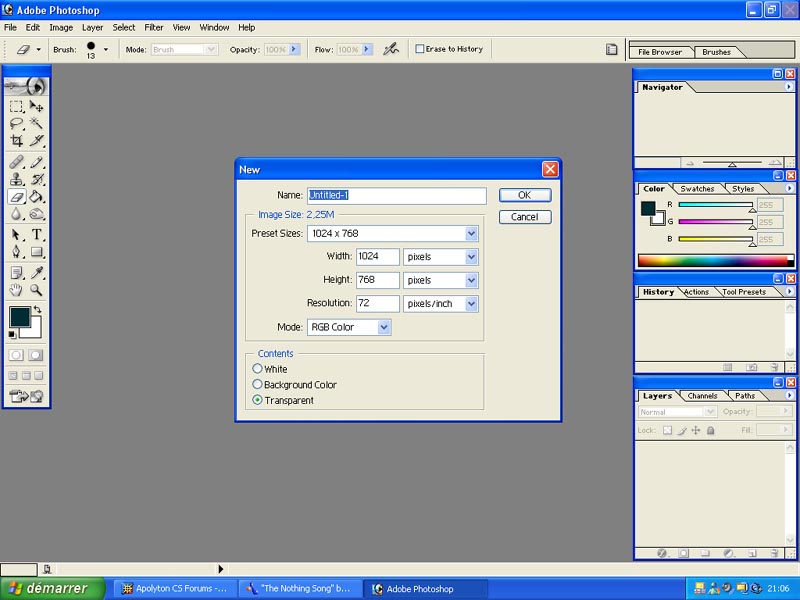
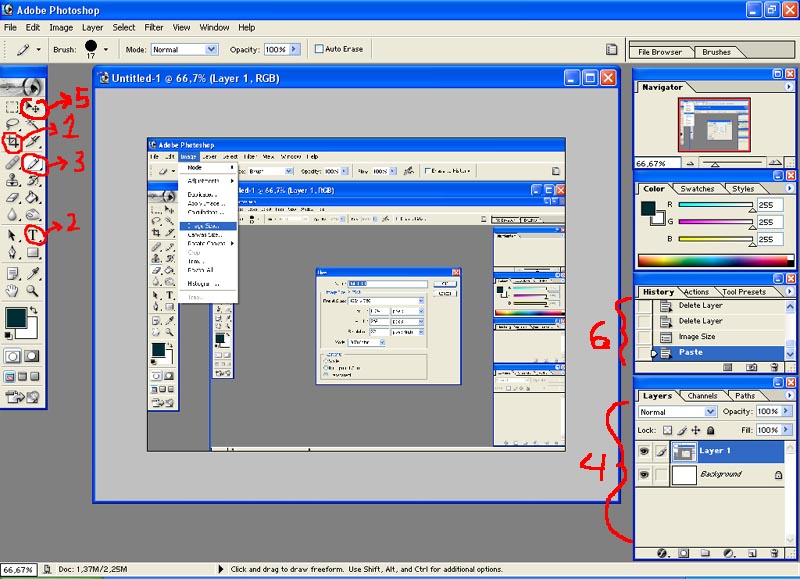
To resize the image in 800x600, go to Image/Image Size... and select a format of 800x600. The image will automatically resize. If you create a 800x600 file and then you paste your screenshot in it, the lower right part of it will be cut out, as in the example below.
In the screenshot, #1 is the crop image tool. Select it, drag the frame you want on your image then hit enter. The rest of the image will be cut out. Useful when you want to single out a detail
#2 is the type tool. Hit this, click where you want your text to appear in your image and then type. You can choose the font, size and color too.
#3 is the pencil tool. I used it to draw those amrvelous numbers.
#4 is your layer box. This of your image as a big sandwich. You're just piling things up. If you select the layer you want, and then use the move tool (#5), you can slide layers on top of each other., creating beautiful arrangements!
Don't be afraid to experiment. If you ahve done something wrong, you can go back in your history box (#6) or simply hit Ctrl-Z.
 Attachment: ps2.jpg Attachment: ps2.jpg
This has been downloaded 208 time(s).
|
|
| |
All times are GMT. The time now is 05:29.
Apolyton Time is 00:29. |
top of page
|
| archivepost |
|
Forum Rules:
You may not post new threads
You may not post replies
You may not post attachments
You may not edit your posts
|
HTML code is ON
vB code is ON
Smilies are ON
[IMG] code is ON
|
|
|
|
|
|







 29-06-2003 17:40





 ) on your keyboard. Your image then goes in your clipboard.




 |
|