|

|
Cruddy
|
|
(Totally) Useless advice;
1. Put some tape on your monitor to cover the icons.
|
|
| |
|
|
|
Zopperoni
|
|
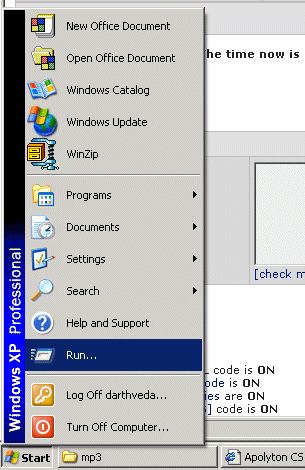
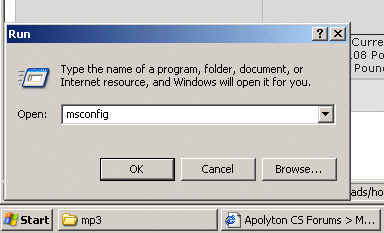
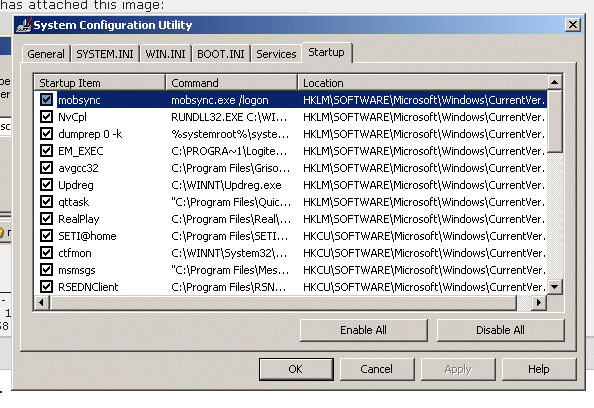
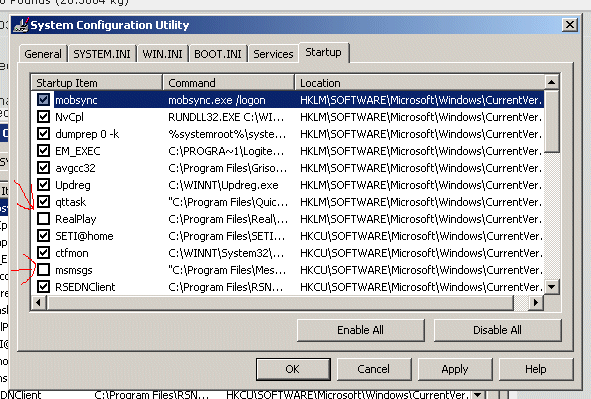
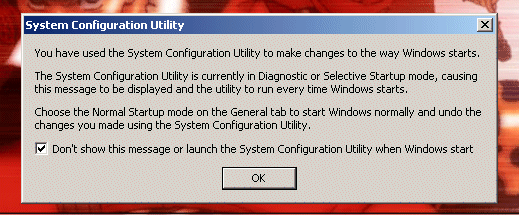
1) Go to: Start > Run > type in: msconfig > [tab] Startup > untick evntsvc
2) In the program, go to: Tools > Options > [tab] General > untick "Automatically run Messenger when I log on to Windows"
|
|
| |
|
|
|
Cruddy
|
|
I think Zopperoni's advice looks good... msconfig is a handy little devil, probably why MS concealed it.
|
|
| |
|
|
|
Nacht
|
|
Amsterdam
May 2002
time: 06:29
|
|
And if you don't want the messenger icon to reappear whenever you start Outlook Express you can open the registry editor go to 'HKEY_LOCAL_MACHINE\SOFTWARE\Microsoft\Outlook Express' and add a value with the name: 'Hide Messenger', type: REG_DWORD and value 2.
|
|
| |
|
|
|
Cruddy
|
|
Nacht - Express has been altered many times, but even in the anceint version I have, there is an option to disable the Messenging. Look under Option if you don't have a Preferences choice.
|
|
| |
All times are GMT. The time now is 05:29.
Apolyton Time is 00:29. |
top of page
|
| archivepost |
|
Forum Rules:
You may not post new threads
You may not post replies
You may not post attachments
You may not edit your posts
|
HTML code is ON
vB code is ON
Smilies are ON
[IMG] code is ON
|
|
|
|
|
|






 21-07-2003 04:15








 Attachment:

 |
|