|

|
dman2430
|
|
South Jackson
Mar 2002
time: 23:29
|
|
I'm playing a game with 16 civs & signed a Mutual Protection Pact with the Zulu to have one less enemy in the world for awhile. Now I don't want it anymore, how the heck do I cancel it, or any other agreement for that matter?
Thank in advance for your help,
Dylan
|
|
| |
|
|
|
dman2430
|
|
South Jackson
Mar 2002
time: 23:29
|
|
It's regular Civ3 no expansion pack. So, uh, how do I cancel it/renegotiate it whatever? All this and he's just gonna be annoyed with me again anyway. Damn.
|
|
| |
|
|
|
asleepathewheel
|
|
listening too long to one song
Mar 2002
time: 00:29
|
|
Hmm, I think in regular civ3 you just have to wait out the 20 turns. And yes, he will go back to hating you.
|
|
| |
|
|
|
dman2430
|
|
South Jackson
Mar 2002
time: 23:29
|
|
I have waited out the 20 turns, but he doesn't want to cancel it, I know it's still in effect because when I go to propose trades "mutual protection pact" is not an option.
Now that I've waited 20 turns, is there something I'm missing?
|
|
| |
|
|
|
asleepathewheel
|
|
listening too long to one song
Mar 2002
time: 00:29
|
|
Ok, I think if you click on clear trades? that might work. or click on the pact itself. Hmm. maybe someone with vanilla civ will come along.
|
|
| |
|
|
|
TheArsenal
|
 |
Sunny Southern California
Mar 2002
time: 21:29
|
|
quote:
Originally posted by Solomwi
I think you're right, vmxa. The other change is you can see what deals are active in the Foreign Advisor screen, rather than have to call up each leader to find out. In fact, I know you're right, because I remember having to call up each leader and click Active to find out what was up. |
Just to be clear. Sorry if this is repeating.
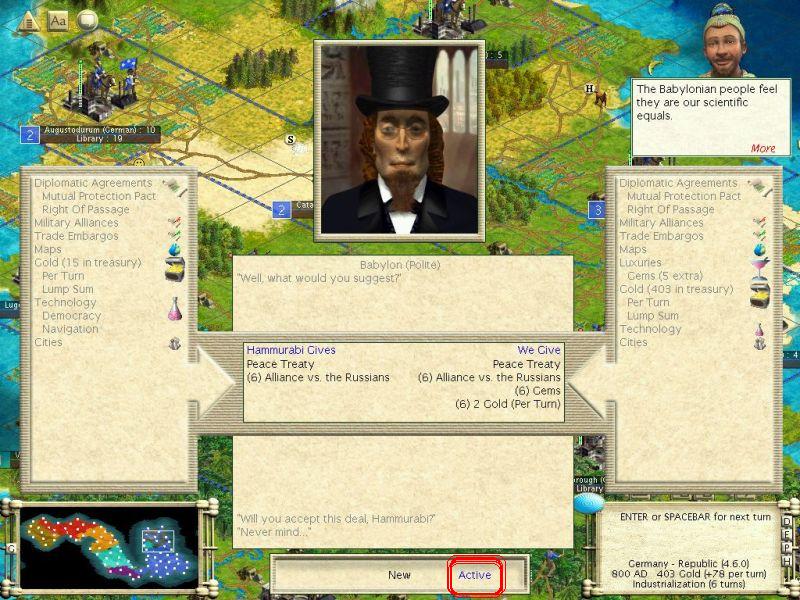
In PtW (I can no longer remember how Civ III Vanilla is laid out) inside the foreign advisor screen there are two other screens which show your relationship to the other heads of state. These can be reached through tabs on the right hand side of the screen. One screen is trade - which shows which countries you have potential, and active trades with. The other is the screen which shows what deals you have that are active.
Instead of having to open up the negotiation screen (the screen illustrated by Catt above) you may click on the foreign leaders image, and the active deals appear in a status box on the right hand side. This allows you to quickly check all of your deals without the monotony of going in and out of the negotiation screen with every leader.
If you have sixteen turns left on a peace you sued for, for example, it will give you a number of turns left on the treaty (16) once those turns are up, the words "peace treaty" will appear but no parenthetical number will appear beside it.
-edited for clarity
Last edited by TheArsenal on 25-07-2003 at 22:38
|
|
| |
|
|
|
dman2430
|
|
South Jackson
Mar 2002
time: 23:29
|
|
Thanks for all your help guys.
|
|
| |
All times are GMT. The time now is 05:29.
Apolyton Time is 00:29. |
top of page
|
| archivepost |
|
Forum Rules:
You may not post new threads
You may not post replies
You may not post attachments
You may not edit your posts
|
HTML code is ON
vB code is ON
Smilies are ON
[IMG] code is ON
|
|
|
|
|
|





 24-07-2003 02:31






 Attachment:







 |
|