|

|
Shokto
|
|
Exactly as the subject says...how do you get moo1 to run in windows xp?
|
|
| |
|
|
|
Shokto
|
|
I did that and when i run it. The dos windows opens then crashes.
|
|
| |
|
|
|
Shokto
|
|
it says FONTS.LBX could not be found.
|
|
| |
|
|
|
Ljube
|
 |
Belgrade
May 2003
time: 06:30
|
|
A sure way to run it in XP is to download a program called VDM Sound from this url
http://www.ece.mcgill.ca/~vromas/vdmsound/
Then, install it, and right click the exe file and click "Run with VDM Sound". Success guarantied!
By the way, MOO1 is the best game ever (can compare with pirates only). Sad there's no multiplayer.
Last edited by Ljube on 01-09-2003 at 17:06
|
|
| |
|
|
|
pes
|
|
In search of assistance..... After reading up on the XP posts--
* I am running XP Pro
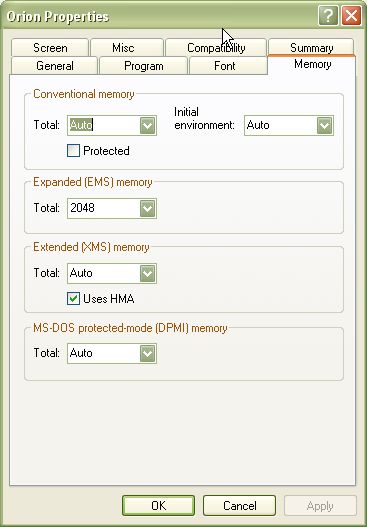
* Have made a shortcut to ORION.EXE with EMS memory set at 2048 (have tried all other settings as well)
* Have tried running in all compatibility modes (Win95-XP)
* When I run the shortcut, I just get a black DOS box that says "You must have at least 1024K of expanded memory"
When I go into DOS command prompt and type MEM, I get:
655360 bytes total conventional memory
655360 bytes available to MS-DOS
598176 largest executable program size
1048576 bytes total contiguous extended memory
0 bytes available contiguous extended memory
941056 bytes available XMS memory
MS-DOS resident in High Memory Area
I've even tried running ORION.EXE with VDMSound, and get the same "You must have at least 1024K of expanded memory" message.
I can run the Install program fine. But just can't run the game. Am I missing something here? This is driving me nuts.
|
|
| |
|
|
|
vmxa1
|
 |
Oviedo, Fl
Nov 2001
time: 21:30
|
|
Garth, if you open the pif (shortcut) for Orion and look at the properties page. Select the program tab. Then advanced. This should point to the system root and then autoexec.nt and config.nt. If it does, then you are using the ones that came with the system. Well I guess you could have replaced those, but I doubt it.
If you wanted to use private ones, then copy those into the directory for Orion and modify them. You then need to change the properties pages to point to the new ones.
Last edited by vmxa1 on 29-09-2003 at 07:50
|
|
| |
All times are GMT. The time now is 05:30.
Apolyton Time is 00:30. |
top of page
|
|
|
Forum Rules:
You may not post new threads
You may not post replies
You may not post attachments
You may not edit your posts
|
HTML code is ON
vB code is ON
Smilies are ON
[IMG] code is ON
|
|
|
|
|
|





 08-08-2003 03:50


 Attachment:


 |
|