|
| |
|
|
Allard HS
|
Let us bring into public knowledge what I wanted to keep
for myself 
code:
TEXT COMMANDS:
-=-=-=-=-=-=-=
By Allard H.S. Höfelt
May be used freely without my permission.
-----------NOTES-----------
Not all of these function everywhere, eg. they do not work in
events, menus, etc. Also, some functions are prefixed, eg. the field
to fill in your name is an editbox, though the @options tag is used
as with any other value. Also the "^" command works very differently
in CREDITS.TXT than normally.
It is also unfortunately not possible to add icons/units to places
where they are not originally, nor is it possible to make "links"
to other dialog boxes or to call up movies, etc.
I am not certain about the commands in Test of Time. There might
be more commands (though I seem to remember John Possidente said there
were none), and there might be new tricks.
The commands given here are all the commands that work. It has
been checked while hex-editing the civ2.exe file (near the end of
the file) and there are no more of them. In Colonization and Antietam
and probably more similar MicroProse games, various other commands
are usable, but they do unfortunately not work in civ2.
Combining several values, however, can lead to surprising results,
and I am certain that not all of it has yet been found. Be original,
therefore, with your tries, and remember that a command might not work
the same in one place and another (especially true for the @options
command).
Not all commands have to be added at the top of the file. This
again is especially true for @options.
-----------main commands-----------
@listbox=....
box with list of choices. You can add @options later.
.... is the no. of rows
@options
radio buttons that can be selected. You can type text
before you add @options to make that text appear on
top of the options, so you do not necessarily have to
add @options at the top of the file.
@default=... number of radio button selected by default
@checkbox uses checkboxes instead of radioboxes
option1 text that shows up in available
option2 options (every new line is new option)
Note: leaving one line empty usually also automatically
----- add the @options command to the next lines.
@text
forces all the next text to be displayed as normal
text instead of listboxes, options, etc.
@columns=....
columns, appears to be only used with listboxes and options
@button=..... adds new button left of OK with .... as text on button
@title=...... title of box
-----------location commands-----------
@width=..... width of dialog box
@height=..... height of dialog box
@length=..... length of dialog box
@y=..... y location (- is lower)
@x=..... x location (- is more to right)
-----------obsolete commands-----------
@smallfont
and
@system
These are both older (used in Colonization) commands with no effect.
-----------some more useful strings/commands-----------
%STRING0, %STRING1, ... = pieces of text used in memory.
%NUMBER0, %NUMBER1, ... = numbers used in memory.
^ - New paragraph.
^^ - Center this line.
@@ - Skips this line.
; - Used to time comments after it. Does not always work.
_ - A space. Used by some scenario authors (JB) to add empty lines.
& - Adds a line under the next letter. May be used only once per line.
% - Indicates a string or number. Works inpredictably in other cases.
| - Seems only usable in menu.txt and mapmenu.txt. Aligns further text
to the right.
-----------interesting tricks-----------
- You can let the player choose its tribe from the scenario introduction
screen instead of the next screen, which does not appear then. Simply
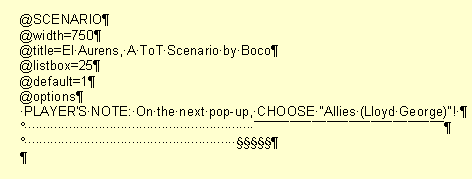
open myscenarioname.txt, add "@listbox" on top, and add "@options"
later on where you want to have the choices. Like this, you can also
devide the available civs in 2 or even 3 columns and have more fun.
The normal (next) screen where you choose your civ itself is not
editable in the game.txt (!) so this is the only way of modifying it.
- You can make a much longer scenario introduction text than normally
(you can almost add half a book ) by adding "@listbox=.." with ..
meaning the number of lines you want the text box to be high, and
later add "@options". All text after options will be in a scrolling box.
Note that this is basically the same as the trick above only you type
your text AFTER @options. The nice thing of this is that it also allows
you to type the more important text above the box, and you can use the
box itself for text giving flavour. You can add "."'s in an further
empty line to make it empty, and allowing a new paragraph, which would
normally not be possible, because no empty lines are allowed.
- If you wish to disable certain options (which only works for menus, and
therefore only to humans and then only to options which do not have
keyboard shortcuts) in menus, game.txt or wherever, simply add @@ at
the beginning of the line. Unfortunately, this does not change the
assigned command for that location (i.e. if you remove "begin scenario"
in the first screen when you start up the game, selecting "view credits"
will show you the hall of fame, and selecting "load game" will still
bring you to the load scenario screen). Adding a ~ before the first or the
second character in various of the lines might do the trick, but it is
very unstable, illogical, and only works at some places (i've only seen
it working in the same very screen I just talked of).
- A great deal of fun can be achieved by adding more options (simply more
lines below) to certain values, such as adding more levels of difficulty
and more barbarians. This is known already for a while.
However, another fun thing to add is this. In the field in GAME.TXT where
the scenario player has to fill in its name, you can simply add more lines:
@NAME
@width=440
@title=Please Enter Your Name
@options
Name:
Political Preference:
Nationality:
Date of Birth:
Place of Birth:
Homepage:
Email:
In the next screen, the gender screen, let's remove the gender question,
assuming that Stalin is only supposed to be male, and let's add this
instead:
^^NEWS NEWS NEWS NEWS
^^
^^New %STRING2 Ruler has been announced.
^^%STRING0 will soon start his new function.
^^
^^%STRING0 was born on the %STRING3 in %STRING4. As
^^soon as he finished his University carreer, he
^^joined the %STRING1 party.
Remember that the %strings values will soon be overwritten with new values
that the game uses (it's funny to find these out by adding a %string0 or 1
to a frequently occuring pop-up screen). Therefore, you might want to ask
the more important questions later, to allow them to return later. Remember
however, that when quitting the game, the values are lost and are also not
saved when you save the game. Keep this in mind to avoid strange messages
in the game, and use the strings only in the very first few pop-ups and
the first turns.
- Remember that any text can be changed in GAME.TXT. If you wish to make
clear that the human player should only choose Deity level, write that
before the @options start. You can add whole little stories, for example
like this, another, more fun, way of asking your name.
^"Friends, - for common to all is our return hereafter, and common
to all is our path - now therefore with ungrudging heart choose
the bravest to be our leader, who shall be careful for everything,
to take upon him our quarrels and covenants with strangers."
@options
Name:
You can also change the text that you see when you save or load a game,
such as remove the title of the leader, or you can change the text if
a saved game is in obsolete or later format ("Sorry, this scenario is
only playable using Fantastic Worlds").
- I imagine many more things are possible without me yet knowing of it.
Explore these commands and use them in your scenarios.
|
|
| |
|
| |
|
|
Allard HS
|
<center><table width=80%><tr><td><font color=000080 face="Verdana" size=2><font size="1">quote:
<img src="/images/blue1.gif" width=100% height=1>
</font>Now, how much extra memory would using this (well, some of it) take up? Like...nothing?
<img src="/images/blue1.gif" width=100% height=1></font></td></tr></table></center>
why would it take more memory? it's just an edit for game.txt, they're not events. well I have no idea if it will take more memory but do not suppose so.
I mean, it's not a trick or something, the commands are used in game.txt and a lot of other text files, it's just that nobody ever cared to find out what it all means. and what to do with them.
<font size=1 face=Arial color=444444>[This message has been edited by Allard HS (edited May 06, 2000).]</font>
|
|
| |
|
| |
|
| |
|
|
Allard HS
|
Actually, I found out all this already quite a while ago, but I wanted to keep it a surprise till my next scenario comes out, but since I doubt that will ever happen, I thought, no reason to withhold my information.
Actually, I asked the same a while ago to John Possidente in the ToT forum. Let me find the link http://apolyton.net/forums/Forum29/HTML/000603.html .
As you'll see there, no need to make too much out of this, to describe it as a new "events" language as I did before is far too exagerated, cause the more interesting things are all hard-coded in the game.
Does anyone, by the way, own that Ultimate Guide to Scenario Building John Possidente was mentioning? I don't like buying such books (I ám Dutch after all).
<center><table width=80%><tr><td><font color=000080 face="Verdana" size=2><font size="1">quote:
<img src="/images/blue1.gif" width=100% height=1>
</font>Could you please post the code for the Ancient Empires Scenario Intro? Your instructions are not very clear on that point.
<img src="/images/blue1.gif" width=100% height=1></font></td></tr></table></center>
I already did they are mere examples of what I told in my first post (though the letters are too small). Yes, I took Ancient Empires as an example it was the first of the alphabet listed in my scenarios folder. Here it comes again:
- "You can let the player choose its tribe from the scenario introduction screen instead of the next screen, which does not appear then. Simply open myscenarioname.txt, add "@listbox" on top, and add "@options" later on where you want to have the choices. Like this, you can also devide the available civs in 2 or even 3 columns and have more fun. The normal (next) screen where you choose your civ itself is not editable in the game.txt (!) so this is the only way of modifying it."
<center><table width=80%><tr><td><font color=000080 face="Verdana" size=2><font size="1">quote:
<img src="/images/blue1.gif" width=100% height=1>
</font>There is a way to combine text boxes and option buttons, right
<img src="/images/blue1.gif" width=100% height=1></font></td></tr></table></center>
that doesn't seem to work. It doesn't seem that more than one command work individually (i.e. separately from each other, so i mean first some options, then some text, then more options). But, I don't know all of it myself 100%. It might also very well be.
<center><table width=80%><tr><td><font color=000080 face="Verdana" size=2><font size="1">quote:
<img src="/images/blue1.gif" width=100% height=1>
</font>is it possible, at the point where you add more lines to the "enter your name" screen, to stop it printing stupid default values in the boxes
<img src="/images/blue1.gif" width=100% height=1></font></td></tr></table></center>
If you find a way to clear the %string1's and 2's etc. then the field would be empty. The dates are in there cause the date has been used as that specific string number earlier in the program (in the scenario intro text it has) and has remained in memory as that string. I don't think that is possible, i'm afraid. I mean, that's the thing I said that a lot of things are hardcoded; there is unfortunately no way to make the game do special things. I mean, it's not a programming language.
Oh well, there are worse things in life than pre-filled in texts...
<center><table width=80%><tr><td><font color=000080 face="Verdana" size=2><font size="1">quote:
<img src="/images/blue1.gif" width=100% height=1>
</font>i thought RedFront would be the highest level of scenario and game design
<img src="/images/blue1.gif" width=100% height=1></font></td></tr></table></center>
Red Front was the first scenario to make advanced use of the Game.txt. By editing the philosophy pop-up, which added a nice icon above a seemingly events' message. Τhat was extremely clever, and was the reason why i got interested in these text commands in the first place.
poeh! now I'm tired of typing.
|
|
| |
|
Civfan
|
Toronto, Canada
Sep 1999
time: 05:16
|
|
Cool, this gets better every day. I've done abit of changing to the game.txt before but nothing like this. How did you do that wonderful intro screen? Could you post the text commands.
Civfan...
|
|
| |
|
Panda
|
Europe
Jan 1970
time: 05:16
|
|
A word of caution: extra strings not in the original pop-up are not reliable enough to use.
Mind you this has been quite useful in revamping the games.txt.
------------------
"The man who can smile when things go wrong has thought of someone he can blame it on"
|
|
| |
|
|
Allard HS
|
William, that's great! I knew that the | was being used in menu's (menu.txt) but did not think it had any other function. Can I add it to the list?
I had thought so far that the only way to make spaces was to add a hardly visible thing as a "." to make an empty line.. But this | makes it a lot easier.
<center><table width=80%><tr><td><font color=000080 face="Verdana" size=2><font size="1">quote:
<img src="/images/blue1.gif" width=100% height=1>
</font>BTW, there is a rumour that these crash MGE/UCC
<img src="/images/blue1.gif" width=100% height=1></font></td></tr></table></center>
that's a bit simple to say. "It" is after all used all over in games.txt, whether it's FW, MGE, or ToT. It's just that you shouldn't do things that make no sense, as with anything else cause it crashes the game.
Basically it should work exactly the same with FW and with MGE (why not? it's almost the same.), but with the new Ancient Empires scenario, a crash occured when the scenario intro text was changed, which did only happen under MGE, not FW. So I'd say; if you use any strings (other than the ones already used) check it under both FW and MGE.
|
|
| |
|
Panda
|
Europe
Jan 1970
time: 05:16
|
|
DV, would you like this to be a sticky?
|
|
| |
All times are GMT. The time now is 05:16.
Apolyton Time is 00:16. |
top of page
|
| |
|
|
|
|

 |
Amazon
UK
|
Amazon
UK |
Amazon DE |
Amazon FR |
|
Amazon DE |
Amazon FR |






 A nicer intro screen
 Fill in your name
 Choose your civ screen and intro screen in one





 Using Windows WordPad, I worked out the spacing to get the 'underline' at the right region by editing in Arial font)
 Attachment: